
1. Introduction
This manual provides essential information for the proper installation, operation, and maintenance of your World Power Systems MCR7252N Alternator. Please read this manual thoroughly before attempting any procedures to ensure safe and effective use of the product. This alternator is designed as a direct replacement for Delco 25Si units and is compatible with various Caterpillar and Cummins engines, including models 3208, 3306, 3406, 3408, and 3412.
2. Product Overview
The World Power Systems MCR7252N is a brand new, aftermarket replacement alternator engineered to meet or exceed OEM specifications. It is designed for reliability and performance in demanding applications. This unit is not rebuilt, refurbished, or repurposed, ensuring a high standard of quality and longevity.

Figure 2.1: Front view of the World Power Systems Alternator, showing the pulley shaft and mounting points. This view highlights the primary drive mechanism and the robust housing.
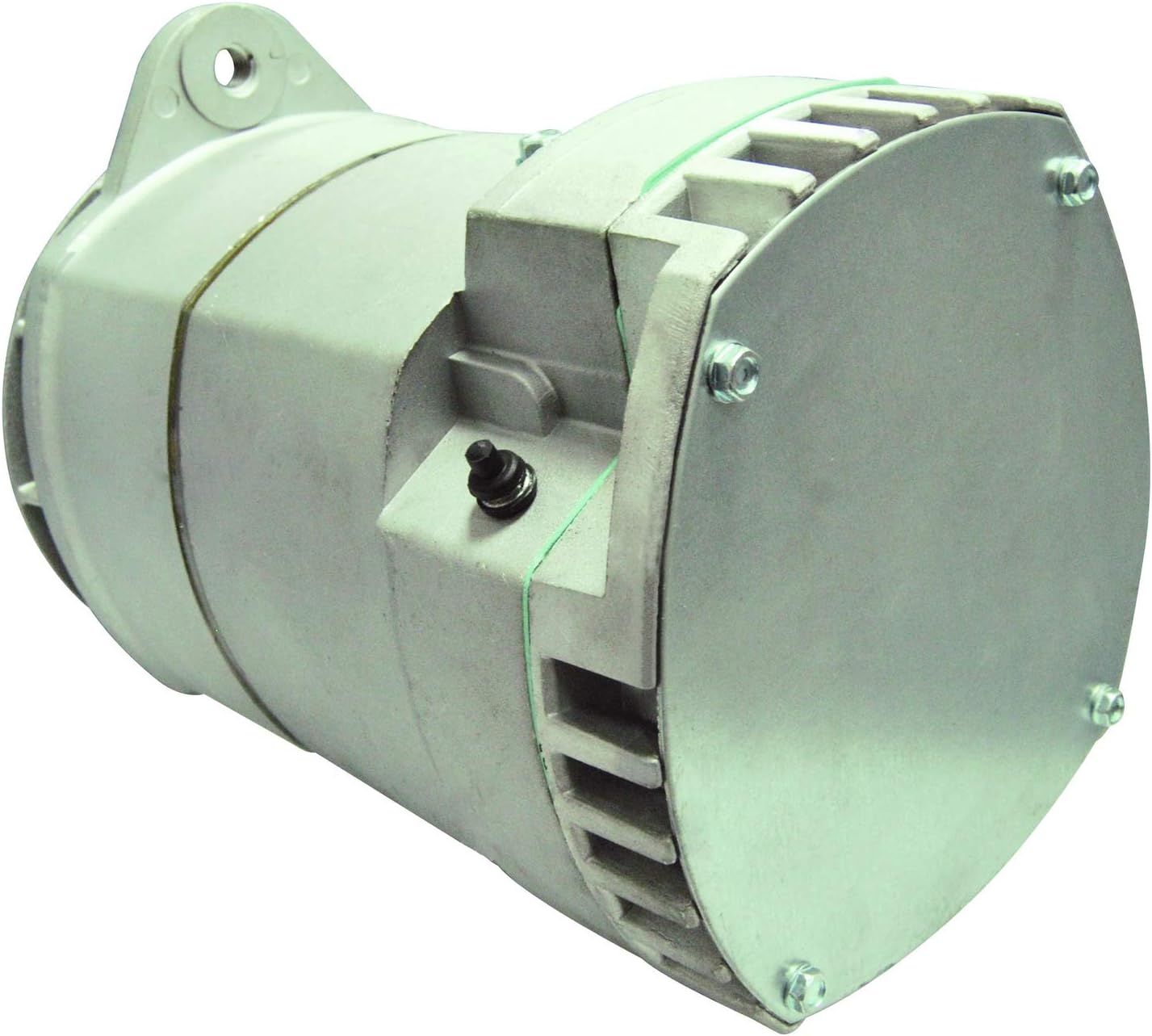
Figure 2.2: Side view of the World Power Systems Alternator, highlighting the cooling fins and electrical connections. The design incorporates features for efficient heat dissipation and secure wiring.
3. Setup and Installation
Proper installation is crucial for the safe and efficient operation of the alternator. It is highly recommended that installation be performed by a qualified technician.
3.1 Safety Precautions
- Always disconnect the vehicle's battery terminals (negative first) before beginning any work on the electrical system.
- Ensure the engine is off and cool to the touch.
- Wear appropriate personal protective equipment, including safety glasses and gloves.
- Refer to the vehicle or engine manufacturer's service manual for specific instructions related to your application.
3.2 Installation Steps (General)
- Preparation: Disconnect the battery. Identify and label all wires connected to the old alternator.
- Removal: Loosen the belt tensioner and remove the drive belt. Unbolt the old alternator from its mounting brackets and carefully remove it.
- Installation: Position the new MCR7252N alternator into the mounting brackets. Secure it with the appropriate bolts, ensuring a snug fit.
- Belt Installation: Reinstall the drive belt and adjust its tension according to the engine manufacturer's specifications.
- Wiring: Reconnect all electrical wires to the new alternator, ensuring correct polarity and secure connections. Refer to the labels made during removal.
- Final Check: Reconnect the battery (positive first, then negative). Start the engine and verify proper charging system operation.
4. Operating Instructions
Once installed, the alternator operates automatically to generate electrical power for the vehicle's systems and recharge the battery. The alternator converts mechanical energy from the engine's crankshaft (via the drive belt) into electrical energy.
4.1 Normal Operation
- Upon starting the engine, the alternator should begin charging the battery and supplying power to the electrical system.
- The vehicle's dashboard charging system indicator light (if present) should turn off shortly after the engine starts.
- A voltmeter should indicate a charging voltage typically between 13.8 and 14.8 volts when the engine is running.
5. Maintenance
Regular maintenance helps ensure the longevity and optimal performance of your alternator.
5.1 Routine Checks
- Drive Belt: Periodically inspect the drive belt for cracks, fraying, or excessive wear. Ensure proper tension; a loose belt can lead to insufficient charging, while an overly tight belt can damage bearings.
- Electrical Connections: Check all wiring connections to the alternator for tightness and corrosion. Loose or corroded connections can impede current flow and cause charging issues.
- Noise: Listen for unusual noises (e.g., grinding, squealing) coming from the alternator, which could indicate bearing wear or other internal issues.
5.2 Cleaning
Keep the exterior of the alternator clean and free from excessive dirt, oil, and debris. Avoid spraying water directly onto the alternator, especially near electrical connections.
6. Troubleshooting
This section outlines common issues and basic troubleshooting steps. For complex problems, consult a qualified automotive technician.
6.1 Common Issues and Solutions
- No Charge / Low Charge:
- Check drive belt tension and condition.
- Inspect all electrical connections for looseness or corrosion.
- Test battery voltage; a weak battery can affect charging.
- Overcharging:
- This often indicates a faulty voltage regulator, which is typically integrated into the alternator. Professional diagnosis is required.
- Unusual Noise:
- Squealing may indicate a loose or worn drive belt.
- Grinding or rattling could suggest internal bearing failure.
- Battery Light On:
- Indicates a problem with the charging system. Follow steps for 'No Charge / Low Charge'.
7. Specifications
The following table details the technical specifications for the World Power Systems MCR7252N Alternator:
| Specification | Value |
|---|---|
| Manufacturer | World Power Systems |
| Model Number | MCR7252N |
| Item Weight | 30 pounds |
| Amperage | 75 Amps |
| Voltage | 24 Volts |
| OEM Part Numbers Replaced | 0R2415, 0R3615, 3E7577, 5Z1083, 8N0999, 10459071, 10459076, 10459102, 10459148, 10461237, 1117069, 1117238, 1117249, 1117256, 1117281, 19010000, 19010002, 19010008, 214318, 3604225RX, 3675108RX, 10459062 |
| Compatible Engines | Caterpillar AG. & IND. (1973-2016), Clark (1973-1986), Cummins Engines (1983-1990), Dresser (1987-1989), WABCO (1983-1987) |
8. Warranty and Support
This World Power Systems alternator is a 100% brand new aftermarket replacement, thoroughly tested for reliability and performance. It is engineered to exceed OEM specifications.
8.1 Return Policy
The product is subject to a 30-day return policy for refund or replacement, as per the seller's terms. Please retain your proof of purchase for any warranty or return claims.
8.2 Customer Support
For technical assistance, troubleshooting beyond the scope of this manual, or warranty inquiries, please contact the seller or manufacturer directly. Ensure you have your product model number (MCR7252N) and purchase details available when contacting support.
