
1. Product Overview
The Zoom CMF-8 is a specialized camera mount adapter designed to securely attach your Zoom F8 or F8n MultiTrack Field Recorder to a DSLR camera setup. This accessory facilitates integrated audio and video recording workflows by providing a stable connection between your recorder and camera.
The adapter is constructed for durability and features a standard camera screw for attachment, ensuring a reliable fit for compatible devices.
2. Package Contents
- Zoom CMF-8 Camera Mount Adapter (1 unit)
3. Setup and Installation
Follow these steps to properly install the CMF-8 Camera Mount Adapter with your Zoom F8/F8n recorder and DSLR camera.
3.1 Attaching the CMF-8 to the Recorder
- Identify the four screw holes on the bottom of your Zoom F8 or F8n MultiTrack Field Recorder.
- Align the CMF-8 adapter with these holes, ensuring the central camera screw is facing upwards.
- Using appropriate screws (not included with the CMF-8, typically provided with the recorder or camera rig), securely fasten the four corners of the CMF-8 adapter to the recorder. Do not overtighten.

Figure 1: The CMF-8 adapter securely attached to the base of a Zoom F8/F8n recorder. The adapter's arms extend outwards, providing a stable platform.
3.2 Attaching the Recorder Assembly to a DSLR Camera
- Locate the tripod mount thread on the bottom of your DSLR camera.
- Position the recorder assembly (with the CMF-8 attached) directly beneath your DSLR camera.
- Align the central camera screw of the CMF-8 adapter with the tripod mount thread on your DSLR camera.
- Rotate the knurled screw on the CMF-8 adapter clockwise until the camera is firmly secured to the adapter. Ensure a snug fit to prevent movement, but avoid excessive force.
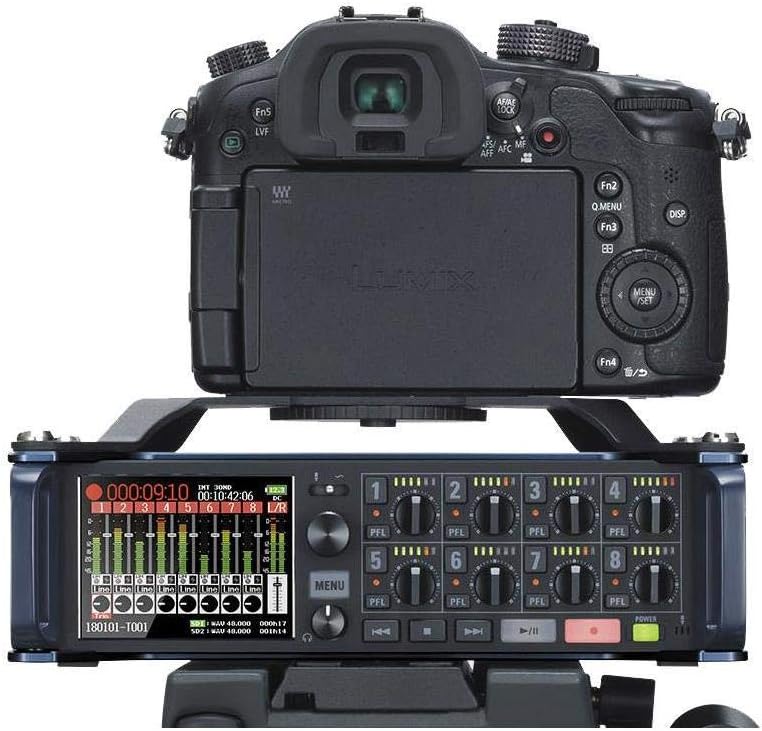
Figure 2: A Zoom F8/F8n recorder, equipped with the CMF-8 adapter, positioned directly below a DSLR camera. This configuration allows for integrated audio and video capture.
4. Operation
Once installed, the CMF-8 adapter provides a stable platform for your Zoom F8 or F8n recorder, allowing it to be mounted directly beneath a DSLR camera. This setup is ideal for filmmakers and videographers who require high-quality audio recording synchronized with their camera's video feed. The adapter ensures that both devices move as a single unit, simplifying handling and transport.
5. Maintenance
The CMF-8 Camera Mount Adapter requires minimal maintenance. To ensure longevity and proper function:
- Periodically inspect all screws for tightness.
- Clean the adapter with a soft, dry cloth to remove dust or debris. Avoid using harsh chemicals or abrasive materials.
- Store the adapter in a dry environment when not in use.
6. Troubleshooting
If you encounter issues with the CMF-8 adapter, consider the following:
- Unstable Connection: Ensure all screws attaching the adapter to the recorder and the recorder to the camera are tightened appropriately. Check for any obstructions preventing a flush fit.
- Compatibility: Verify that your recorder is a Zoom F8 or F8n model. The adapter is specifically designed for these units.
- Damaged Threads: If the camera screw or tripod mount threads appear damaged, discontinue use and consider professional repair or replacement.
7. Specifications
| Feature | Specification |
|---|---|
| Model Number | CMF-8 |
| Compatible Devices | Zoom F8, Zoom F8n MultiTrack Field Recorders, DSLR Cameras (with standard tripod mount) |
| Color | Black |
| Item Weight | 8 ounces (approx. 227 grams) |
| Product Dimensions | 6.86 x 5 x 0.75 inches (approx. 17.4 x 12.7 x 1.9 cm) |
| Material | Metal (painted black) |

Figure 3: The Zoom CMF-8 Camera Mount Adapter, showcasing its design and central mounting screw.
8. Safety Information
- Always ensure the adapter is securely fastened to both the recorder and the camera before operation.
- Do not overtighten screws, as this may damage the threads of the adapter, recorder, or camera.
- Keep small parts away from children to prevent choking hazards.
- Avoid dropping the adapter or subjecting it to strong impacts, which could compromise its structural integrity.


