
Introduction
This manual provides comprehensive instructions for the installation, operation, and maintenance of your A. O. Smith AO-US-200 2-Stage Under Sink Water Filter System. Please read all instructions carefully before beginning installation or use to ensure proper function and safety. This system is designed to provide clean, filtered drinking water directly from a dedicated faucet.
Important Safety Information
Always follow basic safety precautions when installing or maintaining this product to reduce the risk of fire, electric shock, or injury to persons. Keep this manual for future reference.
- Turn off the main water supply before installation.
- Do not install the system where it will be exposed to freezing temperatures.
- Ensure all connections are secure to prevent leaks.
- Use only genuine A. O. Smith replacement filters.
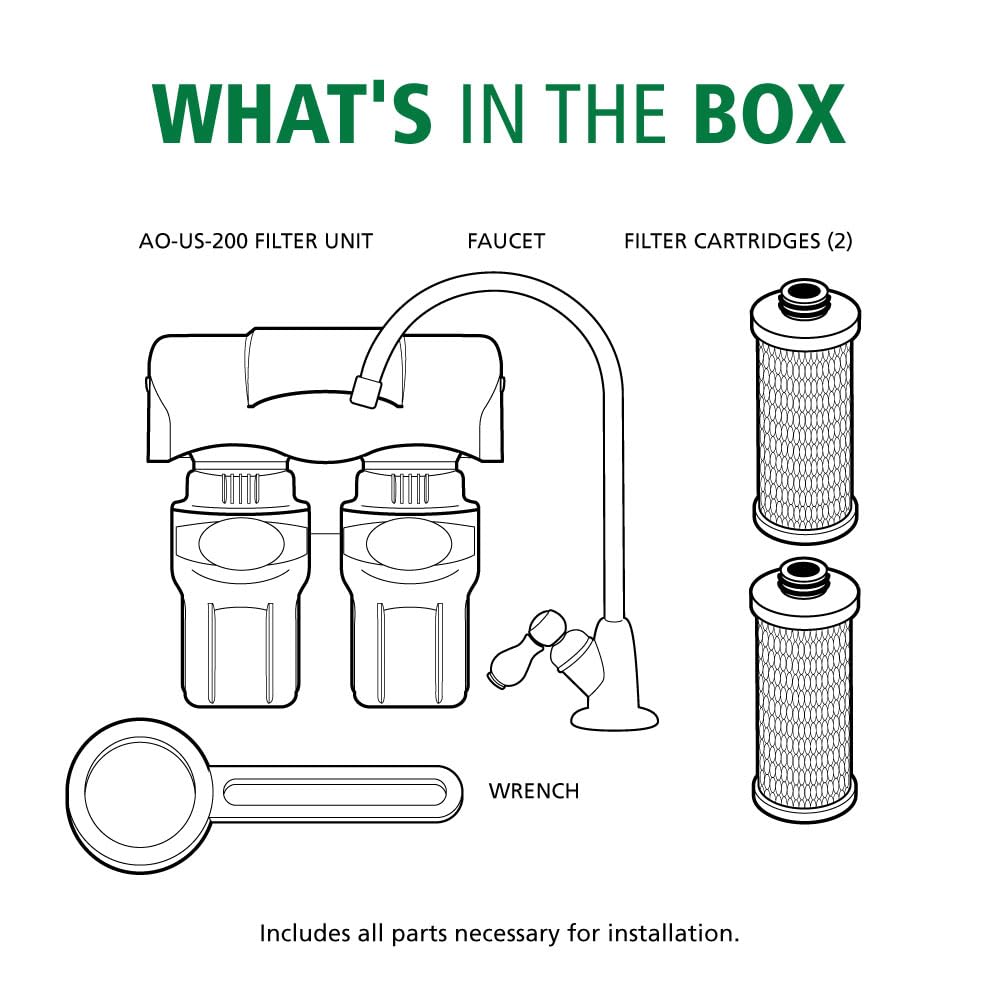
What's in the Box
Verify that all components are present before beginning installation:
- AO-US-200 Filter Unit
- Faucet
- Filter Cartridge Set (2 cartridges)
- Wrench
- Tubing
- 1/4" Brass Tee
- Mounting Screws with Anchors
- Faucet Installation Hardware (spacers, nuts, washers)
Specifications
| Feature | Detail |
|---|---|
| Model Number | AO-US-200 |
| Filtration Stages | 2-Stage Claryum Filtration |
| Filter Life | 6 months / 500 Gallons |
| Contaminant Reduction | Reduces up to 99% of 78 contaminants including Lead, PFAS, Chlorine, Mercury, Asbestos, Pharmaceuticals, Chloramine |
| Certifications | NSF/ANSI Standards 42, 53, and 401 (WQA Tested & Certified) |
| Flow Rate | 0.5 gallons per minute |
| Material | Carbon Block |
| Dimensions (Approx.) | Height: 9 in (22.9 cm), Width: 8.25 in (21 cm), Depth: 4.25 in (10.2 cm) |

Setup & Installation
1. Pre-Installation Checklist
- Tools Required: Adjustable wrench, measuring tape, pencil, Phillips head screwdriver, hammer, variable speed drill with 7/32" bit, level.
- Location: Select a space under your sink that is at least 12 inches from the bottom of your cabinet and allows for easy access to a cold water supply line.
- Faucet Placement: The dedicated faucet may be mounted on the sink using an existing hole (e.g., for a sprayer nozzle or soap dispenser) or by drilling a new hole no more than 1/2 inch in diameter. Ensure the faucet's spout extends slightly past the edge of the sink. Note: We recommend using an approved or certified professional if drilling is required.
2. Connecting to Cold Water Supply
- Turn off the cold water supply to your sink.
- Disconnect the cold water supply line from the shut-off valve.
- Attach the threaded end of the 1/4" brass tee to the cold water shut-off valve.
- Connect the cold water supply line to the top of the brass tee.
- Tighten all connections using an adjustable wrench.
3. Faucet Installation
- Insert the faucet stem through the chosen hole in your sink.
- From underneath the sink, slide the faucet rubber washer, faucet washer, and faucet spacer onto the faucet stem.
- Secure the faucet with the faucet nut, tightening it with a wrench to ensure it is secure to the sink.
4. Mounting the Filter Unit
- Temporarily position the filter unit under the sink in your chosen location.
- Mark the mounting holes with a pencil.
- Drill pilot holes at the marked locations. If mounting into drywall, insert the provided drywall anchors.
- Mount the unit to the wall using the provided screws.


5. Connecting Tubing
- Connect one end of the provided tubing to the open port on the brass tee. Ensure the plastic tube insert and brass nut are correctly installed for a secure, leak-free connection.
- Insert the other end of this tubing completely into the 'IN' port of the filter unit.
- Connect another piece of tubing to the faucet stem. Ensure the chrome nut and plastic collar are correctly installed.
- Insert the other end of this tubing completely into the 'OUT' port of the filter unit.
6. Initial System Flush
- Slowly turn on the cold water supply.
- Open the dedicated filtered water faucet and allow water to run for 10 minutes to flush the system. This removes air and carbon fines.
- Check all connections for leaks. Tighten if necessary.
Video 1: Official A. O. Smith AO-US-200 Installation Guide. This video provides a visual walkthrough of the installation process for the 2-stage under sink water filter system.
Operating Your System
Once installed and flushed, your A. O. Smith AO-US-200 system is ready for use. Simply open the dedicated filtered water faucet to dispense clean, filtered water. The system filters water at a rate of 0.5 gallons per minute, suitable for families of 1 to 4 people.
Maintenance: Filter Replacement
For optimal performance, replace your filter cartridges every 6 months or after 500 gallons of use, whichever comes first. The system is designed for easy, tool-free filter replacement.
Filtration Technology


Filter Replacement Steps
- Turn off the cold water supply to the system.
- Open the filtered water faucet to relieve pressure and drain any remaining water.
- Twist the old filter cartridges counter-clockwise to remove them from the unit housing.
- Discard the old filters.
- Insert new filter cartridges into the unit housing, aligning the connection points.
- Push the new filters up and twist clockwise until they are securely locked into place.
- Slowly turn on the cold water supply.
- Open the filtered water faucet and allow water to run for 10 minutes to flush the new filters.
- Check for any leaks.

Troubleshooting
| Problem | Possible Cause | Solution |
|---|---|---|
| Leaks at connections | Loose fittings, missing O-rings, improper tubing insertion. | Ensure all nuts are tightened, check for properly seated O-rings, re-insert tubing fully into quick-connect fittings. Using plumber's tape on threaded connections can help. |
| Low water flow from faucet | Clogged filters, kinked tubing, low incoming water pressure. | Replace filters if they are past their service life. Check tubing for kinks. Verify adequate household water pressure. |
| Unpleasant taste/odor | Filters are exhausted, initial carbon fines not fully flushed. | Replace filters. Flush the system for an extended period (e.g., 15-20 minutes) after filter replacement. |
| Filter change indicator not working | Battery needs replacement. | Replace the battery in the filter unit's indicator. |
Warranty Information
A. O. Smith provides a limited warranty for this product. Please refer to the warranty card included with your purchase or visit the official A. O. Smith website for detailed terms and conditions. Keep your proof of purchase for warranty claims.
Customer Support
If you have any questions, require assistance with installation, or need to order replacement parts, please contact A. O. Smith Customer Support:
- Website: www.aosmith.com
- Phone: Refer to your product packaging or the A. O. Smith website for the most current contact numbers.


