
1. Safety Information
Please read all instructions carefully before assembly and use. Retain this manual for future reference.
- Electrical Safety: Ensure the power supply is disconnected before installation or maintenance. This product is designed for 120V AC power outlets only.
- Indoor Use Only: This lamp is intended for indoor use in dry locations. Do not expose to water or moisture.
- Integrated LED: The LED light source is integrated and not user-replaceable. Do not attempt to disassemble the LED module.
- Handling: Handle the lamp with care. Avoid dropping or subjecting it to strong impacts.
- Cleaning: Use a soft, dry cloth for cleaning. Do not use abrasive cleaners or solvents.
- Ventilation: Ensure adequate airflow around the lamp. Do not cover the lamp head or base with materials that could obstruct ventilation.
2. Product Overview
The Dainolite DLED-102-BK is a modern, energy-efficient LED desk lamp designed for office and bedroom environments. It features an adjustable arm and a dimmable LED light source.
Package Contents:
- Dainolite DLED-102-BK LED Desk Lamp (with integrated LED)
- Instruction Manual
Key Features:
- Integrated 5W LED for energy efficiency
- Dimmable light output
- Adjustable arm for flexible lighting direction
- Durable metal construction with a black finish

Figure 2.1: Front view of the Dainolite DLED-102-BK LED Desk Lamp.
3. Setup
This desk lamp comes pre-assembled. Follow these steps for initial setup:
- Unpack: Carefully remove the lamp from its packaging. Retain packaging materials for future transport or returns.
- Placement: Place the lamp on a stable, flat surface such as a desk or table. Ensure the base is fully supported and the lamp is not at risk of tipping over.
- Connect Power: Plug the power cord into a standard 120V AC electrical outlet.
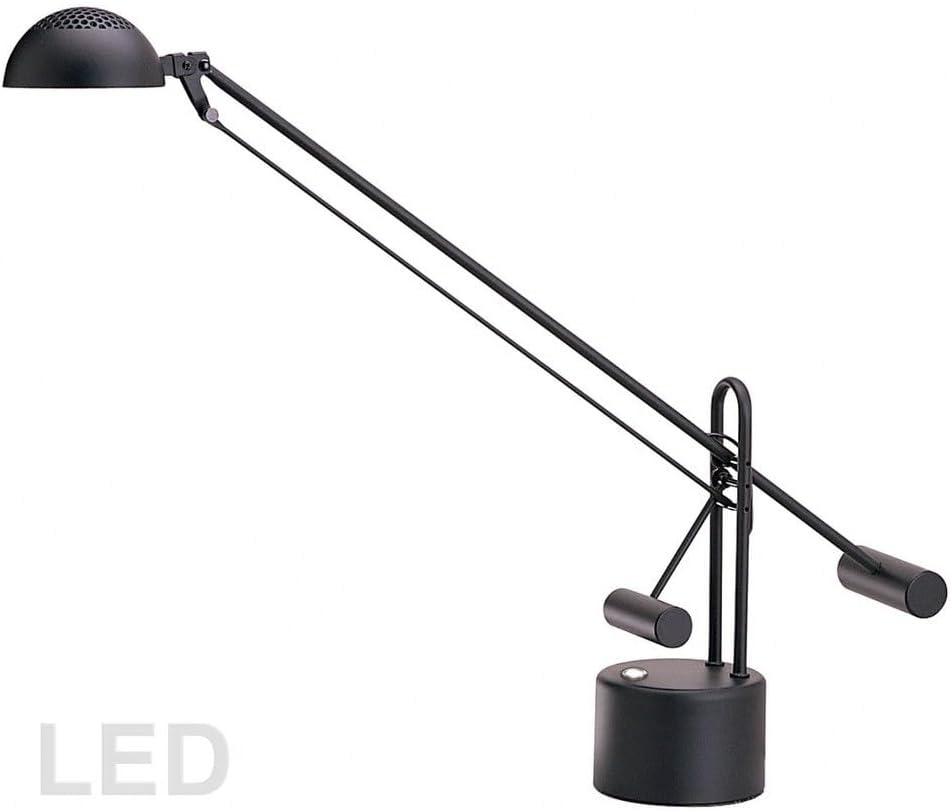
Figure 3.1: Dimensional drawing of the lamp, showing approximate height of 26 inches (660mm) and width of 29 inches (737mm).
4. Operating Instructions
The Dainolite DLED-102-BK desk lamp features a simple push-button switch for power and dimming control.
- Power On/Off: Press the push-button switch located on the lamp base once to turn the lamp ON. Press it again to turn the lamp OFF.
- Dimming: When the lamp is ON, press and hold the push-button switch to adjust the brightness level. Release the button when the desired brightness is reached. The lamp will cycle through its dimming range.
- Adjusting Lamp Head: Gently adjust the lamp arm and head to direct the light as needed. Do not force the joints beyond their natural range of motion.

Figure 4.1: Close-up view of the lamp base, highlighting the push-button switch for operation.
5. Maintenance
Proper care ensures the longevity and performance of your desk lamp.
- Cleaning: Disconnect the lamp from the power outlet before cleaning. Use a soft, dry, lint-free cloth to wipe down the lamp. Do not use liquid cleaners, aerosols, or abrasive materials, as these can damage the finish or electrical components.
- Inspection: Periodically inspect the power cord for any signs of damage. If the cord is damaged, discontinue use and contact customer support.
- LED Care: The integrated LED is designed for long life and requires no maintenance. Do not attempt to replace the LED.
6. Troubleshooting
If you encounter issues with your lamp, refer to the following common problems and solutions:
| Problem | Possible Cause | Solution |
|---|---|---|
| Lamp does not turn on. | No power to the lamp. | Ensure the power cord is securely plugged into a working outlet. Check if the outlet is controlled by a wall switch and that the switch is ON. |
| Light flickers or is dim. | Loose connection or power fluctuation. | Check power cord connection. Try plugging into a different outlet. If dimming, ensure the brightness is set to maximum. |
| Dimming function not working. | Incorrect operation. | Ensure you are pressing and holding the button to dim, not just pressing it. |
| Lamp makes unusual noise. | Internal electrical issue. | Immediately unplug the lamp and contact customer support. Do not attempt to repair. |
7. Specifications
| Feature | Detail |
|---|---|
| Model Number | DLED-102-BK |
| Brand | Dainolite |
| Lamp Type | LED Desk Lamp |
| Light Source | Integrated LED |
| Wattage | 5 Watts |
| Voltage | 120 Volts |
| Color Temperature | 3000K (Warm White) |
| Lumens | 650 Lumens |
| CRI | 80+ |
| Rated Life | 30,000 Hours |
| Switch Type | Push Button (Dimmable) |
| Material | Metal |
| Finish | Black |
| Item Weight | 5 Pounds |
| Base Dimension | 4.5 inches (diameter) |
| Overall Dimensions (Approx.) | 29" W x 26" H (737mm W x 660mm H) |
| Indoor/Outdoor Use | Indoor Use Only |
| Included Components | Lamp with integrated LED |
8. Warranty and Support
Dainolite stands behind the quality of its products.
Warranty Information:
- Replacement Parts Policy: All products include a 30-day replacement parts policy to ensure a fully functional item upon receipt.
- Product Warranty: This product is covered by a 1-year warranty from the date of original shipment when purchased on Amazon.
- Coverage: The warranty covers items and conditions identified in the original manufacturer's warranty.
- Exclusions: The warranty specifically excludes loss and theft, water damage, customer abuse, and finish deterioration due to UV or coastal exposure.
Customer Support:
For warranty claims, technical assistance, or any questions regarding your Dainolite DLED-102-BK LED Desk Lamp, please contact Dainolite customer support through your retailer or the official Dainolite website.


