
Victrola VTA-67-BLK
Contents
Victrola 3-in-1 Bluetooth Record Player
Model: VTA-67-BLK
Brand: Victrola
Introduction
This manual provides detailed instructions for the setup, operation, and maintenance of your Victrola 3-in-1 Bluetooth Record Player, model VTA-67-BLK. This versatile audio system features a 3-speed turntable, Bluetooth connectivity for wireless audio streaming, and an FM radio. It is equipped with built-in stereo speakers, an RCA output for connecting to external audio systems, and a headphone jack for private listening. A removable clear acrylic dust cover is included to protect the turntable.
What's in the Box
Please ensure all items are present before proceeding with setup.
- Victrola 3-in-1 Bluetooth Record Player (VTA-67-BLK)
- Power Adaptor
- Instruction Manual (this document)
Setup
- Unpacking: Carefully remove the unit from its packaging. Retain the packaging materials for future transport or storage.
- Placement: Place the record player on a flat, stable surface away from direct sunlight, heat sources, and excessive dust or vibration.
- Dust Cover Installation: Gently attach the clear acrylic dust cover to the hinges at the back of the unit.
- Power Connection: Connect the power adaptor to the DC IN jack on the back of the unit, then plug the adaptor into a standard wall outlet.
- Initial Power On: Turn the VOLUME knob clockwise to power on the unit. The indicator light will illuminate.
Operating Instructions
Turntable Operation
This unit supports 33 1/3, 45, and 78 RPM records. Ensure the correct speed is selected for your vinyl.
- Select Mode: Turn the FUNCTION knob to the PHONO position.
- Prepare Record: Place a record on the turntable platter. If playing a 45 RPM single, place the included 45 RPM adaptor on the center spindle.
- Select Speed: Set the SPEED SELECTOR switch to the appropriate speed (33, 45, or 78) for your record.
- Remove Stylus Protector: Carefully remove the clear stylus protector from the stylus assembly.
- Position Tone Arm: Gently lift the tone arm using the tone arm lift lever. Move the tone arm over the desired starting track of the record.
- Lower Tone Arm: Slowly lower the tone arm onto the record using the tone arm lift lever. The turntable will begin to spin and playback will start.
- Adjust Volume: Adjust the volume using the VOLUME knob.
- End of Playback: When the record finishes playing, the turntable will automatically stop spinning. Manually return the tone arm to the tone arm rest and secure it with the tone arm lock.

Image: The Victrola 3-in-1 Bluetooth Record Player, showing the turntable, tone arm, and open dust cover. A vinyl record is placed on the platter.
Bluetooth Operation
Stream audio wirelessly from your Bluetooth-enabled device to the record player.
- Select Mode: Turn the FUNCTION knob to the BT (Bluetooth) position. The Bluetooth indicator light will flash, indicating pairing mode.
- Enable Bluetooth: On your external Bluetooth device (e.g., smartphone, tablet), enable Bluetooth and search for available devices.
- Pair Device: Select "Victrola VTA-67" from the list of available devices. Once paired, the Bluetooth indicator light will stop flashing and remain solid.
- Play Audio: You can now play audio from your Bluetooth device through the record player's speakers.
FM Radio Operation
Listen to your favorite FM radio stations.
- Select Mode: Turn the FUNCTION knob to the FM position.
- Tune Station: Use the TUNING knob to manually tune to your desired FM radio station.
- Adjust Antenna: Extend the FM wire antenna located on the back of the unit for optimal reception.
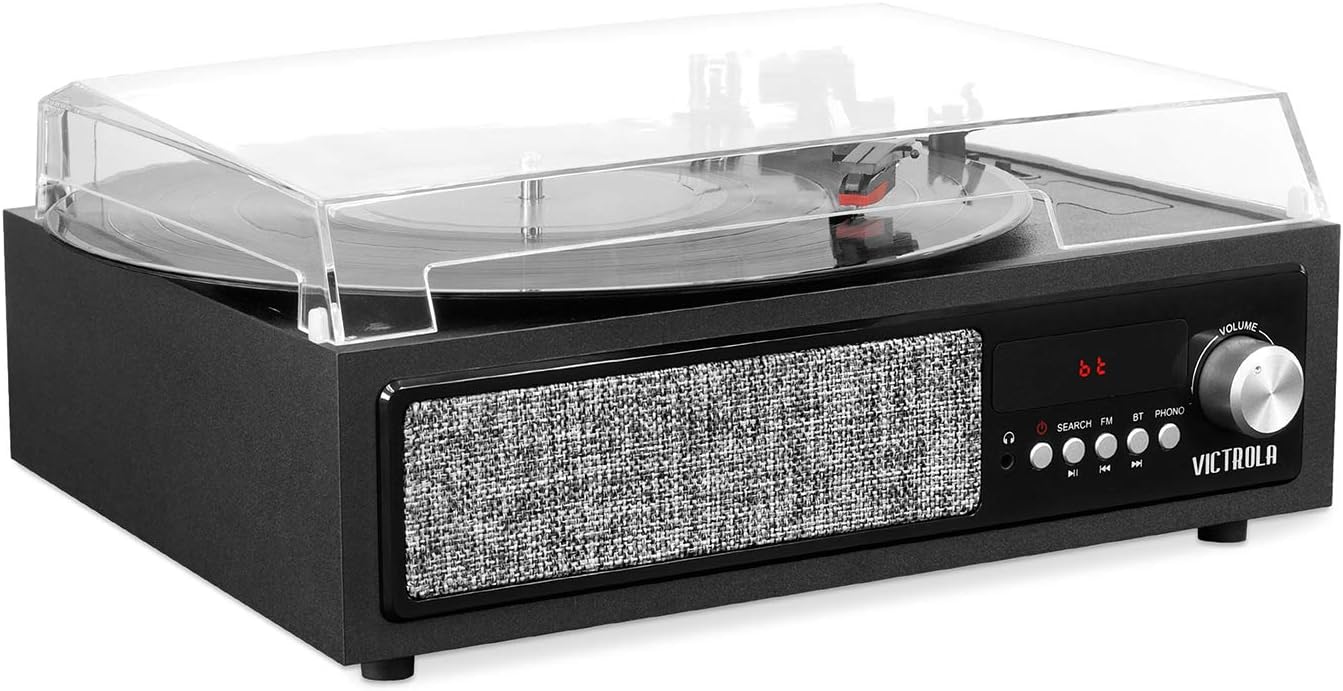
Image: Front view of the Victrola 3-in-1 Bluetooth Record Player, highlighting the control panel with mode selection, tuning, and volume knobs.
RCA Output
Connect the record player to an external amplifier or powered speakers using the RCA output jacks on the back of the unit. Use standard RCA cables (not included) to connect the L/R outputs of the record player to the corresponding L/R inputs on your external audio system.
Headphone Jack
For private listening, plug any standard 3.5mm stereo headphones (not included) into the headphone jack located on the front of the unit. Audio will be routed to the headphones, and the built-in speakers will be muted.
Maintenance
- Cleaning the Unit: Use a soft, dry cloth to wipe the exterior surfaces of the unit. Do not use harsh chemicals, waxes, or solvents.
- Dust Cover Care: The acrylic dust cover can be cleaned with a soft, damp cloth. Avoid abrasive cleaners that may scratch the surface.
- Stylus Care: Periodically clean the stylus (needle) using a soft brush, brushing gently from back to front. A dirty stylus can affect sound quality and damage records.
- Record Care: Keep your records clean and free of dust. Store them vertically in their sleeves to prevent warping.
Troubleshooting
| Problem | Possible Cause | Solution |
|---|---|---|
| No Power | Power adaptor not connected; outlet not active. | Ensure power adaptor is securely plugged into the unit and a working wall outlet. |
| No Sound from Speakers | Volume too low; wrong mode selected; headphones connected. | Increase VOLUME knob. Ensure correct FUNCTION mode is selected. Disconnect headphones. |
| Turntable Not Spinning | Tone arm not moved over record; unit not powered on. | Ensure tone arm is lifted and moved over the record. Verify unit is powered on. |
| Skipping Records | Dirty record; dirty or damaged stylus; unit not level. | Clean record. Clean stylus. Ensure unit is on a flat, stable surface. Consider replacing stylus if damaged. |
| Bluetooth Not Connecting | Unit not in BT mode; device too far; device already paired elsewhere. | Set FUNCTION to BT. Ensure device is within range (approx. 30 ft). Disconnect from other Bluetooth devices. |
| Poor FM Reception | Antenna not extended; weak signal. | Fully extend the FM wire antenna. Try repositioning the unit or antenna. |
Specifications
| Feature | Detail |
|---|---|
| Model Number | VTA-67-BLK |
| Product Dimensions | 13.16 x 5.4 x 13.11 inches |
| Item Weight | 4.89 pounds |
| Brand | Victrola |
| Material | Plastic |
| Color | Black |
| Turntable Speeds | 33 1/3, 45, 78 RPM |
| Connectivity | Bluetooth, RCA Output, Headphone Jack |
| Radio | FM Radio |
| Included Components | Manual, Power Adaptor |
| Manufacturer | Innovative Technology |
Warranty and Support
This Victrola product is covered by a manufacturer's warranty. For detailed warranty information, technical support, or service inquiries, please refer to the warranty card included with your product or visit the official Victrola website. You can also find more information and support resources on the Victrola Brand Store on Amazon.
Documents and downloads
Ask a question about this manual
Ask about setup, troubleshooting, compatibility, parts, safety, or missing instructions. Manuals+ will review the question and use this page’s manual context to help answer it.