
Sightmark SM13043FTR
Sightmark Latitude Riflescope 8-32x60 F-Class Instruction Manual
Model: SM13043FTR
1. Introduction
This manual provides comprehensive instructions for the proper setup, operation, and maintenance of your Sightmark Latitude 8-32x60 F-Class Riflescope. Designed for precision and durability, this riflescope is engineered to meet the demands of long-range competition shooting and Precision Rifle Series matches. Please read this manual thoroughly before using the product to ensure optimal performance and safety.
2. Product Overview
The Sightmark Latitude 8-32x60 F-Class Riflescope is built for extreme accuracy over long distances. It features oversized turrets for quick adjustments, a zero stop elevation dial, and an etched, first focal plane reticle with red/green illumination. The locking, fast focus eyepiece ensures consistent focus. This model is IP67 waterproof and designed to withstand significant recoil, featuring a single-piece 34mm tube and fully multi-coated optics for superior light transmission.

Figure 2.1: The Sightmark Latitude 8-32x60 F-Class Riflescope, showcasing its robust design and optical components.
3. Key Features
- Oversized Adjustment Turrets: Designed for ease and precision in critical situations like long-range hunting or target practice. Larger size enables easier hold and more accurate adjustments, enhancing user experience for precise aiming and focusing.
- Dynamic Reticle Adjustment: Adjusts with magnification, facilitating precise holdover at any zoom level. Red/green illumination for varied lighting. Ideal for quick, accurate targeting in long-range scenarios.
- Zero Stop Elevation: Swiftly returns to zeroed impact after adjustments, vital for precision. Ensures consistent performance, reducing recalibration needs for enhanced accuracy in long-range engagements.
- Locking, Fast Focus Eyepiece: Featuring a locking mechanism, the fast-focus eyepiece allows for quick and precise reticle adjustment, ensuring optimal clarity and target acquisition. The locking function prevents unintentional changes during use.
- 34mm Single-Piece Tube: This scope features a durable 34mm single-piece tube construction, ensuring robust structural integrity and stability. It enhances durability and maintains precise alignment even in demanding conditions.
- IP67 Waterproof and Dustproof: Certified to be waterproof up to 1 meter (3 feet) for 1 hour, providing reliable performance in various environmental conditions.
- Fully Multi-Coated Lenses: Lenses are fully multi-coated to provide over 90% light transmittance, ensuring clear and bright images.
- Nitrogen Purged: Internally purged with nitrogen to prevent internal fogging due to temperature changes.
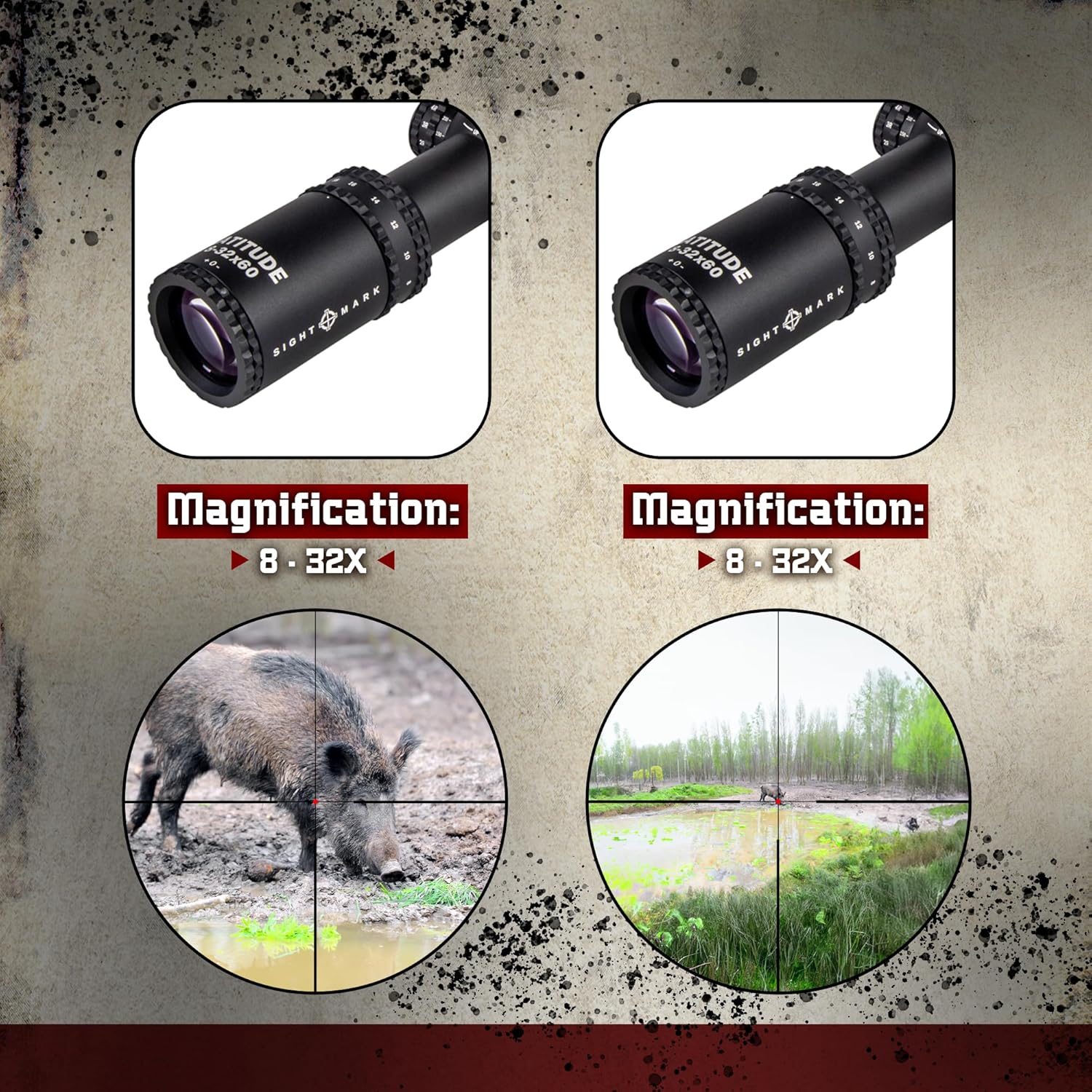
Figure 3.1: Visual representation of magnification capabilities, showing the clarity and detail at different zoom levels (8-32X).

Figure 3.2: Illustration of the Second Focal Plane reticle, demonstrating how the reticle size remains constant relative to the field of view across different magnifications.
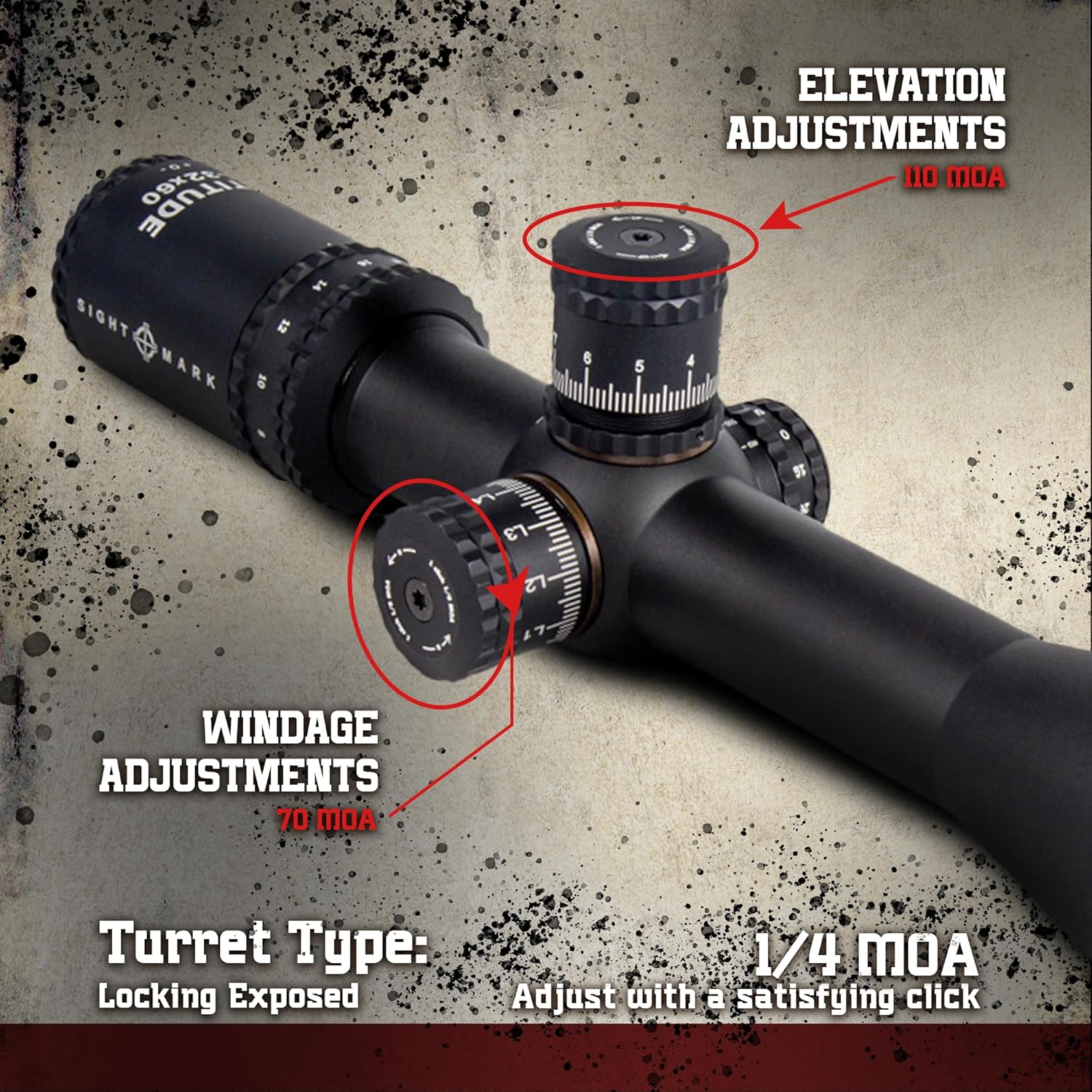
Figure 3.3: Close-up view of the oversized elevation and windage adjustment turrets, highlighting their clear markings and tactile clicks for precise adjustments.

Figure 3.4: Depiction of the illuminated F-Class MOA Dash reticle, showing its visibility in varying light conditions with red/green illumination options.

Figure 3.5: Visual demonstration of the riflescope's IP67 waterproof certification, showing it submerged in water.

Figure 3.6: Comparison illustrating the superior clarity and light transmission of the fully multi-coated lenses compared to single-coated lenses.

Figure 3.7: Explanation of the nitrogen purging process, which prevents internal lens fogging for consistent clear vision.
4. Setup
4.1 Mounting the Riflescope
Proper mounting is crucial for accuracy and consistent performance. Use high-quality 34mm scope rings and a suitable base for your rifle. Ensure the scope is level and positioned for optimal eye relief.
- Secure the scope base to your rifle according to the manufacturer's instructions.
- Attach the bottom halves of the scope rings to the base, ensuring they are aligned.
- Place the riflescope into the bottom rings. Adjust its position forward or backward to achieve proper eye relief when shouldering the rifle.
- Rotate the scope to ensure the reticle is level with the rifle's bore. A scope leveling tool is recommended for precision.
- Place the top halves of the scope rings over the scope and tighten the screws evenly, following the torque specifications provided by the ring manufacturer. Do not overtighten.
4.2 Initial Focus Adjustment
Before zeroing, adjust the fast focus eyepiece to ensure the reticle is sharp and clear for your eye.
- Point the scope at a plain, bright background (e.g., a clear sky or a blank wall).
- Look through the scope and quickly glance away. Then, look back through the scope and adjust the fast focus eyepiece until the reticle appears crisp and sharp.
- Once focused, engage the locking mechanism on the eyepiece to prevent accidental changes.
4.3 Zeroing the Riflescope
Zeroing aligns the point of impact with the point of aim. This process typically involves firing shots at a target and adjusting the turrets.
- Set up a target at a known distance (e.g., 100 yards/meters).
- Fire a group of three shots.
- Observe the point of impact relative to your aim point.
- Use the elevation and windage turrets to adjust the reticle. Each click of the turret moves the point of impact by 1/4 MOA. Turn the elevation turret (top) to move the impact up or down, and the windage turret (right side) to move it left or right.
- Repeat firing and adjusting until your shots consistently hit the desired aim point.
- Once zeroed, set the zero stop on the elevation turret according to the instructions provided with your scope. This allows you to return to your zero setting quickly after making adjustments for long-range shots.
5. Operating Instructions
5.1 Magnification Adjustment
The magnification ring is located near the eyepiece. Rotate it to adjust the magnification from 8x to 32x. The first focal plane reticle ensures that the reticle subtensions remain accurate at all magnification settings.
5.2 Parallax Adjustment
The parallax adjustment knob is typically located on the left side of the scope. Parallax is the apparent shift in the reticle's position relative to the target when your eye moves. To eliminate parallax:
- Aim the scope at your target.
- While looking through the scope, slowly move your head slightly up and down, or side to side.
- Adjust the parallax knob until the reticle appears stationary relative to the target, regardless of slight head movements. The numbers on the parallax knob indicate approximate distances, but fine-tuning is often required.
5.3 Reticle Illumination
The Sightmark Latitude features an illuminated reticle with red and green options. The illumination control is usually integrated with the parallax knob or a separate dial.
- Rotate the illumination dial to turn on the reticle.
- Select between red or green illumination and adjust the brightness level to suit ambient light conditions.
- Turn the dial to the "OFF" position when illumination is not needed to conserve battery life.
6. Maintenance
6.1 Cleaning the Lenses
Keep the lenses clean to ensure optimal optical performance. Always use proper lens cleaning techniques to avoid scratching the coatings.
- Gently brush away any loose dust or debris using a soft lens brush or compressed air.
- Apply a small amount of lens cleaning solution to a clean microfiber lens cloth.
- Wipe the lens surface in a circular motion, starting from the center and moving outwards.
- Avoid using harsh chemicals, paper towels, or clothing, as these can damage the lens coatings.
6.2 Cleaning the Body
Wipe down the riflescope body with a soft, damp cloth to remove dirt, dust, or fingerprints. For stubborn grime, a mild soap solution can be used, followed by wiping with a clean, damp cloth and drying thoroughly.
6.3 Storage
When not in use, store the riflescope in a cool, dry place, preferably in its original packaging or a protective case. Ensure lens caps are in place to protect the lenses from dust and scratches. Remove the battery if storing for extended periods to prevent corrosion.
7. Troubleshooting
| Problem | Possible Cause | Solution |
|---|---|---|
| Blurry image / Reticle not sharp | Improper eyepiece focus or parallax setting. | Adjust the fast focus eyepiece (Section 4.2) and parallax knob (Section 5.2) until the image and reticle are clear. |
| Reticle illumination not working | Dead battery, incorrect battery orientation, or illumination dial off. | Check battery (CR2032) and replace if necessary. Ensure battery is inserted with correct polarity. Turn the illumination dial to an "ON" setting. |
| Point of impact shifts / Inconsistent accuracy | Loose mounting rings/base, damaged scope, or improper zeroing. | Check all mounting screws and ensure they are torqued to specifications. Re-zero the riflescope (Section 4.3). If issues persist, contact customer support. |
| Fogging inside the scope | Extreme temperature changes or seal compromise. | The scope is nitrogen purged to prevent fogging. If internal fogging occurs, it may indicate a seal issue. Contact customer support. |
8. Specifications
| Feature | Detail |
|---|---|
| Model Number | SM13043FTR |
| Magnification | 8-32x |
| Objective Lens Diameter | 60 mm |
| Tube Diameter | 34 mm |
| Reticle Type | F-Class MOA Dash, First Focal Plane |
| Reticle Illumination | Red/Green |
| Adjustment Click Value | 1/4 MOA |
| Elevation Adjustment Range | 31 mil |
| Windage Adjustment Range | 70 MOA |
| Waterproof Rating | IP67 (submersible to 1m/3ft for 1 hour) |
| Material | Aluminum |
| Product Dimensions | 6.35 x 7.62 x 5.08 cm (2.5 x 3 x 2 inches) |
| Item Weight | 1.03 kg (36.2 ounces) |
| Included Components | Sunshade, CR2032 Battery, Instruction Manual |
9. Warranty and Support
For warranty information, technical support, or service inquiries regarding your Sightmark Latitude Riflescope, please refer to the official Sightmark website or contact their customer service department directly. Keep your proof of purchase for any warranty claims.
Manufacturer: Sellmark Corporation
Website: www.sightmark.com (Note: This is a placeholder URL, please refer to the actual manufacturer's website for support.)
Related documentsSM13043FTR

Ask a question about this manual
Ask about setup, troubleshooting, compatibility, parts, safety, or missing instructions. Manuals+ will review the question and use this page’s manual context to help answer it.