Introduction
Welcome to the instruction manual for your Canon EOS 7D Digital SLR Camera. This guide provides essential information to help you set up, operate, and maintain your camera, ensuring you can fully utilize its advanced features for high-quality photography and videography. The Canon EOS 7D is equipped with an 18.0-megapixel APS-C CMOS sensor and Dual DIGIC 4 Image Processors, offering exceptional image quality and speed.
Product Overview
The Canon EOS 7D is a robust digital SLR camera designed for enthusiasts and professionals. It features a durable body with environmental sealing, making it suitable for various shooting conditions.
Key Features:
- 18MP APS-C CMOS sensor for detailed images.
- 8 frames per second continuous shooting for capturing fast action.
- 1080p HD video recording with manual controls for cinematic video.
- 3.0 inch Clear View II LCD screen with 920,000 dots for clear playback and menu navigation.
- 19-point AF system (all cross-type) for precise autofocus.
- 100% viewfinder coverage for accurate framing.
- 63-zone metering system for consistent exposure.
- Built-in wireless flash control for versatile lighting setups.
- Dual axis electronic level for precise composition.
Camera Components:
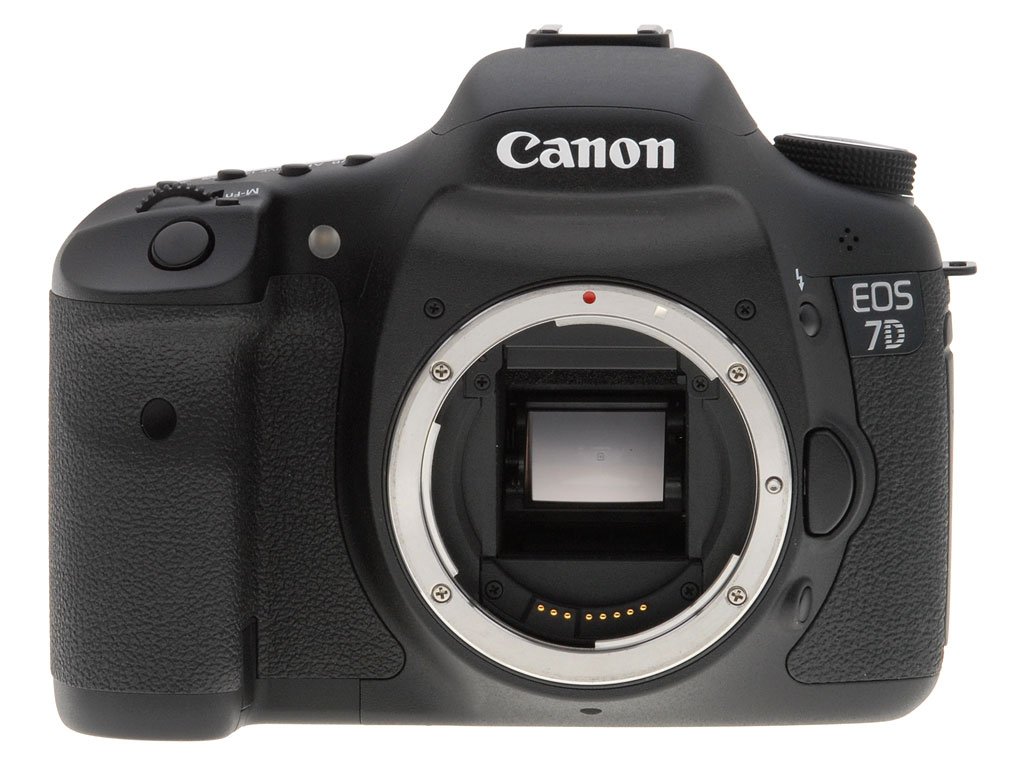
Figure 1: Front view of the Canon EOS 7D camera body, showing the lens mount and grip.

Figure 2: Rear view of the Canon EOS 7D, highlighting the LCD screen, viewfinder, and various control buttons and dials.

Figure 3: Top view of the Canon EOS 7D, showing the mode dial, hot shoe, and top LCD panel for settings.

Figure 4: Left side view of the Canon EOS 7D, revealing the port covers for audio, USB, and HDMI connections.

Figure 5: Right side view of the Canon EOS 7D, showing the memory card compartment door.

Figure 6: Close-up of the Canon EOS 7D lens mount, with the camera sensor visible.
Setup
1. Battery Installation
The Canon EOS 7D uses an LP-E6 Battery Pack. To install the battery:
- Open the battery compartment cover located on the bottom of the camera.
- Insert the LP-E6 battery pack with the contacts facing inward, ensuring it clicks into place.
- Close the battery compartment cover securely.
Use the provided Battery Charger LC-E6 to charge the battery.
2. Memory Card Installation
The EOS 7D uses CompactFlash (CF) cards (Type I and II, UDMA-compliant). To install a memory card:
- Open the memory card compartment cover on the right side of the camera.
- Insert the CF card into the slot with the correct orientation until it is fully seated.
- Close the memory card compartment cover securely.
Ensure the card is formatted in the camera before first use to prevent data loss.
Operating the Camera
Power On/Off
To power on the camera, rotate the power switch located near the mode dial to the "ON" position. To power off, rotate it to "OFF".
Basic Photography
- Attach a Lens: Align the red or white index mark on the lens with the corresponding mark on the camera's lens mount, then turn the lens clockwise until it locks.
- Select a Shooting Mode: Use the mode dial on the top of the camera to select your desired shooting mode (e.g., Program AE, Shutter-priority AE, Aperture-priority AE, Manual, or various Scene modes).
- Adjust Settings: Use the main dial and quick control dial, along with the various buttons (e.g., ISO, AF, WB) to adjust exposure, focus, white balance, and other settings. Information is displayed on the top LCD panel and the rear LCD screen.
- Focus: Look through the viewfinder or use Live View on the LCD screen. Press the shutter button halfway down to activate autofocus.
- Capture Image: Press the shutter button fully down to take a picture.
HD Video Recording
The EOS 7D supports 1080p HD video recording with manual exposure control.
- Enter Live View/Movie Shooting Mode: Press the START/STOP button to enter Live View mode. Press it again to begin or end movie recording.
- Adjust Settings: In movie shooting mode, you can manually control exposure settings like aperture, shutter speed, and ISO.
- Audio: The camera has a built-in microphone, and an external microphone can be connected via the 3.5mm jack for improved audio quality.
Maintenance
Cleaning the Camera
- Camera Body: Use a soft, dry cloth to wipe the camera body. For stubborn dirt, slightly dampen the cloth with water.
- LCD Screen: Use a soft cloth specifically designed for LCD screens. Avoid harsh chemicals.
- Lens: Use a lens brush to remove dust, then a lens cloth with a specialized lens cleaning solution.
- Sensor: The camera has an integrated cleaning system. For persistent dust, professional cleaning is recommended.
Storage
When not in use, store the camera in a cool, dry place, away from direct sunlight and extreme temperatures. Remove the battery if storing for extended periods.
Troubleshooting
| Problem | Possible Cause / Solution |
|---|---|
| Camera does not power on. | Ensure the battery is fully charged and correctly inserted. Check if the power switch is in the "ON" position. |
| Images are blurry. | Check focus settings (autofocus or manual focus). Ensure shutter speed is fast enough for the subject. Use image stabilization if available. |
| Memory card error. | Ensure the memory card is inserted correctly. Try reformatting the card (this will erase all data). If the problem persists, try a different card. |
| No image appears on LCD. | Check if the display is turned off or if the camera is in viewfinder-only mode. Adjust brightness if necessary. |
For more detailed troubleshooting or issues not covered here, please refer to the comprehensive software instruction manual or contact Canon customer support.
Specifications
| Feature | Detail |
|---|---|
| Product Dimensions | 5.83 x 2.91 x 4.37 inches |
| Item Weight | 1.9 pounds |
| Item Model Number | 3814B004-cr |
| Batteries | 2 Lithium Ion batteries required (included) |
| Manufacturer | Canon |
| Compatible Mountings | Canon EF, Canon EF-S |
| Aspect Ratio | 4:3 |
| Photo Sensor Technology | CMOS |
| Supported File Format | JPEG, RAW |
| Image Stabilization | Optical |
| Maximum Focal Length | 35 Millimeters |
| Optical Zoom | 5 x |
| Maximum Aperture | 5.6 f |
| Expanded ISO Minimum | 100 |
| Metering Description | Multi, Center-weighted, Spot, Partial |
Warranty and Support
This Canon EOS 7D camera, if purchased as a renewed product, is typically eligible for replacement or refund under the Amazon Renewed Guarantee within a specified period (e.g., 90 days). Please refer to your purchase documentation for specific warranty details.
For technical support, service, or additional information, please visit the official Canon support website or contact their customer service.


