Introduction
This manual provides essential instructions for the safe and efficient use of your Stanley 37204 Wireless Light Switch Remote System. Please read this manual thoroughly before installation and operation, and retain it for future reference.
Product Overview
The Stanley 37204 system allows you to wirelessly control lights and other electrical devices. It includes three wireless outlets and two remote transmitters. The units are pre-programmed for immediate use and offer individual control for each outlet, as well as an all-on/all-off function.
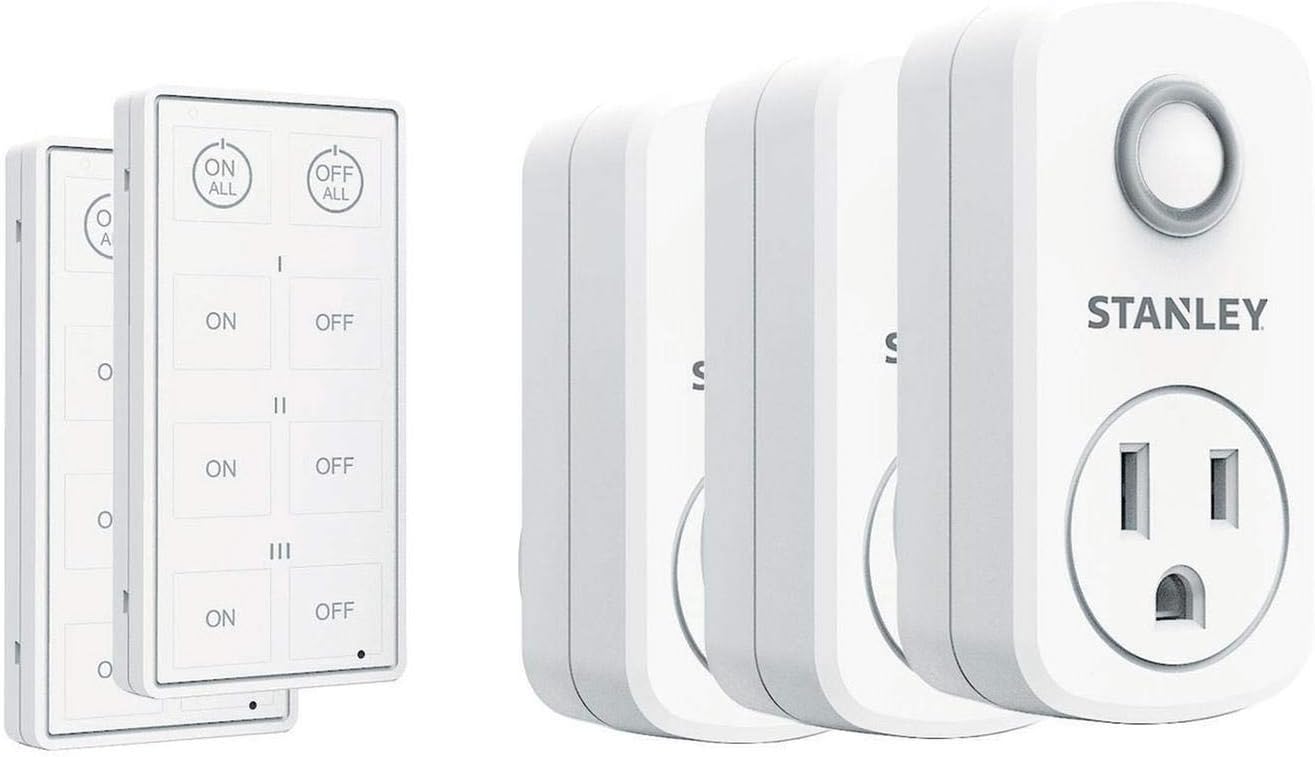
Image 1: Components of the Stanley 37204 Wireless Light Switch Remote System. This image displays two white remote transmitters on the left and three white wireless outlets on the right, illustrating the complete system package.
Key Features:
- Wireless control for hard-to-reach lights and appliances.
- Potential for energy saving by easily turning off unused appliances.
- Operating range of up to 100 feet.
- Each receiver features one grounded outlet, rated for 15 Amps.
- Two touch-sensing remote transmitters included.
Important Safety Information
- WARNING: For indoor use only. Do not expose to moisture or extreme temperatures.
- CAUTION: Do not exceed the maximum electrical ratings of 15 Amps or 1875 Watts.
- Ensure the device is properly grounded.
- Do not attempt to disassemble or modify the product.
- Keep out of reach of children.
Setup Instructions
- Unpack Components: Carefully remove all wireless outlets and remote transmitters from the packaging.
- Install Remote Batteries: The remote transmitters come with lithium batteries included. Ensure they are properly seated. If replacing, use a CR2032 type battery.
- Plug in Wireless Outlets: Insert each wireless outlet into a standard 120V AC wall receptacle. Ensure the outlet is easily accessible for initial setup.
- Connect Appliances: Plug the appliance or light you wish to control into the grounded outlet on the wireless receiver. Ensure the appliance's power switch is in the "ON" position.
- Initial Pairing (Pre-programmed): The units are typically pre-programmed at the factory. Test functionality by pressing the "ON" and "OFF" buttons on the remote for each corresponding outlet. Each remote has three pairs of ON/OFF buttons (I, II, III) to control up to three individual outlets. There is also an "ALL ON" and "ALL OFF" button.
- Manual Pairing (If needed): If an outlet does not respond to a remote, follow these steps to manually pair:
- Plug the wireless outlet into a wall receptacle.
- Within 5 seconds of plugging it in, press and hold the desired "ON" button (I, II, or III) on the remote transmitter for approximately 3 seconds.
- The outlet should respond, indicating successful pairing.
- Repeat for any other outlets or if you wish to change which remote button controls which outlet.

Image 2: Demonstrates the use of the Stanley wireless remote control with an outlet. A hand holds the remote, aiming it at a wireless outlet plugged into a wall, which has a green power cord connected to it.
Operating Instructions
Once the wireless outlets are plugged in and paired with the remote transmitters, operation is straightforward:
- Individual Control: Press the "ON" button (I, II, or III) corresponding to the desired outlet to turn the connected appliance ON. Press the respective "OFF" button to turn it OFF.
- All On/Off: Use the "ALL ON" button to activate all paired outlets simultaneously. Use the "ALL OFF" button to deactivate all paired outlets simultaneously.
- Range: The system operates up to 100 feet in open areas. Obstructions like walls and metal structures may reduce the effective range.
Maintenance
- Cleaning: Wipe the devices with a soft, dry cloth. Do not use liquid cleaners or solvents.
- Battery Replacement: If a remote transmitter becomes unresponsive, replace its lithium battery (CR2032). To replace, open the battery compartment on the back of the remote, remove the old battery, and insert a new one with the correct polarity.
- Storage: Store the system in a cool, dry place when not in use for extended periods.
Troubleshooting
| Problem | Possible Cause | Solution |
|---|---|---|
| Outlet does not respond to remote. |
|
|
| Appliance connected to outlet does not turn on. |
|
|
| Remote buttons are inconsistent or overly sensitive. |
|
|
Specifications
| Model Number: | 37204 |
| Input Voltage: | 120 Volts AC |
| Max Current Rating: | 15 Amps |
| Max Wattage: | 1875 Watts |
| Wireless Range: | Up to 100 feet (line of sight) |
| Remote Battery Type: | CR2032 Lithium (included) |
| Number of Outlets: | 3 |
| Number of Transmitters: | 2 |
| Material: | Plastic |
| Certification: | FCC |
| Dimensions (Outlet): | Approximately 3.81 x 6.35 x 10.16 cm (1.5 x 2.5 x 4 inches) |
| Weight (System): | 265 g (0.58 lbs) |
Warranty and Support
Specific warranty details and direct customer support contact information were not provided in the product data. For warranty claims or technical assistance, please refer to the product packaging or contact Stanley customer service through their official website or the retailer where the product was purchased.


