
Introduction
This manual provides essential information for the safe and efficient operation, installation, and maintenance of your Olimpia Splendid Dolceclima 12 HP P portable air conditioner. Please read these instructions carefully before using the appliance and keep them for future reference.

Olimpia Splendid Dolceclima 12 HP P portable air conditioner in a modern room, showcasing its compact design.
Safety Information
- Always ensure the appliance is placed on a flat, stable surface.
- Do not obstruct the air inlets or outlets. Maintain adequate clearance around the unit.
- Keep children and pets away from the appliance during operation.
- Do not insert objects into the air vents.
- Unplug the unit from the power supply before cleaning or performing any maintenance.
- If the power cord is damaged, it must be replaced by the manufacturer, its service agent, or similarly qualified persons to avoid a hazard.
- This appliance uses R290 refrigerant, which is flammable. Handle with care and ensure proper ventilation during installation and maintenance.
Product Overview
Key Features:
- Cooling and Heating Functionality: Equipped with a heat pump for year-round climate control.
- Multiple Operating Modes: Cooling, Heating, Fan, Dehumidifier, Night, Automatic, and Turbo.
- Blue Air Technology: Designed for faster and more uniform cooling distribution.
- High Capacity: 12,000 BTU/h cooling capacity.
- Eco-friendly Refrigerant: Uses R290 gas with low environmental impact.
- Integrated Controls: Built-in display and remote control for convenient operation.
Components:
- Portable Air Conditioner Unit
- Exhaust Hose
- Window Kit (adapters, window slide)
- Remote Control
- Air Filter (pre-filter)

All included accessories: exhaust hose, window kit components, and remote control.

The remote control for the Olimpia Splendid Dolceclima 12 HP P, showing all buttons and display.
Setup
1. Unpacking:
Carefully remove the air conditioner and all accessories from the packaging. Retain the packaging for future storage or transport.
2. Placement:
Place the unit on a firm, level surface. Ensure there is at least 30 cm (12 inches) of space around the unit for proper airflow. The appliance is designed for indoor use only.
3. Exhaust Hose Installation:
- Attach one end of the exhaust hose to the air outlet on the back of the unit.
- Connect the other end of the exhaust hose to the window adapter.

Installation of the exhaust hose into the rear port of the portable air conditioner.
4. Window Kit Installation:
Install the window kit into a compatible window opening. The minimum window opening height required is 45 cm. Extend the window slide kit to fit your window and secure it. Insert the window adapter with the exhaust hose into the opening of the window kit to expel hot air outside.
5. Power Connection:
Plug the power cord into a grounded electrical outlet. Ensure the voltage matches the specifications of the unit.
Operating Instructions

Close-up view of the control panel and display on the top of the air conditioner.
1. Power On/Off:
Press the Power button on the control panel or remote control to turn the unit on or off.
2. Mode Selection:
Press the Mode button to cycle through the available operating modes:
- Cooling: For cooling the room.
- Heating: For heating the room (heat pump function).
- Fan: Circulates air without cooling or heating.
- Dehumidifier: Reduces humidity in the room.
- Auto: Automatically selects the operating mode based on the ambient temperature.
- Night: Adjusts temperature and fan speed for quieter operation during sleep.
- Turbo: Provides maximum cooling or heating power for rapid temperature change.
3. Temperature Adjustment:
Use the Temperature Up (+) or Temperature Down (-) buttons to set your desired temperature.
4. Fan Speed:
Press the Fan Speed button to select the desired fan speed (e.g., Low, Medium, High). The unit has 3 speeds.
5. Timer Function:
Use the Timer On and Timer Off buttons on the remote control to program the unit to turn on or off automatically after a set period.
Maintenance
1. Air Filter Cleaning:
The air filter should be cleaned regularly (every two weeks or more often depending on usage) to ensure optimal performance.
- Turn off and unplug the unit.
- Locate the pre-filter cover on the back of the unit.
- Remove the filter.
- Wash the filter with lukewarm water and a mild detergent. Rinse thoroughly.
- Allow the filter to air dry completely before reinserting it into the unit.

A hand removing the air filter from the back of the unit for cleaning.
2. Condensate Drainage:
During dehumidification or prolonged cooling/heating, the unit may accumulate condensate. The unit has an internal collection system. If the unit indicates a full water tank, turn off the unit and drain the water through the drainage port at the bottom of the unit using the provided hose or by carefully tilting the unit over a suitable container.
3. General Cleaning:
Wipe the exterior of the unit with a soft, damp cloth. Do not use harsh chemicals or abrasive cleaners.
4. Storage:
Before storing the unit for an extended period, ensure it is thoroughly cleaned and dried. Drain any remaining water. Store the unit in a cool, dry place, preferably in its original packaging.
Troubleshooting
| Problem | Possible Cause | Solution |
|---|---|---|
| Unit does not turn on | No power supply; Power cord not plugged in; Fuse blown; Water tank full. | Check power outlet; Plug in power cord securely; Replace fuse; Drain water tank. |
| Insufficient cooling/heating | Air filter dirty; Exhaust hose blocked or disconnected; Room too large; Doors/windows open; Temperature setting too high/low. | Clean air filter; Check exhaust hose connection and ensure it's clear; Ensure room size is within unit capacity; Close doors/windows; Adjust temperature setting. |
| Unit is noisy | Unit not on a level surface; Air filter dirty; Obstruction in fan. | Place unit on a level surface; Clean air filter; Check for and remove any obstructions. |
| Water leakage | Drain plug not properly sealed; Water tank full. | Ensure drain plug is securely closed; Drain water tank. |
| Remote control not working | Batteries dead or incorrectly inserted; Obstruction between remote and unit. | Replace batteries; Ensure correct battery polarity; Remove obstructions. |
Specifications

Dimensional view of the portable air conditioner: Height 76.2 cm, Width 46 cm, Depth 39.6 cm.
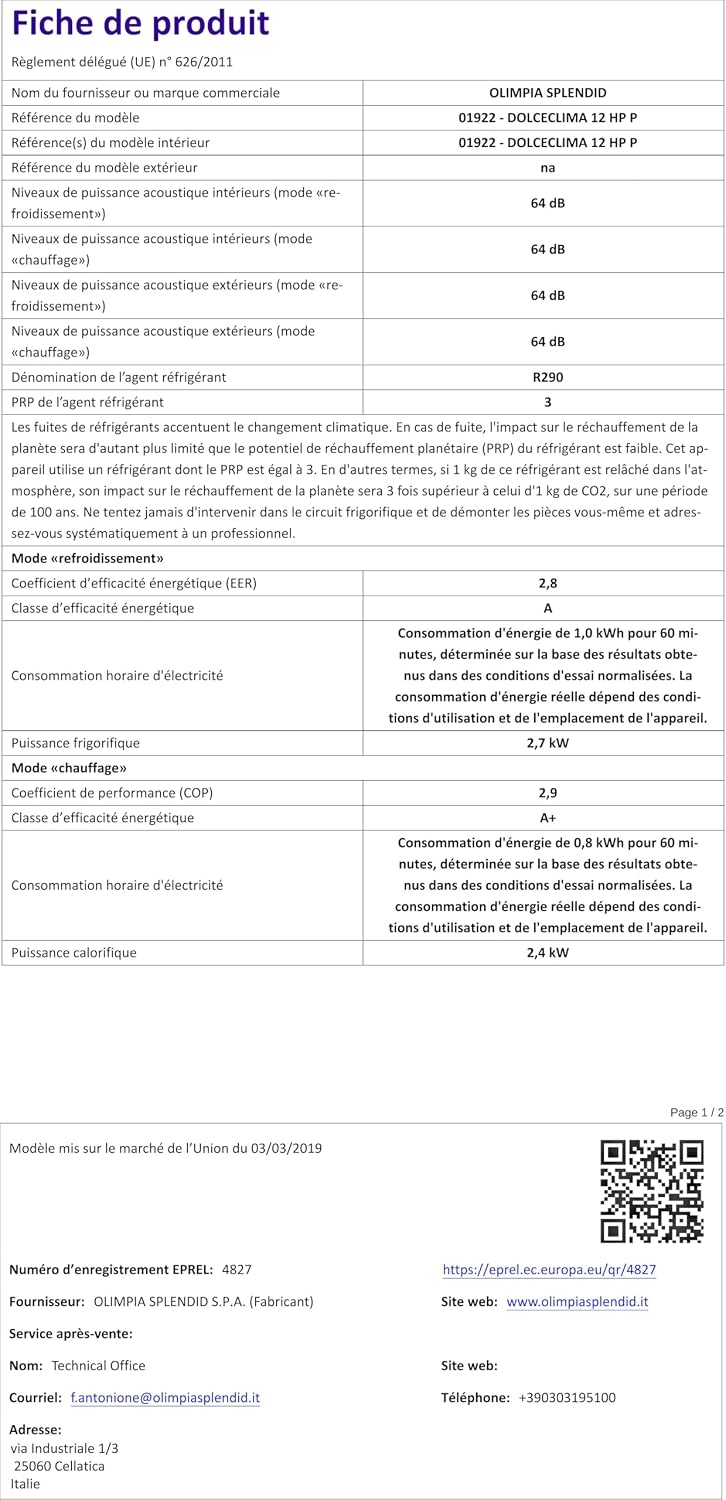
Energy efficiency label for the Olimpia Splendid Dolceclima 12 HP P, showing energy ratings and noise level.
| Feature | Detail |
|---|---|
| Brand | Olimpia Splendid |
| Model Name | 01922 Dolceclima 12 HP P |
| Model Number | 1922 |
| Cooling Capacity | 12,000 BTU/h |
| Heating Capacity | 2.4 kW |
| Refrigerant | Propane (R290) |
| Noise Level | 64 Decibels |
| Power (Cooling) | 2.7 kW |
| Energy Efficiency Ratio (EER) | 2.8 |
| Seasonal Energy Efficiency Ratio (SEER) | 2.8 |
| Coefficient of Performance (COP) | 2.9 |
| Filter Type | Prefilter |
| Control Method | Remote Control |
| Dimensions (H x W x D) | 76.2 cm x 46 cm x 39.6 cm |
| Minimum Window Opening Height | 45 Centimeters |
| Included Components | Air conditioner unit, exhaust hose, window kit, remote control |
Warranty
This Olimpia Splendid product comes with a limited product warranty of 2+1 years. Please retain your proof of purchase for warranty claims. For detailed terms and conditions, refer to the warranty card included with your product or visit the official Olimpia Splendid website.
Support
For technical assistance, spare parts, or any inquiries regarding your Olimpia Splendid Dolceclima 12 HP P, please contact Olimpia Splendid customer support. You can find contact information on the official Olimpia Splendid website or through the documentation provided with your product.
For additional product information and energy efficiency data, you may refer to the EU EPREL database: