
Voltex Voltex37
Voltex 37" L x 8" H Truck Mounted Arrow Board Light Traffic Control LED Sign Advisor
Instruction Manual
Model: Voltex37 | Brand: Voltex
Product Overview
The Voltex 37" L x 8" H Traffic Amber Sign Arrow LED Bar Lightbar is designed for effective traffic control and advisory signaling on trucks and other vehicles. This manual provides essential information for the proper setup, operation, and maintenance of your new arrow board.
Key features include:
- Durable 37" L x 8" H x 1.5" D aluminum panel construction.
- Equipped with 24 high-visibility amber LED lamps, each 1 watt.
- Operates on 12-volt power access.
- Features multiple flash patterns for various traffic control needs.
- Includes an 8 ft long LED display controller for convenient operation.
- Patented LED Control box supports up to 2 distinct flash patterns for arrow indicators.
Package Contents
Verify that all items listed below are included in your package:
- 1 x Voltex 37" L x 8" H Traffic Amber Sign Arrow LED Bar Lightbar
- 1 x LED Display Controller (8 ft cable)
- 1 x Patented LED Control Box
- Power Cable (approx. 8-10 ft)
- Mounting Screws (2, for backside of post)
Setup and Installation
Follow these steps for proper installation of your Voltex Arrow Board:
- Mounting Location: Identify a suitable mounting location on your truck or vehicle. The arrow board is designed to be mounted using two screws on the backside of a post. Note that truck/vehicle mounting brackets are not included and may need to be acquired separately. A custom mounting rack is necessary if not mounting on a flat surface.
- Secure Mounting: Ensure the arrow board is securely fastened to prevent movement during vehicle operation.
- Power Connection: Connect the arrow board to a 12-volt power source. The provided power cable is approximately 8-10 feet long, sufficient for routing from the roof to the control cabin. Ensure all connections are secure and properly insulated.
- Controller Connection: Connect the 8 ft long LED display controller to the arrow board system.

Figure 1: Side view of the arrow board, illustrating its dimensions and potential mounting orientation.
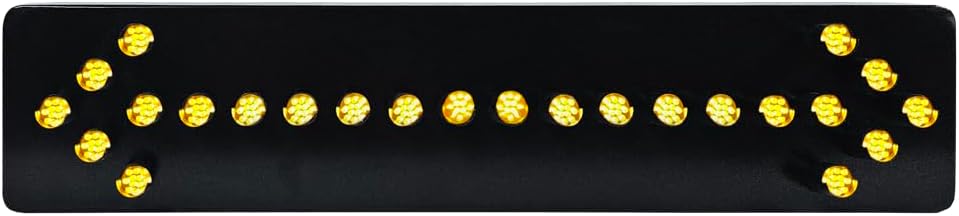
Figure 2: Front view of the arrow board with LEDs active, demonstrating visibility.
Operating Instructions
The Voltex Arrow Board is operated via the included LED display controller. This controller allows you to select various flash patterns to suit different traffic control scenarios.
- Power On/Off: Locate the power button on the controller to turn the unit on or off.
- Pattern Selection: Use the designated buttons on the controller to cycle through the available flash patterns. The system supports up to 4 different patterns, with the patented LED Control box specifically offering up to 2 flash patterns for arrow indicators (e.g., left arrow, right arrow, double arrow, caution bar).
- Visibility Check: After selecting a pattern, ensure the arrow board is clearly visible and displaying the intended pattern to oncoming traffic.

Figure 3: The LED Display Controller, used to select flash patterns.
Maintenance
To ensure the longevity and optimal performance of your Voltex Arrow Board, follow these maintenance guidelines:
- Cleaning: Regularly clean the aluminum panel and LED lenses with a soft, damp cloth. Avoid abrasive cleaners or solvents that could damage the surface or LEDs.
- Connections: Periodically check all electrical connections for tightness and signs of corrosion. Ensure the power cable and controller cable are free from damage.
- Water Resistance: Please note that this product is Not Water Resistant. Protect the unit from direct exposure to heavy rain or submersion to prevent damage to electronic components.
- Storage: When not in use for extended periods, store the arrow board in a dry, protected environment.
Troubleshooting
If you encounter issues with your Voltex Arrow Board, consider the following common solutions:
- No Power/Lights Not Illuminating:
- Check the 12-volt power source to ensure it is active and providing sufficient voltage.
- Verify all power cable connections are secure and free from damage.
- Ensure the LED display controller is properly connected and powered on.
- Incorrect/No Pattern Display:
- Confirm the controller cable is securely connected to the arrow board.
- Cycle through the patterns using the controller buttons to ensure proper selection.
- Flickering Lights:
- Check for loose wiring connections.
- Ensure the power supply is stable and not fluctuating.
If the issue persists after attempting these steps, please refer to the Warranty and Support section for further assistance.
Specifications
| Feature | Detail |
|---|---|
| Item Dimensions (L x W x H) | 37 x 1.5 x 8 inches |
| Brand | Voltex |
| Color | Amber |
| Form Factor | Bar |
| Recommended Uses For Product | Vehicle Exterior |
| Included Components | LED display controller, patented LED control box |
| Material | Aluminum |
| Water Resistance Level | Not Water Resistant |
| Remote Control Included? | No |
| Number of Pieces | 1 |
| Manufacturer | Voltexlights |
| UPC | 659499623131 |
| Item Weight | 16.52 pounds |
| Product Dimensions | 37 x 1.5 x 8 inches |
| Is Discontinued By Manufacturer | No |
| Manufacturer Part Number | Voltex37 |
| Mirror Lighting Type | LED |
| Wattage | 3 watts |
| ASIN | B07NDMSH44 |
| Customer Reviews | 5.0 5.0 out of 5 stars 1 rating 5.0 out of 5 stars |
| Best Sellers Rank | #2,076,268 in Automotive (See Top 100 in Automotive) #4,520 in Automotive Light Bars |
| Date First Available | February 5, 2019 |
Warranty and Support
Limited Warranty: This Voltex product comes with a 1-year limited warranty on electronic parts from the date of purchase.
Returns Policy: There are no returns or refunds on used items. For defects, customers must notify within 3 days of receipt. To qualify for an exchange, customers must pay for shipping, provide their purchase receipt, ensure the item is in new condition, and ship it back with original packaging.
For any questions, technical assistance, or warranty claims, please feel free to contact Voltex customer support. Contact information can typically be found on the Voltex website or your purchase documentation.
Ask a question about this manual
Ask about setup, troubleshooting, compatibility, parts, safety, or missing instructions. Manuals+ will review the question and use this page’s manual context to help answer it.