
Introduction
This manual provides comprehensive instructions for the setup, operation, maintenance, and troubleshooting of your Hisense 100L10E 100-Inch 4K UHD Smart Laser Projector TV. Please read this manual thoroughly before using your device to ensure proper functionality and safety.
The Hisense 100L10E is designed to deliver a stunning home theater experience with its 100-inch screen, 4K Ultra HD resolution, and integrated 2.1 audio system. Its ultra-short throw optics allow for flexible placement, and smart TV features provide access to a wide range of entertainment options.
What's in the Box
Upon unpacking, ensure all components are present:
- Projector Unit
- 100-inch Screen
- Wireless Subwoofer
- Remote Control
- Screen Mounting Hardware
- Power Cords
- Quick Start Guide
- User Manual (this document)
Setup
1. Placement
The Hisense 100L10E Laser TV features ultra-short throw optics, allowing the projector unit to be positioned inches from the wall and approximately 8 inches away from the included 100-inch screen. Ensure the projector is placed on a stable, flat surface.
2. Screen Assembly and Installation
Refer to the dedicated screen mounting hardware guide for detailed instructions on assembling and installing the 100-inch Ambient Light Rejecting (ALR) screen. The screen is designed to display bright and crisp images in various lighting conditions.
3. Connecting Power
Connect the power cords to the projector unit and the wireless subwoofer, then plug them into a suitable power outlet.
4. Initial Setup and Connectivity
Upon first power-on, follow the on-screen prompts for initial setup, including language selection, network connection (Wi-Fi or Ethernet), and account setup. The TV supports 2x2 dual-band 802.11ac Wi-Fi, Ethernet, and Bluetooth for connectivity.
Use the four HDMI ports to connect external devices such as Blu-ray players, gaming consoles, or cable boxes. Two USB ports are available for media playback or connecting accessories.

Figure 1: Hisense 100L10E Laser TV components including the projector, 100-inch screen, and wireless subwoofer.
Operating
1. Remote Control
The Hisense voice remote control allows for easy navigation and voice commands via Alexa. Familiarize yourself with the button layout for power, input selection, volume, channel control, and smart TV app shortcuts.
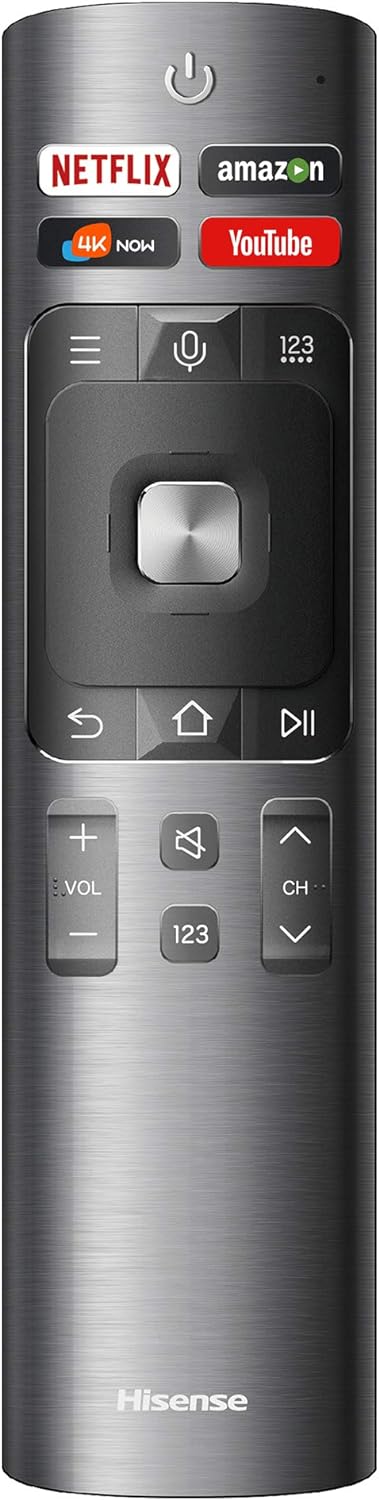
Figure 2: The Hisense voice remote control with dedicated buttons for popular streaming services and voice command functionality.
2. Smart TV Features
Access built-in music and movie applications such as Prime Video, Netflix, YouTube, and Pandora directly from the home screen. Use voice commands through the remote for convenient control.
3. Picture and Audio Settings
Navigate to the settings menu to adjust picture modes (e.g., Standard, Movie, Sports), brightness, contrast, and color settings. The TV features 4K UHD resolution, HDR (High Dynamic Range) for enhanced detail in dark and light areas, and MEMC technology for smooth motion.
The integrated 40-watt Harman Kardon speakers and 60-watt wireless subwoofer, combined with DBX-TV sound enhancement technology, provide a rich 3D surround sound experience. Adjust audio modes and equalizer settings as desired.

Figure 3: Close-up view of the Hisense Laser TV projector unit, highlighting its sleek design and ultra-short throw lens.
Features
- 4K Ultra HD Resolution: Delivers a razor-sharp, stunningly realistic picture with 4x the resolution of standard full HD TVs.
- Ultra-Short Throw Optics: Allows the projector to be positioned inches from the wall and just 8 inches away from the 100-inch screen for an immersive home theater experience, ideal for tight spaces.
- Ambient Light Rejecting (ALR) Screen: Displays bright and crisp images in any type of lighting and is comfortable for the eyes, even at close viewing distances.
- High Dynamic Range (HDR): Enhances the darkest and lightest areas of the picture, revealing incredible detail.
- MEMC Technology: Smooths fast-moving images in action movies and sports, reducing motion blur.
- Wide Color Gamut: Delivers an enhanced spectrum of over a billion rich and vibrant colors.
- Integrated 2.1 Audio System: Features built-in 40-watt Harman Kardon speakers and an included 60-watt wireless subwoofer with DBX-TV sound enhancement technology for deep, rich 3D surround sound.
- Smart TV with Voice Control: Access built-in apps like Prime Video, Netflix, YouTube, and Pandora, and control the TV by speaking commands to Alexa via the Hisense voice remote.
- Connectivity: Includes four HDMI ports, two USB ports, 2x2 dual-band 802.11ac Wi-Fi, Ethernet, and Bluetooth.

Figure 4: Visual representation of the integrated Harman Kardon speakers and wireless subwoofer, highlighting DBX-TV sound enhancement.
Maintenance
1. Cleaning
To clean the screen and projector lens, use a soft, lint-free cloth. For stubborn marks, lightly dampen the cloth with water or a screen-safe cleaning solution. Avoid harsh chemicals or abrasive materials.
2. Software Updates
Ensure your TV's software is kept up-to-date for optimal performance and security. The TV will typically prompt you for available updates. You can also manually check for updates in the settings menu.
3. Environmental Considerations
Avoid placing the projector unit in direct sunlight or near heat sources. Ensure adequate ventilation around the unit to prevent overheating. Operate the TV within recommended temperature and humidity ranges.
Troubleshooting
If you encounter issues with your Hisense Laser TV, try the following basic troubleshooting steps:
- No Power: Check if the power cords are securely connected to both the TV and the power outlet. Ensure the outlet is functional.
- No Picture/Sound: Verify that the correct input source is selected. Check all HDMI and audio cables for secure connections.
- Poor Picture Quality: Adjust picture settings (brightness, contrast, sharpness). Ensure your content source is high-resolution (4K content is recommended for best results).
- Remote Not Responding: Replace the batteries in the remote control. Ensure there are no obstructions between the remote and the TV.
- Network Connectivity Issues: Restart your router and modem. Reconnect the TV to your Wi-Fi network or try an Ethernet connection.
For more complex issues, refer to the detailed troubleshooting section in the full user manual or contact customer support.
Specifications
- Brand: Hisense
- Model Number: 100L10E
- Display Resolution: 3840 x 2160 (4K UHD)
- Item Weight: 49.9 pounds (Projector Unit)
- Product Dimensions (Projector): 8.1 x 24 x 15.7 inches
- Product Dimensions (100-inch Screen): 88.4 x 1.4 x 50.3 inches
- Speaker Type: Integrated 2.1 Audio System (40W Harman Kardon speakers + 60W wireless subwoofer)
- Connectivity Technology: Bluetooth, Ethernet, Wireless (2x2 dual-band 802.11ac Wi-Fi)
- Special Features: 4K UHD, HDR, High Brightness (3000 Lumens), MEMC, Smart TV, Theater-Quality Audio, Voice Control (Alexa)
- Recommended Uses: Home Cinema
Official Product Video
Watch the official product video for an overview of the Hisense 100L10E Laser TV's features and capabilities.
Video Description: This video showcases the Hisense 100-inch 4K Ultra HD Smart HDR Laser TV (100L10E), highlighting its immersive display, vibrant colors, smart features, and integrated audio system. It demonstrates the TV's suitability for a premium home cinema experience.
Warranty and Support
The Hisense 100L10E Laser TV is backed by a 2-year manufacturer's limited warranty. For warranty claims, technical assistance, or customer support, please refer to the contact information provided in your Quick Start Guide or visit the official Hisense support website.
You can also find additional support resources and FAQs on the Amazon Customer Support page.