
1. Introduction
This manual provides essential information for the safe and effective installation, operation, and maintenance of your Philips Hue Econic Up Outdoor Smart Wall Light. Please read this manual thoroughly before installation and retain it for future reference.
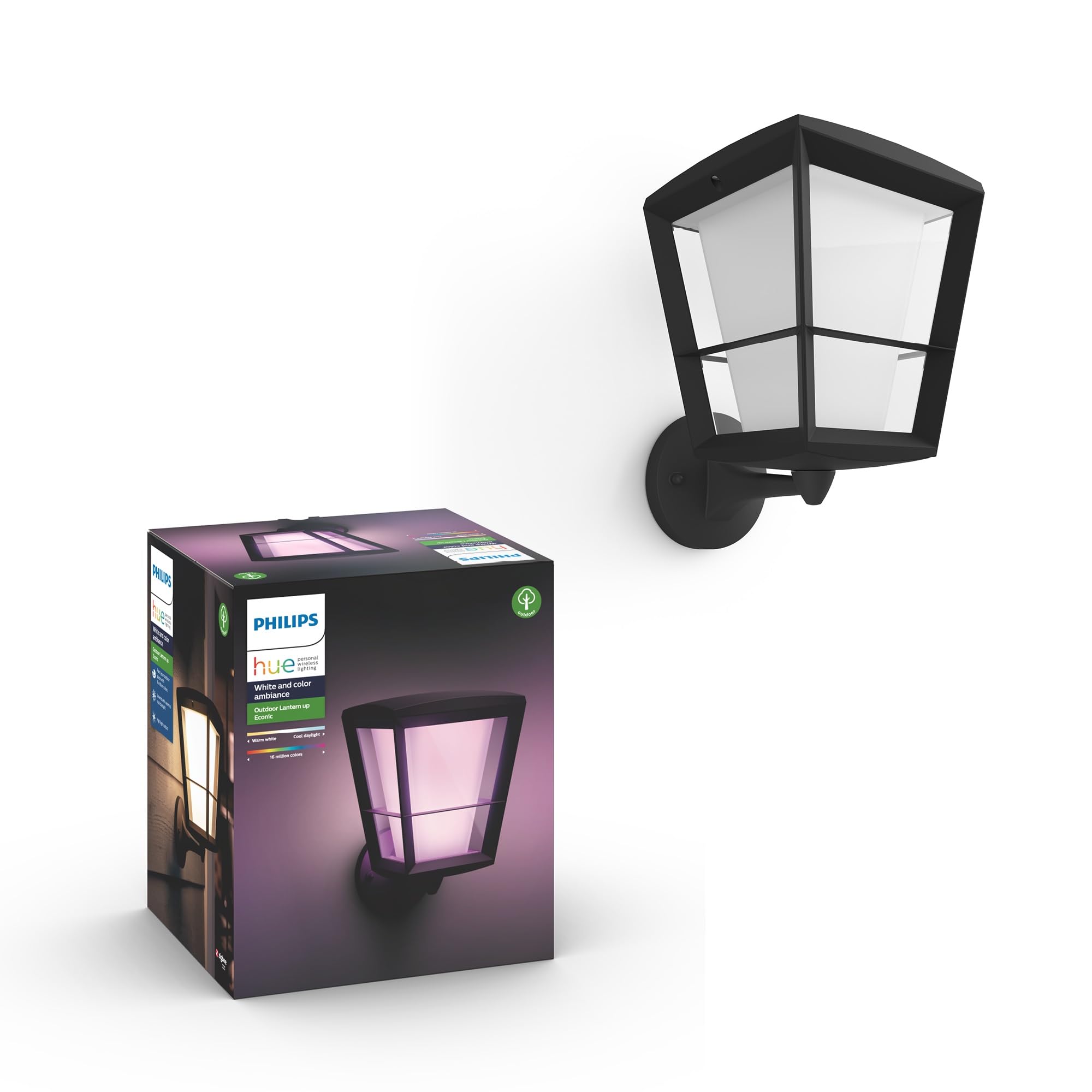
Figure 1: Philips Hue Econic Up Outdoor Smart Wall Light.
2. Safety Information
WARNING: Risk of electric shock. Installation requires knowledge of electrical wiring systems. If not qualified, do not attempt installation. Contact a qualified electrician.
- Disconnect power at the circuit breaker before installation or servicing.
- Ensure all connections are secure and correct to prevent electrical hazards.
- This product is designed for outdoor use and is UL Wet Location rated.
- Do not modify the product in any way not described in this manual.
- Use only with Philips Hue E26 White and Color Ambiance LED bulbs.
3. Package Contents
The package includes:
- 1x Philips Hue Econic Up Outdoor Smart Wall Light fixture
- 1x E26 White and Color Ambiance LED Color-Changing Bulb
- Installation hardware (screws, wire nuts)
- User Manual
Note: A Philips Hue Bridge is required for smart features and is sold separately.
4. Setup and Installation
4.1 Physical Installation
The Philips Hue Econic Up light fixture is designed for hard-wired wall mount installation. Follow these general steps:
- Turn off power: Ensure electricity to the installation area is completely off at the circuit breaker.
- Prepare wiring: Connect the fixture's wires to your household wiring according to local electrical codes. Typically, this involves connecting live, neutral, and ground wires.
- Mount the fixture: Securely attach the light fixture to the wall using the provided hardware.
- Install bulb: Screw the E26 Philips Hue bulb into the fixture.
- Restore power: Turn the electricity back on at the circuit breaker.

Figure 2: General installation steps for Philips Hue outdoor lighting.
4.2 Connecting to Philips Hue Bridge and App
To unlock smart features, your Econic Up light requires a Philips Hue Bridge (sold separately) and the Philips Hue App.
- Install Hue Bridge: Connect your Philips Hue Bridge to your Wi-Fi router and power it on.
- Download App: Download the Philips Hue App from your device's app store (www.philips-hue.com/app).
- Discover Lights: Open the Hue App, navigate to Settings > Lights > Add Light, and follow the on-screen instructions to discover your new Econic Up light.

Figure 3: Philips Hue Bridge is essential for outdoor smart lighting features.
5. Operation
5.1 Color and Brightness Control
Using the Philips Hue App, you can select from 16 million colors and 50,000 shades of white light (warm to cool). Adjust brightness levels to suit your preference or activity.

Figure 4: The Philips Hue App allows selection of 16 million colors and various shades of white.
5.2 Voice Control
Integrate your Philips Hue system with voice assistants like Amazon Alexa, Google Assistant, or Apple HomeKit for hands-free control. Set up voice commands within the respective apps or the Hue App.

Figure 5: Voice control integration with Amazon Alexa and Google Assistant.
5.3 Automations and Scenes
Create custom scenes and automations through the Philips Hue App. This includes scheduling lights to turn on/off, setting routines based on time of day, or linking with Philips Hue Outdoor Motion Sensors for enhanced security and convenience.
Video 1: Overview of Philips Hue smart lighting system features, including automations and control options.
6. Maintenance
The Philips Hue Econic Up light is designed for durability and minimal maintenance.
- Cleaning: Periodically clean the exterior of the fixture with a soft, damp cloth. Do not use abrasive cleaners or solvents.
- Bulb Replacement: If the LED bulb needs replacement, ensure power is off at the circuit breaker. Replace with a compatible Philips Hue E26 White and Color Ambiance LED bulb.
- Weather Resistance: The fixture is weatherproof (UL Wet Location rated). Ensure all seals and covers are properly secured after any maintenance to maintain water resistance.

Figure 6: The Econic Up light is designed to withstand outdoor weather conditions.
7. Troubleshooting
| Problem | Possible Cause | Solution |
|---|---|---|
| Light does not turn on. | No power, loose wiring, faulty bulb. | Check circuit breaker. Verify wiring connections. Replace bulb. |
| Light not responding to app/voice control. | Hue Bridge not connected, light out of range, app issue. | Ensure Hue Bridge is powered and connected to router. Check light's proximity to Bridge. Restart Hue App. |
| Colors are incorrect or inconsistent. | Software glitch, bulb issue. | Restart the light by cycling power. Check for Hue App updates. |
8. Specifications
| Feature | Detail |
|---|---|
| Model Name | Econic Up |
| Model Number | 1743930V7 |
| Brand | Philips Hue |
| Color | Black |
| Material | Metal (Fixture), Glass (Shade) |
| Product Dimensions | 23"L x 16.5"W x 7.5"H |
| Indoor/Outdoor Usage | Outdoor |
| Power Source | Electric (Hard-wired) |
| Voltage | 120 Volts |
| Light Source Type | LED (E26 White and Color Ambiance) |
| Wattage | 15 watts |
| Brightness | 1140 Lumens (max) |
| Connectivity Protocol | Wi-Fi, Zigbee |
| Control Method | App and Voice Controlled (Amazon Alexa, Google Assistant, Apple HomeKit) |
| Water Resistance Level | Water Resistant (UL Wet Location Rated) |
9. Warranty and Support
9.1 Warranty Information
This Philips Hue product comes with a 2-year limited warranty from the date of purchase. This warranty covers defects in materials and workmanship under normal use. For full warranty terms and conditions, please refer to the official Philips Hue website or contact customer support.
9.2 Customer Support
For technical assistance, troubleshooting, or warranty claims, please visit the official Philips Hue support website or contact their customer service:
- Website: www.philips-hue.com/support
- Phone: Refer to the Philips Hue website for regional contact numbers.


