
1. Introduction
This manual provides essential information for the safe and efficient use of your PK Power AC DC Adapter. This power supply is designed to provide reliable power to compatible Avaya Nortel IP VoIP phones, ensuring stable operation. Please read this manual thoroughly before use and retain it for future reference.
2. Safety Information
To ensure safe operation and prevent damage, observe the following precautions:
- Indoor Use Only: This adapter is designed for indoor use in dry locations. Do not expose it to rain, moisture, or extreme temperatures.
- Proper Voltage: Ensure the input voltage of your power outlet matches the adapter's specifications (100-240V AC).
- Grounding: Connect the adapter only to a grounded outlet.
- Compatibility: Use this adapter only with the specified compatible Avaya Nortel IP VoIP phone models. Using it with incompatible devices may cause damage.
- Ventilation: Do not cover the adapter during use, as this may lead to overheating.
- Damage Check: Do not use the adapter if the cord or plug is damaged.
The PK Power AC DC Adapter incorporates multiple safety protections:
- OVP (Over Voltage Output Protection): Protects against excessive output voltage.
- OCP (Over Current Output Protection): Guards against excessive output current.
- SCP (Short Circuit Output Protection): Prevents damage from short circuits.
- Over Charge Protection: Safeguards connected devices from overcharging.
- Over Temperature Protection: Monitors and prevents overheating of the adapter.

This image displays the internal components of the adapter, illustrating its built-in safety features such as over-charge, over-voltage, short-circuit, over-current, and over-temperature protection.
3. Product Overview
The PK Power AC DC Adapter is a reliable power solution featuring a robust design and universal input voltage compatibility. It is certified with CE, FCC, and RoHS standards, ensuring quality and safety.
Key Features:
- Wide Input Voltage: 100-240V AC, 50-60Hz, suitable for worldwide use.
- Durable Construction: Features a plum blossom thread cable and special heat-resistant materials for longevity.
- Secure Connection: Equipped with a 2-pin plug for a safer and more durable connection.
- Stable Output: Copper interface ensures stable power delivery.
- EMI Reduction: Includes a ferrite bead on the cable to reduce electromagnetic interference.
Components:
- AC DC Adapter Unit
- Detachable 2-Pin Power Cord

This image shows the adapter's durable plum blossom thread cable, heat-resistant materials, and the secure 2-pin plug, emphasizing stable output and firm connection.

A view of the adapter block and its attached cable, which includes a ferrite bead to reduce electromagnetic interference.
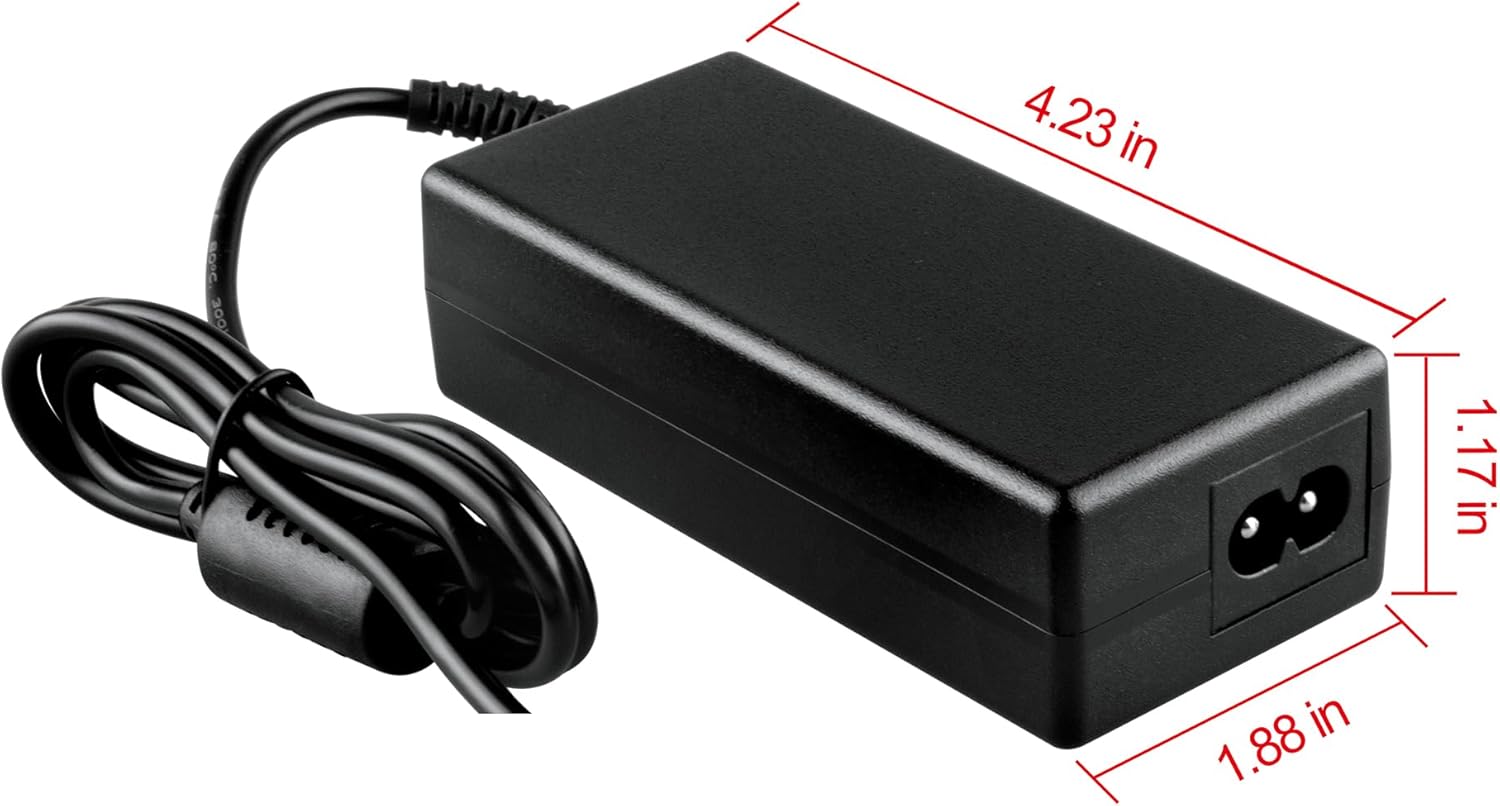
This image provides the physical dimensions of the adapter block: approximately 4.23 inches in length, 1.88 inches in width, and 1.17 inches in height.

The image shows the main adapter unit alongside its detachable 2-pin power cord, ready for connection.
4. Setup
Follow these steps to set up your AC DC Adapter:
- Connect Power Cord: Insert the detachable 2-pin power cord into the AC input port of the adapter unit.
- Connect to Phone: Plug the adapter's output connector into the power input port of your compatible Avaya Nortel IP VoIP phone.
- Connect to Wall Outlet: Insert the 2-pin power cord's plug into a standard, grounded 100-240V AC wall outlet.
Ensure all connections are firm and secure.
5. Operating Instructions
Once properly connected, the adapter will automatically supply power to your Avaya Nortel IP VoIP phone. No further user interaction is required for basic operation. The phone should power on as usual.
6. Troubleshooting
If your Avaya Nortel IP VoIP phone does not power on or experiences issues:
- No Power:
- Check if the power cord is securely connected to both the adapter and the wall outlet.
- Verify that the adapter's output connector is firmly plugged into the phone's power input.
- Test the wall outlet with another device to ensure it is functional.
- Intermittent Power:
- Ensure all connections are stable and not loose.
- Avoid bending or crimping the power cord.
- Adapter Overheating:
- Ensure the adapter is in a well-ventilated area and not covered.
- If overheating persists, discontinue use and contact customer support.
If problems persist after performing these checks, please refer to the Warranty and Support section.
7. Specifications
| Feature | Specification |
|---|---|
| Brand | PKPOWER |
| Input Voltage | 100-240V AC, 50-60Hz |
| Connector Type | Auxiliary (2-Pin) |
| Compatible Devices | Avaya Nortel 1210 NTYS18, 1220 NTYS19, 1230 NTYS20 IP VoIP Phones |
| Safety Certifications | CE, FCC, RoHS |
| Protection Features | OVP, OCP, SCP, Over Charge, Over Temp |
| Color | Black |

This image displays the caution label and input specifications (100-240V, 50-60Hz) printed on the adapter unit.
8. Warranty and Support
This PK Power AC DC Adapter comes with a 1-year manufacturer warranty from the date of purchase. This warranty covers defects in materials and workmanship under normal use.
For warranty claims, technical support, or any inquiries, please contact PK Power customer service. Our friendly and reliable customer service team aims to respond within 24 hours.
Please have your product model and purchase information ready when contacting support.