1. Product Overview
The Zojirushi Microcomputer Boiling Electric Pot "STAN." CP-CA12BA is designed to provide hot water with precision and convenience. Featuring microcomputer temperature control, it offers various temperature settings suitable for different beverages and uses. Its compact and sleek design makes it a practical addition to any kitchen.

Image 1: Front view of the Zojirushi Microcomputer Boiling Electric Pot "STAN." CP-CA12BA.
2. Safety Precautions
- Read all instructions thoroughly before operating the appliance.
- Do not immerse the appliance, power cord, or plug in water or any other liquid.
- Keep the appliance out of reach of children.
- Use only with a grounded electrical outlet that matches the voltage specified on the appliance.
- Do not operate the appliance if the power cord or plug is damaged. Contact qualified service personnel for repair.
- Avoid touching hot surfaces. Always use handles or knobs. Steam is hot and can cause burns.
- Ensure the lid is securely closed before operating the appliance.
- Do not overfill the pot beyond the maximum water level indicator.
3. Setup
- Unpacking: Carefully remove all packaging materials, including any protective films or stickers. Retain the packaging for future transport or storage.
- Initial Cleaning: Before first use, wash the inner pot and detachable lid components with a mild dish detergent and warm water. Rinse thoroughly. Wipe the exterior of the main unit with a damp cloth. Do not immerse the main unit.
- Placement: Place the electric pot on a stable, flat, heat-resistant surface. Ensure there is adequate space around the unit for proper ventilation, away from walls or other appliances.
- Filling: Open the lid and fill the inner pot with fresh water. Fill up to the 'MAX' line indicated inside the pot. Do not exceed this line to prevent overflow during boiling.
- Power Connection: Connect the magnetic power cord to the designated port on the appliance. Then, plug the power cord into a standard, grounded electrical outlet.

Image 2: Water level indicators on the Zojirushi electric pot, showing both external and internal markings for accurate filling.
4. Operating Instructions
- Power On: The unit will automatically power on when connected to an electrical outlet. The display will illuminate.
- Temperature Setting: Use the Temp Set button to cycle through the available temperature options (e.g., 208°F, 195°F, 175°F, 160°F). The selected temperature will be displayed.
- Boiling Water: The pot will automatically begin heating the water to the selected temperature. The current water temperature will be shown on the display. Once the target temperature is reached, the unit will maintain it.
- Dispensing Water:
- Place a cup or container directly under the dispenser spout.
- Press the Unlock button to enable the dispensing function. A light may indicate it is unlocked.
- Press and hold the Dispense button to release hot water. Release the button to stop the flow.
- For safety, the unit will automatically re-lock the dispense function after a short period of inactivity.
- Reboil Function: Press the Reboil button to quickly bring the water back to the highest boiling temperature (208°F), useful if the water has cooled or for dechlorination.
- Energy Saving Mode: Activate the Energy Saving feature to reduce power consumption. This mode may maintain water at a slightly lower temperature or utilize a timer to optimize energy use.
- Timer Function: Use the Timer button to set a delayed start for the boiling process, allowing you to have hot water ready at a specific pre-set time.

Image 3: Dispensing hot water from the Zojirushi electric pot into a cup.

Image 4: Control panel with various temperature settings and function buttons.
5. Special Features
- Slow Drip Mode: This feature allows for a slower, more controlled dispensing of water, ideal for pour-over coffee or delicate teas, preventing splashing.
- Keep Warm Function: The microcomputer maintains the water at your selected temperature for extended periods, ensuring hot water is always available.
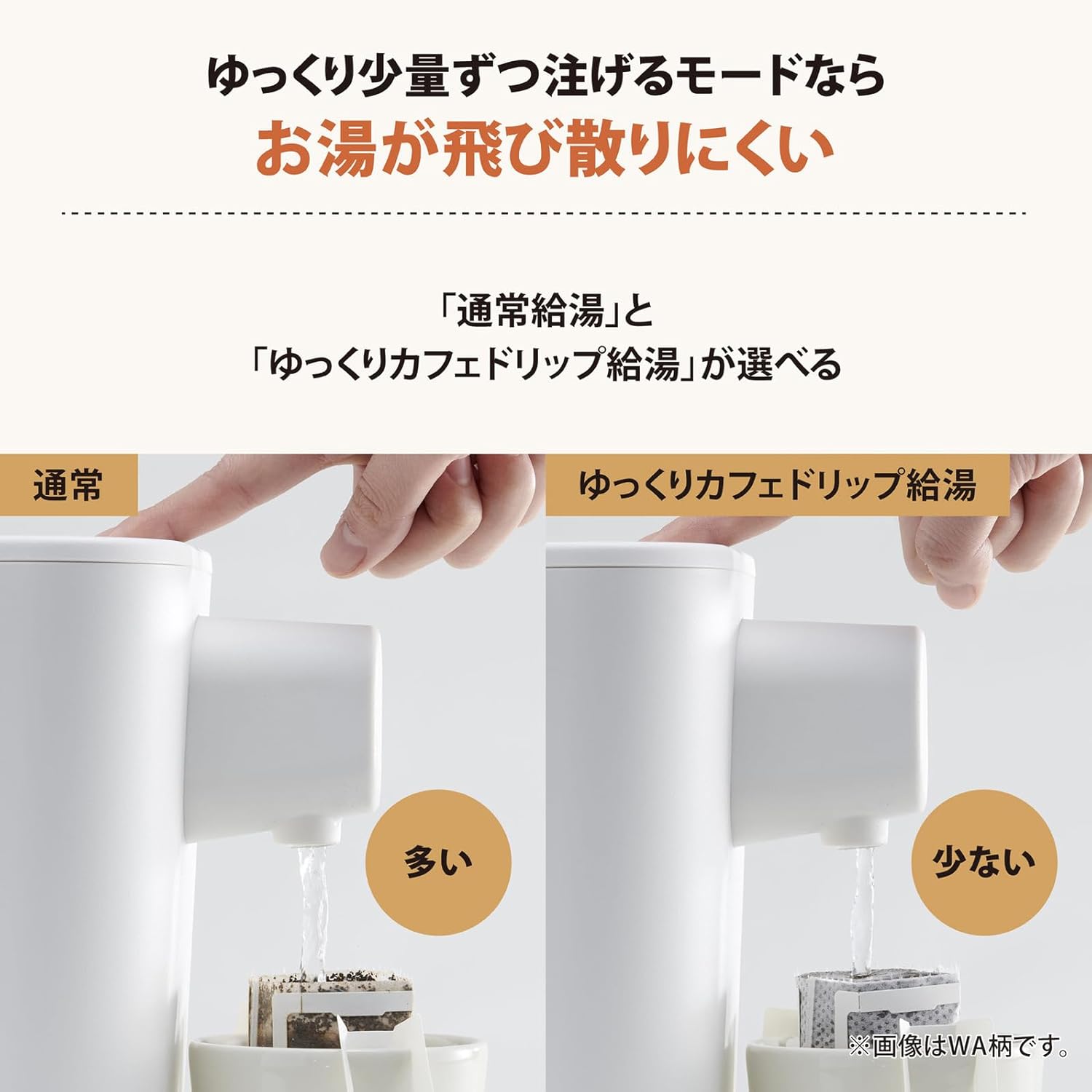
Image 5: The slow drip mode in action, providing a controlled water flow.
6. Maintenance and Cleaning
Regular cleaning and maintenance will ensure the longevity and optimal performance of your Zojirushi electric pot.
- Daily Cleaning: After each use, unplug the unit from the power outlet and allow it to cool completely before cleaning.
- Inner Pot: Hand wash the inner pot with a soft sponge and mild dish soap. Rinse thoroughly with clean water. Avoid using abrasive scrubbers or harsh chemicals that could damage the non-stick coating.
- Exterior: Wipe the exterior of the main unit with a damp cloth. Do not use abrasive cleaners. Never immerse the main unit in water or any other liquid.
- Lid Components: Detach any removable lid components (e.g., steam vent cover) and wash them with mild detergent. Ensure all parts are dry before reassembling.
- Descaling: Over time, mineral deposits (scale) may build up inside the pot, especially in hard water areas. Periodically descale the unit using a citric acid cleaner or a descaling solution recommended by Zojirushi. Follow the specific descaling instructions provided in the full product manual.
7. Troubleshooting
If you encounter any issues with your electric pot, refer to the following common troubleshooting steps:
- No Power:
- Check if the power cord is securely plugged into both the unit and a functional electrical outlet.
- Ensure there is no power outage or tripped circuit breaker.
- Water Not Heating:
- Verify that a temperature setting has been selected and the unit is not in a timed-off state.
- Confirm the lid is properly closed.
- Water Not Dispensing:
- Ensure the Unlock button has been pressed before attempting to dispense.
- Check if the water level in the pot is sufficient.
- Unusual Odor or Taste:
- Perform a thorough cleaning and descaling of the inner pot.
- Consider using filtered water if tap water quality is a concern.
8. Specifications
| Feature | Detail |
|---|---|
| Brand | Zojirushi |
| Model | CP-CA12-BA |
| Capacity | 1.2 Liters |
| Material | Stainless Steel |
| Dimensions (L x W x H) | 9.84" x 6.69" x 9.84" |
| Special Feature | Temperature Control |
| Care Instructions | Hand wash, Wipe clean |
| Item Weight | 4.4 pounds (2 Kilograms) |
| First Available | February 10, 2019 |

Image 6: Product dimensions for the Zojirushi electric pot.
9. Warranty and Support
For detailed warranty information, product registration, and customer support, please visit the official Zojirushi website or contact their customer service department directly. It is recommended to keep your purchase receipt as proof of purchase for any warranty claims.


