
1. Introduction and Overview
The Carepeutic Hand-to-Wrist Acupressure Warm Massager is designed to provide relief from hand and wrist pain, including symptoms associated with carpal tunnel syndrome, tendonitis, arthritis, and overuse injuries. It utilizes a combination of stretching, heated air pressure massage, and vibration techniques to promote relaxation and improve flexibility.
Key Features:
- Acupressure massage with hundreds of small nodes.
- Warm massage function for enhanced comfort and circulation.
- Vibration massage for deep tissue relaxation.
- Stretching of hand palm and fingers to ease tension and improve flexibility.
- Two-way air pressure from top and bottom for comprehensive massage.
- Ergonomic design with enlarged compartment suitable for various hand sizes.
- Six selective automatic massage programs and six intensity levels.
- Built-in rechargeable battery for portable use.
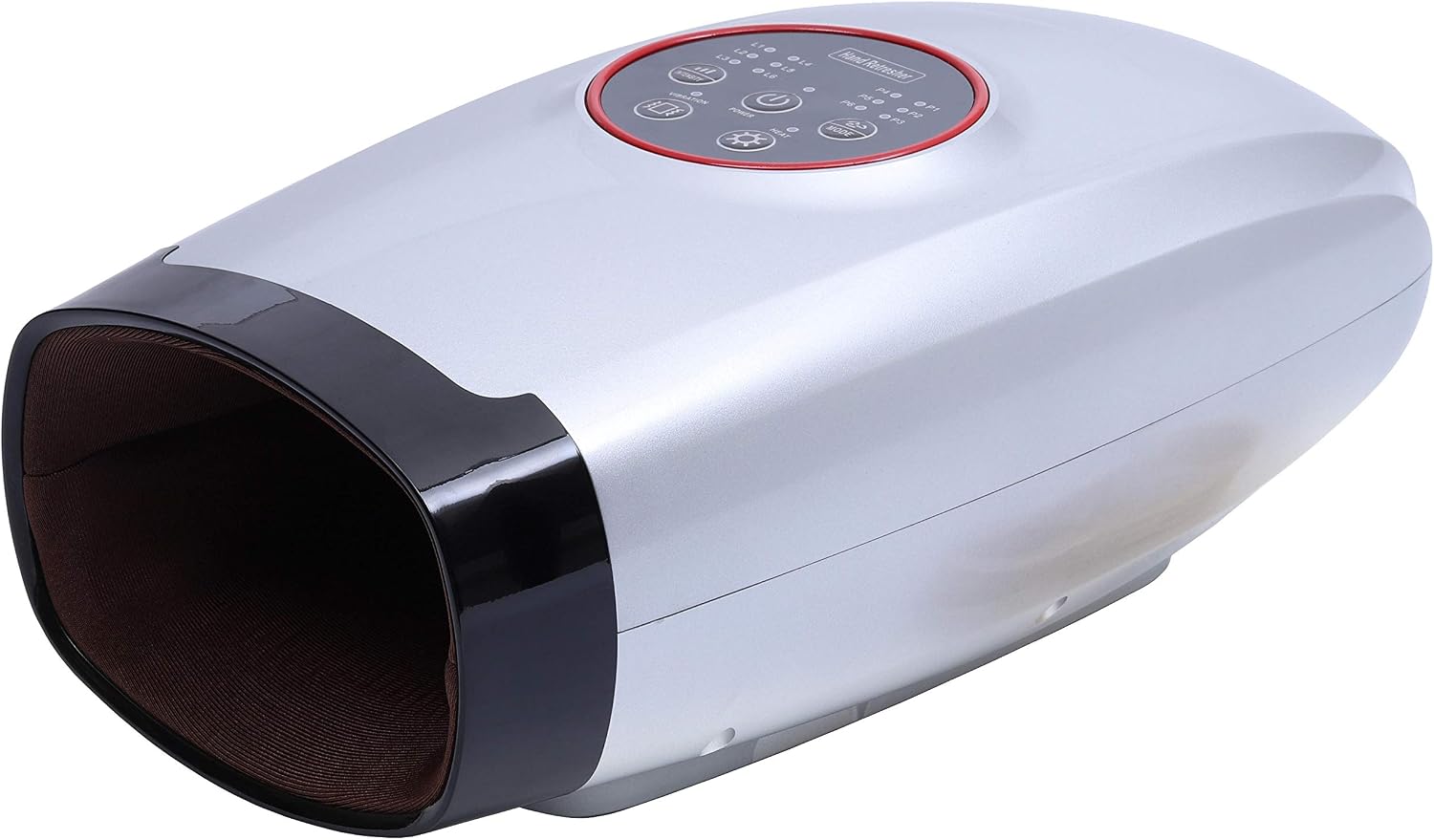
Figure 1.1: Front view of the Carepeutic Hand-to-Wrist Massager, showcasing its sleek design and hand insertion opening.
2. Safety Information
Please read all safety instructions carefully before using this product.
- Consult a physician before use if you have serious health conditions, including but not limited to, severe circulatory disorders, skin conditions, or if you are pregnant.
- Keep the device away from water and do not use it in wet environments or while bathing.
- Do not use the device while sleeping.
- Do not attempt to disassemble or repair the unit yourself. Refer all servicing to qualified personnel.
- Ensure the power adapter and USB cable are undamaged before each use.
- Do not use the device on swollen, inflamed, or injured areas of the skin.
- Keep out of reach of children.
3. Product Components
The Carepeutic Hand-to-Wrist Massager consists of the main unit and its integrated control panel. Key components include:
- Main Unit: The primary body of the massager, housing the internal mechanisms.
- Hand Insertion Opening: The front opening where the hand is placed for massage.
- Control Panel: Located on the top surface, featuring buttons for power, intensity, mode, heat, and vibration, along with indicator lights.
- Internal Acupressure Nodes: Hundreds of small nodes inside the massage chamber designed to stimulate reflex zones.
- Air Bags: Integrated air bags from wrist to hand palm and fingers for compression massage.
- Heating Element: Provides warmth during massage.
- USB Charging Port: Located on the side or back for recharging the internal battery.

Figure 3.1: Close-up view of the control panel, showing the Power, Intensity, Mode, Heat, and Vibration buttons, along with indicator lights for programs and intensity levels.

Figure 3.2: Diagram illustrating the internal acupressure nodes and how they align with the hand's reflex zones during massage.
4. Setup
- Unpack the Device: Carefully remove the massager and all accessories from the packaging. Retain the packaging for future storage or transport.
- Initial Charge: Before first use, fully charge the device. Connect the provided USB charging cable to the massager's charging port and plug the other end into a compatible USB power adapter (not included) or a computer USB port. The charging indicator light will show the charging status.
- Placement: Place the massager on a flat, stable surface.
5. Operating Instructions
Familiarize yourself with the control panel (refer to Figure 3.1) before operation.

Figure 5.1: Proper hand placement within the massager for optimal comfort and effectiveness.
- Insert Hand: Gently slide your hand into the massager's opening, ensuring your palm rests comfortably on the internal acupressure nodes and your wrist is positioned correctly.
- Power On: Press the POWER button to turn on the device. The default massage program and intensity will activate.
- Select Massage Mode: Press the MODE button to cycle through the six automatic massage programs (P1-P6). Each program offers a unique combination of air pressure, vibration, and heat. The corresponding indicator light will illuminate.
- Adjust Intensity: Press the INTENSITY button to adjust the air pressure intensity. There are six levels (L1-L6). Select a level that feels comfortable and effective.
- Activate Heat: Press the HEAT button to turn the warming function on or off. The heat indicator light will illuminate when active.
- Activate Vibration: Press the VIBRATION button to turn the vibration function on or off. The vibration indicator light will illuminate when active.
- Enjoy Massage: Relax and allow the massager to work. A typical massage session lasts for a preset duration (e.g., 15 minutes), after which the device may automatically shut off.
- Power Off: To end the session manually, press the POWER button again.

Figure 5.2: Visual representation of the device's key features, including heat treatment, wrist-to-hand massage, two-way air pressure, acupressure nodes, stretching, and air pressure massage.

Figure 5.3: Diagram illustrating the internal air pressure system, showing how air bags inflate to provide compression massage.
6. Maintenance
- Cleaning: Disconnect the device from power before cleaning. Wipe the exterior of the massager with a soft, slightly damp cloth. Do not use abrasive cleaners or immerse the unit in water.
- Storage: Store the device in a cool, dry place, away from direct sunlight and extreme temperatures. Keep it in its original packaging or a protective cover to prevent dust accumulation.
- Battery Care: To prolong battery life, avoid fully discharging the battery frequently. Recharge the device regularly, even if not in use for extended periods.
7. Troubleshooting
- Device does not turn on:
- Ensure the battery is charged. Connect the USB charging cable and allow it to charge for at least 30 minutes before attempting to power on again.
- Check if the power button is pressed firmly.
- Massage intensity feels too weak/strong:
- Adjust the intensity level using the INTENSITY button.
- Ensure your hand is properly positioned within the massager.
- No heat or vibration:
- Ensure the HEAT or VIBRATION buttons have been pressed and their respective indicator lights are on.
- Some massage programs may not include heat or vibration by default; try a different mode.
- Unusual noises during operation:
- Minor sounds from the air pump are normal. If the noise is excessive or unusual, discontinue use and contact customer support.
If the issue persists after attempting these troubleshooting steps, please contact Carepeutic customer support for assistance.
8. Specifications
| Feature | Specification |
|---|---|
| Product Dimensions | 6.5 x 5 x 12 inches |
| Item Model Number | KH325 |
| Item Weight | 2.1 Pounds |
| Batteries | 1 CR2 batteries required (included) |
| Power Source | Battery Powered |
| Material | Acrylonitrile Butadiene Styrene |
| Use For | Hands |
| Manufacturer | Unipride |
9. Warranty and Support
Carepeutic products are manufactured with quality and care. For information regarding product warranty, please refer to the warranty card included with your purchase or visit the official Carepeutic website.
For technical support, troubleshooting assistance, or inquiries about your device, please contact Carepeutic customer service. You can find contact information on the official Carepeutic website or through your retailer.
You can also visit the Carepeutic Store on Amazon for more product information and support resources.
10. Legal Disclaimer
Statements regarding dietary supplements have not been evaluated by the FDA and are not intended to diagnose, treat, cure, or prevent any disease or health condition.
