Timex Marathon Digital Dial Silicone Strap Ladies Watch TW5M14200
Introduction
This manual provides comprehensive instructions for the setup, operation, and maintenance of your Timex Marathon Digital Dial Silicone Strap Ladies Watch, model TW5M14200. Please read this manual carefully to ensure proper use and to maximize the lifespan of your watch.
Product Overview and Features
The Timex Marathon Digital Watch is designed for active individuals, offering a blend of sporty aesthetics and practical digital functions. Key features include:
Digital Display: Clear and easy-to-read digital time display.
Calendar Function: Displays Day and Date.
Stopwatch: For timing activities.
Dual Time: Allows tracking of a second time zone.
Alarm: Programmable daily alarm.
Indiglo Light: Timex's signature night-light for low-light visibility.
Water Resistance: Rated for 5 bars (50 meters), suitable for showering or swimming in shallow water.
Durable Strap: High-quality silicone strap for comfort and longevity.
Front view of the Timex Marathon Digital Watch, highlighting the digital display and control buttons.
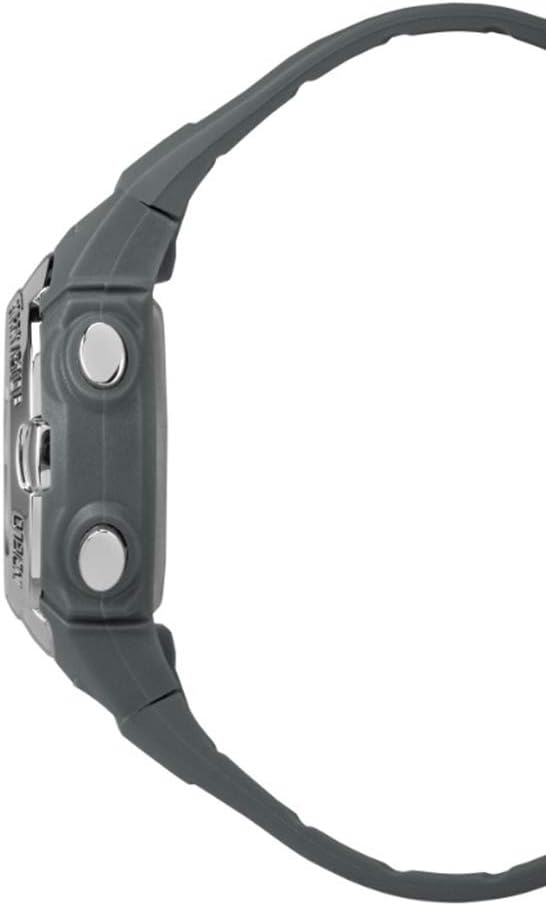
Side profile of the watch, illustrating its ergonomic design and button placement.
Detail of the durable silicone strap and buckle mechanism.
The watch as worn on a wrist, demonstrating its fit and appearance.
Setup and Initial Configuration
Before using your watch, it is recommended to set the correct time, date, and any desired alarms.
Setting Time and Date
Press the MODE button repeatedly until the time setting mode is displayed (often indicated by flashing digits).
Use the SET button to select the digit or setting you wish to adjust (e.g., hours, minutes, year, month, day).
Use the START/STOP button to increase the value of the selected digit. Hold to advance rapidly.
Once all settings are correct, press the MODE button to exit the setting mode and return to the normal time display.
Setting the Alarm
Press the MODE button until the alarm time is displayed.
Press the SET button to activate the alarm setting. The hour digits will flash.
Use the START/STOP button to adjust the hour.
Press SET again to move to the minute digits, then use START/STOP to adjust.
Press MODE to save the alarm setting and return to the alarm display.
To turn the alarm on or off, typically press START/STOP while in the alarm display mode. An alarm icon will appear when active.
Operating Modes
Your Timex Marathon watch features several useful operating modes:
Stopwatch Function
Press the MODE button until the stopwatch display appears (usually showing 00:00:00).
Press START/STOP to begin timing.
Press START/STOP again to pause the stopwatch.
To reset the stopwatch, press the SET button while the stopwatch is paused.
Dual Time Mode
Press the MODE button until the Dual Time (T2) display appears.
To set the Dual Time, press SET and use START/STOP to adjust the hours and minutes, similar to setting the main time.
Press MODE to save and exit.
Indiglo Night-Light
To activate the Indiglo night-light, press the INDIGLO button (often located on the top right or as part of the main display button). The light will illuminate the display for a few seconds, allowing visibility in low-light conditions.
Care and Maintenance
Proper care will ensure the longevity and performance of your Timex watch.
Water Resistance: Your watch is water resistant to 50 meters (5 ATM). This means it is suitable for showering, swimming in shallow water, or brief immersion. Do NOT press any buttons while the watch is wet or submerged, as this can compromise the water seal. Avoid exposure to hot water or steam.
Cleaning: Clean your watch regularly with a soft, damp cloth. For the silicone strap, mild soap and water can be used. Ensure the watch is completely dry before storing.
Battery Replacement: The watch uses 1 Lithium Metal battery (included). When the display dims or functions become erratic, it may be time to replace the battery. It is recommended to have the battery replaced by a qualified watch technician to ensure the water resistance is maintained.
Storage: Store your watch in a cool, dry place away from direct sunlight and extreme temperatures.
Troubleshooting
If you encounter issues with your watch, please refer to the following common solutions:
Problem
Possible Cause
Solution
Display is blank or dim.
Low or dead battery.
Replace the battery.
Buttons are unresponsive.
Watch may be in a locked mode or internal issue.
Try pressing all buttons firmly. If unresponsive, a battery reset (removal and reinsertion) might be needed by a technician.
Time is incorrect.
Time was not set correctly or watch was reset.
Refer to the "Setting Time and Date" section to re-set the time.
Water inside the watch.
Water resistance compromised (e.g., buttons pressed underwater, seal failure).
Immediately take the watch to a qualified service center. Do not attempt to dry it yourself.
If the problem persists after attempting these solutions, please contact Timex customer support or an authorized service center.
Technical Specifications
Feature
Detail
Model Number
TW5M14200
Brand
Timex
Case Diameter
33 mm
Case Thickness
13 mm
Strap Material
Plastic (Silicone)
Strap Length
19 cm
Strap Width
15 mm
Weight
30 g
Water Resistance
5 bars (50 meters)
Battery Type
Lithium Metal (1 required, included)
Functions
Day-Date, Stopwatch, Dual Time, Alarm, Indiglo Light
Warranty and Support
Your Timex Marathon Digital Dial Silicone Strap Ladies Watch TW5M14200 comes with a 2-year warranty from the date of purchase, covering manufacturing defects. Please retain your proof of purchase for warranty claims.
For warranty service, technical support, or further inquiries, please visit the official Timex website or contact their customer service department. Contact information can typically be found on the Timex official website or within the packaging materials.
Note: The warranty does not cover normal wear and tear, damage caused by improper use, accidents, or unauthorized repairs.
Related Documents - TW5M14200
Timex Marathon Digital Watch User Manual and Operating Instructions Comprehensive user guide for the Timex Marathon Digital watch. Learn how to set time, alarm, stopwatch, use INDIGLO night-light, and understand water resistance. Includes safety warnings and warranty information.
Руководство по эксплуатации часов Timex Подробное руководство по эксплуатации часов Timex, охватывающее настройку времени, использование хронографа, водонепроницаемость, регулировку браслета и функции подсветки INDIGLO® для различных механизмов Timex.
Timex Analog Watch User Manual - Features, Settings, and Care Comprehensive user guide for Timex Analog watches, covering setup, features like INDIGLO® Night-Light, water resistance, alarms, perpetual calendar, and maintenance. Available in multiple languages.
Timex Kids Digital Watch User Guide - Operation and Features Comprehensive user guide for the Timex Kids digital watch (model 791-095007). Covers features, basic operations, setting time and date, chronograph, alarm, timer, INDIGLO night light, water resistance, strap adjustments, battery information, and warranty details.
Timex Atelier Marine M1a User Manual and International Warranty Comprehensive user manual and international warranty details for the Timex Atelier Marine M1a watch. Includes product specifications, instructions for setting the time and adjusting the bracelet, and warranty coverage information.
Timex Ironman 50-Lap Watch User Manual Comprehensive user manual for the Timex Ironman 50-Lap watch, detailing features, operations, and maintenance for optimal use.