
1. Product Overview
The Ergosolid NB F160 is a universal gas spring adjustable dual monitor mount designed for desktop use. It provides an ergonomic solution for mounting two LED or LCD screens, ranging from 17 to 27 inches (43-68 cm) in size. Each arm is capable of supporting a monitor weighing between 2 kg and 9 kg. This mount features a dual swivel arm with an integrated gas spring mechanism, allowing for smooth and effortless adjustments. It includes a 360-degree pivot function for screen orientation changes, and offers extensive movement capabilities including rotation, tilt, and height adjustment to optimize your viewing experience and free up desk space.

Image 1.1: Side view of the Ergosolid NB F160 Dual Monitor Mount, showcasing its robust design.
- Supports two 17-27 inch (43-68 cm) LCD/LED monitors.
- Weight capacity: 2-9 kg per monitor.
- Integrated gas spring for smooth and precise adjustments.
- 360-degree screen pivot function for landscape or portrait orientation.
- Adjustable height up to 260 mm.
- Vertical tilt range: +35 degrees to -50 degrees.
- Horizontal rotation: 180 degrees.
- Extends up to 53 cm from the desk edge.
- Integrated cable management system.
- VESA compatibility: 75x75 mm and 100x100 mm.
- Includes 2 USB 3.0 cables with a mountable base for convenient access.
2. Safety Information
Please read all instructions carefully before assembly and use. Incorrect assembly or use may result in injury or damage to the product or property. If you do not understand these instructions or have doubts about the safety of the installation, please contact a qualified professional.
- Weight Capacity: Do not exceed the maximum weight capacity of 9 kg (19.8 lbs) per monitor. Exceeding this limit can result in instability, potential damage, and serious injury.
- Monitor Size: This mount is designed for monitors between 17 and 27 inches. Using monitors outside this range may affect stability and functionality.
- Desk Thickness: Ensure your desk surface is strong enough to support the combined weight of the mount and monitors. The clamp mechanism supports desk thicknesses from 2 mm to 95 mm.
- Assembly: Assemble the product exactly as described in this manual. Do not modify the structure or use parts not supplied by the manufacturer.
- Moving Parts: The gas spring mechanism contains high-pressure gas. Do not attempt to disassemble the gas spring cylinder.
- Children: Keep children away from the assembly area. Small parts may be a choking hazard.
3. Package Contents
Verify that all components are present and undamaged before beginning assembly. If any parts are missing or damaged, please contact your retailer for assistance.
| Part | Description | Quantity |
|---|---|---|
| A | Main Arm Assembly | 1 |
| B | Desk Clamp Base | 1 |
| C | VESA Plate | 2 |
| D | USB 3.0 Extension Cable | 2 |
| E | Cable Management Clips | Various |
| F | Mounting Hardware (Screws, Washers, Spacers) | Various |
| G | Hex Keys / Wrenches | Various |
4. Setup Instructions
4.1 Desk Clamp Installation
- Place the desk clamp base (Part B) on the edge of your desk.
- Attach the main arm assembly (Part A) to the desk clamp base.
- Tighten the clamp screw until the mount is securely fastened to the desk. Ensure the desk thickness is between 2mm and 95mm.
4.2 Monitor Attachment
- Attach the VESA plate (Part C) to the back of your monitor using the appropriate screws and washers from the mounting hardware (Part F). Ensure the VESA pattern (75x75mm or 100x100mm) matches your monitor.
- Carefully slide the monitor with the attached VESA plate onto the arm's VESA head. Ensure it clicks into place securely.
- Repeat for the second monitor.

Image 4.1: The dual monitor mount with monitors attached, highlighting the integrated USB 3.0 ports.
4.3 Cable Management
- Route your monitor cables (power, video) through the integrated cable management clips (Part E) along the arms.
- Connect the included USB 3.0 extension cables (Part D) to the base of the mount and then to your computer's USB ports for convenient access.
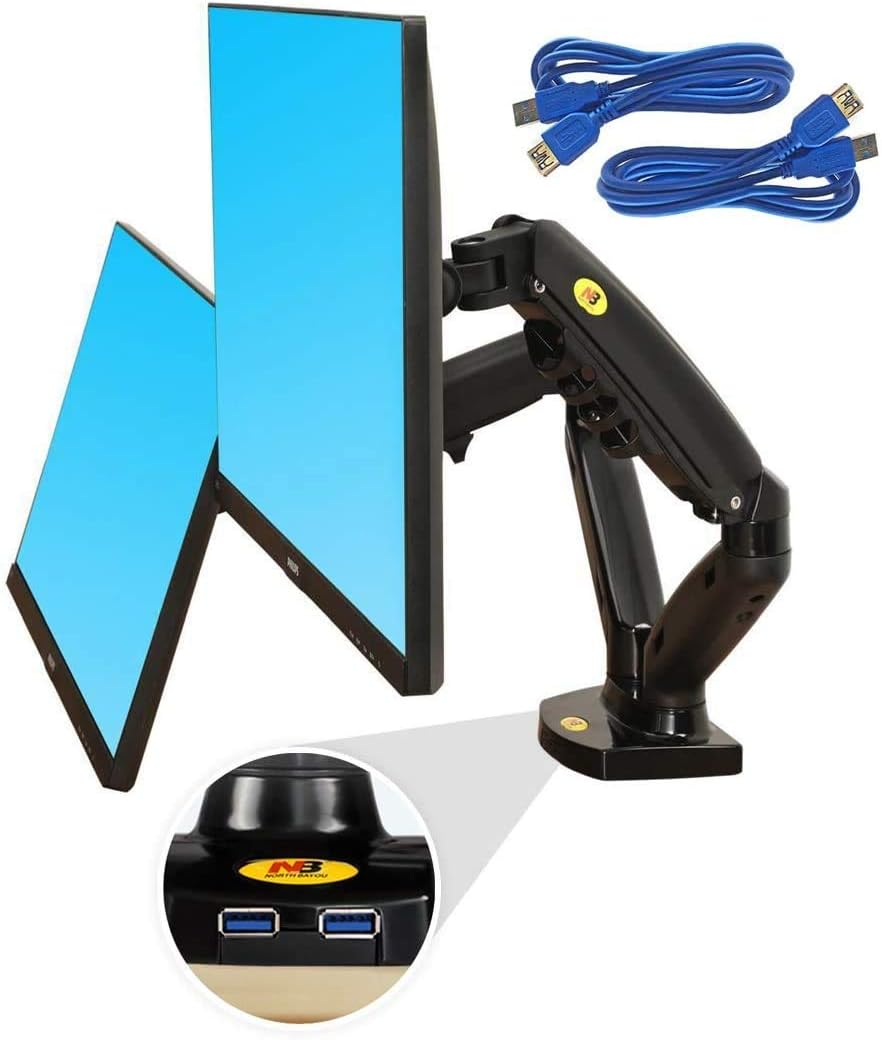
Image 4.2: Monitors mounted in portrait orientation, demonstrating flexibility and cable routing.
5. Operating Instructions
The Ergosolid NB F160 monitor mount offers a wide range of adjustments to achieve optimal ergonomic positioning for your screens.
5.1 Gas Spring Tension Adjustment
After mounting your monitors, you may need to adjust the gas spring tension to ensure the monitors stay at the desired height and move smoothly. Use the provided hex key to turn the adjustment screw located on the arm. Turn clockwise to increase tension for heavier monitors, and counter-clockwise to decrease tension for lighter monitors.
5.2 Monitor Position Adjustment
- Height Adjustment: Gently push or pull the monitor up or down to adjust its vertical position. The gas spring will hold it in place. The mount allows for a vertical adjustment range of 0-260 mm.
- Tilt Adjustment: Tilt the monitor screen up or down to achieve your preferred viewing angle. The vertical tilt range is +35 degrees to -50 degrees.
- Swivel Adjustment: Swivel the monitor left or right to share your screen or change your viewing perspective. The arms allow for 180-degree rotation.
- Rotation (Pivot): Rotate the monitor 360 degrees to switch between landscape and portrait orientations.
- Extension/Retraction: Extend or retract the monitor arms to bring the screens closer or push them further away. The mount can extend up to 53 cm from the desk edge.
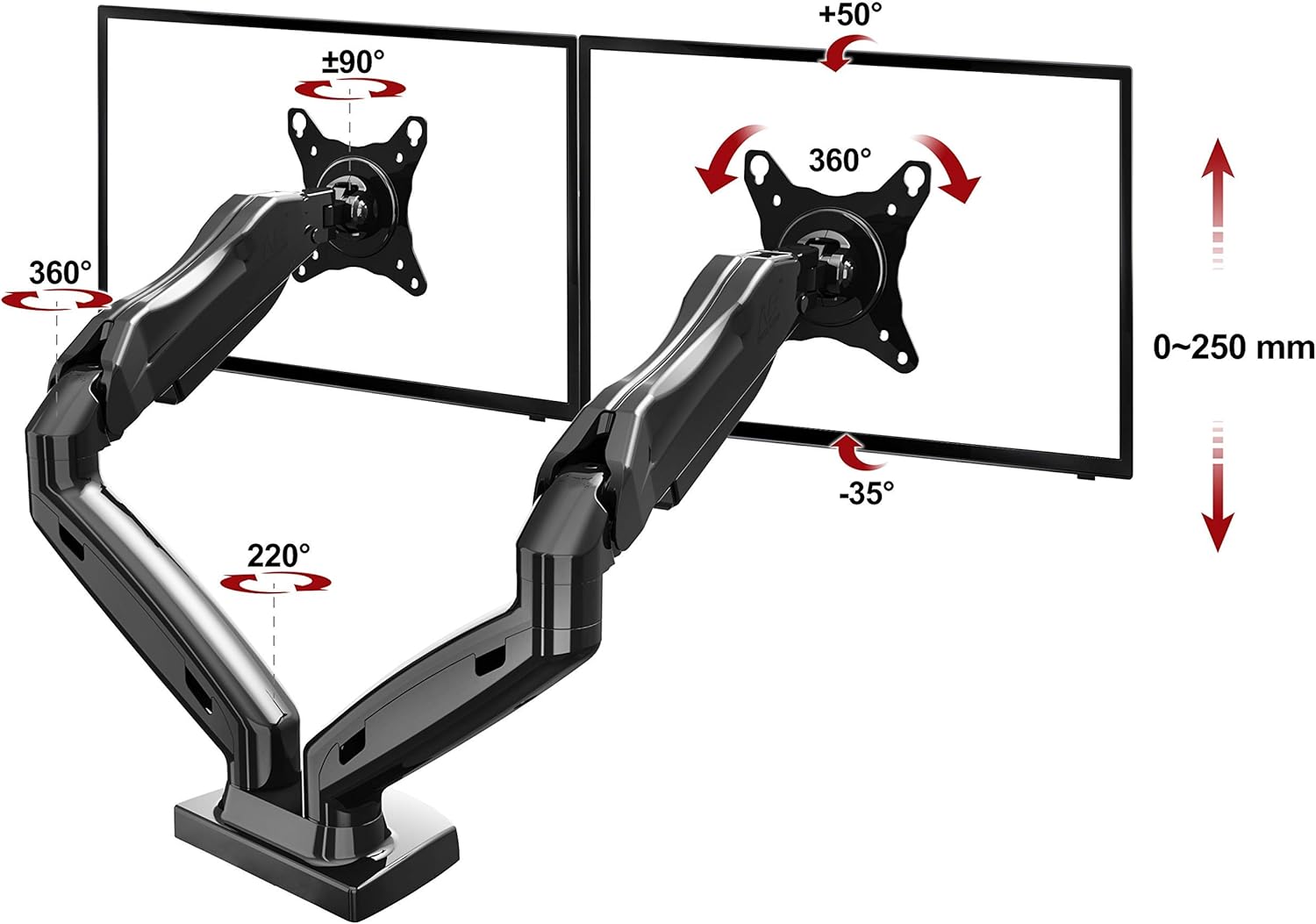
Image 5.1: Diagram illustrating the extensive range of motion, including tilt, swivel, rotation, and height adjustment.
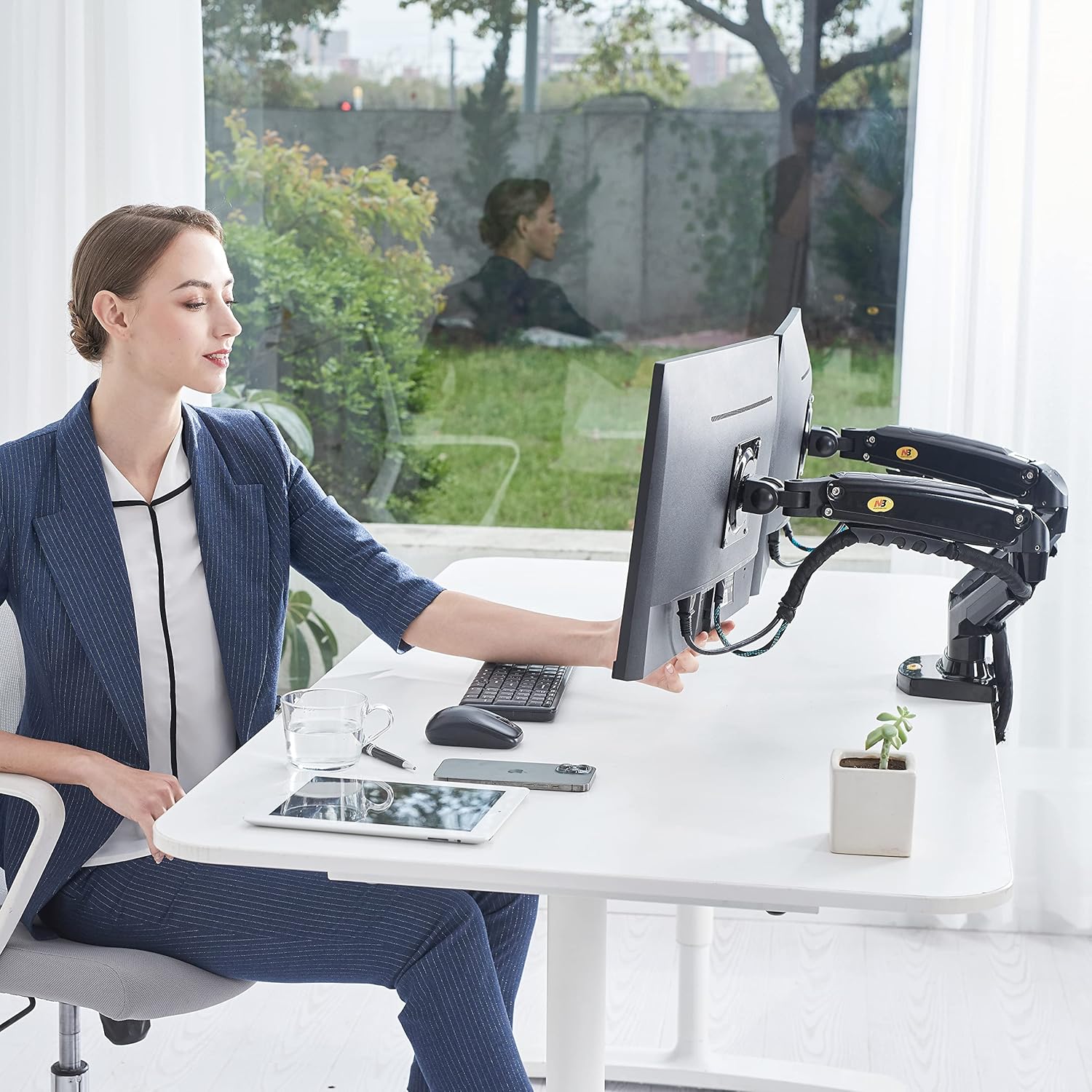
Image 5.2: A user demonstrating the ease of adjusting a monitor's position with the Ergosolid NB F160 mount.
6. Maintenance
Regular maintenance ensures the longevity and optimal performance of your monitor mount.
- Cleaning: Wipe the mount surfaces with a soft, damp cloth. Avoid using abrasive cleaners or solvents that could damage the finish.
- Periodic Checks: Periodically check all screws and connections to ensure they remain tight. Re-tighten if necessary.
- Gas Spring: The gas spring is designed for long-term use and generally requires no maintenance. Do not attempt to lubricate or disassemble the gas spring cylinder.
7. Troubleshooting
If you encounter issues with your monitor mount, refer to the following common problems and solutions:
- Monitor Sags or Does Not Stay at Desired Height:
Solution: The gas spring tension needs to be increased. Use the provided hex key to turn the adjustment screw clockwise until the monitor holds its position. - Monitor is Difficult to Move Up or Down:
Solution: The gas spring tension is too high. Use the provided hex key to turn the adjustment screw counter-clockwise until the monitor moves smoothly. - Mount Feels Unstable:
Solution: Ensure the desk clamp is securely tightened to the desk. Check all VESA plate screws to ensure monitors are firmly attached. - USB Ports Not Working:
Solution: Ensure the USB 3.0 extension cables are properly connected from the mount's base to your computer's USB ports.
8. Specifications
Detailed technical specifications for the Ergosolid NB F160 Dual Monitor Mount.

Image 8.1: Technical drawing providing detailed dimensions and movement capabilities of the mount.
| Feature | Specification |
|---|---|
| Manufacturer | Ergosolid |
| Model Number | NB F160 |
| Compatible Devices | Monitors (17-27 inches) |
| Weight Capacity | 2-9 kg per monitor |
| VESA Compatibility | 75x75 mm, 100x100 mm |
| Mounting Type | Desk Clamp (2-95 mm thickness) |
| Movement Type | Rotate, Swivel, Tilt, Height Adjustment |
| Max Tilt Angle | +35 / -50 degrees |
| Rotation | 360 degrees (pivot), 180 degrees (arm swivel) |
| Max Extension | 53 cm from desk edge |
| Product Dimensions | 18 x 31 x 42 cm (approximate, packaging) |
| Product Weight | 5.52 kg |
| Material | Aluminum, Plastic |
| Color | Black |
| Additional Features | 2x USB 3.0 ports, Cable Management |
9. Warranty and Support
For warranty information or technical support, please refer to the documentation provided with your purchase or contact your retailer. Keep your proof of purchase for any warranty claims.


