
Sndway SW-T100
Contents
SNDWAY SW-T100 Digital Laser Rangefinder
Model: SW-T100
Introduction
The SNDWAY SW-T100 Digital Laser Rangefinder is a precision instrument designed for accurate distance, area, and volume measurements. This device offers a wide measuring range and high accuracy, making it suitable for various professional and DIY applications. Key features include instant measurement, automatic calculation functions, and an easy-to-read multi-line LCD with backlight.

Figure 1: Front view of the SNDWAY SW-T100 Digital Laser Rangefinder, showing the display and control buttons.
Package Contents and Setup

Figure 2: The SNDWAY SW-T100 Laser Rangefinder and its included accessories, such as the user manual, carrying pouch, and wrist strap.
Battery Installation
The device requires two (2) 1.5V AAA batteries for operation. Please note that batteries are typically not included due to shipping regulations.
- Locate the battery compartment cover on the rear of the device.
- Slide or unclip the cover to open the compartment.
- Insert the two AAA batteries, ensuring correct polarity (+ and -) as indicated inside the compartment.
- Close the battery compartment cover securely.
Initial Power On
Press the READ button to power on the device. The LCD will illuminate, and the device will be ready for use.
Operating Instructions
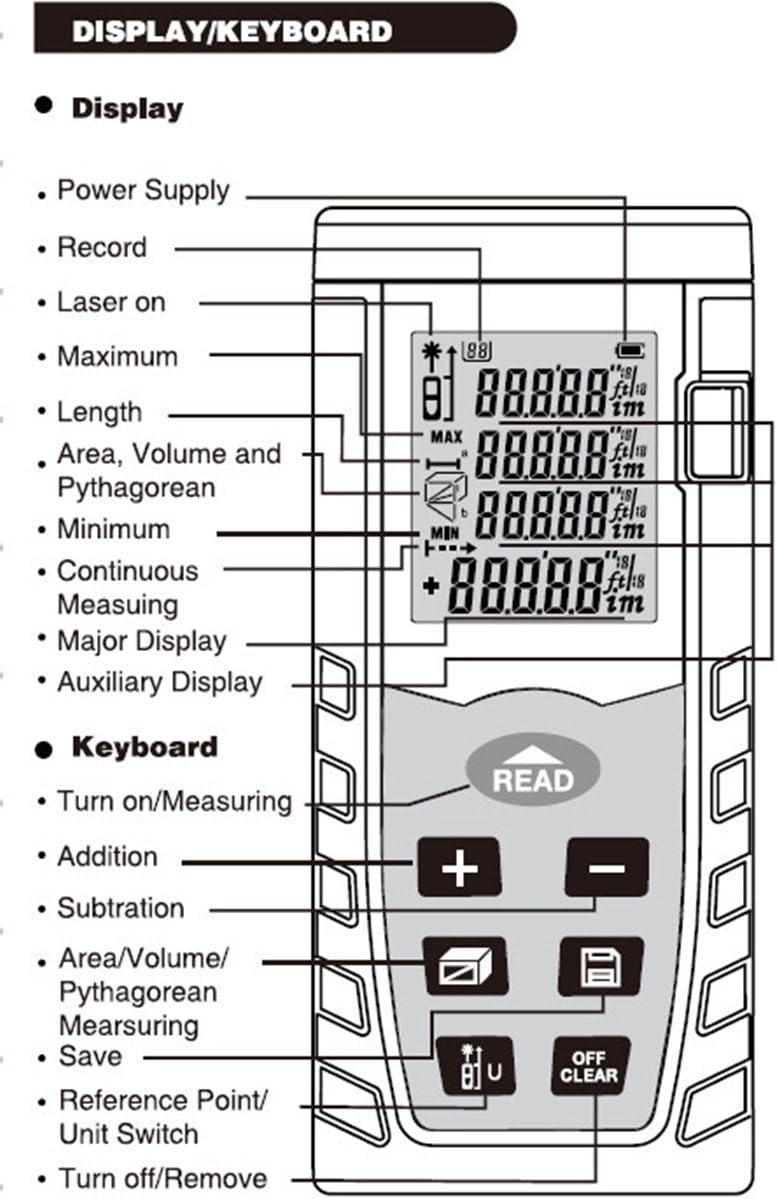
Figure 3: Detailed diagram of the SNDWAY SW-T100's display indicators and keyboard functions.
Display Indicators
- Power Supply: Indicates battery level.
- Record: Shows if data is being recorded or recalled.
- Laser On: Indicates the laser is active.
- Maximum/Minimum: Displays max/min distance tracking.
- Length: Standard single distance measurement.
- Area, Volume and Pythagorean: Icons for respective measurement modes.
- Continuous Measuring: Indicates continuous measurement mode.
- Major Display: Primary measurement reading.
- Auxiliary Display: Secondary readings or previous measurements.
Keyboard Functions
- READ Button: Powers on the device, initiates measurement, or confirms selection.
- + (Addition) Button: Adds measurements.
- - (Subtraction) Button: Subtracts measurements.
- Area/Volume/Pythagorean Measuring Button: Cycles through Area, Volume, and Pythagorean measurement modes.
- Save Button: Saves current measurement data.
- Reference Point/Unit Switch Button: Toggles between front/rear reference point and changes measurement units (m, in, ft).
- OFF/CLEAR Button: Clears the current display or powers off the device (long press).
Measurement Modes
- Single Distance Measurement:
Press the READ button once to activate the laser. Press it again to take a single measurement. The result will be displayed on the main line.
- Continuous Measurement (Max/Min Tracking):
From single measurement mode, press and hold the READ button. The device will continuously measure, displaying the maximum and minimum distances detected during the sweep. Press READ again to stop.
- Area Measurement:
Press the Area/Volume/Pythagorean button until the area icon appears. Take two consecutive distance measurements (length and width). The device will automatically calculate and display the area.
- Volume Measurement:
Press the Area/Volume/Pythagorean button until the volume icon appears. Take three consecutive distance measurements (length, width, and height). The device will automatically calculate and display the volume.
- Pythagorean Theorem Measurement:
Press the Area/Volume/Pythagorean button until the Pythagorean icon appears. Follow the on-screen prompts to measure the required sides of a right-angled triangle. The device will calculate the unknown side using the Pythagorean theorem.

Figure 4: Visual examples demonstrating various Pythagorean measurement scenarios.
Unit Switching and Reference Point
- Unit Switch: Press the Reference Point/Unit Switch button to cycle through measurement units: meters (m), inches (in), and feet (ft).
- Reference Point: Press and hold the Reference Point/Unit Switch button to toggle between measuring from the front or rear of the device. An icon on the display will indicate the active reference point.
Data Management
- Data Store/Recall: Use the Save button to store measurements. Refer to the manual's specific instructions for recalling stored data.
- Data Hold/Clear: Measurements are typically held on the display until a new measurement is taken or the OFF/CLEAR button is pressed.
Maintenance
Proper maintenance ensures the longevity and accuracy of your SNDWAY SW-T100 Laser Rangefinder.
- Cleaning: Use a soft, damp cloth to clean the device's exterior. Do not use abrasive cleaners or solvents. Pay special attention to keeping the laser lens clean and free of dust or smudges.
- Storage: When not in use for extended periods, remove the batteries to prevent leakage. Store the device in a cool, dry place, away from direct sunlight and extreme temperatures.
- Protection: The device has an IP54 rating, meaning it is protected against dust ingress and splashing water from any direction. However, it is not waterproof and should not be submerged. Avoid dropping the device or subjecting it to strong impacts.
Troubleshooting
The SNDWAY SW-T100 is equipped with auto-correction and error reporting technology. If you encounter issues, consider the following:
- Device Not Powering On: Check battery installation and ensure batteries are not depleted. Replace with fresh AAA batteries if necessary.
- Inaccurate Readings:
- Ensure the laser lens is clean.
- Verify the correct reference point (front/rear) is selected.
- Ensure the target surface is reflective enough and perpendicular to the laser beam.
- Avoid measuring through transparent materials like glass.
- Check for strong light sources interfering with the laser.
- Buzzer Indication: A buzzer sound typically indicates a successful measurement or an error. Refer to the specific error codes or patterns in the full user manual if available.
- Display Issues: If the display is dim or flickering, replace the batteries.
- Device Unresponsive: Try removing and reinserting the batteries. If the issue persists, contact customer support.
Specifications
| Measuring Range | 0.05 to 100 meters |
| Accuracy | ±2mm (0.079 inch) |
| Laser Class | Class II |
| Laser Maximum Output | <1Mw |
| Dust & Splash Proof | IP54 |
| Laser Auto Off | 20 seconds |
| Power Auto Off | 150 seconds |
| Operation Temperature | 0°C to 40°C (32°F to 104°F) |
| Storage Temperature | -20°C to 60°C (14°F to 140°F) |
| Power Supply | 2 x 1.5V AAA Battery |
| Dimensions | 112 x 50 x 25 mm (4.41 x 1.97 x 0.99 inch) |
| Weight | Approx. 250 g |
| Certificates | CE, ROHS, FCC |
Warranty and Support
Information regarding the product warranty is not available in the provided data. For specific warranty terms, technical support, or service inquiries, please refer to the official documentation included with your purchase or contact the manufacturer directly.
Manufacturer: Sndway
Ask a question about this manual
Ask about setup, troubleshooting, compatibility, parts, safety, or missing instructions. Manuals+ will review the question and use this page’s manual context to help answer it.