
Divoom N12107
Divoom Timebox Mobile Bluetooth Speaker User Manual
Model: N12107
Introduction
Thank you for purchasing the Divoom Timebox Mobile Bluetooth Speaker. This manual provides essential information for setting up, operating, and maintaining your device. The Divoom Timebox is a versatile portable Bluetooth speaker featuring a unique pixel art display, offering both audio playback and visual entertainment.
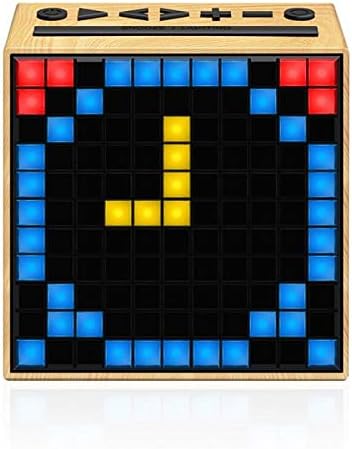
Image: Front view of the Divoom Timebox speaker, showcasing its pixel display with a digital clock. The speaker has a light wood-grain finish.
Safety Information
Please read all safety instructions before using this product. Failure to follow these instructions may result in electric shock, fire, or other injuries.
- Do not expose the device to extreme temperatures, direct sunlight, or high humidity.
- Do not immerse the device in water or any other liquids.
- Do not attempt to disassemble, repair, or modify the device. Refer all servicing to qualified personnel.
- Use only the specified charging cable and power adapter.
- Keep the device away from children and pets.
- Avoid dropping or subjecting the device to strong impacts.
Setup
1. Unboxing and Initial Charge
Carefully remove the Divoom Timebox speaker and all accessories from the packaging. Before first use, it is recommended to fully charge the speaker. Connect the provided USB charging cable to the speaker's charging port and the other end to a USB power source (e.g., computer USB port or USB wall adapter).
2. Powering On/Off
To power on the speaker, press and hold the power button located on the top panel for a few seconds until the pixel display illuminates. To power off, press and hold the power button again until the display turns off.
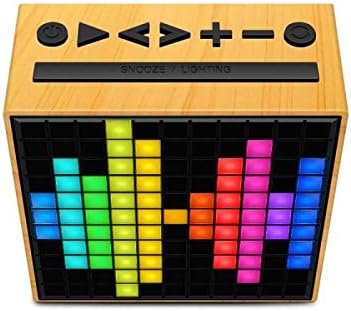
Image: Top view of the Divoom Timebox speaker, highlighting the control buttons including power, volume, and playback controls. The pixel display shows a colorful pattern.
3. Bluetooth Pairing
- Ensure the Divoom Timebox is powered on. It will automatically enter Bluetooth pairing mode, indicated by a blinking Bluetooth icon on the display.
- On your mobile device (smartphone, tablet, etc.), enable Bluetooth.
- Search for available Bluetooth devices. Select "Divoom Timebox" from the list.
- Once connected, the speaker will emit a confirmation sound, and the Bluetooth icon on the display will become solid.
- Your device is now paired and ready for audio playback.
Operating Instructions
Audio Playback
- Play/Pause: Press the Play/Pause button on the top panel.
- Volume Up/Down: Press the '+' or '-' buttons to adjust the volume.
- Next/Previous Track: Press the 'Next' or 'Previous' track buttons.
- Aux-in Mode: Connect an audio device using a 3.5mm audio cable to the AUX-in port. The speaker will automatically switch to AUX mode.
Pixel Display Functions
The Divoom Timebox features a customizable pixel display. To fully utilize its features, download the official Divoom app from your device's app store. The app allows you to:
- Create and display custom pixel art.
- Choose from pre-set animations and designs.
- Set alarms and timers with custom pixel animations.
- Display notifications from your phone.
- Access various pixel games.
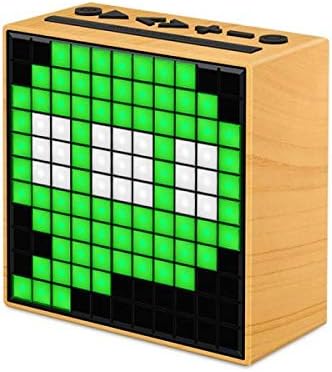
Image: Side view of the Divoom Timebox speaker, showcasing a vibrant green pixel art design on its display. The speaker maintains its light wood-grain aesthetic.
Maintenance
- Cleaning: Use a soft, dry, lint-free cloth to clean the speaker's surface. Do not use abrasive cleaners, waxes, or solvents.
- Storage: When not in use for extended periods, store the speaker in a cool, dry place, away from direct sunlight and extreme temperatures.
- Battery Care: To prolong battery life, avoid fully discharging the battery frequently. Charge the speaker regularly, even if not in active use.
Troubleshooting
| Problem | Possible Cause | Solution |
|---|---|---|
| Speaker does not power on. | Low battery; Power button not held long enough. | Charge the speaker fully. Press and hold the power button for 3-5 seconds. |
| No sound from speaker. | Volume too low; Device not connected; Incorrect input mode. | Increase speaker and device volume. Re-pair Bluetooth. Ensure AUX cable is fully inserted if using AUX mode. |
| Bluetooth connection fails. | Speaker not in pairing mode; Device Bluetooth off; Interference. | Ensure speaker is in pairing mode. Turn device Bluetooth off and on. Move speaker closer to device. Forget device on phone and re-pair. |
| Pixel display not working. | Software glitch; Low battery. | Restart the speaker. Ensure battery is charged. Check Divoom app for updates. |
Specifications
| Feature | Detail |
|---|---|
| Brand | Divoom |
| Model Number | N12107 |
| Speaker Type | Bluetooth Speakers |
| Connectivity Technology | Bluetooth |
| Nominal Output / Speaker Maximum Output Power | 5 Watts |
| Port Type | Audio Jack |
| Product Weight | 383 g |
| Dimensions (Depth x Height x Width) | 114 mm x 115.8 mm x 55 mm |
| Power Source | Electricity (Rechargeable Battery) |
| First Available Date | 28 January 2019 |
Warranty and Support
For warranty information and technical support, please refer to the documentation included with your product or visit the official Divoom website. Keep your purchase receipt as proof of purchase for warranty claims.
Manufacturer: Divoom
Related documentsN12107


Ask a question about this manual
Ask about setup, troubleshooting, compatibility, parts, safety, or missing instructions. Manuals+ will review the question and use this page’s manual context to help answer it.