1. Introduction
Thank you for choosing the Techsmarter 30000mAh 45W USB C PD Power Bank. This compact yet powerful unit is designed to provide reliable and fast charging for a wide range of devices, including smartphones, tablets, and laptops. With its 30000mAh capacity and 45W Power Delivery (PD) output, it ensures you stay powered on the go. This manual provides essential information on how to use and maintain your power bank safely and effectively.

Image Description: A sleek, black Techsmarter 30000mAh 45W USB C PD Power Bank is shown vertically. The Techsmarter logo is prominently displayed in blue on the lower half, and four small white LED indicator lights are visible on the top left, with the bottom-most light glowing green, indicating charge status.
2. What's in the Box
Please check the contents of your package. If any items are missing or damaged, please contact customer support.
- Techsmarter 30000mAh 45W USB C PD Power Bank
- USB-C 3A 4-in-1 Cable
- User Guide (this manual)
3. Key Features
- High Capacity: 30000mAh battery capacity for multiple charges of your devices.
- Powerful 45W USB-C PD Output: Fast charges USB-C smartphones, tablets, and laptops like MacBook Air/Pro, iPad Air/Pro, Chromebook, Dell XPS, HP, Steam Deck, and Nintendo Switch.
- 18W TS+ Quick Charge Port: Charges compatible smartphones up to 4 times faster than conventional chargers, reaching 53% battery in approximately 35 minutes.
- Triple Output Ports: Features one 45W USB-C PD port, one 18W USB-A TS+ port, and one standard 5W USB-A port, allowing simultaneous charging of up to three devices.
- Universal Compatibility: Supports a wide range of USB and USB-C devices from various brands including Samsung, iPhone, HTC, LG, Nokia, Motorola, Huawei, Sony, Xiaomi, Google, Pixel, Nexus, Blackberry, Alcatel, and ZTE.
- Advanced Safety: Equipped with TurboGuard, an exclusive 11-point advanced safety and protection system to ensure device and user safety.
- LED Indicators: Convenient LED lights display the remaining power level of the power bank.
- TSA Compliant: Approved for carry-on during flights.

Image Description: The Techsmarter power bank is shown next to an iPhone XS, both connected by cables. Text indicates "PD45W 30000 mAh A new experience" and charging capabilities for iPhone, iPad Pro, and Samsung S9, S10, highlighting "TS+ Power Delivery, USB C to USB C Charging Faster Than QC3.0".
4. Setup
4.1 Initial Charging of the Power Bank
Before first use, it is recommended to fully charge your Techsmarter Power Bank. This ensures optimal performance and battery longevity.
- Connect the provided USB-C cable to the USB-C PD input/output port on the power bank.
- Connect the other end of the USB-C cable to a 45W Power Delivery (PD) wall charger (not included).
- The LED indicators on the power bank will illuminate to show the charging progress. A full charge typically takes about 3-5 hours with a 45W PD charger.

Image Description: The Techsmarter power bank is shown connected via USB-C to a laptop and via USB-A to a smartphone (iPhone XS). Text indicates "PD45W 30000mAh Full Charge in 1.5 Hours" and "Charge USB-C Phones, Tablets, and Laptops at full speed, up to 45W".
5. Operating Instructions
5.1 Checking Battery Level
Press the power button on the side of the power bank to activate the LED indicators. The number of illuminated LEDs indicates the remaining battery capacity:
- 4 LEDs: 75% - 100%
- 3 LEDs: 50% - 75%
- 2 LEDs: 25% - 50%
- 1 LED: 0% - 25%
5.2 Charging Your Devices
The Techsmarter Power Bank features three output ports for versatile charging:
- USB-C PD Port (45W): Use this port with a USB-C to USB-C cable for fast charging compatible laptops, tablets, and smartphones. For Apple devices requiring a Lightning connector, use a USB-C to Lightning cable (not included).
- USB-A TS+ Quick Charge Port (18W): Use this port with a standard USB-A cable for fast charging compatible smartphones and other devices.
- Standard USB-A Port (5W): Use this port for charging other USB-powered devices at standard speeds.
To charge a device:
- Connect your device to the appropriate output port on the power bank using a compatible charging cable.
- The power bank will automatically begin charging your device. The LED indicators will show the power bank's remaining charge.

Image Description: A bar chart titled "Optimized for Smartphones" compares the charging percentage after 35 minutes for various iPhone and Samsung models using TS+ / TS2PD versus stock chargers. For example, iPhone 11, XS, XR, X reaches 53% with TS+ / TS2PD compared to 18% with stock chargers.

Image Description: The Techsmarter power bank is positioned next to a MacBook Pro laptop. Text highlights "Power Delivery" and states that it can "Charge USB-C phones, tablets and Laptops at full speed, up to 45W," indicating that the power bank can provide 2.6 charges to a MacBook Pro in 2 hours.
6. Compatibility
The Techsmarter 30000mAh 45W USB C PD Power Bank offers broad compatibility with a wide range of electronic devices:
- Laptops: Compatible with USB-C PD enabled laptops such as MacBook Pro, MacBook Air, MacBook 12, Dell XPS 13, HP Spectre X360, Spectre X2, Spectre Folio, ELITE BOOK 830 G5, Lenovo X1, YOGA730, E490, ideapad 720s-13, THINKPAD X390, Huawei MateBook X Pro, MateBook X, MateBook13, Samsung Notebook9 (950XBE), Xiaomi Air, and more.
- Tablets: iPad Pro 12.9-inch, iPad Pro 10.5-inch, iPad Pro 11-inch, and other USB-C or USB-A compatible tablets.
- Smartphones: Universally compatible with iPhone 13, 12, 11, XS, XR, X, 8 Plus, 8, 7, 7 Plus, 6, Samsung Galaxy S10, S10e, S10+, S9, S9+, S8, S8+, Note 9, Note 8, Huawei P10, Mate 9, Mate 20X, Mate 20 Pro, LG G7, V30+, Google Pixel 3a, Pixel XL, 3, 2XL, 2, Nexus 5X, 6P, Sony XZ2 Premium, Sony XZ3, and most other USB and USB-C smartphones.
- Gaming Devices: Steam Deck, Nintendo Switch, and other portable gaming consoles.
- Other Devices: GPS devices, cameras, headphones, and other USB electronics.

Image Description: A collage of various smartphones, tablets (iPad Pro, Kindle), and a Nintendo Switch, illustrating the "One Size Fits All" compatibility of the Techsmarter power bank for both USB and USB-C devices.
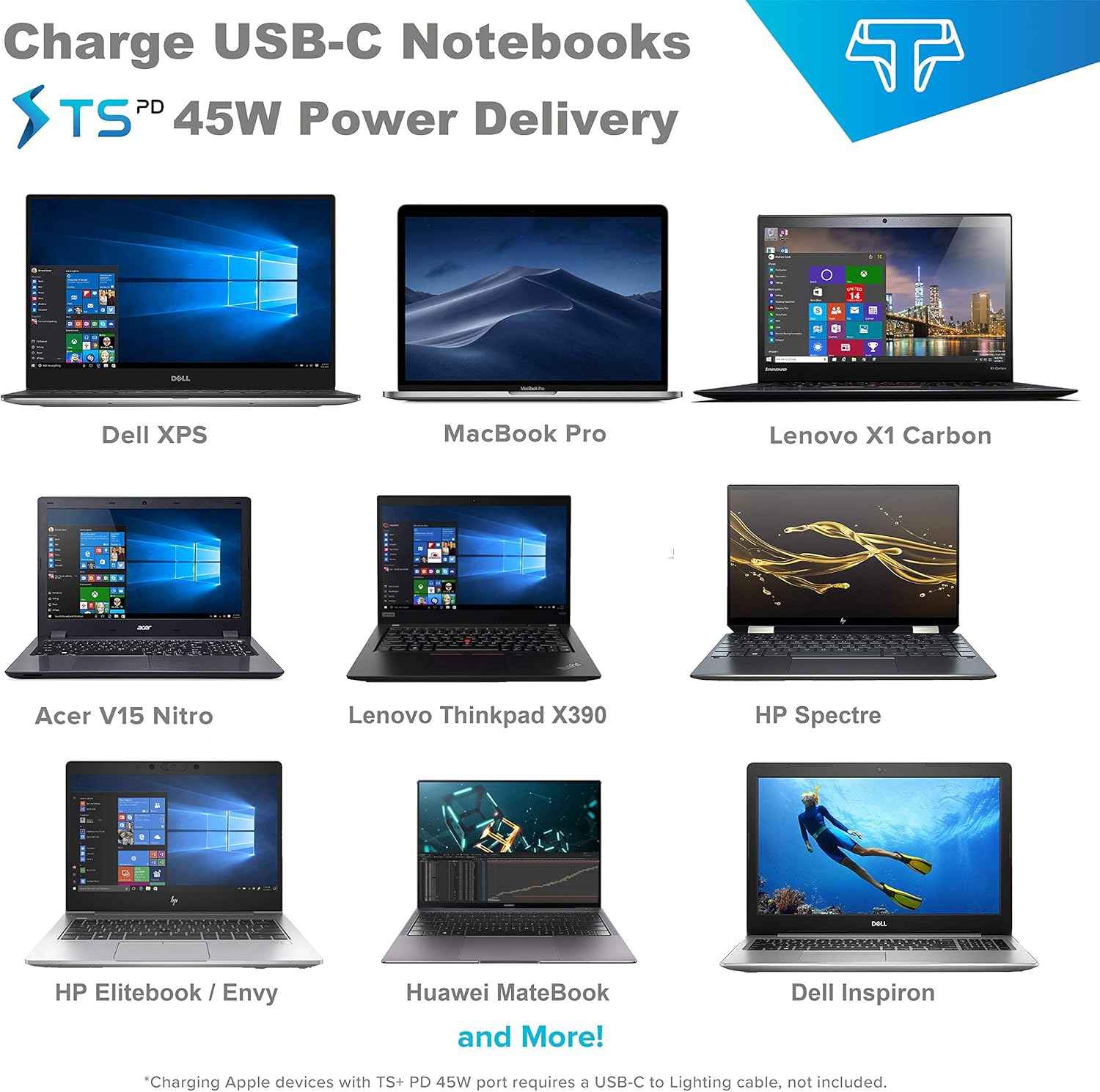
Image Description: A grid of nine different USB-C notebooks, including Dell XPS, MacBook Pro, Lenovo X1 Carbon, Acer V15 Nitro, Lenovo Thinkpad X390, HP Spectre, HP Elitebook/Envy, Huawei MateBook, and Dell Inspiron, demonstrating the wide laptop compatibility of the Techsmarter 45W Power Delivery.
7. Maintenance
To ensure the longevity and optimal performance of your power bank, follow these maintenance guidelines:
- Storage: Store the power bank in a cool, dry place away from direct sunlight, extreme temperatures, and humidity.
- Cleaning: Use a soft, dry cloth to clean the exterior of the power bank. Do not use liquid cleaners or aerosols.
- Charging Cycle: For best battery health, fully charge and discharge the power bank at least once every three months if not in regular use.
- Avoid Drops: Protect the device from drops, impacts, and excessive vibrations.
- Water Exposure: Do not expose the power bank to water or any other liquids.
8. Troubleshooting
If you encounter issues with your Techsmarter Power Bank, please refer to the following common solutions:
| Problem | Possible Cause / Solution |
|---|---|
| Power bank not charging | Ensure the charging cable is securely connected to both the power bank and the wall charger. Use a 45W PD compatible wall charger. Try a different cable or wall charger. |
| Device not charging from power bank | Ensure the power bank has sufficient charge. Press the power button to activate output. Check if the charging cable is securely connected to both the power bank and the device. Try a different port or cable. Ensure your device is compatible with the power bank's output (e.g., 45W PD for laptops). |
| Slow charging | Ensure you are using the correct port for fast charging (USB-C PD or USB-A TS+). The cable used also affects charging speed. Some devices may limit charging speed if they are in heavy use. |
| "Insufficient power supply" error on laptop | Some laptops require a higher wattage than 45W, especially under heavy load. While the power bank provides 45W PD, some laptops (e.g., certain Dell XPS models) may require 65W or more for consistent charging during active use. Try charging the laptop while it is off or in sleep mode. |
| LED indicators not working | Press the power button firmly. If still unresponsive, the unit may be fully discharged or require service. |
9. Specifications
| Feature | Detail |
|---|---|
| Model Number | TSB9290 |
| Battery Capacity | 30000mAh |
| USB-C PD Output/Input | 45W Max |
| USB-A TS+ Output | 18W Max |
| Standard USB-A Output | 5W Max |
| Dimensions | 17.53 x 7.62 x 2.54 cm (6.9 x 3 x 1 inches) |
| Weight | 18 g (0.63 oz) - Note: This weight seems unusually low for a 30000mAh power bank. Please refer to product packaging for accurate weight. |
| Battery Cell Composition | Lithium Ion |
| Color | Black |
| Charging Time | Approx. 3-5 hours (with 45W PD charger) |
10. Safety Information
Your Techsmarter Power Bank is designed with TurboGuard, an 11-point advanced safety and protection system. To ensure safe operation, please adhere to the following:
- Do not disassemble, open, or shred the battery pack.
- Do not expose the power bank to heat or fire. Avoid storage in direct sunlight.
- Do not short-circuit the battery pack. Do not store battery packs haphazardly in a box or drawer where they may short-circuit each other or be short-circuited by conductive materials.
- Do not subject battery packs to mechanical shock.
- In the event of a battery leaking, do not allow the liquid to come into contact with the skin or eyes. If contact has been made, wash the affected area with copious amounts of water and seek medical advice.
- Keep the power bank clean and dry.
- Do not leave a battery pack on prolonged charge when not in use.
- Supervise children when using the power bank.
- Dispose of the power bank properly according to local regulations. Do not dispose of with household waste.

Image Description: A graphic titled "TurboGuard" displays 11 icons representing various safety features: Input High-Voltage Protection, Output High-Voltage Protection, Input Current Regulation, Output Current Regulation, Automatic Current Matching, Input Short-Circuit Protection, Output Short-Circuit Protection, Static Resistance, Device Overcharge Protection, Battery Overdischarge Protection, and Output Temperature Control.
11. Warranty and Support
Techsmarter provides a one-year warranty for this product. For 12 months after the date of purchase, Techsmarter will take care of all quality-related issues with a replacement.
For warranty claims, technical support, or any other inquiries, please contact Techsmarter customer service through their official website or the retailer where the product was purchased. Please have your proof of purchase and model number (TSB9290) ready when contacting support.


