
Introduction
Welcome to the world of high-fidelity audio with your new Mistral DT-307B Integrated Stereo Vacuum Tube Amplifier. This amplifier is designed to deliver rich, warm, and detailed sound, combining classic vacuum tube technology with modern connectivity options like Bluetooth and RCA inputs. Please read this manual thoroughly before operating the device to ensure proper use, optimal performance, and safety.
Important Safety Instructions
- Power Source: Ensure the amplifier is connected to a 110V AC power supply.
- Ventilation: Do not block any ventilation openings. Maintain adequate space around the unit for proper airflow to prevent overheating.
- Water and Moisture: Do not expose this apparatus to rain or moisture. Do not place objects filled with liquids, such as vases, on the apparatus.
- Heat: Do not place near any heat sources such as radiators, heat registers, stoves, or other apparatus (including amplifiers) that produce heat.
- Cleaning: Unplug this apparatus during lightning storms or when unused for long periods of time. Clean only with a dry cloth.
- Servicing: Refer all servicing to qualified service personnel. Servicing is required when the apparatus has been damaged in any way, such as power-supply cord or plug is damaged, liquid has been spilled or objects have fallen into the apparatus, the apparatus has been exposed to rain or moisture, does not operate normally, or has been dropped.
- Tube Handling: Vacuum tubes can become very hot during operation. Avoid touching them directly. Allow sufficient time for tubes to cool before handling or replacing.
Package Contents

This image displays the items typically included in the package: the Mistral DT-307B Vacuum Tube Amplifier itself, a Bluetooth antenna for wireless connectivity, and a 3.5mm audio cable for auxiliary input.
Please verify that all items listed below are present in your package:
- Mistral DT-307B Vacuum Tube Amplifier
- Bluetooth Antenna
- 3.5mm Audio Cable
- Power Cord
Product Overview and Controls
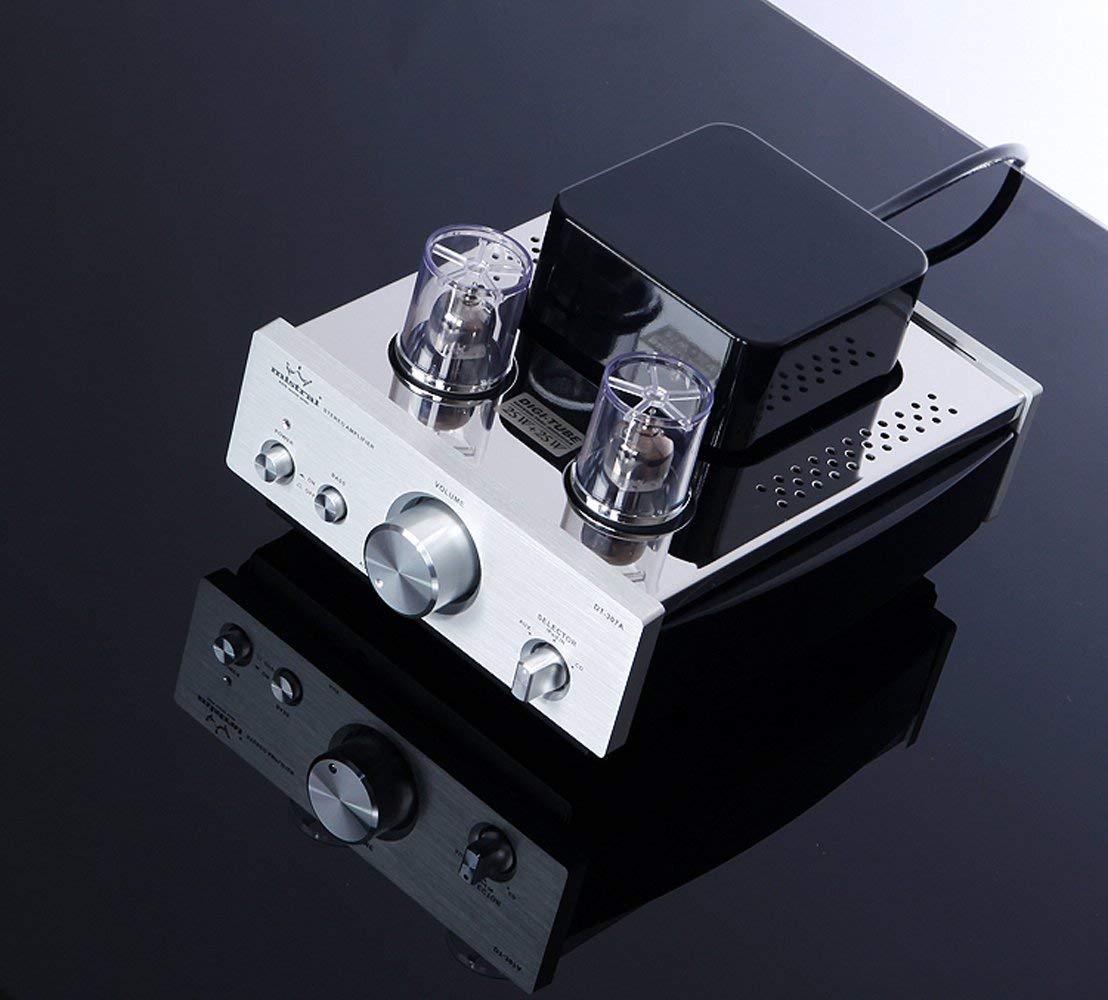
This image provides a clear view of the front panel of the Mistral DT-307B amplifier, highlighting the main controls: the power button with its LED indicator, the bass boost switch, the large central volume control knob, and the input selector knob for choosing between Bluetooth, AUX, and CD inputs.
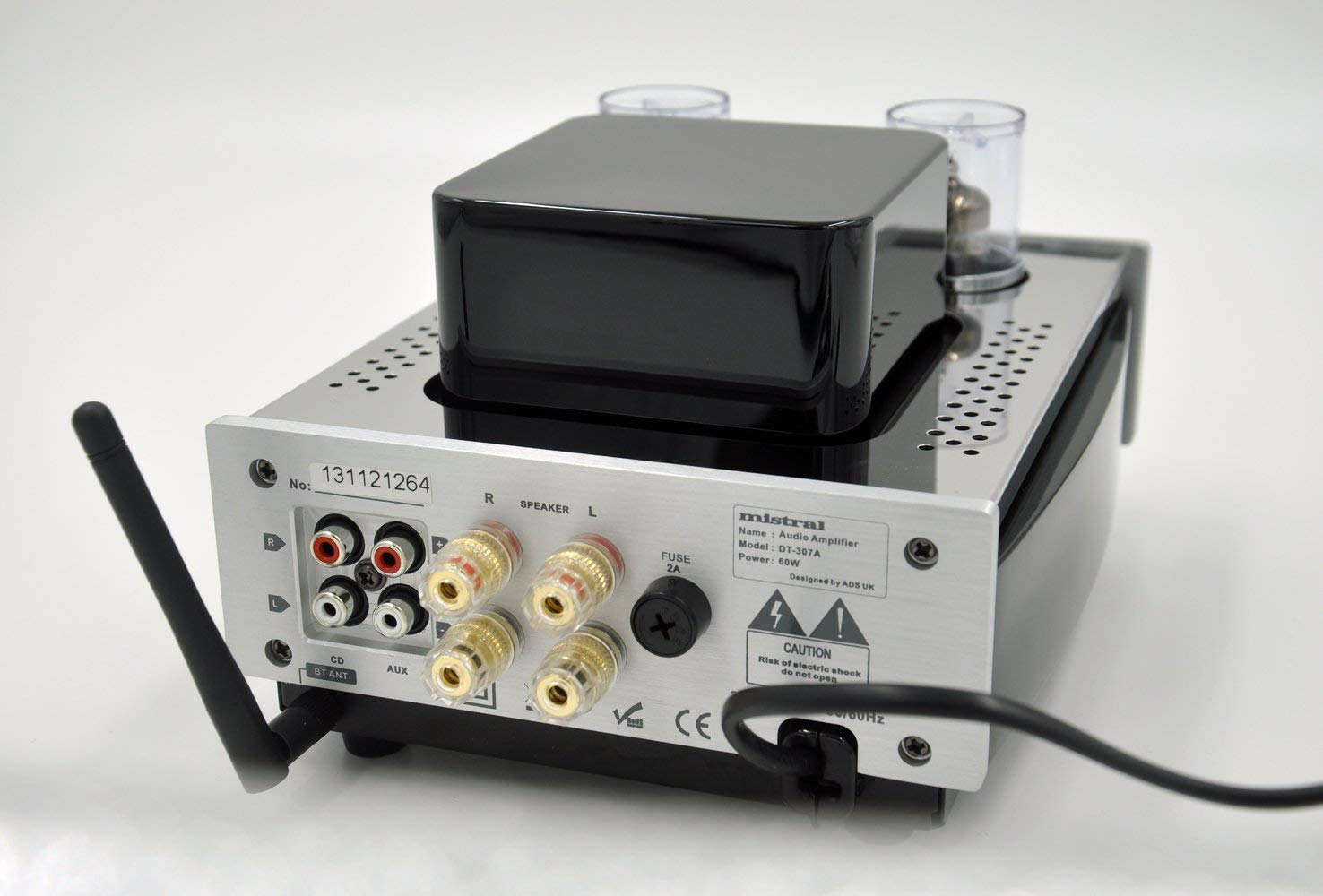
This image shows the rear panel of the amplifier, detailing the various connection ports: RCA inputs for CD and AUX sources, speaker output terminals (R and L), the Bluetooth antenna connector, and the AC power input with a fuse holder.

This diagram illustrates the layout of the amplifier's front and rear panels with numbered labels corresponding to the following components: 1. Power LED, 2. Power Switch, 3. Bass Boost, 4. AUX Front In, 5. Volume Control, 6. Input Selector, 7. BT ANT (Bluetooth Antenna), 8. CD Input, 9. AUX Input (rear), 10. Speaker Output, 11. AC Power In.
Front Panel Controls:
- Power LED (1): Illuminates when the amplifier is powered on.
- Power Switch (2): Turns the amplifier on or off.
- Bass Boost (3): Toggles bass enhancement on or off.
- AUX Front In (4): 3.5mm auxiliary input jack for portable devices.
- Volume Control (5): Adjusts the overall output volume.
- Input Selector (6): Rotates to select between Bluetooth (BT), AUX (rear), and CD inputs.
Rear Panel Connections:
- BT ANT (7): Connector for the Bluetooth antenna.
- CD Input (8): RCA input jacks for connecting a CD player or other line-level audio source.
- AUX Input (9): RCA input jacks for connecting auxiliary audio sources.
- Speaker Output (10): Binding posts for connecting passive speakers (Right and Left channels).
- AC Power In (11): Power cord inlet with integrated fuse holder.
Setup
- Placement: Place the amplifier on a stable, flat surface away from direct sunlight, heat sources, and moisture. Ensure there is adequate ventilation around the unit.
- Connect Speakers: Connect your passive speakers to the Speaker Output terminals (10) on the rear panel. Ensure correct polarity (+ to + and - to -) for both left and right channels.
Connect speaker wires to the clearly marked speaker output terminals on the rear of the amplifier.
- Connect Audio Sources:
- For CD players or other RCA devices, connect them to the CD Input (8) or AUX Input (9) RCA jacks on the rear panel.
- For portable devices requiring a 3.5mm connection, use the AUX Front In (4) on the front panel.
- Attach Bluetooth Antenna: Screw the provided Bluetooth antenna onto the BT ANT connector (7) on the rear panel.
- Connect Power: Ensure the amplifier's power switch (2) is in the "OFF" position. Connect the power cord to the AC Power In (11) on the rear panel, then plug the other end into a suitable 110V AC wall outlet.
Operating Instructions
- Power On: Press the Power Switch (2) to the "ON" position. The Power LED (1) will illuminate. Allow a few moments for the vacuum tubes to warm up.
- Select Input: Rotate the Input Selector knob (6) to choose your desired audio source (BT for Bluetooth, AUX for rear RCA or front 3.5mm, CD for rear RCA).
- Adjust Volume: Slowly turn the Volume Control knob (5) clockwise to increase the volume. Start at a low volume level and gradually increase it to a comfortable listening level.
- Bass Boost: Toggle the Bass Boost switch (3) to "ON" or "OFF" according to your preference for enhanced bass response.
- Power Off: When finished listening, turn the Volume Control knob (5) to its minimum position, then press the Power Switch (2) to the "OFF" position.
Bluetooth Pairing
- Ensure the Bluetooth antenna is securely attached to the BT ANT connector (7).
- Turn on the amplifier and select "BT" using the Input Selector knob (6). The amplifier will enter pairing mode.
- On your Bluetooth-enabled device (smartphone, tablet, computer), go to the Bluetooth settings and enable Bluetooth.
- Search for available devices. The amplifier should appear as "Mistral DT-307B" or a similar name.
- Select "Mistral DT-307B" to pair. Once paired, you will hear a confirmation tone, and the Bluetooth indicator on your device will show a successful connection.
- You can now play audio from your device through the amplifier.
Maintenance
- Cleaning: Disconnect the power cord before cleaning. Use a soft, dry cloth to wipe the exterior of the amplifier. Do not use liquid cleaners or aerosol sprays.
- Tube Replacement: Vacuum tubes have a finite lifespan. If you notice a degradation in sound quality or if a tube fails, they can be replaced. Consult a qualified technician or refer to specific tube replacement guidelines. Ensure the amplifier is unplugged and tubes have cooled completely before attempting replacement.
- Fuse Replacement: If the amplifier does not power on, check the fuse located in the AC Power In (11) receptacle. Unplug the unit, carefully remove the fuse holder, and replace the fuse with one of the same type and rating (2A).
Troubleshooting
| Problem | Possible Cause | Solution |
|---|---|---|
| No power | Power cord not connected; Power switch off; Blown fuse | Ensure power cord is securely plugged in; Turn power switch on; Replace fuse (2A) |
| No sound | Incorrect input selected; Volume too low; Speakers not connected; Source device not playing | Select correct input; Increase volume; Check speaker connections; Ensure source device is playing audio |
| Distorted sound | Volume too high; Poor source quality; Damaged tubes; Incorrect speaker impedance | Reduce volume; Try a different audio source; Consult technician for tube inspection/replacement; Ensure speakers match amplifier impedance |
| Bluetooth not connecting | Bluetooth antenna not attached; Amplifier not in BT mode; Device not in pairing mode; Interference | Attach antenna; Select BT input; Ensure device Bluetooth is on and searching; Move closer to amplifier; Restart both devices |
Specifications
| Feature | Detail |
|---|---|
| Model Number | Mistral DT-307B |
| Output Power | 25W x 2 |
| Tubes | 6N1*2pcs |
| Inputs | RCA (CD, AUX), Bluetooth, 3.5mm AUX (Front) |
| Voltage | 110 Volts |
| Product Dimensions (L x W x H) | 6.69 x 9.25 x 4.92 inches (170 x 235 x 125 mm) |
| Item Weight | 8.14 Pounds |
| Manufacturer | MISTRAL |
Warranty and Support
For warranty information and technical support, please refer to the documentation provided with your purchase or contact the manufacturer directly. Keep your proof of purchase for warranty claims.
Manufacturer: MISTRAL