
1. Introduction
The LAUNCH CR319 OBD2 Scanner is a powerful diagnostic tool designed to help you quickly identify and resolve issues with your vehicle. This manual provides detailed instructions on how to set up, operate, and maintain your device, ensuring optimal performance and longevity. It supports full 10-mode OBDII diagnostics, including reading and erasing fault codes, viewing freeze frame data, and monitoring emissions-related systems.

Image: LAUNCH CR319 OBD Scanner highlighting key benefits like smog check, fault detection, and repair savings.
2. Product Features
The LAUNCH CR319 offers a comprehensive set of features for effective vehicle diagnostics:
- Full 10-Mode OBDII Diagnostics: Reads and clears fault codes, views freeze frame data, and checks I/M readiness.
- Engine Fault Check: Quickly identifies the cause of the Check Engine Light (MIL) and turns it off.
- O2 Sensor Test: Monitors oxygen sensor performance to ensure optimal fuel efficiency and emissions.
- EVAP System Test: Diagnoses issues with the evaporative emission control system.
- DTC Lookup Library: Provides clear definitions for diagnostic trouble codes, eliminating the need for online searches.
- Live Data Stream: Displays real-time vehicle sensor data in text or graph format.
- Wide Compatibility: Supports most American, European, and Asian OBDII-compliant vehicles manufactured from 1996 and newer, supporting all OBDII protocols (KWP2000, ISO9141, J1850 VPW, J1850 PWM, and CAN).
- Multilingual Support: Available in English, Portuguese, Russian, Italian, Spanish, French, and German.
- Plug and Play: No batteries or chargers required; powered directly from the vehicle's OBDII port.

Image: LAUNCH CR319 OBD2 Scanner displaying icons for various functions like Read Codes, Erase Codes, Live Data Stream, EVAP System Test, O2 Sensor Test, I/M Readiness, On-board Monitor Test, Read VIN, MIL Fault Indicator Light, and DTC Code Lookup.
3. Vehicle Compatibility
The LAUNCH CR319 OBD2 Scanner is designed for extensive vehicle coverage:
- American Vehicles: Most OBDII-compliant models manufactured from 1996 and newer.
- European Vehicles: Most OBDII-compliant models manufactured from 1996 and newer.
- Asian Vehicles: Most OBDII-compliant models manufactured from 1996 and newer.
- Supported Protocols: KWP2000, ISO9141, J1850 VPW, J1850 PWM, and CAN.

Image: Map illustrating worldwide vehicle coverage for the LAUNCH CR319, showing compatibility with American, European, and Asian models from 1996 onwards, and listing supported OBDII protocols and languages.
4. Setup and Connection
The LAUNCH CR319 is a plug-and-play device, making setup straightforward:
- Locate your vehicle's 16-pin OBDII port, typically found under the dashboard on the driver's side.
- Ensure the vehicle's ignition is in the 'ON' position (engine off).
- Plug the CR319's diagnostic cable into the OBDII port. The device will power on automatically.
- Follow the on-screen prompts to begin diagnostics.

Image: Diagram showing the components of the LAUNCH CR319, including the LCD screen, UP/DOWN buttons, OK/EXIT buttons, diagnostic cable, and plug-and-play interface, along with specifications for screen, voltage range, operating temperature, dimensions, and weight.
Video: Connecting and Using the OBD2 Scanner
Video Description: This video demonstrates the process of connecting an OBD2 scanner to a vehicle's port, turning the ignition on, and navigating through the diagnostic menu to read and erase codes. It highlights the device's ability to access engine and transmission modules and check monitor readiness status.
Video: OBD2 Scanner Features and Connection
Video Description: This video showcases the features of an OBD2 scanner, including its compact design, ease of use, and ability to connect to various car models. It demonstrates plugging the device into the car's OBD2 port and navigating the main menu for diagnosis, battery check, and DTC lookup.
Video: LAUNCH Creader 3001 Overview and Usage
Video Description: This video provides an overview of the LAUNCH Creader 3001, demonstrating its connection to a vehicle's OBD2 port and navigation through its diagnostic menu. It highlights features like reading and erasing codes, I/M readiness, data stream, freeze frame, and O2 sensor tests.
Video: LAUNCH CR529 OBD2 Scanner Demonstration
Video Description: This video demonstrates the LAUNCH CR529 OBD2 scanner, showing its connection to a vehicle and navigation through its diagnostic functions. It highlights the device's ability to read and clear DTCs, view live data, and check vehicle information.
5. Operating Instructions
Once connected, the CR319 provides several diagnostic functions:
- Read Codes: Select 'Diagnose' from the main menu, then 'Read Codes' to view current, pending, and permanent Diagnostic Trouble Codes (DTCs).
- Erase Codes: After addressing a vehicle issue, select 'Erase Codes' to turn off the Check Engine Light and clear stored DTCs.
- Live Data Stream: Select 'Data Stream' to view real-time data from various vehicle sensors. This can be displayed as values or graphs.
- View Freeze Frame: When an emission-related fault occurs, the ECU records certain vehicle parameters. Select 'Freeze Frame' to view this snapshot data.
- I/M Readiness: Select 'I/M Readiness' to check the status of emission-related monitors, indicating if the vehicle is ready for an emissions test.
- DTC Lookup: Enter a DTC code into the 'DTC Lookup' function to get a detailed description of the fault.
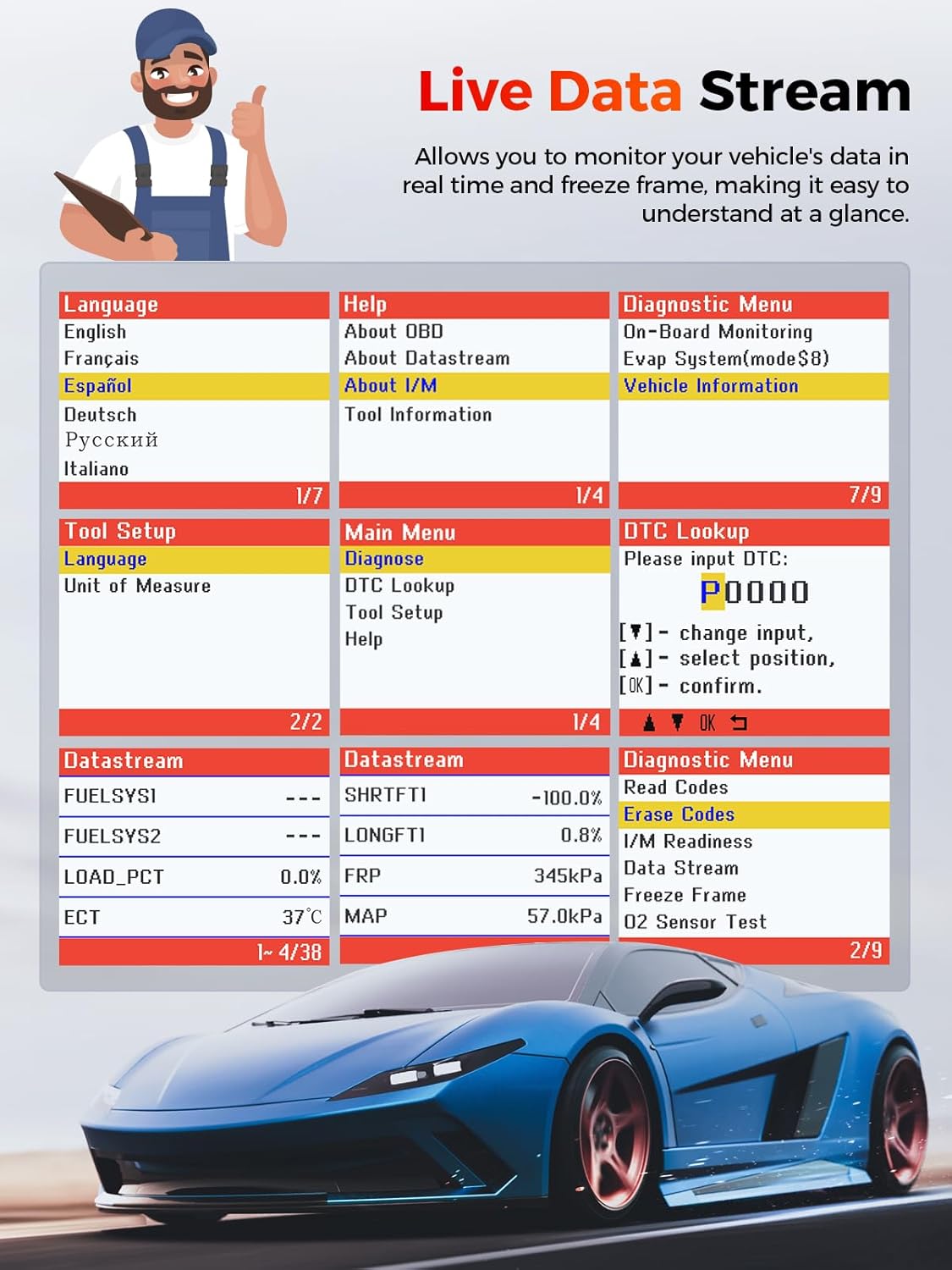
Image: Screenshot of the LAUNCH CR319 displaying live data stream with various parameters like FUELSYSI, FUELSYS2, LOAD_PCT, ECT, SHRTFTI, LONGFTI, FRP, and MAP, along with language options and diagnostic menu items.
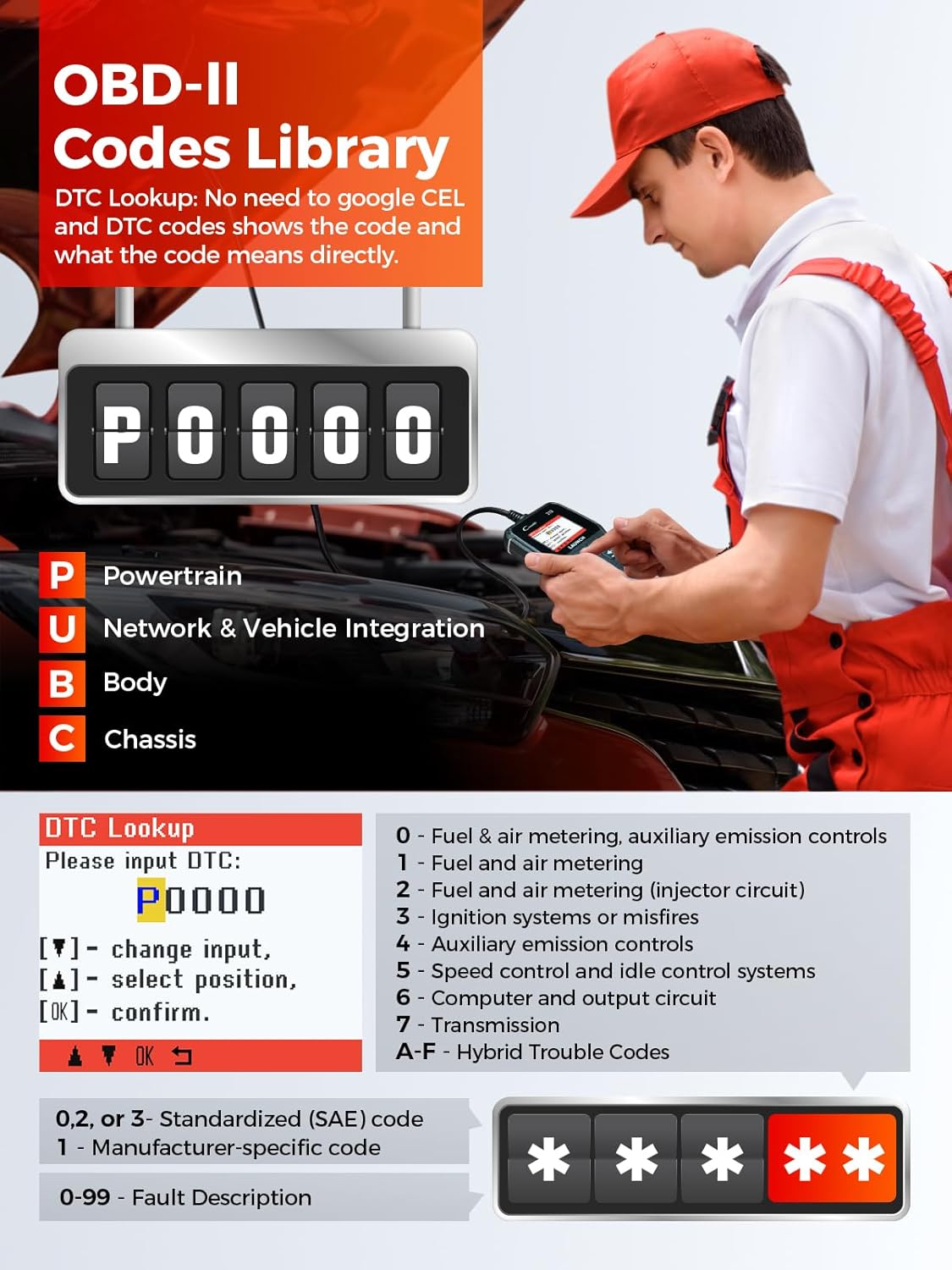
Image: Image illustrating the OBD-II Codes Library function of the LAUNCH CR319, showing how to input a DTC code (e.g., P0000) and receive a description of the fault, categorized by Powertrain, Network & Vehicle Integration, Body, and Chassis.
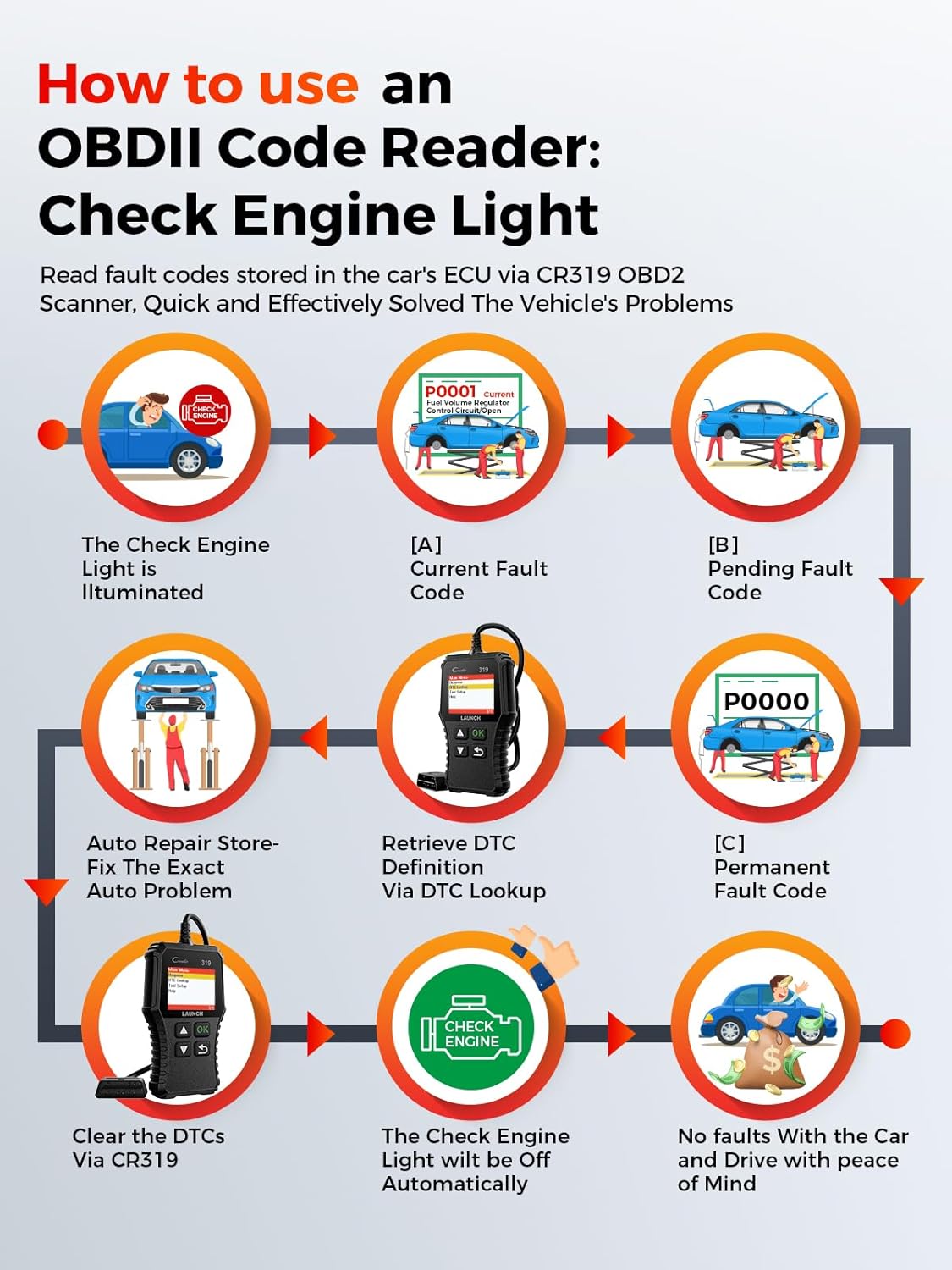
Image: Flowchart demonstrating how to use an OBDII Code Reader to diagnose and clear a Check Engine Light, from illumination of the light to retrieving DTC definitions and clearing codes.
6. Maintenance and Updates
To ensure your LAUNCH CR319 operates with the latest vehicle data and features, regular software updates are recommended. The device supports lifetime free updates.
- Connect the CR319 to a computer using the provided USB cable.
- Visit the official LAUNCH website to download the update tool and latest software.
- Follow the instructions provided with the update tool to install the new software on your device.
Image: Collage of images showcasing the enhanced features of the LAUNCH CR319 OBD-II Scanner, including high-end hardware, compatibility with all OBD-II protocols, its recognition as a best code reader, and its smog check function.
7. Troubleshooting
If you encounter issues with your vehicle or the CR319, consider the following:


