1. Introduction
Thank you for purchasing the IRIS OHYAMA Extremely Lightweight Stick Cleaner, model IC-SLDC4-WPG. This manual provides important information for the safe and efficient use, maintenance, and troubleshooting of your new stick cleaner. Please read this manual thoroughly before use and keep it for future reference.
This stick cleaner is designed for household use, offering powerful cleaning performance in a lightweight and compact design. Its advanced features, such as the Cyclone Stream Head and dust sensor, ensure efficient and convenient cleaning.
2. Package Contents
Please check that all the following items are included in your package:
- Main Unit
- Charging Adapter
- Extension Pipe
- Floor Head (1 pc)
- Wall-Mount Part
- Disposable Dust Packs (25 pcs)
- Spare Adhesive Sheet (1 pc)
- Screws (2 pcs)
3. Product Overview
The IRIS OHYAMA IC-SLDC4-WPG is an extremely lightweight stick cleaner designed for ease of use and efficient dust removal. Key features include:
- Extremely Lightweight Design: Weighing approximately 1.2kg with the extension pipe and floor head attached, making cleaning effortless.
- Cyclone Stream Head: Generates a powerful cyclone airflow to scrape out and suck up fine dust without damaging surfaces like carpets. Features a 99% dust pickup rate on hard floors.
- Dust Sensor: Automatically detects the amount of dust and adjusts power, optimizing battery life.
- Dust Pack System: Uses non-woven, antibacterial, and deodorizing disposable dust packs for hygienic disposal, preventing dust scattering.
- Flexible Head Movement: The floor head offers 180-degree left/right and 90-degree up/down movement for easy maneuverability in tight spaces.
- Wall-Mountable Storage: Includes a wall-mount part with residue-free adhesive tape (and screws for optional permanent fixing) for convenient storage and charging.

Image 1: The IRIS OHYAMA IC-SLDC4-WPG stick cleaner in use, demonstrating its lightweight design (approx. 1.2kg).
4. Setup
4.1 Assembly
- Attach the Extension Pipe: Insert the extension pipe firmly into the main unit until it clicks into place.
- Attach the Floor Head: Connect the floor head to the other end of the extension pipe, ensuring it is securely attached.
- Install Dust Pack: Open the dust pack compartment on the main unit. Insert a new disposable dust pack, making sure it is properly seated. Close the compartment securely.
4.2 Charging
Before first use, fully charge the cleaner. The charging time is approximately 3 hours.
- Connect the charging adapter to the charging port on the main unit.
- Plug the charging adapter into a standard AC100V (50/60Hz) power outlet.
- The charging indicator light will illuminate during charging and turn off or change color when charging is complete (refer to the indicator section in the full manual for specific light behavior).
4.3 Wall-Mount Installation (Optional)
For convenient storage and charging, you can install the wall-mount part.
- Choose a suitable location on a wall, ensuring it is near a power outlet for charging.
- Clean the wall surface. Attach the spare adhesive sheet to the back of the wall-mount part, then firmly press the wall-mount part onto the desired location.
- For a more secure installation, use the provided screws to fix the wall-mount part to the wall.
- The cleaner can be stood upright on the wall-mount part for storage and charging.

Image 2: The stick cleaner stored upright using the wall-mount part, demonstrating convenient storage.
5. Operating Instructions
5.1 Power On/Off
- To turn on, press the power button located on the main unit.
- To turn off, press the power button again.
5.2 Cleaning Modes
The cleaner offers multiple operating modes:
- Standard Mode: Provides approximately 20 minutes of continuous cleaning. Suitable for general cleaning tasks.
- Turbo Mode: Provides approximately 9 minutes of powerful suction for stubborn dirt.
- Auto Mode: Utilizes the dust sensor to detect dirt levels and automatically adjusts suction power. This mode offers approximately 30 minutes of operating time, optimizing battery usage.
To switch between modes, press the mode selection button on the main unit.

Image 3: The dust sensor indicator. Red indicates high dust levels and powerful operation, while green indicates low dust levels and reduced power operation, conserving battery.
5.3 Using the Cyclone Stream Head
The Cyclone Stream Head is designed for effective dust removal on various surfaces.
- The head can pivot 180 degrees horizontally (left/right) and 90 degrees vertically (up/down), allowing easy access under furniture and into corners.
- Move the cleaner slowly over the surface to allow the cyclone airflow to effectively dislodge and collect dust.
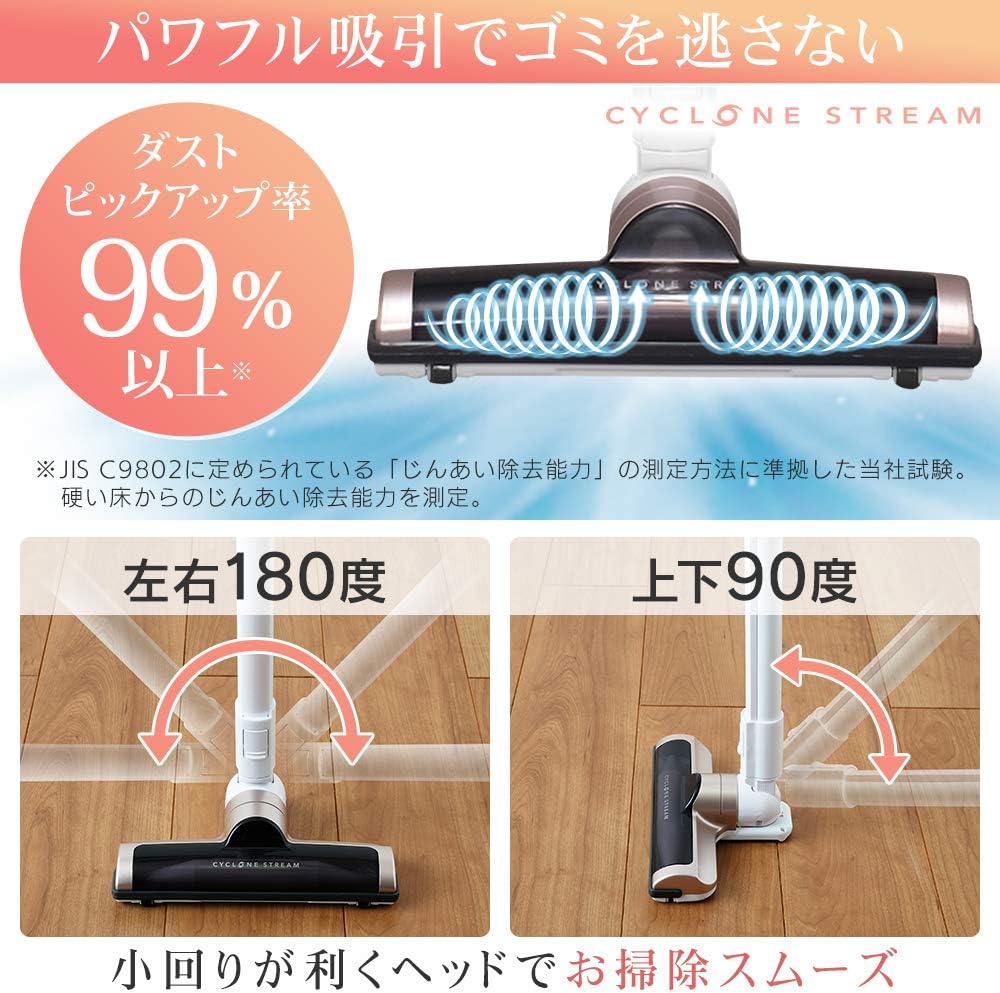
Image 4: Illustration of the floor head's flexible movement, showing 180-degree left/right rotation and 90-degree up/down tilt for easy cleaning.
5.4 Versatile Cleaning
The lightweight and compact design allows for cleaning in various situations:
- Narrow Spaces: Easily reaches under furniture.
- High Places: The lightweight body makes it easy to lift and clean high areas.
- Stairs: Convenient for cleaning staircases.
- Car Interiors: Cordless operation makes it ideal for cleaning inside vehicles.

Image 5: The stick cleaner demonstrating its versatility, cleaning under furniture, high areas, stairs, and inside a car.
6. Maintenance
6.1 Replacing the Dust Pack
The disposable dust pack should be replaced when full to maintain optimal suction performance and hygiene.
- Ensure the cleaner is turned off and disconnected from the charger.
- Open the dust pack compartment on the main unit.
- Carefully remove the full dust pack. The paper pack system helps to prevent dust from scattering during disposal.
- Dispose of the used dust pack in a trash bin.
- Insert a new disposable dust pack, ensuring it is properly seated and the compartment is securely closed.

Image 6: Steps for replacing the disposable dust pack, highlighting the ease of disposal and the antibacterial/deodorizing features of the dust packs.
6.2 Cleaning the Floor Head
Regularly check the floor head for tangled hair or debris. Remove any obstructions to ensure efficient cleaning.
- Turn off the cleaner and detach the floor head.
- Use scissors or a brush to remove any hair or fibers wrapped around the brush roll.
- Wipe the exterior of the head with a dry cloth. Do not wash with water.
6.3 Cleaning the Main Unit
Wipe the main unit with a soft, dry cloth. Do not use abrasive cleaners or solvents.
7. Troubleshooting
If you encounter any issues with your cleaner, please refer to the following common problems and solutions:
| Problem | Possible Cause | Solution |
|---|---|---|
| Cleaner does not turn on. | Battery is depleted. | Charge the battery fully. |
| Power button not pressed correctly. | Ensure the power button is pressed firmly. | |
| Weak suction power. | Dust pack is full. | Replace the disposable dust pack. |
| Floor head or extension pipe is clogged. | Check and clear any blockages in the floor head or extension pipe. | |
| Battery is low. | Recharge the battery. | |
| Cleaner stops during operation. | Battery is depleted. | Recharge the battery. |
| Overheating protection activated. | Turn off the cleaner and allow it to cool down for at least 30 minutes. Check for blockages. |
If the problem persists after trying these solutions, please contact customer support.
8. Specifications
| Model Number | IC-SLDC4-WPG |
| Brand | IRIS OHYAMA |
| Product Size (Main Unit Only) | Approx. 9.6 cm (W) x 48.5 cm (D) x 14.4 cm (H) |
| Product Size (With Extension Pipe & Floor Head) | Approx. 23.6 cm (W) x 16.2 cm (D) x 100.3 cm (H) |
| Weight (Main Unit Only) | Approx. 0.9 kg |
| Weight (With Extension Pipe & Floor Head) | Approx. 1.2 kg |
| Battery Type | Lithium-ion secondary battery |
| Battery Capacity | 1500 mAh |
| Rated Voltage | DC10.8V |
| Battery Life | Approx. 500 charge cycles |
| Charging Power Supply Input | AC100V (50/60Hz common) 15VA |
| Charging Power Supply Output | DC13.7V 0.5A |
| Charging Time | Approx. 3 hours (at 25°C environment) |
| Operating Time (Standard Mode) | Approx. 20 minutes |
| Operating Time (Turbo Mode) | Approx. 9 minutes |
| Operating Time (Auto Mode) | Approx. 30 minutes (varies by usage environment) |
| Operating Temperature Range | 0~40°C |
| Dust Collection Capacity | 0.3 L |
| Power Cord Length | Approx. 2.5 m |
| Recommended Use Location | Hard floors |
| Other Features | Nationwide compatibility (AC100V 50/60Hz power supply) |
9. Warranty and Support
For warranty information and customer support, please refer to the warranty card included with your product or visit the official IRIS OHYAMA website. Keep your purchase receipt as proof of purchase for warranty claims.
Contact Information: Please refer to the contact details provided in your product packaging or on the official IRIS OHYAMA website for service and support inquiries.