
VILTROX VL-500T 3 Packs Kit
VILTROX VL-500T 3 Packs Kit User Manual
10-Inch Bi-Color 2000LM LED Studio Round Light Kit
Brand: VILTROX | Model: VL-500T 3 Packs Kit
1. Introduction
The VILTROX VL-500T 3 Packs Kit is an ultra-bright, bi-color LED edge light system designed for professional photography and video shooting. It features a unique honeycomb design for soft brightness and accurate color temperature, making it ideal for various specialized uses including child photography, portraits, and video shoots. The kit offers adjustable brightness and color temperature, along with flexible power supply options for both indoor and outdoor use.
2. What's in the Box
Your VILTROX VL-500T 3 Packs Kit includes the following components:
- (3) x 10-inch LED Round Lights
- (3) x 26-75 inch Light Stands
- (3) x Hot Shoe Adapters
- (3) x Light Power AC Adapters
- (1) x Carrying Bag
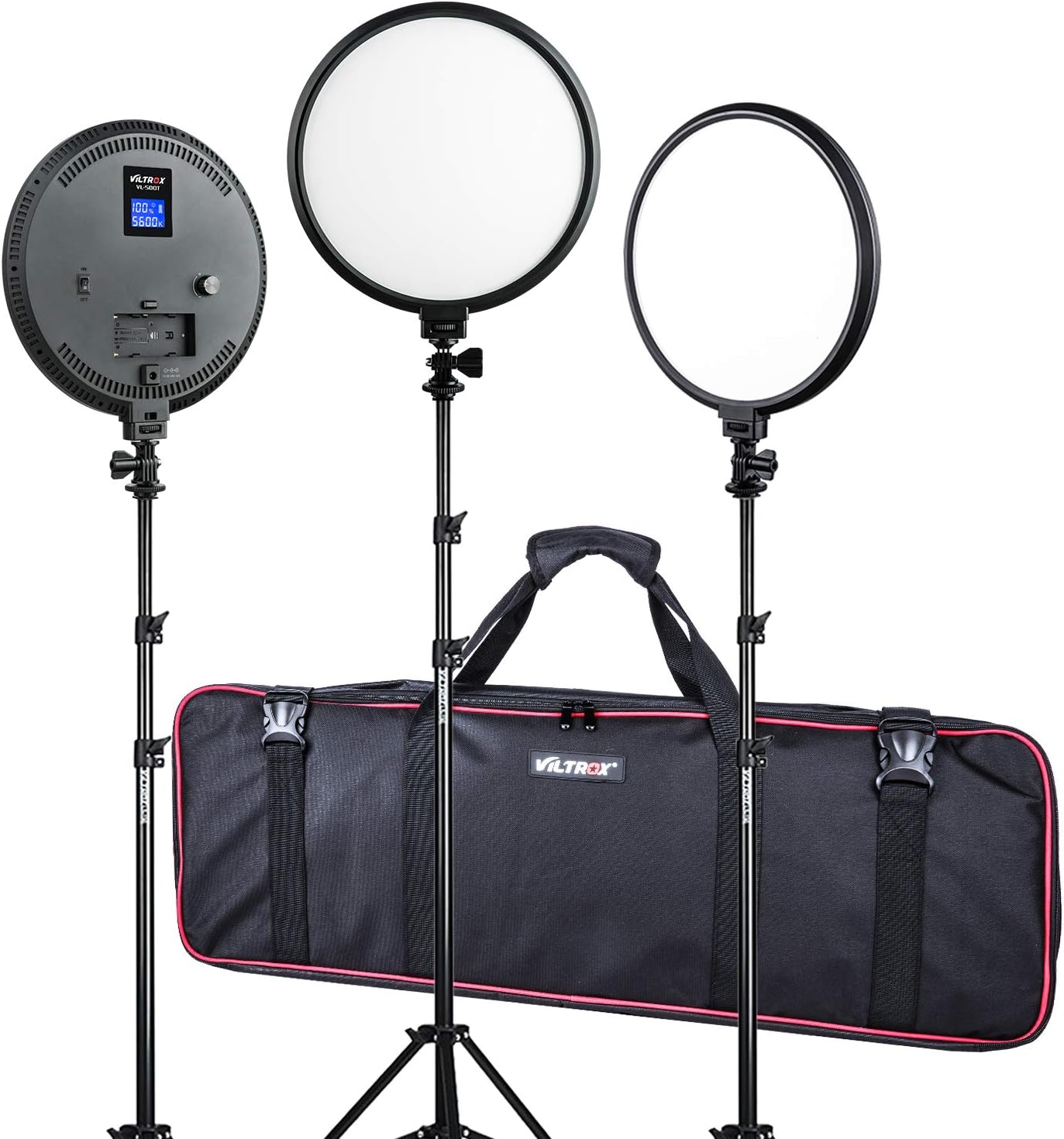

3. Features
- Ultra-Bright, Bi-Color LED Edge Lights: Adopts the newest LED honeycomb design, providing soft brightness and accurate color temperature.
- Adjustable Color Temperature: Features 3300K-5600K Tungsten / Daylight color temperature, allowing matching with other lights, ambient lighting, or creative color effects.
- Dimmer Control: Brightness is adjustable from 20% to 100% via dedicated control dials.
- High Color Rendering Index (CRI): CRI of ≥95(RA)+ ensures accurate color reproduction.
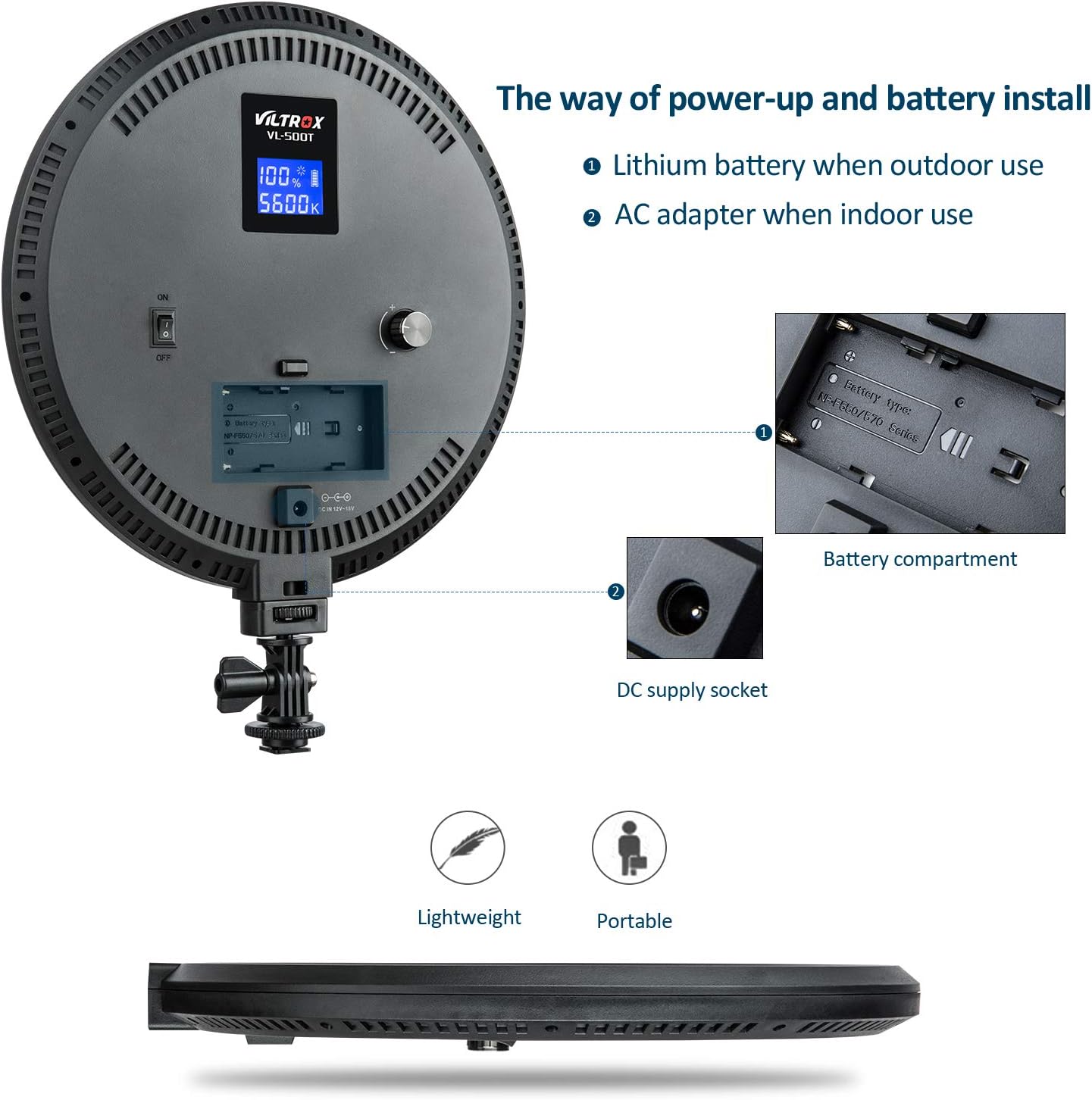
- Dual Power Supply Modes: Can be powered by NP-F series Lithium batteries for outdoor use or by the included AC power adapter for indoor use.
- LCD Digital Display: Shows battery capacity, brightness, and color temperature for precise control.
- Lightweight and Portable: Designed for easy transport and setup.



4. Setup
- Assemble the Light Stand: Extend the legs of the light stand to form a stable base. Adjust the height to your desired level using the locking knobs.
- Attach the Light Unit: Securely mount the 10-inch LED round light onto the top of the light stand using the integrated mounting bracket and hot shoe adapter. Ensure it is tightened to prevent wobbling.
- Power Connection:
- AC Power: Connect the provided AC power adapter to the DC supply socket on the back of the light unit, then plug the adapter into a standard wall outlet.
- Battery Power: If using NP-F series Lithium batteries (not included), insert a charged battery into the battery compartment on the back of the light unit.
- Positioning: Place the assembled light kit in your desired location for optimal lighting. The round design provides a soft, even light distribution.


5. Operating Instructions
- Power On/Off: Locate the ON/OFF switch on the back of the light unit and toggle it to the 'ON' position to power on the light. Toggle to 'OFF' to power it down.
- Adjust Brightness: Use the dimmer control dial (typically a rotary knob) on the back of the light to adjust the brightness from 20% to 100%. Turn clockwise to increase brightness, counter-clockwise to decrease.
- Adjust Color Temperature: Use the color temperature control dial (another rotary knob) to change the color temperature between 3300K (warm, tungsten-like) and 5600K (cool, daylight-like).
- Monitor Settings: The LCD digital display on the back of the light will show the current brightness percentage, color temperature (in Kelvin), and battery capacity (if using battery power).
6. Maintenance
- Cleaning: Use a soft, dry cloth to wipe the surface of the light unit and stand. Do not use abrasive cleaners or solvents.
- Storage: When not in use, store the light kit in the provided carrying bag in a cool, dry place away from direct sunlight and excessive humidity.
- Battery Care: If using batteries, ensure they are fully charged before long-term storage and periodically recharge them to maintain battery health. Remove batteries if the light will not be used for an extended period.
- Handle with Care: While durable, avoid dropping the light units or stands, and do not apply excessive force to the adjustable parts.
7. Troubleshooting
| Problem | Possible Cause | Solution |
|---|---|---|
| Light does not turn on. | No power supply; battery depleted; power switch off. | Ensure AC adapter is properly connected or battery is charged and inserted correctly. Check if the ON/OFF switch is in the 'ON' position. |
| Brightness cannot be adjusted. | Control dial stuck or faulty. | Gently rotate the dimmer dial. If unresponsive, contact customer support. |
| Color temperature cannot be changed. | Control dial stuck or faulty. | Gently rotate the color temperature dial. If unresponsive, contact customer support. |
| Light flickers or dims unexpectedly. | Low battery; unstable power connection. | Recharge or replace battery. Ensure AC adapter connection is secure and power outlet is stable. |
8. Specifications
- LED Bulb Quantity: 140pcs
- Max. Brightness: 2000LM (0.5m)
- Input Voltage: 8-15V (power not less than 28W), φ5.5*2.0mm
- Power: 25W
- Max Illumination: 1550Lux/0.5m
- Color Temperature: Internal adjustable 3300K-5600K
- Color Rendering Index (CRI): >95 (RA)
- Brightness Adjustable: 20% ~ 100%
- Brightness Light Angle: 180°
- Display: LCD digit display (shows battery capacity/brightness/color temperature)
- Compatible Batteries: Sony NP-F970/F770/F570/F550 series
- Dimensions: 270mm x 270mm x 24mm
- Weight (per light unit): 660g
- Package Dimensions: 33 x 12.99 x 4.88 inches
- Item Weight (total kit): 13.82 pounds
- Item Model Number: VL-500T 3 Packs Kit
- Manufacturer: Shenzhen Jueying Technology Co., Ltd.
- First Available Date: January 25, 2019
9. Warranty & Support
VILTROX products are manufactured to high quality standards. For warranty information, technical support, or service inquiries, please refer to the official VILTROX website or contact their customer service directly. Please retain your proof of purchase for any warranty claims.
Official VILTROX Store: VILTROX Official Store on Amazon
Ask a question about this manual
Ask about setup, troubleshooting, compatibility, parts, safety, or missing instructions. Manuals+ will review the question and use this page’s manual context to help answer it.