Introduction
Thank you for choosing the Platinet PM1061W Wireless In-Ear Sport Bluetooth Earphones. These earphones are designed to provide high-quality audio and hands-free communication, featuring a built-in microphone and a microSD card reader for standalone music playback. This manual will guide you through the setup, operation, and maintenance of your device.
Safety Information
- Do not expose the earphones to extreme temperatures, humidity, or corrosive substances.
- Avoid dropping or subjecting the earphones to strong impacts.
- Do not attempt to disassemble or modify the earphones, as this may void the warranty and cause damage.
- Keep the earphones away from children and pets.
- Use only the provided charging cable or a certified equivalent.
- Prolonged listening at high volume levels can cause hearing damage. Adjust volume to a safe level.
Package Contents
Please check the package for the following items:
- Platinet PM1061W Wireless In-Ear Sport Bluetooth Earphones
- USB Charging Cable
- User Manual
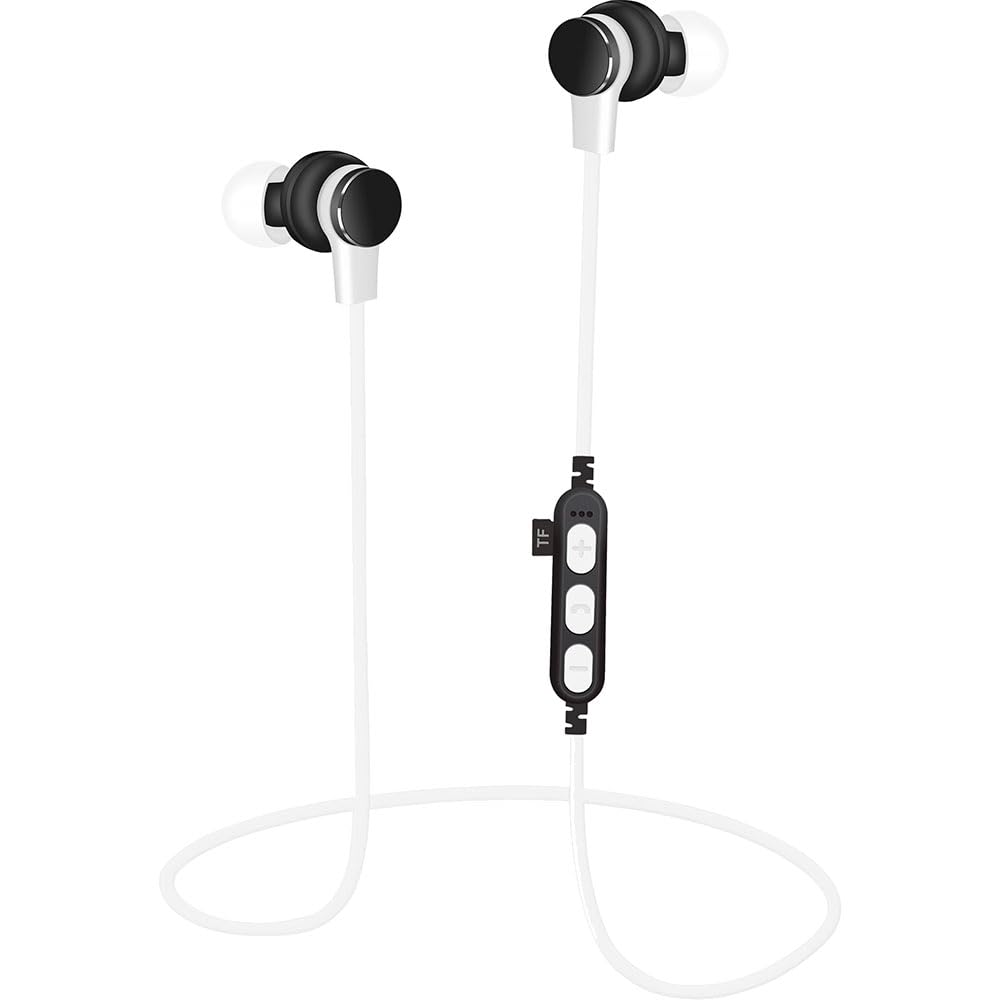
Image: Retail box of the Platinet PM1061W earphones, showing the white earphones, control panel with microSD slot, and compatibility icons.
Product Overview
The Platinet PM1061W earphones feature a lightweight, ergonomic design suitable for sports and daily use. Key components include the in-ear buds, an inline control panel with buttons, a microphone, and a microSD card slot.

Image: Close-up view of the Platinet PM1061W wireless earphones, highlighting the earbud design and the inline control unit.
Control Panel Functions:
- Power Button / Multi-function Button: Power on/off, play/pause, answer/end calls.
- Volume Up / Next Track Button: Increase volume, skip to next track.
- Volume Down / Previous Track Button: Decrease volume, go to previous track.
- Microphone: For hands-free calls.
- MicroSD Card Slot: Insert microSD card for MP3 playback.
- Charging Port: Connect USB charging cable.
Setup
1. Charging the Earphones
- Connect the USB charging cable to the charging port on the earphones.
- Connect the other end of the USB cable to a USB power adapter (not included) or a computer's USB port.
- The LED indicator will illuminate during charging and turn off when fully charged.
- A full charge takes approximately 1-2 hours and provides up to 4 hours of music playback.
2. Bluetooth Pairing
- Ensure the earphones are fully charged.
- Press and hold the Multi-function Button for approximately 3-5 seconds until the LED indicator flashes blue and red alternately, indicating pairing mode.
- On your device (smartphone, tablet, computer), enable Bluetooth and search for available devices.
- Select "PM1061W" from the list of found devices.
- Once paired, the LED indicator will flash blue slowly, and you will hear a confirmation tone.
- The earphones will automatically reconnect to the last paired device when powered on, if Bluetooth is enabled on the device.
3. MicroSD Card Usage (MP3 Player)
- Ensure your microSD card contains MP3 audio files.
- Carefully insert the microSD card into the designated slot on the control panel until it clicks into place.
- The earphones will automatically switch to MP3 playback mode if a card is detected.
- Use the Volume Up/Down buttons to navigate tracks and the Multi-function Button to play/pause.
Operating Instructions
Power On/Off
- Power On: Press and hold the Multi-function Button for 3 seconds. The LED will flash blue.
- Power Off: Press and hold the Multi-function Button for 3 seconds. The LED will flash red and then turn off.
Music Playback (Bluetooth Mode)
- Play/Pause: Short press the Multi-function Button.
- Next Track: Long press the Volume Up button.
- Previous Track: Long press the Volume Down button.
- Volume Up: Short press the Volume Up button.
- Volume Down: Short press the Volume Down button.
Call Management
- Answer/End Call: Short press the Multi-function Button.
- Reject Call: Long press the Multi-function Button.
- Redial Last Number: Double-press the Multi-function Button.
Maintenance
- Clean the earphones regularly with a soft, dry cloth.
- Do not use abrasive cleaners or solvents.
- Store the earphones in a cool, dry place when not in use.
- Avoid prolonged exposure to direct sunlight or high temperatures.
Troubleshooting
| Problem | Solution |
|---|---|
| Earphones do not power on. | Ensure the earphones are fully charged. Connect to a power source and try again. |
| Cannot pair with device. |
|
| No sound during playback. |
|
| Poor call quality. |
|
Specifications
| Feature | Detail |
|---|---|
| Model Number | PM1061W |
| Bluetooth Version | V4.2 A2DP |
| Bluetooth Range | Up to 10 meters |
| Battery Type | 3.7V Li-Polymer |
| Battery Capacity | 80 mAh |
| Music Playback Time | Up to 4 hours |
| Standby Time | Up to 120 hours |
| Speaker Diameter | 10 mm |
| Impedance | 16 ohm |
| Sound Sensitivity | 112 dB |
| Frequency Response | 20Hz-20KHz |
| Power Input | 30 mW |
| Material | Plastic |
| Weight | 60 Grams |
| Compatibility | Android, iPhone, iPad, Windows devices |
Warranty and Support
Platinet products are designed and manufactured to the highest quality standards. For detailed warranty information and customer support, please refer to the warranty card included with your purchase or visit the official Platinet website. Keep your proof of purchase for warranty claims.
For technical assistance or further inquiries, please contact Platinet customer service.