
1. Introduction
The Noaton DF 4123 HEPA is a versatile 2-in-1 appliance designed to effectively control humidity and purify air in your living spaces. This unit combines the functions of a powerful dehumidifier with an advanced air purifier, featuring a HEPA filter to capture airborne particles. With a dehumidification capacity of up to 23 liters per day and suitable for rooms up to 50 m², it helps maintain a healthy and comfortable indoor environment. This manual provides essential information for the safe and efficient operation, setup, and maintenance of your Noaton DF 4123 HEPA unit.
2. Safety Instructions
Please read all safety instructions carefully before using the appliance to prevent injury or damage. Keep this manual for future reference.
- Always connect the appliance to a grounded power outlet with the correct voltage.
- Do not operate the unit with a damaged power cord or plug. If damaged, contact qualified service personnel.
- Ensure the unit is placed on a stable, level surface to prevent tipping and water spillage.
- Maintain a minimum distance of 20 cm (8 inches) from walls and furniture to ensure proper airflow.
- Do not insert objects into the air inlet or outlet.
- Unplug the appliance before cleaning, maintenance, or when not in use.
- Do not use the appliance in areas where flammable gases or liquids are stored.
- This appliance is not intended for use by persons (including children) with reduced physical, sensory, or mental capabilities, or lack of experience and knowledge, unless they have been given supervision or instruction concerning use of the appliance by a person responsible for their safety.
- Children should be supervised to ensure that they do not play with the appliance.
3. Product Overview
The Noaton DF 4123 HEPA unit combines efficient dehumidification with advanced air purification. Key features include:
- Dehumidification Capacity: Up to 23 liters per 24 hours.
- Air Purification: Integrated HEPA filter (included) for removing allergens, dust, and other airborne particles. Optional carbon and combined filters are available.
- Water Tank: 4.5-liter capacity with a full tank indicator and automatic shut-off.
- Continuous Drainage: Option to connect a drainage hose for uninterrupted operation (hose sold separately).
- Adjustable Humidistat: Allows setting desired humidity levels (30% to 80% RH).
- Airflow: 180 m³/h.
- Operating Modes: Dehumidification, Air Purification, Laundry Drying.
- Convenience Features: Timer, Child Lock, Memory Function, Automatic Defrost, LED display for current humidity.
- Portability: Equipped with a handle and wheels for easy movement.

Figure 1: The Noaton DF 4123 HEPA 2-in-1 Dehumidifier and Air Purifier. This image shows the overall design of the appliance, highlighting its compact and modern appearance.

Figure 2: Close-up view of the control panel with LED display. This image illustrates the intuitive button layout and digital screen for easy operation and monitoring of humidity levels.
4. Setup
Follow these steps to set up your dehumidifier and air purifier:
- Unpack the Unit: Carefully remove the appliance from its packaging. Retain packaging materials for future storage or transport.
- Placement: Place the unit on a firm, level surface in the desired room. Ensure there is at least 20 cm (8 inches) of clear space around all sides for optimal airflow. Avoid placing it near heat sources or in direct sunlight.
- Filter Installation: The HEPA filter is typically pre-installed. To check or replace, open the filter cover at the back of the unit. Ensure the filter is securely in place.
- Power Connection: Plug the power cord into a suitable grounded electrical outlet.
- Continuous Drainage (Optional): If you wish to use continuous drainage, connect a suitable hose (not included) to the drainage port at the back of the unit. Ensure the hose is directed downwards to a drain or container, allowing gravity to facilitate water flow.

Figure 3: The dehumidifier placed in a room, demonstrating appropriate spacing from furniture for effective operation.

Figure 4: View of the rear panel showing how to access the filter compartment for installation or replacement.

Figure 5: Illustration of the continuous drainage port with a hose connected, allowing for direct water removal without needing to empty the tank.
5. Operating Instructions
Familiarize yourself with the control panel and its functions:

Figure 6: Detailed view of the control panel, showing various buttons and the digital display for setting and monitoring.
5.1 Power On/Off
Press the Power button to turn the unit on or off. The LED display will show the current room humidity when powered on.
5.2 Setting Desired Humidity
In dehumidification mode, press the Humidity Setting buttons (Up/Down arrows) to adjust the target relative humidity from 30% to 80%. The unit will operate until the set humidity level is reached, then cycle on and off to maintain it.
5.3 Operating Modes
- Dehumidification Mode: The primary function to remove excess moisture from the air.
- Air Purification Mode: When a HEPA filter (or optional carbon/combined filter) is installed, the unit can operate solely as an air purifier.
- Combined Mode: The unit can perform both dehumidification and air purification simultaneously.
- Laundry Drying Mode: This mode provides continuous powerful dehumidification to help dry clothes faster indoors.

Figure 7: The unit operating in laundry drying mode, indicated by a specific icon or setting on the control panel.
5.4 Timer Function
Press the Timer button to set a delay for the unit to turn on or off. Use the Up/Down arrows to adjust the desired time in hours.
5.5 Child Lock
Activate the Child Lock feature to prevent accidental changes to settings. Refer to the control panel diagram for the specific button combination or dedicated button.
5.6 Water Tank Full Indicator
When the 4.5-liter water tank is full, the unit will automatically shut off, and an indicator light will illuminate. Empty the tank and reinsert it correctly for the unit to resume operation.
5.7 Automatic Defrost
The unit features an automatic defrost function that activates when frost builds up on the evaporator coils, ensuring efficient operation in cooler environments.
6. Maintenance
Regular maintenance ensures optimal performance and extends the lifespan of your appliance.
6.1 Cleaning the Exterior
Wipe the exterior of the unit with a soft, damp cloth. Do not use harsh chemicals, abrasives, or solvents.
6.2 Cleaning/Replacing Filters
The HEPA filter should be checked regularly and replaced as needed, typically every 6-12 months depending on usage and air quality. A dirty filter can reduce efficiency and air quality.
- Unplug the unit before accessing the filter.
- Open the filter cover at the back of the unit.
- Remove the old filter and dispose of it properly.
- Insert a new HEPA filter (or optional carbon/combined filter) into the slot.
- Close the filter cover securely.

Figure 8: A close-up view of the HEPA filter, illustrating its pleated design for capturing fine particles. HEPA filters are crucial for removing allergens, dust, and other airborne contaminants with an efficiency of at least 99.97% for particles 0.3 microns in size.
6.3 Emptying the Water Tank
When the water tank is full, carefully remove it from the unit, empty the collected water, and reinsert it firmly until it clicks into place. Ensure the tank is properly seated to allow the unit to resume operation.

Figure 9: The transparent water collection tank, showing its design and handle for easy removal and emptying.
6.4 Long-Term Storage
If storing the unit for an extended period, ensure the water tank is empty and clean, and the filters are clean or replaced. Store the unit in a dry, cool place, preferably in its original packaging.

Figure 10: The integrated power cord storage hooks on the back of the unit, useful for neat storage and transport.
7. Troubleshooting
Before contacting customer support, please refer to the following common issues and solutions:
| Problem | Possible Cause | Solution |
|---|---|---|
| Unit does not turn on. | No power supply; Power cord not plugged in; Water tank full or incorrectly inserted. | Check power connection; Empty and reinsert water tank correctly. |
| No dehumidification. | Room temperature too low (below 5°C); Humidity level already reached; Air filter blocked. | Ensure room temperature is within operating range; Adjust desired humidity setting; Clean or replace air filter. |
| Unit is noisy. | Unit not on a level surface; Air filter blocked; Internal components loose. | Place on a flat, stable surface; Clean or replace air filter; If noise persists, contact support. |
| Water leaks from the unit. | Water tank not properly inserted; Continuous drainage hose improperly connected or blocked. | Ensure water tank is fully seated; Check continuous drainage hose for proper connection and clear any blockages. |
8. Specifications
Technical specifications for the Noaton DF 4123 HEPA:
- Model: DF4123
- Dehumidification Capacity: 23 Liters/24 hours
- Water Tank Volume: 4.5 Liters
- Recommended Room Size: Up to 50 m²
- Airflow: 180 m³/hour
- Power Consumption: < 330 W (Dehumidification Mode), < 28 W (Air Purification Mode)
- Operating Temperature Range: 5°C to 35°C
- Dimensions (H x W x D): 56.2 x 37.6 x 23.2 cm
- Weight: 14 kg
- Filter Type: HEPA (included), optional Carbon and Combined filters available
- Special Features: Timer, Child Lock, Memory Function, Continuous Drainage, Laundry Drying Mode, Automatic Defrost, LED Humidity Indicator
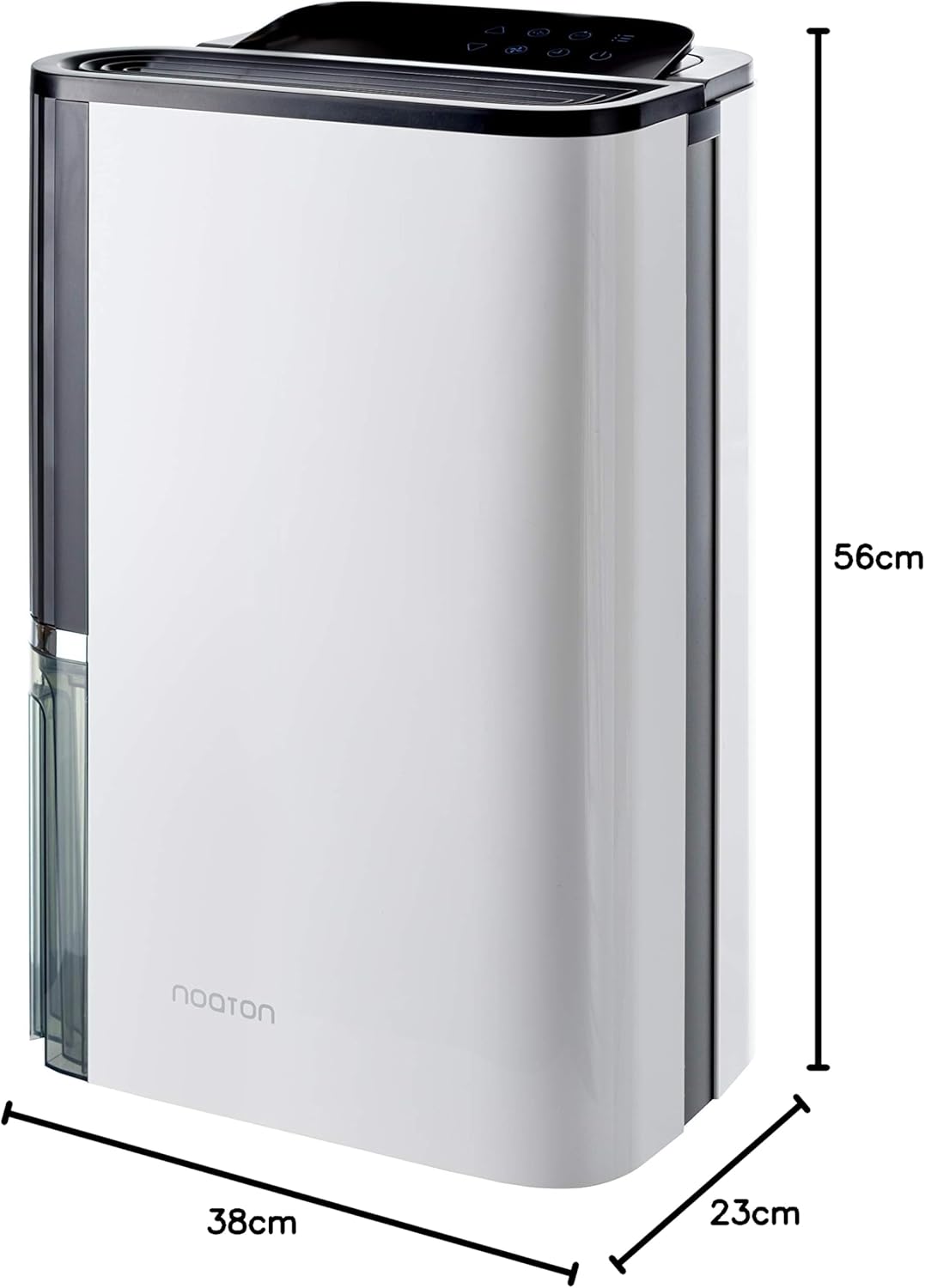
Figure 11: Visual representation of the unit's dimensions (height, width, depth) for planning placement.

Figure 12: A summary of key performance specifications, including dehumidification capacity, airflow, room size, noise level, power consumption, filter type, and tank volume.
9. Warranty and Support
The Noaton DF 4123 HEPA comes with a 3-year official manufacturer warranty. For any technical issues, warranty claims, or further assistance, please contact the manufacturer's customer support. Refer to the product packaging or manufacturer's website for contact details.