
1. Introduction
This manual provides essential information for the proper installation, operation, and maintenance of your FPVDrone Waterproof 35A Electronic Speed Controller (ESC). Designed for 1/14, 1/16, and 1/18 scale RC cars and trucks, this brushless ESC offers reliable performance with multiple protection features. Please read this manual thoroughly before use to ensure safe and optimal performance.
2. Safety Precautions
- Always disconnect the battery from the ESC when not in use to prevent accidental motor activation.
- Ensure all connections are secure and properly insulated to avoid short circuits.
- Never operate the ESC with damaged wires or connectors.
- Monitor the ESC and motor temperature during operation. Excessive heat can damage components.
- While the ESC is waterproof, it is not designed for prolonged submersion. Always clean and dry the ESC thoroughly after exposure to water to prevent corrosion.
- Use only compatible batteries (2-3S LiPo or 4-9S NiMH) as specified. Incorrect voltage can cause severe damage.
3. Package Contents
- 1 x FPVDrone Waterproof 35A Brushless Electronic Speed Controller (Model: ESC25A)
4. Specifications
| Feature | Specification |
|---|---|
| Model | ESC25A |
| Continuous Current | 35A |
| Burst Current | 120A |
| Battery Compatibility | 2-3S LiPo / 4-9S NiMH |
| BEC Output | 5.0V/2A (Analog Mode) |
| Resistance | 0.0015 ohm |
| Application | 1/14, 1/16, 1/18 RC Car/Truck |
| Material | Metal |
| Item Weight | 0.05 Kilograms (approx. 37g) |
Protection Features:
- Low Voltage Cut-off Protection (for Lithium or Nickel battery)
- Over-heat Protection
- Throttle Signal Loss Protection
- Motor Blocked Protection

Image: The FPVDrone 35A ESC displayed on a digital scale, indicating a weight of approximately 37 grams.
5. Setup Guide
5.1 Wiring Connections
Proper wiring is crucial for the ESC's functionality and safety. Follow these steps:
- Motor Connection: Connect the three motor wires from your brushless motor to the three output wires of the ESC. The order of connection may affect motor rotation direction; if the motor spins in the wrong direction, swap any two of the motor wires.
- Receiver Connection: Plug the ESC's throttle cable (usually a three-wire servo connector: signal, positive, negative) into the throttle channel (CH2) of your RC receiver.
- Battery Connection: Connect your battery pack to the power input wires of the ESC. Ensure correct polarity (red to positive, black to negative) to prevent damage.

Image: The FPVDrone 35A ESC showing its various input and output wires, including battery, motor, and receiver connections.
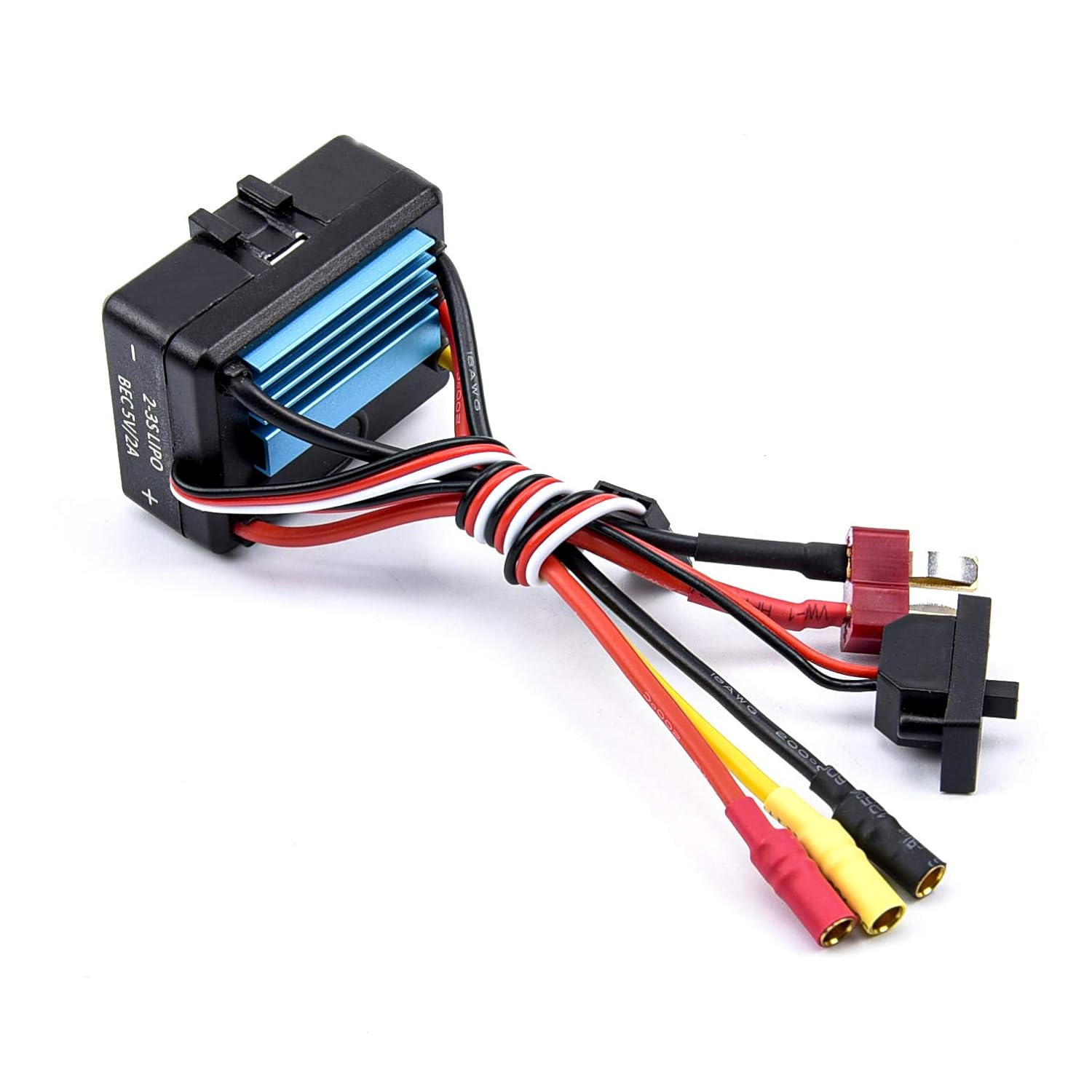
Image: A top-down view of the FPVDrone 35A ESC, highlighting the arrangement of its wires and the heat sink.
5.2 Throttle Range Calibration
To ensure proper throttle response, calibrate the ESC with your radio transmitter:
- Turn on your transmitter and set the throttle channel to its maximum position (full throttle).
- Connect the battery to the ESC. The ESC will emit a series of beeps.
- When the ESC emits a specific tone (refer to the ESC's specific beep codes if available), move the throttle stick to the minimum position (full brake/reverse).
- The ESC will emit another series of beeps, confirming successful calibration.
- Disconnect and reconnect the battery to save the settings.
5.3 Programming (Optional)
This ESC is easily programmed and compatible with a pocket-sized program card (sold separately). Refer to the program card's manual for detailed instructions on adjusting parameters such as cut-off voltage, brake force, and start mode.
6. Operating Instructions
After successful setup and calibration, you can begin operating your RC vehicle:
- Ensure the transmitter is turned on and the throttle stick is at the neutral position.
- Connect the battery to the ESC. The ESC will initialize and emit a confirmation tone.
- Slowly increase the throttle to move the vehicle forward.
- To brake, move the throttle stick to the reverse position. For reverse movement, apply brake, then move the throttle stick to reverse again.
- Always operate your RC vehicle in a safe and open area, away from people, pets, and obstacles.
7. Maintenance
Regular maintenance helps prolong the life and performance of your ESC:
- Cleaning: After each use, especially if exposed to dirt, dust, or water, clean the ESC with a soft brush or compressed air. If exposed to water, ensure it is completely dry before storing or operating again.
- Inspection: Periodically check all wires and connectors for signs of wear, fraying, or corrosion. Replace any damaged components immediately.
- Heat Management: Ensure adequate airflow around the ESC during operation. Avoid covering the heat sink. If the ESC consistently overheats, consider reducing load or improving ventilation.
- Storage: Store the ESC in a cool, dry place away from direct sunlight and extreme temperatures.
8. Troubleshooting
| Problem | Possible Cause | Solution |
|---|---|---|
| Motor does not run |
|
|
| Motor runs in wrong direction | Incorrect motor wire connection | Swap any two of the three motor wires connected to the ESC. |
| ESC overheats |
|
|
| Erratic throttle response |
|
|
9. Warranty and Support
FPVDrone products are manufactured to high-quality standards. For specific warranty information or technical support, please refer to the retailer's policy or contact FPVDrone customer service directly. Keep your purchase receipt as proof of purchase.