
Rain Bird C53210
Contents
Rain Bird ST8O-2.0 Smart Indoor/Outdoor WiFi Sprinkler/Irrigation System Timer/Controller User Manual
Model: C53210 | Brand: Rain Bird
Introduction
The Rain Bird ST8O-2.0 Smart Indoor/Outdoor WiFi Sprinkler/Irrigation System Timer/Controller offers advanced control over your irrigation system. This WaterSense Certified device is designed to optimize water usage, saving time, water, and money. It features enhanced app control, automatic seasonal adjustments, and compatibility with smart home systems like Amazon Alexa.
This manual provides essential information for the setup, operation, and maintenance of your Rain Bird ST8O-2.0 controller.

Image: The Rain Bird ST8O-2.0 controller shown alongside its mobile application interface, highlighting its smart capabilities.
What's in the Box
Upon opening the package, ensure all components are present:
- Rain Bird ST8O-2.0 Smart Sprinkler/Irrigation System Timer/Controller
- Transformer with 6’ cord
- Mounting hardware
- Installation guide (this manual)
- 1 AAA battery (included for memory retention)

Image: The retail packaging for the Rain Bird ST8O-2.0 Smart Irrigation WiFi Timer.
Key Features
- WiFi Control: Conveniently manage your timer from anywhere using the Rain Bird app.
- Easy Programming: Simple setup and access to timer functions via mobile device or control panel.
- Smart Home Compatibility: Works with Amazon Alexa, Apple iOS 8+, and Android 4.4+.
- Automatic Seasonal Adjust: Daily watering schedules adapt based on season, local weather, temperature, and humidity.
- Notifications: Receive alerts on your mobile device about watering events, system status, and potential issues.
- Watering Delay: Suspend watering for 1 to 14 days, with automatic resumption.
- Flexible Scheduling: Up to 6 start times per zone, with run times from 0-199 minutes.
- Memory Retention: All settings are stored indefinitely, even during power outages.
- WaterSense Certified: EPA WaterSense certified for at least 20% water savings.


Image: Highlights of smart compatibility and water-saving features.
Setup
1. Mounting the Controller
The ST8O-2.0 is designed for both indoor and outdoor weather-resistant locations, such as a garage or waterproof shed. Use the provided mounting hardware to secure the controller to a wall.

Image: The Rain Bird controller securely mounted on a wall, ready for wiring.
2. Wiring the Controller
Before wiring, ensure the power is off. Connect your irrigation system's zone wires and common wire to the corresponding terminals on the controller. The controller supports most 24 VAC irrigation valves. A wired Rain Sensor (CPRSDBEX, sold separately) can also be connected to automatically turn off watering during rain.

Image: Close-up of a hand connecting irrigation wires to the controller's terminal block.
For detailed wiring instructions, refer to the comprehensive User Manual PDF available via the link in the Support section.
3. Powering On and Initial Setup
Once wired, plug in the transformer. The controller will power on. Download the Rain Bird app from your device's app store (compatible with Apple iOS 8+ and Android 4.4+). Follow the in-app instructions to connect your controller to your WiFi network and complete the initial setup.
Video: An overview of the Rain Bird ST8 Smart Irrigation WiFi Timer, demonstrating its features and app connectivity. This video is provided by Rain Bird.
Operating Instructions
Using the Rain Bird App
The Rain Bird app provides comprehensive control over your irrigation system. You can access timer functions via your wireless network, in-range mobile device (Bluetooth), or directly through the control panel.
- Customizing Watering Schedules: Each watering zone can be set with a different name, picture, frequency, start time, and run time. This ensures optimal watering for healthy plants and helps reduce water consumption.
- Automatic Seasonal Adjust: Enable this feature in the app to automatically adjust daily watering schedules based on the season, local weather, temperature, and humidity for your specific ZIP Code. Data is downloaded and calculated nightly.
- Watering Days: Set watering on custom days of the week, odd or even calendar days, or cyclically (every 1-14 days).
- Start Times & Run Times: Allows 6 Start Times per zone and Run Times from 0-199 minutes.
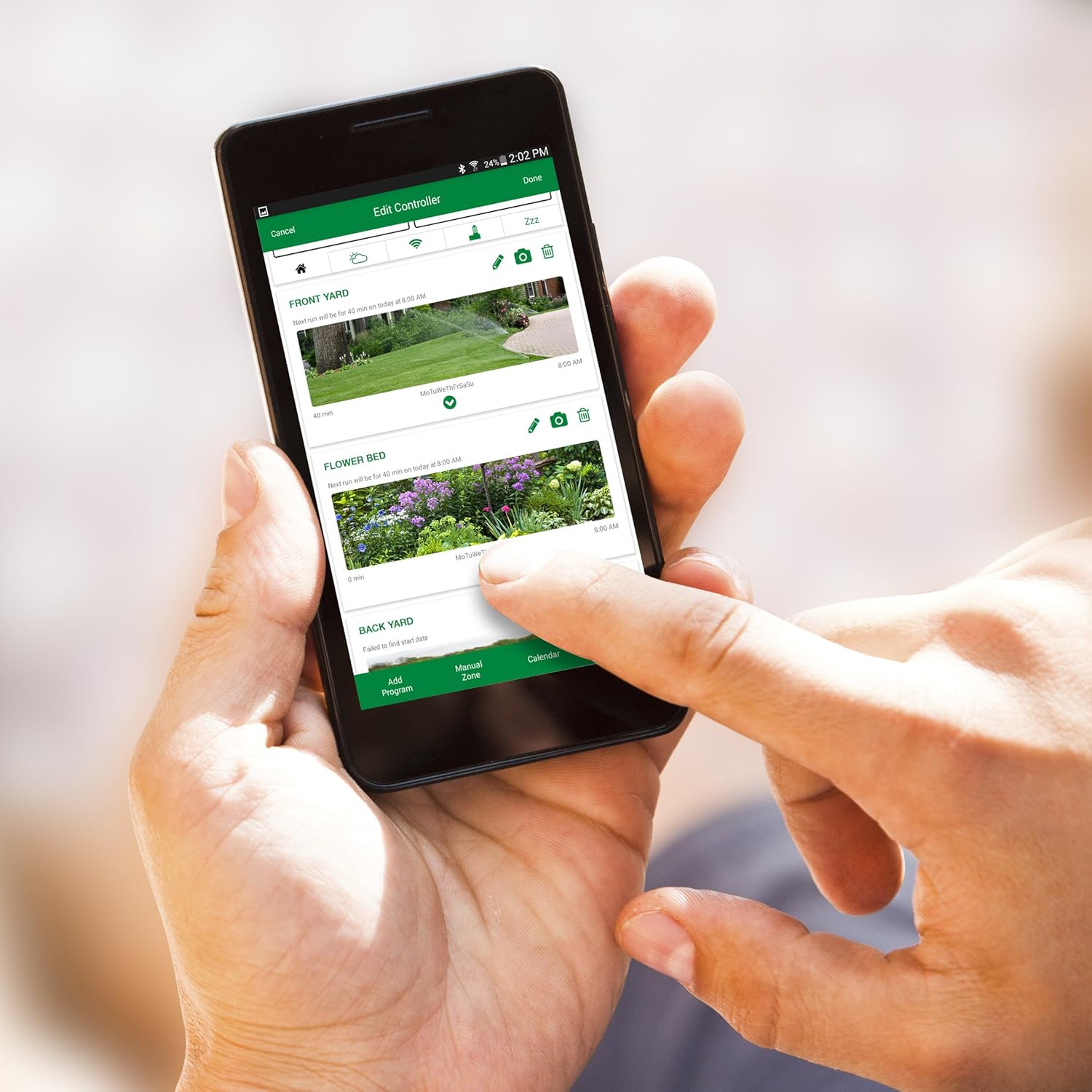
Image: A smartphone displaying the Rain Bird app, showing options for managing irrigation zones and schedules.

Image: The "Edit Controller" screen within the Rain Bird app, providing access to various settings and adjustments.
Manual Control
You can also operate the controller directly using its control panel. The buttons allow for manual watering, seasonal adjustments, and basic programming without the app.
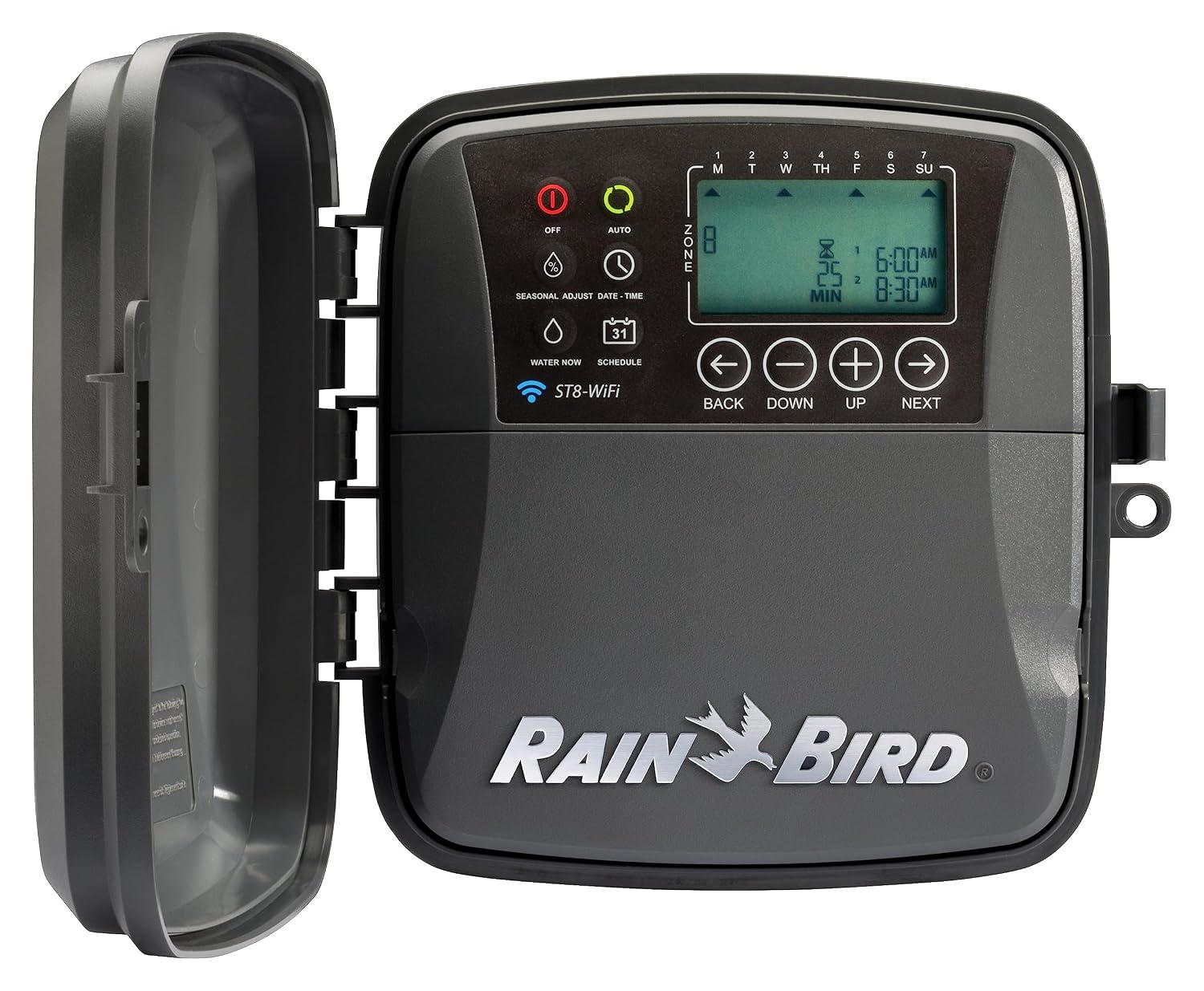
Image: Front view of the Rain Bird ST8O-2.0 controller, showing its display and physical control buttons.
Maintenance
- Battery Replacement: The controller uses 1 AAA battery (included) to retain settings during power outages. Replace the battery periodically to ensure settings are saved.
- Cleaning: The sealed case protects from moisture, insects, and grime. Clean the exterior with a soft, damp cloth as needed. Avoid harsh chemicals.
- Winterization: In colder climates, follow local guidelines for winterizing your irrigation system to prevent damage from freezing temperatures. This typically involves shutting off the water supply and draining the system.
Troubleshooting
If you encounter issues with your Rain Bird ST8O-2.0 controller, consider the following common solutions:
- No Power/Display Off:
- Check the power outlet and transformer connection.
- Ensure the circuit breaker is not tripped.
- No WiFi Connection:
- Verify your home WiFi network is active and the signal is strong at the controller's location.
- Restart your home router and the Rain Bird controller.
- Ensure correct WiFi password entry in the app.
- Zones Not Watering:
- Check that the main water supply to your irrigation system is turned on.
- Inspect wiring connections for each zone at the controller and at the valve.
- Ensure the watering schedule is active and not on a delay.
- Check for valve malfunctions or shorted solenoids (the app can notify you of these).
- Over-watering/Under-watering:
- Review your custom watering schedules for each zone in the app.
- Verify that Automatic Seasonal Adjust is enabled and functioning correctly based on your local ZIP Code.
For more detailed troubleshooting steps and error codes, please refer to the official User Manual PDF linked in the Support section.
Specifications
| Attribute | Detail |
|---|---|
| Product Dimensions | 9.25"L x 4.1"W x 8.75"H (4.1 x 9.25 x 8.75 inches; 2.29 Pounds) |
| Item Model Number | C53210 |
| Batteries | 1 AAA batteries required (included) |
| Date First Available | January 24, 2019 |
| Manufacturer | Rain Bird |
| ASIN | B07N3DTQH4 |
| Color | Gray/Black |
| Brand | Rain Bird |
| Voltage | 24 Volts |
| Material | Plastic |
Support & Resources
For comprehensive information, detailed installation diagrams, and advanced programming options, please refer to the official User Manual:
You can also visit the official Rain Bird website for additional support, FAQs, and product registration:
For warranty information, please consult the official User Manual PDF or the Rain Bird website.
Ask a question about this manual
Ask about setup, troubleshooting, compatibility, parts, safety, or missing instructions. Manuals+ will review the question and use this page’s manual context to help answer it.