Introduction
This manual provides detailed instructions for the installation, operation, and maintenance of your Furmore4 T100 7 Inch Car Stereo MP5 Player. Please read this manual thoroughly before using the product to ensure proper functionality and safety. The T100 is a versatile car head unit featuring a 7-inch capacitive touchscreen, FM/AM radio with RDS, Bluetooth 4.0, USB, and AUX connectivity, and support for mobile phone interconnection.

Image: Front view of the T100 Car Stereo with its 7-inch screen extended, displaying an image of a car. This illustrates the primary function and appearance of the device.
Setup
Package Contents
Before installation, verify that all components are present in the package:
- 1 x Car MP5 Player (T100 Head Unit)
- 1 x Xiaomi Remote Control
- 1 x Buttcock Line (Wiring Harness)
- 1 x Tool (Installation Tool)
- 1 x Manual (This document)
Installation Guidelines
Professional installation is recommended for optimal performance and safety. Ensure the vehicle's power is disconnected before beginning installation. Connect the wiring harness securely, paying attention to power, ground, speaker, and accessory connections. The unit operates on a 12V system.
The T100 unit has specific dimensions for installation. Refer to the diagram below for product size specifications:

Image: Diagram showing the dimensions of the T100 Car Stereo. The unit measures 178mm in width, 50mm in height, and 170mm in depth, with the front panel measuring 188mm in width and 58mm in height. This is crucial for ensuring compatibility with your vehicle's dashboard opening.
For reversing camera input, connect the reversing detection line to the vehicle's reversing light source. The unit supports video input for DVR recorders.
Operating Instructions
General Operation
The T100 features a 7-inch capacitive touchscreen for primary control. Physical buttons and a rotary knob are also available for common functions. The display can be manually stretched for adjustment.
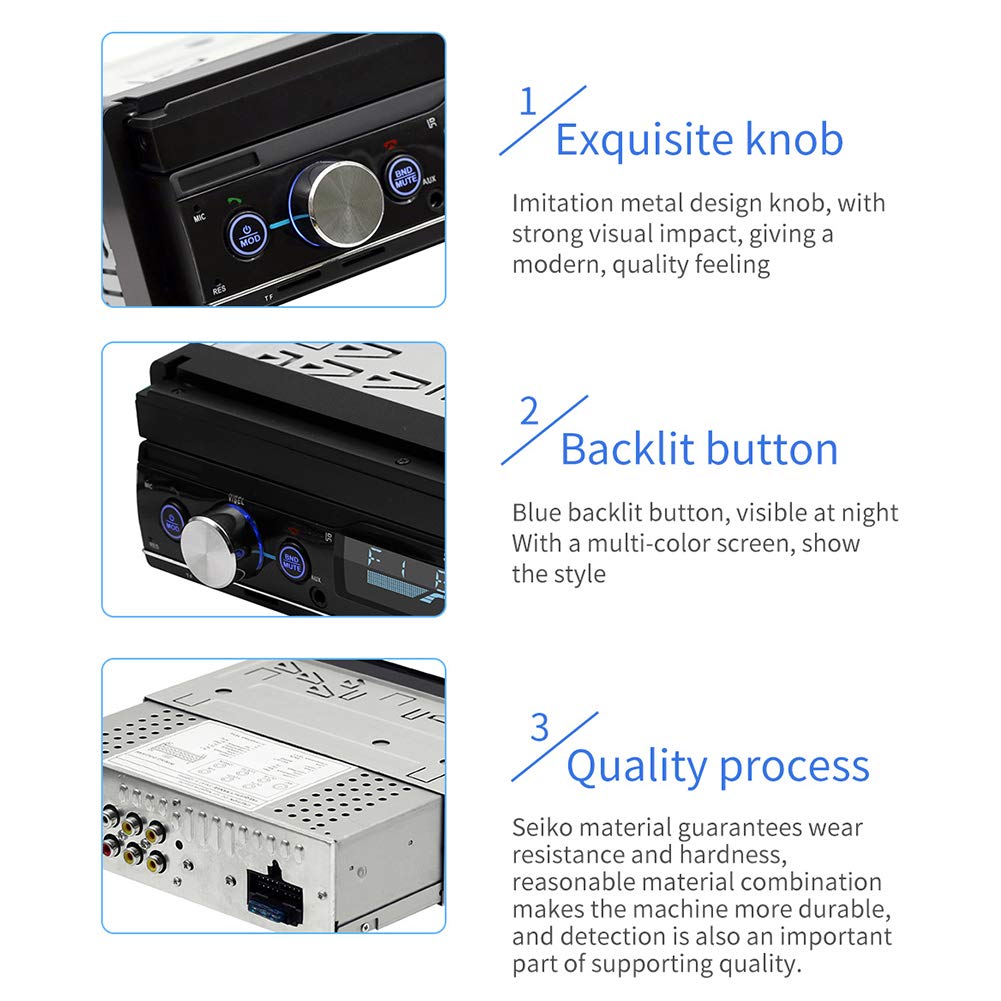
Image: Close-up view highlighting the exquisite knob and backlit buttons of the T100 Car Stereo. The knob features an imitation metal design, and the buttons are blue backlit for visibility at night, contributing to a modern aesthetic.

Image: Compilation of screenshots showing various user interface screens of the T100 Car Stereo, including the dialing interface, video playback, radio tuner, music player, wallpaper selection, and general settings. This provides a visual guide to the unit's software capabilities.
Radio Function (FM/AM/RDS)
Access the radio interface to tune into FM1/FM2/FM3 and AM1/AM2 bands. The unit supports RDS (Radio Data System) for displaying station information where available. Use the on-screen controls or physical buttons to scan and save stations.
Bluetooth Connectivity
The T100 features Bluetooth version 4.0. To pair your device:
- Enable Bluetooth on your mobile phone.
- On the T100, navigate to the Bluetooth menu.
- Search for available devices and select "T100" or similar.
- Enter the Bluetooth connection password: 0000 when prompted.
- Once paired, you can make/receive phone calls and stream music wirelessly.
Media Playback (USB/AUX)
Connect USB drives to the designated USB port for MP3/MP5 playback. Use the AUX input for connecting external audio devices. The unit supports various video formats including RM/RMVB/AVI/MP4/MKV/3GP.

Image: The T100 Car Stereo screen displaying a movie, with text indicating support for RM, RMVB, AVI, MP4, MKV, and 3GP video formats. This highlights the unit's multimedia playback capabilities.
Mobile Interconnection (Android)
The T100 supports mobile phone interconnection for Android devices. This feature allows for mirroring or control of certain phone functions on the stereo's screen. Refer to the unit's on-screen instructions for specific setup procedures.
Steering Wheel Controls
The unit supports connection to original car steering wheel controls. This allows for convenient operation of functions like volume adjustment and track skipping without taking your hands off the steering wheel.

Image: A car steering wheel with integrated control buttons, illustrating the compatibility of the T100 Car Stereo with original car steering wheel controls. This feature allows for convenient volume and track adjustments while driving.
System Settings
Access the settings menu to configure various options, including language (Chinese, English, Spanish, Portuguese, Russian, Italian, German, French, Polish, Turkish, Czech, Hebrew), time format (12-hour/24-hour), display settings, and audio adjustments.
Maintenance
To ensure the longevity and optimal performance of your T100 Car Stereo, follow these maintenance guidelines:
- Cleaning: Use a soft, dry cloth to clean the screen and exterior surfaces. For stubborn smudges on the screen, a slightly damp, lint-free cloth can be used. Avoid abrasive cleaners or solvents.
- Temperature: Do not expose the unit to extreme temperatures, direct sunlight for prolonged periods, or high humidity.
- Ventilation: Ensure the unit's ventilation openings are not blocked to prevent overheating.
- Power Off: Always turn off the unit before cleaning or performing any maintenance.
Troubleshooting
If you encounter issues with your T100 Car Stereo, refer to the following common problems and solutions:
| Problem | Possible Cause / Solution |
|---|---|
| No Power / Unit Does Not Turn On |
|
| No Sound |
|
| Bluetooth Not Connecting |
|
| Touchscreen Unresponsive |
|
| Reversing Camera Not Displaying |
|
If the problem persists after attempting these solutions, please contact customer support.
Specifications
Detailed technical specifications for the Furmore4 T100 Car Stereo MP5 Player:
| Feature | Detail |
|---|---|
| Model | T100 |
| Voltage | 12V |
| System | WIN CE |
| Decoding Chip | Quanzhi C200S |
| Screen Size | 7 inches |
| Touch Screen Type | Capacitive Screen |
| Screen Resolution | 1024*600 |
| Button Light | Blue Light |
| Time Format | 12-hour / 24-hour system switchable |
| Mobile Interconnection | Support (for Android phone) |
| Mobile Phone Charging | Support |
| Radio Band | FM1/FM2/FM3, AM1/AM2 |
| Radio Chip | SI4731 |
| RDS | Support |
| Multi-language Support | Chinese / English / Spanish / Portuguese / Russian / Italian / German / French / Polish / Turkish / Czech / Hebrew |
| Video Output | 2 channels (does not support dual screen simultaneous display) |
| Reversing Video Input | Support |
| Bluetooth Version | 4.0 |
| Bluetooth Connection Password | PIN: 0000 |
| Brake Reminder Function | Support |
| Audio Output Mode | Stereo |
| Connector Type | Auxiliary, Bluetooth, USB |
| Supported Internet Services | Pandora, Spotify (via connected smartphone) |
Warranty and Support
Warranty Policy
This product is covered by a warranty policy. For details regarding warranty terms, duration, and claims, please refer to the warranty information provided at the point of purchase or contact the seller directly. Keep your proof of purchase for warranty validation.
Customer Support
For further assistance, technical support, or inquiries not covered in this manual, please contact Furmore4 customer service or the retailer from whom you purchased the product. Provide your product model (T100) and a detailed description of the issue for efficient support.


