
HoMedics BPW-O200
HoMedics Automatic Wrist Blood Pressure Monitor
Model: BPW-O200
Introduction
Thank you for purchasing the HoMedics Automatic Wrist Blood Pressure Monitor. This device is designed to provide accurate and comfortable blood pressure measurements. It features Smart Measure Technology for personalized inflation and deflation, memory storage for two users, and an irregular heartbeat detector.

Image: HoMedics Automatic Wrist Blood Pressure Monitor, showing the device with its attached cuff and digital display.
Important Safety Information
Please read all instructions carefully before using this device. Keep this manual for future reference.
- This device is intended for adult use only.
- Consult your physician regarding specific blood pressure information. Self-diagnosis and treatment based on measured results can be dangerous.
- Do not use this device on infants, children, or individuals who cannot express their consent.
- Avoid using the monitor in a moving vehicle or on an airplane.
- Do not use the device near strong electromagnetic fields, such as mobile phones or microwave ovens.
- If you experience discomfort during measurement, press the START/STOP button to stop the inflation.
Product Components
The HoMedics BPW-O200 Blood Pressure Monitor package includes:
- HoMedics Automatic Wrist Blood Pressure Monitor with attached cuff
- Storage Case
- 2 AAA 1.5V Batteries
- Instruction Manual (this document)
Setup
1. Battery Installation
The monitor operates on 2 AAA 1.5V batteries, which are included. Ensure correct polarity when inserting the batteries.
- Locate the battery compartment on the back of the monitor.
- Open the battery cover.
- Insert the 2 AAA batteries, matching the (+) and (-) symbols inside the compartment.
- Close the battery cover securely.
Note: Replace batteries when the low battery indicator appears on the display.
2. Setting Date and Time
Setting the correct date and time is important for accurate record-keeping of your measurements.
- With the unit off, press and hold the USER/+ button for a few seconds until the year starts flashing.
- Press the MEM button to adjust the year.
- Press the USER/+ button to confirm and move to the month setting.
- Repeat this process for month, day, hour, and minute.
- Once all settings are confirmed, the unit will automatically turn off.
3. Selecting User
The monitor supports two users (User 1 and User 2), each with 30 memory slots.
- Before taking a measurement, press the USER/+ button to toggle between User 1 and User 2.
- Ensure the correct user icon is displayed before starting a measurement.

Image: The HoMedics monitor on a wrist, highlighting its capacity for 2 users and 60 total memories (30 per user).
Operating Instructions
1. Proper Cuff Placement
Accurate readings depend on correct cuff placement. The cuff should be placed directly on your wrist, above the wrist bone.
- Remove any tight-fitting clothing or jewelry from your left wrist.
- Place the monitor on your left wrist with the display facing upwards. The bottom edge of the cuff should be approximately 1/2 inch (1 cm) from the palm of your hand.
- Wrap the cuff snugly around your wrist. It should be firm but not too tight.
- Ensure the monitor is at heart level during measurement. You can achieve this by resting your elbow on a table and raising your hand.
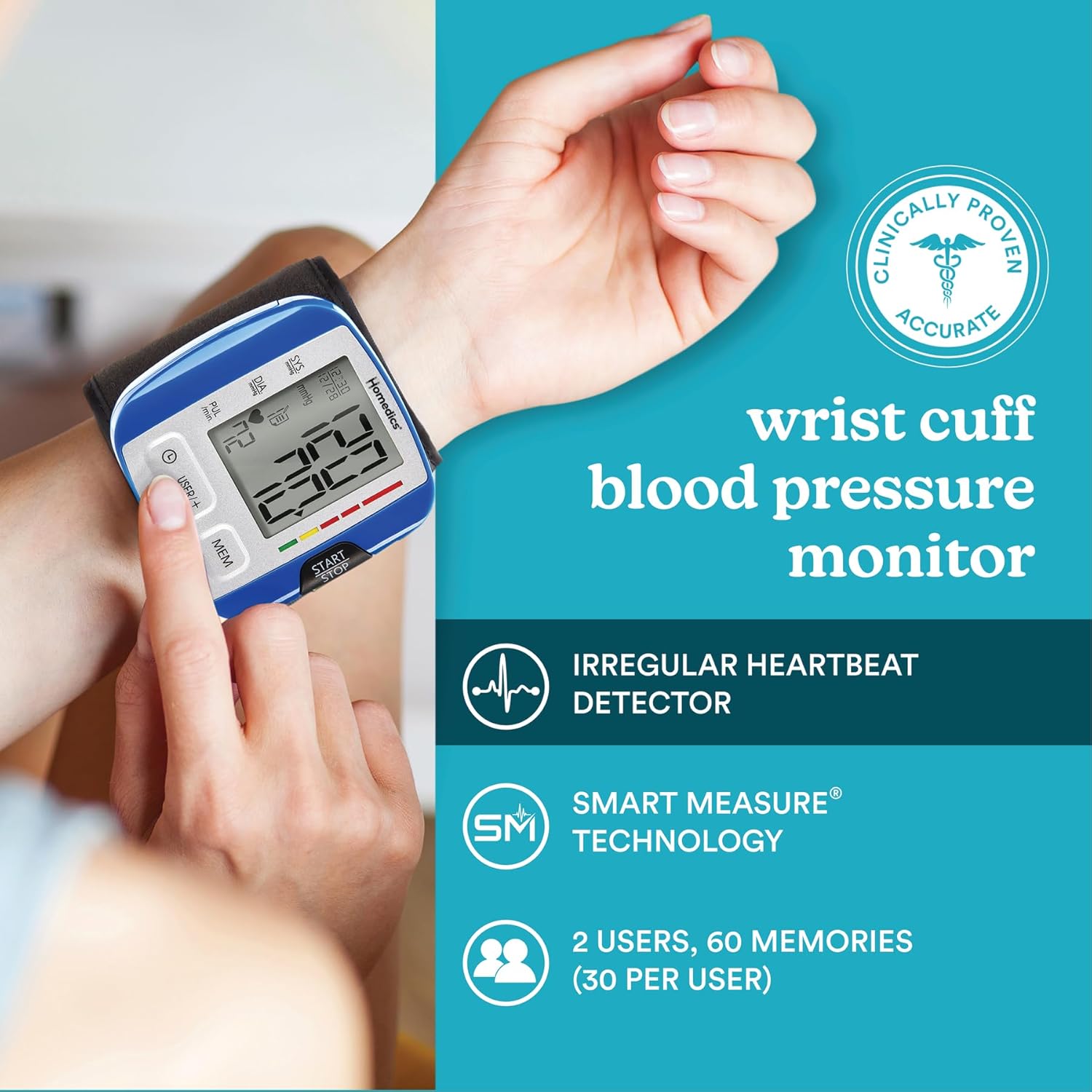
Image: A person demonstrating the correct placement of the wrist blood pressure monitor, ensuring the cuff is snug and the device is positioned properly on the wrist.

Image: Close-up view of the HoMedics blood pressure monitor correctly positioned on a user's wrist, ready for measurement.
2. Taking a Measurement
For accurate results, sit quietly and rest for at least 5 minutes before taking a measurement. Avoid eating, drinking caffeine, smoking, or exercising for 30 minutes prior.
- Sit in a comfortable position with your back supported and feet flat on the floor.
- Place your arm on a table so the monitor is at heart level.
- Press the START/STOP button. The cuff will automatically inflate.
- Remain still and do not talk during the measurement.
- Once the measurement is complete, your Systolic, Diastolic, and Pulse readings will be displayed on the LCD screen. The reading will automatically be stored in the selected user's memory.
- Press the START/STOP button again to turn off the unit, or it will automatically shut off after 1 minute of inactivity.
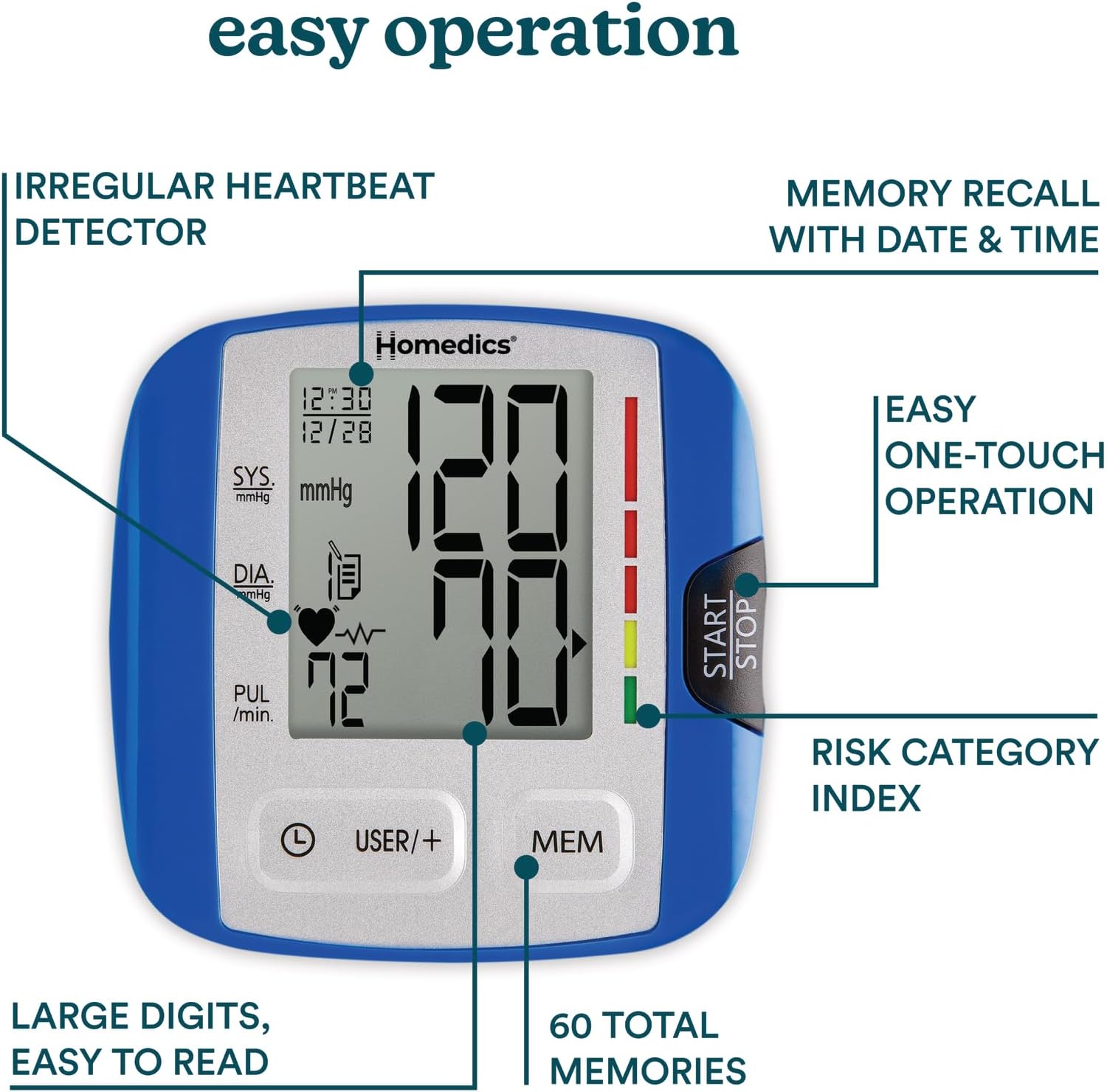
Image: Diagram of the HoMedics monitor's display, pointing out features like Irregular Heartbeat Detector, Memory Recall, Easy One-Touch Operation, Risk Category Index, Large Digits, and 60 Total Memories.
3. Understanding Your Readings
- Systolic (SYS): The top number, representing the pressure in your arteries when your heart beats.
- Diastolic (DIA): The bottom number, representing the pressure in your arteries between beats.
- Pulse (PUL): Your heart rate, measured in beats per minute.
- Risk Category Indicator: The colored bar on the side of the display indicates your reading's category based on American Heart Association (AHA) guidelines.
- Irregular Heartbeat Detector: If an irregular heartbeat is detected during the measurement, a symbol (heart with wavy line) will appear on the display. Consult your physician if this symbol appears frequently.
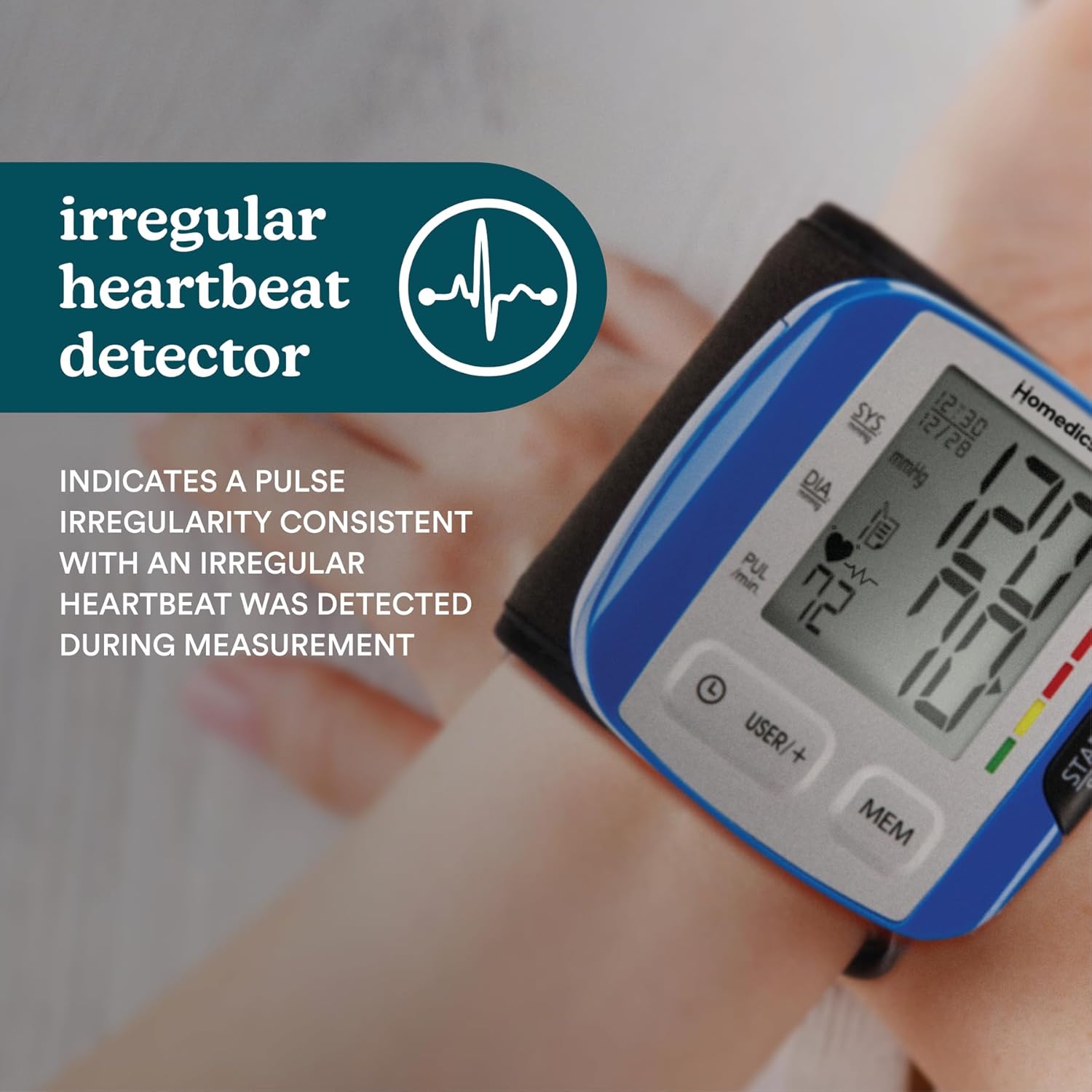
Image: Close-up of the HoMedics monitor display, specifically highlighting the irregular heartbeat detector symbol and its meaning.
4. Memory Function
The monitor stores up to 30 readings for each of the two users, along with the date and time. It also calculates the average of the last 3 readings for each user.
- To access stored readings, ensure the unit is off.
- Press the MEM button. The display will show the average of the last 3 readings for the currently selected user.
- Press the MEM button repeatedly to scroll through individual past readings, from most recent to oldest.
- To switch between User 1 and User 2 memory, press the USER/+ button while in memory recall mode.
- To clear memory for a user, press and hold the MEM button for approximately 3 seconds while in that user's memory recall mode. "CL" will appear, indicating memory is cleared.
Maintenance
Cleaning
- Clean the monitor body and cuff with a soft, dry cloth.
- Do not use abrasive cleaners or immerse the unit in water.
Storage
- Store the monitor in its included storage case when not in use.
- Keep the device in a clean, dry place, away from direct sunlight, extreme temperatures, and humidity.
- If the unit will not be used for an extended period, remove the batteries to prevent leakage.
Troubleshooting
| Problem | Possible Cause | Solution |
|---|---|---|
| No power / Display blank | Batteries are dead or incorrectly inserted. | Replace batteries with new ones, ensuring correct polarity (+/-). |
| "E" or "Err" displayed | Movement during measurement, improper cuff placement, or strong interference. | Remain still and silent. Re-apply cuff correctly. Move away from electronic devices. Try again. |
| Inaccurate readings | Incorrect cuff placement, not resting before measurement, talking during measurement, or monitor not at heart level. | Review "Proper Cuff Placement" and "Taking a Measurement" sections. Ensure proper preparation and technique. |
| Irregular Heartbeat symbol appears frequently | Indicates a pulse irregularity. | This is an indicator, not a malfunction. Consult your physician for interpretation and advice. |
Specifications
- Model: BPW-O200
- Display: Digital LCD
- Measurement Method: Oscillometric
- Measurement Range: Pressure: 0-300 mmHg; Pulse: 40-199 beats/minute
- Accuracy: Pressure: ±3 mmHg; Pulse: ±5% of reading
- Memory: 2 users, 30 memories each (60 total)
- Power Source: 2 AAA 1.5V batteries (included)
- Cuff Circumference: 5.3 - 7.7 inches (13.5 - 19.5 cm)
- Operating Environment: Temperature: 50°F - 104°F (10°C - 40°C); Humidity: 15% - 90% RH
- Storage Environment: Temperature: -4°F - 140°F (-20°C - 60°C); Humidity: 10% - 95% RH
- Dimensions: Approximately 4.02 x 3.78 x 3.15 inches
- Weight: Approximately 8.15 ounces (excluding batteries)
Warranty and Support
This HoMedics Blood Pressure Monitor (BPW-O200) comes with a 5-year limited warranty from the date of purchase.
The warranty covers defects in material and workmanship under normal use. It does not cover damage caused by misuse, abuse, accident, attachment of unauthorized accessories, alteration to the product, or any other conditions whatsoever that are beyond the control of HoMedics.
For warranty service or technical support, please contact HoMedics Customer Service. Please have your model number and date of purchase available.
Manufacturer: Homedics
For more information, visit the official HoMedics website or refer to the contact information provided with your product packaging.
Related Documents - BPW-O200
 |
HoMedics BPW-O200 Wrist Blood Pressure Monitor Instruction Manual Comprehensive instruction manual for the HoMedics BPW-O200 Wrist Blood Pressure Monitor, covering setup, usage, troubleshooting, and specifications for accurate home health monitoring. |
 |
Homedics BPW-O300A Wrist Blood Pressure Monitor Instruction Manual Comprehensive instruction manual for the Homedics BPW-O300A wrist blood pressure monitor. Learn how to use, maintain, and troubleshoot your device for accurate home blood pressure readings. Includes safety guidelines, measurement procedures, specifications, and warranty information. |
 |
HoMedics BPW-200 Blood Pressure Monitor Wrist Instruction Manual This instruction manual provides detailed guidance on using the HoMedics BPW-200 Blood Pressure Monitor Wrist. It covers setup, operation, features like irregular heartbeat detection (IHB) and Smart Sense technology, error troubleshooting, specifications, and maintenance for accurate blood pressure and pulse monitoring. |
 |
HoMedics BPW-200WGN Automatic Wrist Blood Pressure Monitor User Manual Comprehensive user manual for the HoMedics BPW-200WGN Automatic Wrist Blood Pressure Monitor. Learn how to use, maintain, and troubleshoot your device for accurate blood pressure readings. |
 |
HoMedics BPW-201: Manual del Monitor Automático de Presión Arterial de Muñeca Descubra cómo usar y mantener su monitor automático de presión arterial de muñeca HoMedics BPW-201. Este manual proporciona instrucciones detalladas, información de seguridad y especificaciones para mediciones precisas en el hogar. |
 |
HoMedics BPW-0200 Wrist Blood Pressure Monitor Instruction Manual Comprehensive instruction manual for the HoMedics BPW-0200 Wrist Blood Pressure Monitor, covering safety, usage, measurement procedures, troubleshooting, specifications, and warranty information. |
Ask a question about this manual
Ask about setup, troubleshooting, compatibility, parts, safety, or missing instructions. Manuals+ will review the question and use this page’s manual context to help answer it.