
Alopoon T2
Contents
Alopoon T2 Instant Translator User Manual
Model: T2 | Brand: Alopoon
1. Product Overview
The Alopoon T2 Instant Translator is a compact and versatile electronic device designed for seamless two-way language translation. It supports a wide range of languages and dialects, making it an ideal companion for travel, business, learning, and multilingual communication. The device functions in conjunction with a smartphone application to provide real-time translation.
What's in the Box
- Alopoon T2 Instant Translator (Host)
- Micro USB Charging Cable
- User Manual

Figure 1: Alopoon T2 Instant Translator, front view.
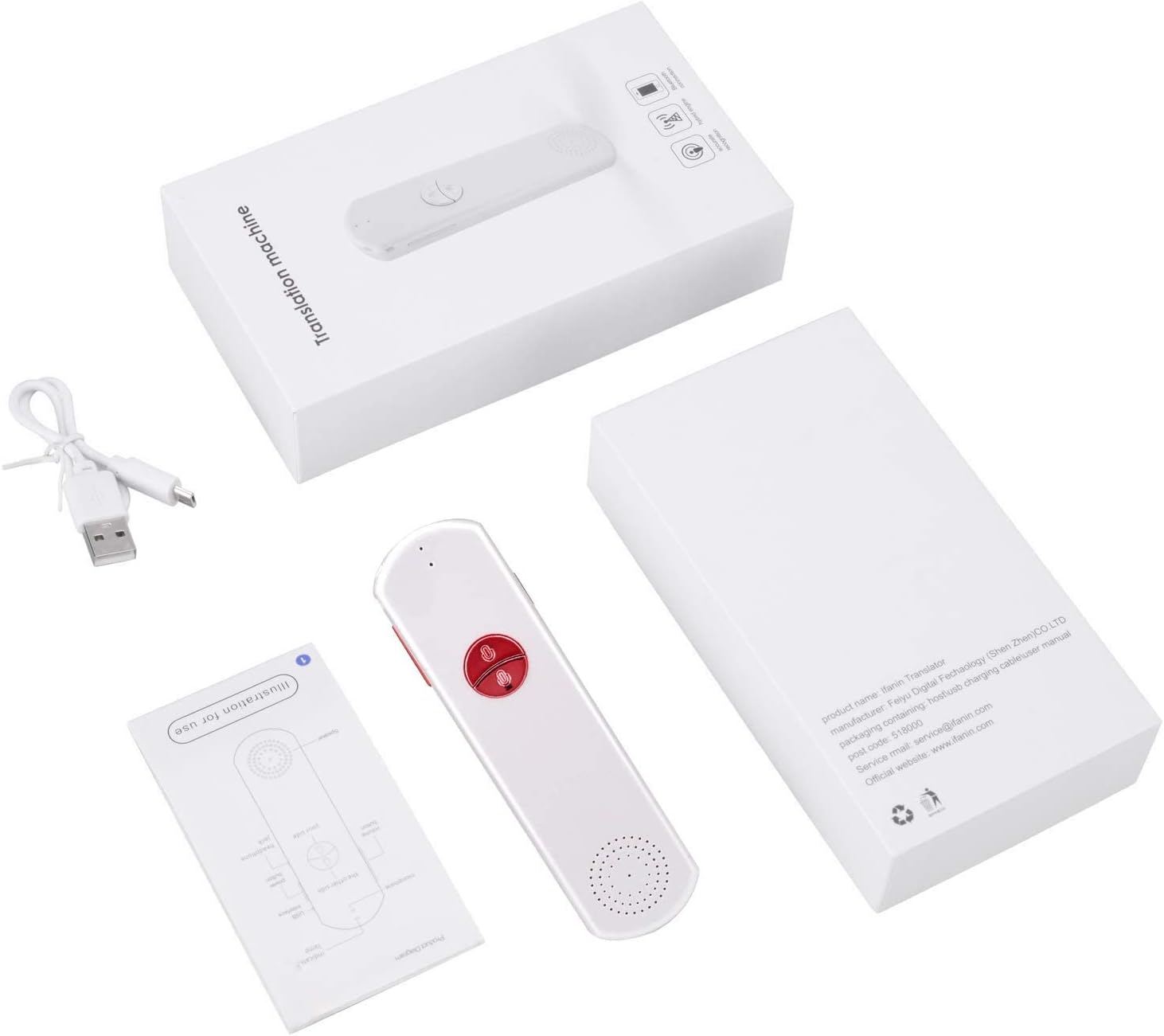
Figure 2: Contents of the Alopoon T2 Instant Translator package.
2. Setup
2.1 Charging the Device
Before first use, ensure your Alopoon T2 translator is fully charged. Use the provided Micro USB charging cable to connect the device to a power source. A full charge takes approximately 30 minutes and provides up to 24 hours of working time or 7 days of standby time.
2.2 App Installation
The Alopoon T2 translator requires the 'ifanin' application to function. Follow these steps to download and install the app:
- For iPhone users: Open the App Store and search for "ifanin".
- For Android users: Open Google Play Store and search for "ifanin".
- Download and install the application.
2.3 Bluetooth Pairing
Once the app is installed, pair your translator with your smartphone via Bluetooth:
- Turn on the Alopoon T2 translator by pressing and holding the power button.
- Wait for the indicator light on the translator to flash alternately red and blue. This indicates it's in Bluetooth pairing mode.
- On your smartphone, go to Settings > Bluetooth.
- Ensure Bluetooth is enabled.
- Look for "TTP" in the list of available devices and tap to connect. The indicator light on the translator will turn solid blue once paired.
- Open the 'ifanin' translation app. The indicator bar at the top of the app interface should change from red to green, signifying a successful connection and readiness for translation.
Video 1: Alopoon Translator Instruction. This video demonstrates the unboxing, component identification, app installation, and Bluetooth pairing process for the Alopoon T2 Instant Translator.
3. Operating Your Translator
3.1 Device Layout

Figure 3: Alopoon T2 Instant Translator Product Diagram.
- Indicator Lamp: Shows device status (pairing, connected, charging).
- Microphone: Captures your speech for translation.
- USB Interface: For charging the device.
- Power Button: Turns the device on/off.
- Volume Buttons: Adjusts the audio output volume.
- Headphone Jack: For private listening.
- Translation Buttons: Two buttons for two-way translation (one for 'your side', one for 'the other side').
- Speaker: Outputs translated audio.
3.2 Translation Modes
The 'ifanin' app offers three primary translation modes:
- Face-to-Face Translation (Stand-alone & Duplex): For direct conversations.
- Picture Translation: Translate text from images.
- Recording Translation (Meeting Mode): For transcribing and translating longer audio.
3.3 Performing a Translation
To perform a real-time two-way translation:
- Open the 'ifanin' app on your smartphone.
- Select the Face to Face translation option.
- Set your language and the other person's language within the app. The translator supports 52 languages and 31 dialects, totaling 83 languages.
- To speak, press and hold the corresponding translation button on the device (one button for your language, the other for the other person's language).
- Speak clearly into the microphone. Release the button when you finish speaking.
- The translator will audibly speak the translation, and the text will also appear on your phone screen.

Figure 4: Usage scenarios for the Alopoon T2 Instant Translator.
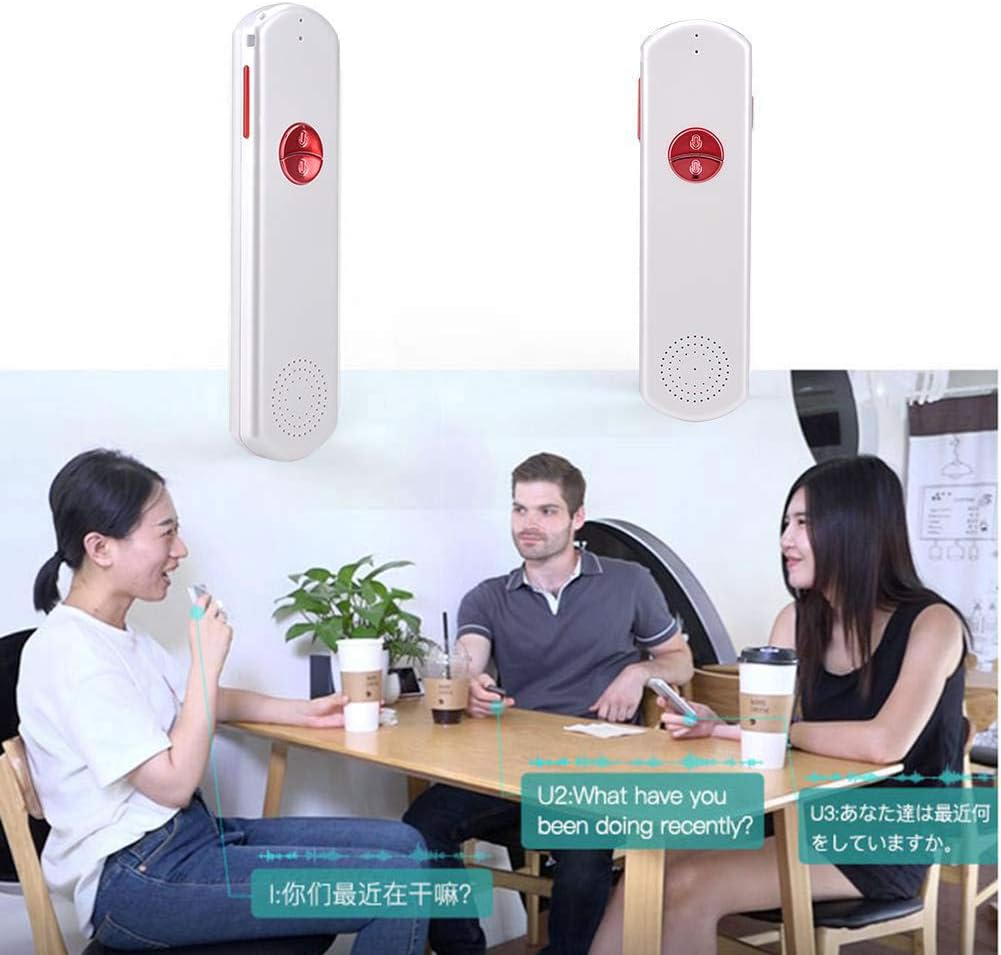
Figure 5: Face-to-face translation in action.
4. Maintenance
To ensure the longevity and optimal performance of your Alopoon T2 Instant Translator, follow these maintenance guidelines:
- Keep the device clean by wiping it with a soft, dry cloth. Avoid using harsh chemicals or abrasive materials.
- Store the translator in a cool, dry place away from direct sunlight and extreme temperatures.
- Avoid dropping the device or subjecting it to strong impacts.
- Do not expose the device to water or moisture, as it is not waterproof.
- Use only the provided charging cable or a certified equivalent to prevent damage to the battery and device.
5. Troubleshooting
If you encounter issues with your Alopoon T2 Instant Translator, refer to the table below for common problems and their solutions:
| Problem | Possible Cause | Solution |
|---|---|---|
| Device does not turn on. | Low battery. | Charge the device for at least 30 minutes. |
| Cannot pair with smartphone. | Bluetooth is off on phone or translator. Translator not in pairing mode. | Ensure Bluetooth is enabled on both devices. Press and hold the power button on the translator until the indicator light flashes red and blue. Restart both devices if necessary. |
| App is not compatible with my phone. | Outdated phone OS or specific phone model incompatibility. | Ensure your phone meets the minimum OS requirements (Apple IOS8.0, Android 4.3). Check for app updates. Contact customer support if the issue persists. |
| Translation is slow or inaccurate. | Poor network connection. Unclear speech. | Ensure a stable internet connection (Wi-Fi or cellular data). Speak clearly and at a moderate pace. The reaction time depends on network speed. |
| No audio output. | Volume too low. Device not connected. | Adjust the volume using the side buttons. Verify Bluetooth connection in the app (indicator bar should be green). |
6. Technical Specifications
| Feature | Detail |
|---|---|
| Model Name | T2 |
| Brand | Alopoon |
| Color | Red |
| Product Dimensions | 4.7 x 1.33 x 0.43 inches |
| Item Weight | 5.9 ounces |
| Battery Life | 24 Hours (Working Time) |
| Standby Time | 7 Days |
| Charging Time | 30 minutes |
| App Support System | Apple iOS 8.0+, Android 4.3+ |
| Supported Languages | 52 languages + 31 dialects (Total 83, including Chinese, English, Hindi, Russian, Spanish, Thai, Korean, Japanese, German, French, Italian, Arabic, Portuguese, Danish, Czech, Icelandic, Croatian, Afrikaans, Indonesian, Tamil, Catalan, Filipino, Hungarian, Dutch, Norwegian, Polish, Romanian, Slovak, Finnish, Swedish, Vietnamese, Turkish, Greek, Serb, Ukrainian, Armenian, Khmer, Latvian, Nepali, Sinhalese, Swahili, Tamil, etc.) |
| Connectivity Technology | Bluetooth, USB |
| Bluetooth Range | 10 Meters |
| Control Method | Voice |
| Speaker Type | Multimedia |
| Water Resistance Level | Not Water Resistant |
7. Warranty and Support
The Alopoon T2 Instant Translator comes with a one-year warranty against manufacturing defects. We also provide life-long maintenance support for your device.
For any questions, technical assistance, or warranty claims, please contact the seller, mooleap, through the Amazon platform or refer to the contact information provided in your product packaging.
Please retain your proof of purchase for warranty purposes.
Documents and downloads
Ask a question about this manual
Ask about setup, troubleshooting, compatibility, parts, safety, or missing instructions. Manuals+ will review the question and use this page’s manual context to help answer it.