
Introduction
This manual provides instructions for the operation and maintenance of your Senville Remote Control, model AR2015-IR. This remote is designed for use with Senville AURA Series and LETO Series mini split air conditioning systems. Please read this manual thoroughly before using the remote control to ensure proper function and longevity.
Product Overview
The Senville AR2015-IR remote control allows you to manage various functions of your compatible Senville mini split system, including temperature settings, operating modes, fan speed, and special features.
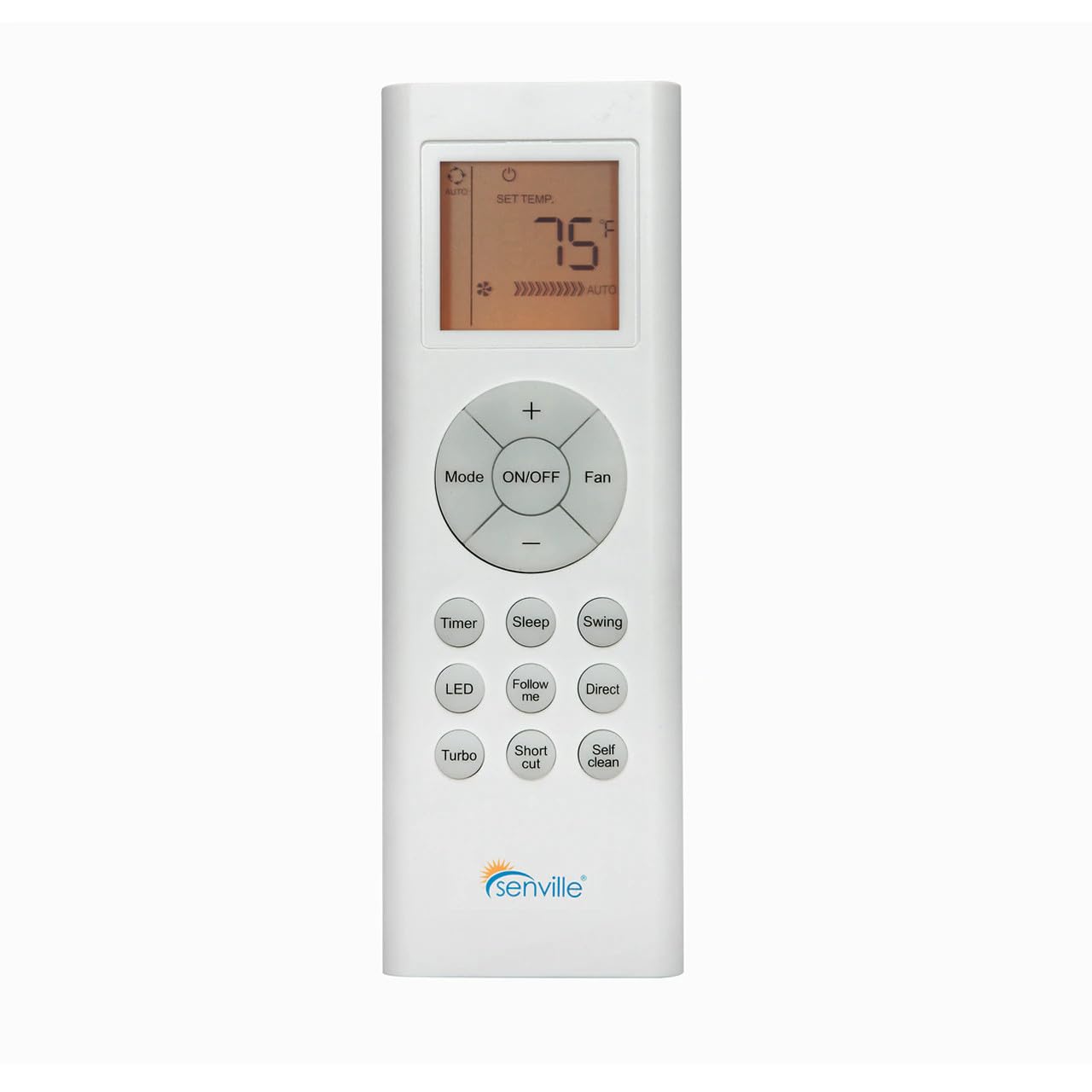
Figure 1: Front view of the Senville AR2015-IR Remote Control. It features an LCD screen at the top, a central circular button cluster for power, mode, fan, and temperature adjustment, and additional function buttons below.
Setup
1. Battery Installation
- Locate the battery compartment cover on the back of the remote control.
- Slide the cover downwards or press the latch to open it.
- Insert two AAA batteries (not included), ensuring the correct polarity (+ and -) as indicated inside the compartment.
- Replace the battery compartment cover.
Note: The remote control does not require programming and should function immediately upon battery installation with compatible Senville AURA and LETO series units.
Operating Instructions
Button Functions
- ON/OFF: Press to turn the air conditioning unit on or off.
- Mode: Cycles through operating modes: Auto, Cool, Dry, Heat, Fan.
- Fan: Adjusts fan speed: Auto, Low, Medium, High.
- Temperature (+/-): Increases or decreases the set temperature. The display shows the set temperature in Fahrenheit or Celsius.
- Timer: Sets the auto-on or auto-off timer.
- Sleep: Activates or deactivates the Sleep mode for energy-efficient operation during sleep.
- Swing: Controls the vertical louver swing function.
- LED: Turns the indoor unit's display LED light on or off.
- Follow Me: Activates the Follow Me function, which senses the temperature at the remote's location.
- Direct: Adjusts the horizontal louver direction.
- Turbo: Activates rapid cooling or heating for a short period.
- Shortcut: Recalls your preferred settings.
- Self Clean: Initiates the self-cleaning function of the indoor unit.
Temperature Unit Selection
To switch between Fahrenheit (°F) and Celsius (°C), ensure the unit is off. Press and hold the Temperature (+) and Temperature (-) buttons simultaneously for approximately 3 seconds. The display will change to the alternate unit.
Maintenance
Battery Replacement
Replace batteries when the display becomes dim or the remote's range decreases. Always replace both batteries at the same time with new AAA batteries. Dispose of used batteries according to local regulations.
Cleaning the Remote Control
Wipe the remote control with a soft, dry cloth. Do not use liquid cleaners or abrasive materials, as these can damage the remote's surface or internal components.
Troubleshooting
- Remote not responding:
- Check if batteries are correctly installed and not depleted. Replace if necessary.
- Ensure there are no obstructions between the remote control and the indoor unit's receiver.
- Confirm the remote is pointed directly at the indoor unit.
- Display is dim or blank:
- Replace the batteries.
- Unit not responding to specific functions:
- Verify that your specific Senville unit model supports the function you are trying to use. Refer to your air conditioner's manual for compatibility.
Specifications
| Model Number | AR2015-IR |
| Compatible Devices | Senville AURA Series, Senville LETO Series mini split air conditioners (HF, HF/Z, CD/X Models) |
| Connectivity Technology | Infrared |
| Power Source | 2 x AAA Batteries (not included) |
| Dimensions (L x W x H) | 6.89 x 2.68 x 0.83 inches |
| Weight | 2.89 ounces (without batteries) |
Warranty and Support
For warranty information or technical support regarding your Senville Remote Control or compatible air conditioning unit, please refer to the documentation provided with your main Senville product or visit the official Senville website. Contacting Senville customer service directly is recommended for specific inquiries.
You can find more information and support resources on the Senville Store on Amazon.


