
1. Introduction
The EcoSavers Countdown Timer 22H is designed to help save energy by automatically switching off connected electrical appliances after a user-defined period. This device allows you to set a countdown from 0 to 22 hours, providing convenience and reducing power consumption.
2. Important Safety Instructions
- For indoor use only. Do not expose to moisture or extreme temperatures.
- Ensure the timer is securely plugged into a wall socket before connecting any appliance.
- Do not exceed the maximum load capacity of 16 A / 3680 W.
- Keep out of reach of children. This product features child protection.
- Do not disassemble or attempt to repair the device. Contact qualified personnel for service.
- Unplug the timer from the wall socket before cleaning.
3. Product Overview
Familiarize yourself with the components of your EcoSavers Countdown Timer 22H.
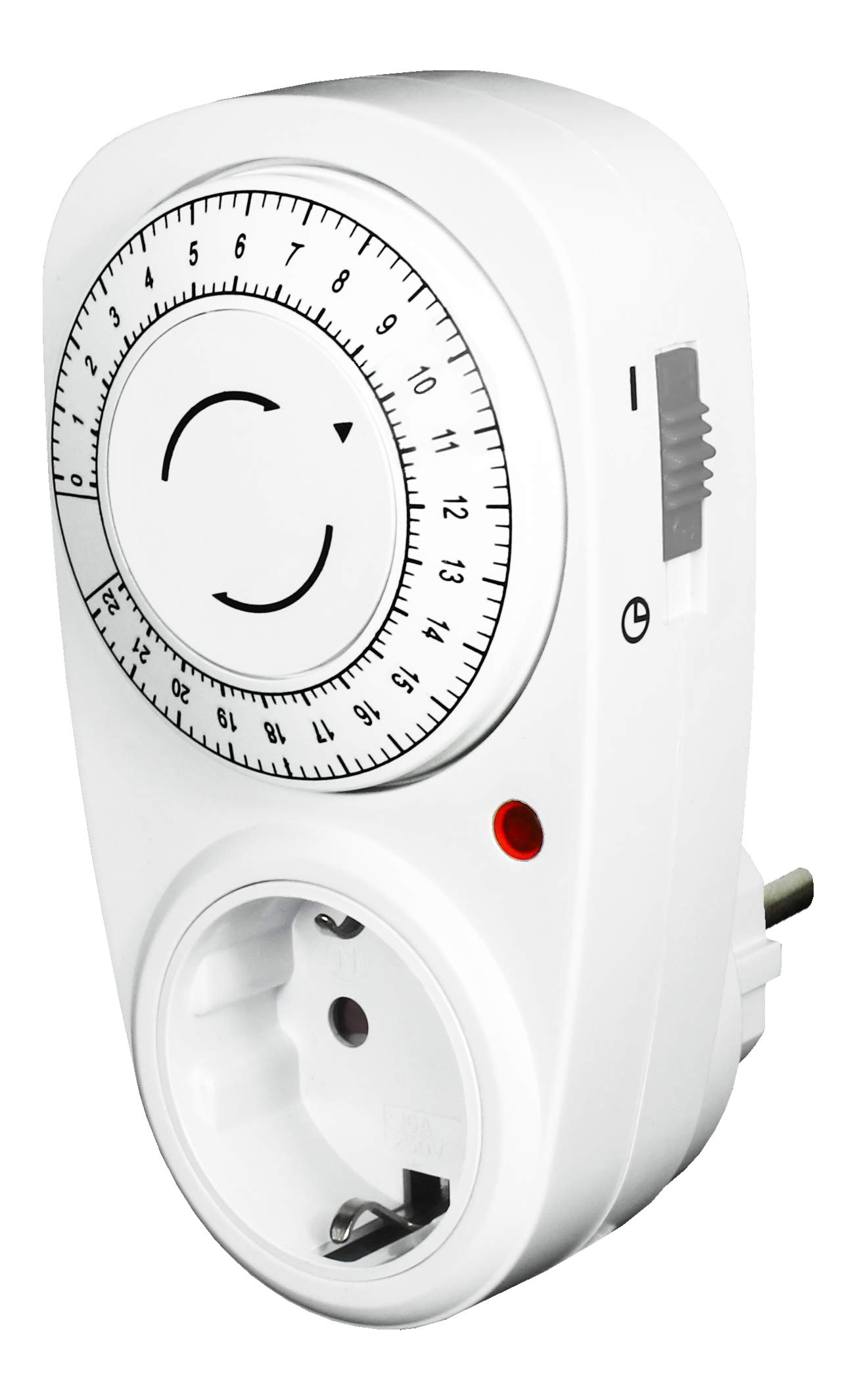
Figure 1: EcoSavers Countdown Timer 22H. The image displays the timer unit, featuring an analogue dial for setting countdown hours (0-22), a power socket for connecting appliances, and a manual override switch on the side. The packaging highlights "SAVE ENERGY" and "ANALOGUE" features.
- Time Dial: Used to set the desired countdown duration (0-22 hours).
- Power Socket: Where the appliance to be controlled is plugged in.
- Mode Slider Switch: Located on the side, it allows selection between timer mode (clock icon) and continuous power mode (I icon).
- Indicator Light: Illuminates when the connected appliance is receiving power.
4. Setup
Follow these steps to set up your countdown timer:
- Set Mode: Place the slider switch on the side of the timer to the clock icon position for countdown timer operation.
- Connect Appliance: Plug the appliance you wish to control into the power socket of the countdown timer.
- Plug into Wall: Insert the countdown timer, with the appliance connected, into a wall socket.
5. Operating Instructions
To use the countdown timer:
- Set Countdown Time: Rotate the time dial clockwise to the desired countdown duration (in hours), aligning it with the arrow indicator on the timer. The available range is 0 to 22 hours.
- Automatic Shut-off: The power supply to the connected appliance will automatically switch off after the selected time has elapsed.
- Manual Override (Continuous Power): If you need to provide continuous power to the connected appliance, slide the side switch to the 'I' icon position. The indicator light will illuminate, confirming that the appliance is receiving power.
- Re-activating Countdown: After the appliance has been switched off by the timer, you can manually reset the countdown by rotating the dial again.
6. Maintenance
To ensure optimal performance and longevity of your EcoSavers Countdown Timer 22H:
- Cleaning: Disconnect the timer from the wall socket before cleaning. Wipe the exterior with a soft, dry cloth. Do not use liquid cleaners or abrasive materials.
- Storage: Store the timer in a cool, dry place when not in use.
- Inspection: Periodically inspect the timer and its plug for any signs of damage. If damage is found, discontinue use and replace the unit.
7. Troubleshooting
| Problem | Possible Cause | Solution |
|---|---|---|
| Appliance does not turn on. |
|
|
| Timer does not switch off appliance. |
|
|
| Indicator light is off. |
|
|
8. Technical Specifications
| Model: | EcoSavers Countdown Timer 22H |
| Voltage: | 230 V / 50 Hz |
| Max. Rated Current: | 16 A |
| Max. Power: | 3680 W |
| Setting Range: | 0 - 22 hours |
| Child Protection: | Yes |
| Dimensions (L x W x H): | 125 x 68 x 82 mm (approx. 8.2D x 6.8W x 8.2H cm) |
| Certification: | GS-tested |
| Material: | Polycarbonate |
| Color: | White |
9. Warranty and Support
For warranty information and customer support, please refer to the documentation provided with your purchase or contact EcoSavers customer service. Keep your proof of purchase for warranty claims.
Manufacturer: EcoSavers