
1. Product Overview
The ESSLNB Binoculars are designed for adults, featuring a compact and waterproof construction with BAK4 prisms and 42mm FMC objective lenses. They are suitable for various outdoor activities such as bird watching, hunting, and boating. This manual provides essential information for the proper use and care of your binoculars.

Image 1.1: Front view of the ESSLNB Binoculars, showcasing the main unit and the included phone adapter.
2. Package Contents
Verify that all items are present in the package:
- ESSLNB Binoculars
- Phone Adapter
- Carrying Bag
- Neck Strap
- Lens Cleaning Cloth
- Objective Lens Caps
- Eyepiece Caps
- Instruction Manual (this document)

Image 2.1: A visual representation of the binoculars and all included accessories, such as the carrying bag, straps, lens caps, and phone adapter.
3. Setup and Initial Use
3.1 Attaching the Neck Strap
- Thread each end of the neck strap through the strap lugs located on the sides of the binocular body.
- Secure the strap ends according to the strap's design, ensuring it is firmly attached to prevent accidental drops.
3.2 Adjusting Eyecups
The binoculars feature twist-up eyecups for comfortable viewing with or without eyeglasses.
- For users without eyeglasses: Twist the eyecups counter-clockwise until they are fully extended. This positions your eyes at the optimal distance from the eyepieces.
- For users with eyeglasses: Twist the eyecups clockwise until they are fully retracted. This allows your eyeglasses to be closer to the eyepieces, providing a full field of view.

Image 3.1: Close-up view illustrating the twist-up mechanism of the eyecups for adjusting eye relief.
3.3 Interpupillary Distance Adjustment
The interpupillary distance (the distance between your pupils) varies among individuals. To adjust:
- Hold the binoculars with both hands and look through them.
- Bend the binocular body at the hinge until you see a single, clear circular field of view.
3.4 Focusing the Binoculars
To achieve a sharp image:
- Close your right eye and look through the left eyepiece. Rotate the central focusing wheel until the image is sharp.
- Close your left eye and look through the right eyepiece. Rotate the diopter adjustment ring (located on the right eyepiece) until the image is sharp.
- Now, with both eyes open, use only the central focusing wheel to focus on objects at varying distances. The diopter setting should remain constant for your vision.
3.5 Using the Phone Adapter
The included phone adapter allows you to capture photos and videos through the binoculars.
- Attach the phone adapter to one of the binocular eyepieces.
- Secure your smartphone into the adapter, ensuring the phone's camera lens is aligned with the binocular eyepiece.
- Adjust the phone's position and zoom to eliminate vignetting and achieve a full view.
- Use your phone's camera app to capture images or record videos.
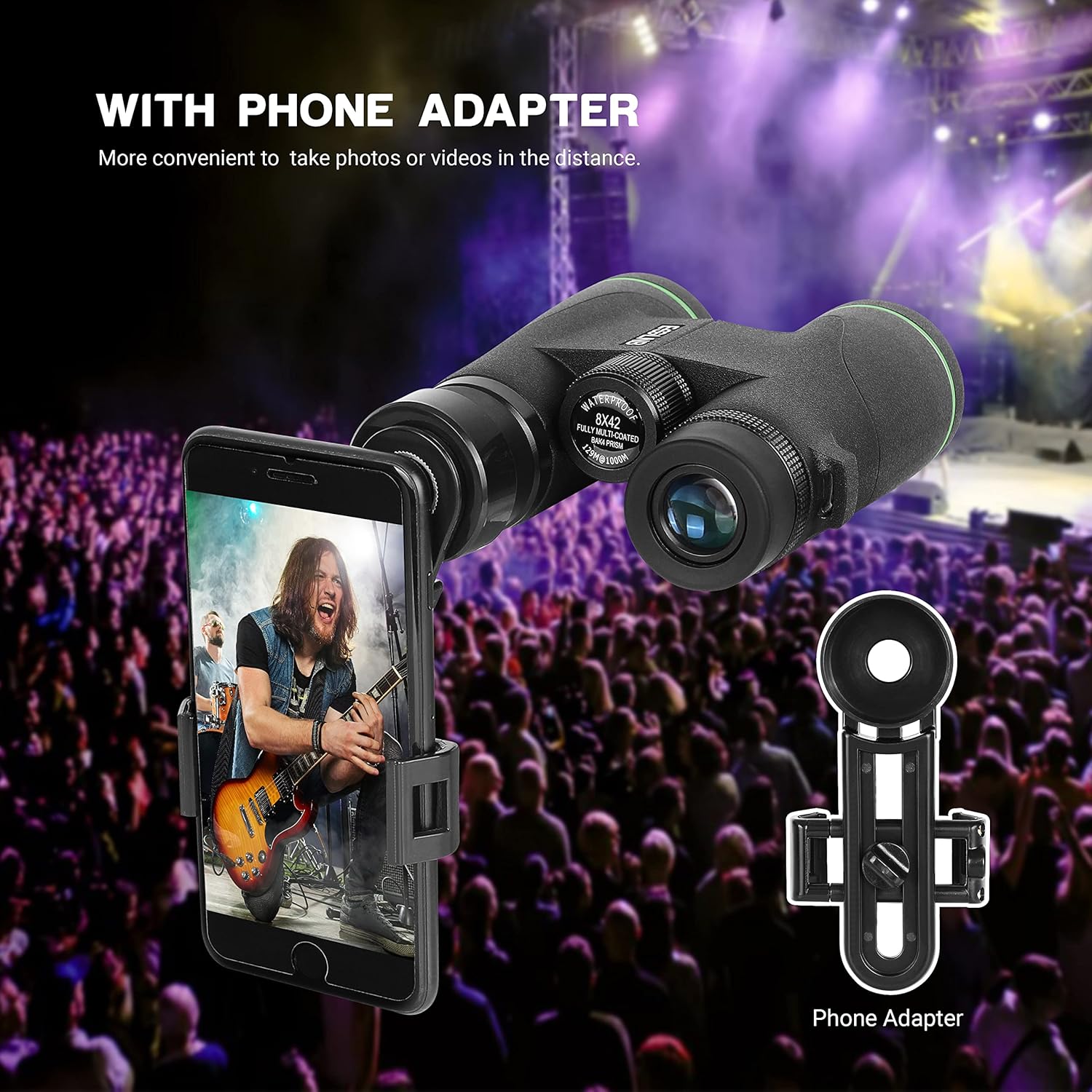
Image 3.2: The binoculars shown with a smartphone mounted on the included adapter, ready for capturing distant views.
3.6 Tripod Mounting
For extended viewing or increased stability, the binoculars can be mounted on a tripod using a binocular tripod adapter (sold separately).
- Locate the 1/4"-20 threaded socket on the front hinge of the binoculars.
- Screw the binocular tripod adapter into this socket.
- Attach the adapter to your tripod's quick-release plate or mounting screw.
4. Optical Features and Performance
4.1 BAK4 Prisms
These binoculars utilize BAK4 (Barium Crown Glass) roof prisms. BAK4 prisms are known for their high refractive index and produce nearly perfect circular exit pupils, resulting in brighter, clearer, and sharper images with increased contrast and resolution compared to less expensive BK7 prisms.

Image 4.1: Diagram illustrating the internal BAK4 prism system, highlighting its role in light transmission and image clarity.
4.2 Fully Multi-Coated (FMC) Lenses
The 42mm objective lenses are Fully Multi-Coated (FMC). This means multiple layers of anti-reflective coatings are applied to all air-to-glass surfaces. FMC lenses significantly reduce light loss and glare, enhancing light transmission for brighter, higher-contrast images with true-to-life color fidelity, especially in low-light conditions.
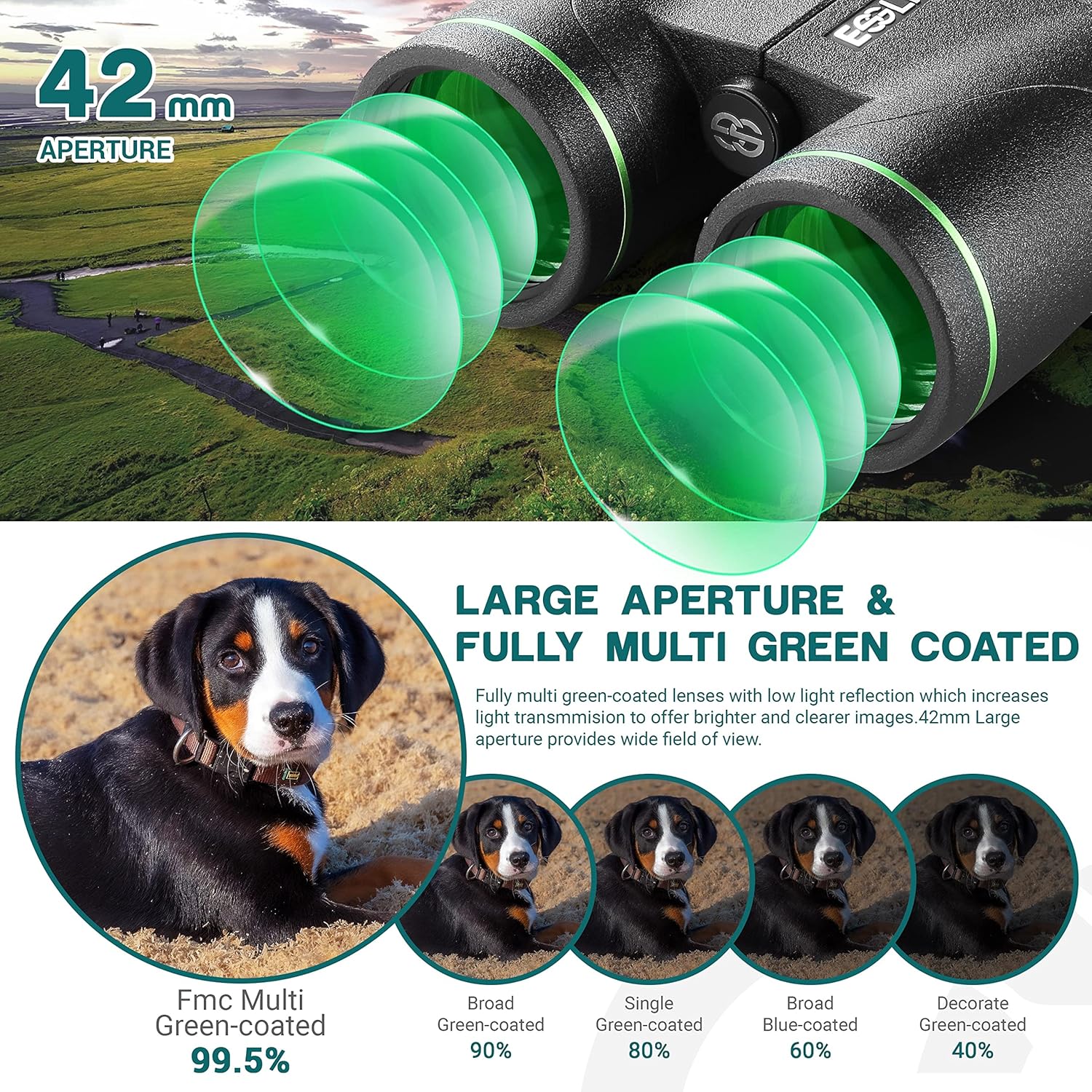
Image 4.2: Visual representation of the 42mm objective lenses with green multi-coatings, emphasizing light gathering capability.
4.3 Field of View and Close Focus
These binoculars offer a wide field of view of 388ft/1000yds, allowing for efficient observation of large areas. The close focus distance of 6.5 feet enables detailed viewing of nearby subjects.
5. Care and Maintenance
5.1 Cleaning the Lenses
To clean the lenses:
- Gently brush away any dust or debris using a soft lens brush or compressed air.
- Apply a small amount of lens cleaning fluid to the included cleaning cloth or a specialized optical cleaning cloth.
- Wipe the lens surfaces in a circular motion, starting from the center and moving outwards. Avoid excessive pressure.
- Do not use abrasive cloths, paper towels, or household cleaners, as these can scratch or damage the lens coatings.
5.2 Waterproof and Fogproof Design
The binoculars are IPX7 waterproof, meaning they can withstand immersion in water up to 1.5 meters for 30 minutes. They are also dry nitrogen-filled and O-ring sealed to prevent internal fogging in varying temperatures and humid conditions. While designed for durability in harsh environments, avoid unnecessary exposure to extreme conditions.

Image 5.1: The binoculars submerged in water, demonstrating their IPX7 waterproof rating.
5.3 Storage
When not in use, store the binoculars in their protective carrying bag in a cool, dry place. Ensure lens caps are in place to protect the optical surfaces from dust and scratches.
6. Troubleshooting
If you encounter issues with your ESSLNB Binoculars, refer to the following common problems and solutions:
- Blurred Image: Ensure both the central focusing wheel and the diopter adjustment ring are correctly set for your vision and the distance to the object. Refer to Section 3.4 for focusing instructions.
- Double Image: Adjust the interpupillary distance by bending the binocular body at the hinge until a single, clear circular field of view is achieved. Refer to Section 3.3.
- Dark or Uneven Image: Check that the objective lens caps have been removed. Ensure lenses are clean and free from obstructions.
- Difficulty with Phone Adapter: Verify that the phone's camera lens is perfectly aligned with the binocular eyepiece and that the phone is securely mounted. Adjust the phone's position slightly to eliminate vignetting.
If problems persist, please contact ESSLNB customer support for further assistance.
7. Specifications
| Feature | Specification |
|---|---|
| Brand | ESSLNB |
| Model Number | B07MYSZP1M |
| Magnification | 8x |
| Objective Lens Diameter | 42 mm |
| Prism Type | BAK4 Roof Prism |
| Lens Coating | Fully Multi-Coated (FMC) |
| Field of View | 388 ft / 1000 yds |
| Close Focus | 6.5 feet |
| Waterproof Rating | IPX7 (1.5m for 30 minutes) |
| Fogproof | Nitrogen-filled |
| Product Dimensions | 5.31 x 4.92 x 0.04 inches |
| Item Weight | 1.48 pounds |
| Age Range (Description) | Adult |
8. Warranty and Support
For warranty information or technical support, please refer to the official ESSLNB website or contact their customer service department. Contact details are typically provided on the product packaging or the brand's official online presence.
You can visit the ESSLNB Store on Amazon for more product information and support resources.


