
Introduction
This manual provides essential information for the proper use and maintenance of your Easytry123 replacement infrared remote control. This remote is designed to be compatible with specific Philips LED HDTV TV models, including 49PUS6501/12, 49PUS6551/12, 49PUS6561/12, 49PUS7101/12, 49PUS7181/12, 49PUT6801/98, and 55PUS6501/12. Please verify your TV model number to ensure compatibility.
Important Note: This is a replacement remote control and may not support all functions of your original TV remote. It is not a universal remote control.
Product Overview

Image 1: Front view of the Easytry123 replacement remote control, showing the power button, navigation pad, channel/volume controls, and numeric keypad.
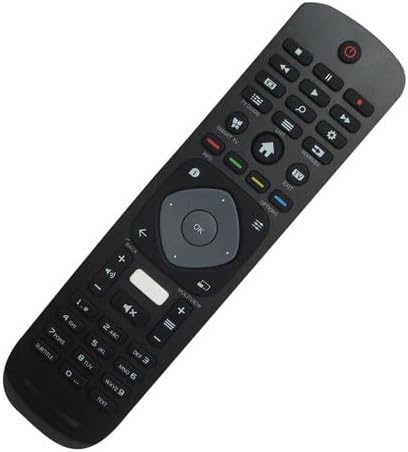
Image 2: Angled front view of the remote control, highlighting its ergonomic design and button layout.

Image 3: Back view of the remote control, showing the battery compartment cover.
The Easytry123 replacement remote control features a standard button layout for TV operation, including power, channel, volume, navigation, and numeric input. It is designed for comfortable handling and intuitive use.
Setup
1. Battery Installation
- Locate the battery compartment on the back of the remote control.
- Slide the battery compartment cover downwards or outwards to open it.
- Insert two (2) AAA batteries, ensuring the positive (+) and negative (-) terminals match the diagrams inside the compartment.
- Close the battery compartment cover securely.
No setup or coding is required for this remote control. Once batteries are installed, it is ready for use with compatible Philips TV models.
Operating Instructions
This remote control operates using infrared (IR) technology. Ensure there is a clear line of sight between the remote control and the IR receiver on your television for optimal performance.
- Power Button: Press to turn the TV on or off.
- Numeric Keypad (0-9): Use to directly enter channel numbers.
- Channel Up/Down: Press to change channels sequentially.
- Volume Up/Down: Press to adjust the sound volume.
- Mute Button: Press to mute or unmute the TV sound.
- Navigation Pad (Arrow Buttons & OK): Use to navigate menus and confirm selections.
- Back/Exit Buttons: Used to return to the previous screen or exit menus.
- Smart TV/Home Button: Accesses the TV's smart features or home screen.
Functionality may vary depending on your specific TV model. Some advanced features or specific buttons present on your original remote may not be replicated on this replacement unit.
Maintenance
Battery Replacement
Replace batteries when the remote control's response becomes sluggish or stops working. Always replace both batteries at the same time with new AAA batteries. Do not mix old and new batteries, or different types of batteries.
Cleaning
To clean the remote control, use a soft, dry cloth. For stubborn dirt, slightly dampen the cloth with water. Avoid using harsh chemicals, abrasive cleaners, or excessive moisture, as these can damage the remote.
Troubleshooting
- Remote not responding:
- Check if the batteries are inserted correctly with the correct polarity.
- Replace old batteries with new AAA batteries.
- Ensure there are no obstructions between the remote and the TV's IR receiver.
- Confirm that the remote is pointed directly at the TV.
- Some functions do not work:
- As a replacement remote, it may not support all functions of the original TV remote. This is normal for some replacement units.
- Verify that your TV model is listed as compatible.
- Short operating range:
- Replace batteries.
- Ensure no strong light sources (like direct sunlight) are interfering with the IR signal.
Specifications
| Brand | Easytry123 |
| Model Number | Easytry5633 |
| Compatible Devices | Television (Specific Philips LED HDTV models) |
| Connectivity Technology | Infrared (IR) |
| Controller Type | Button Control |
| Maximum Range | 10 Meters (approx. 33 feet) |
| Batteries Required | 2 x AAA batteries (not included) |
| Special Feature | Replacement item; may not work with all original functions. Not a universal remote. |
Warranty and Support
Warranty Information
This Easytry123 remote control comes with a 90-day warranty from the date of purchase. This warranty covers manufacturing defects under normal use. It does not cover damage caused by misuse, accidents, unauthorized modifications, or battery leakage.
Customer Support
For any questions, issues, or warranty claims regarding your Easytry123 remote control, please contact the seller or manufacturer directly through your purchase platform. Provide your order number and a detailed description of the issue for prompt assistance.