Introduction
Thank you for choosing the Zoop Kids Digital Watch 16009PP02. This manual provides essential information for the proper setup, operation, and maintenance of your new digital watch. Please read these instructions carefully to ensure optimal performance and longevity of the product.
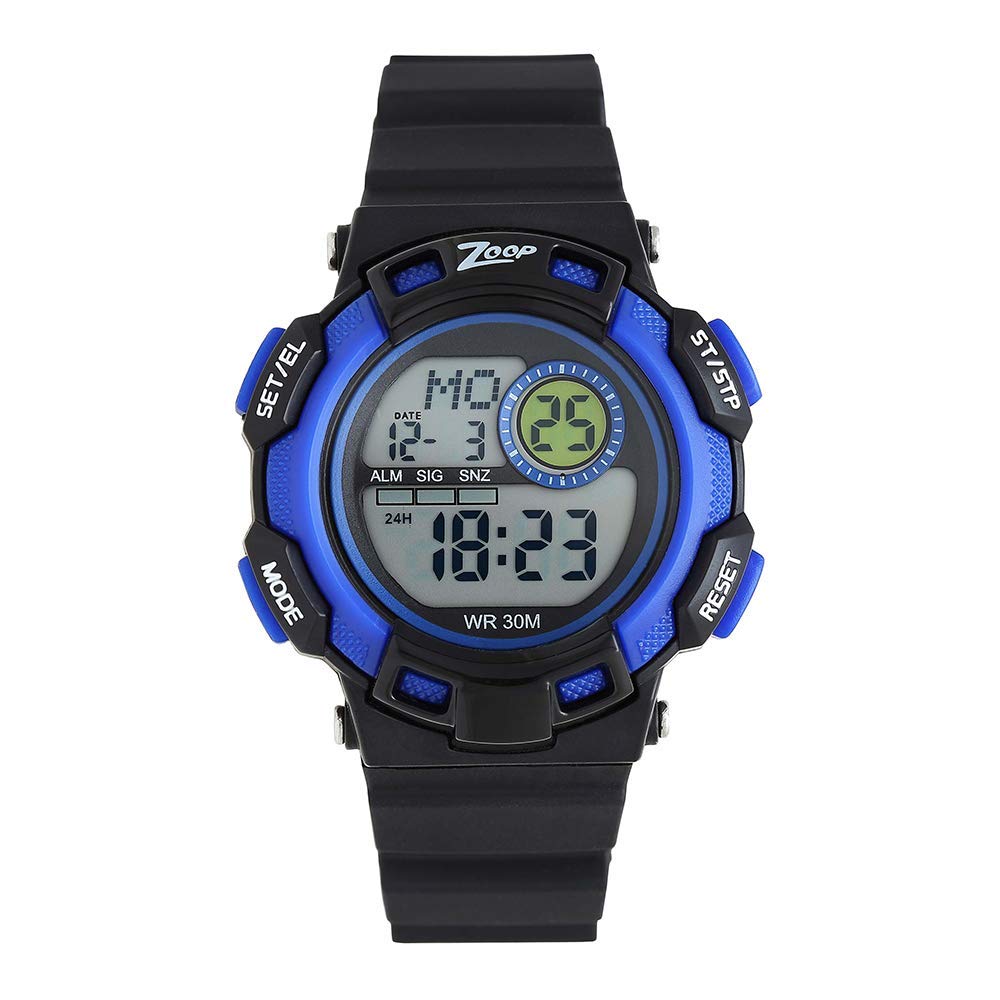
Image: The Zoop Kids Digital Watch 16009PP02 in grey, featuring a clear digital display and a comfortable strap.
Setup
Setting Time and Date
Your Zoop Kids Digital Watch is designed for easy time and date adjustment. Typically, digital watches feature one or more buttons on the side for setting. Refer to the following general steps:
- Identify Buttons: Locate the buttons on the side of the watch. Common labels include 'MODE', 'SET', 'START', or 'LIGHT'.
- Enter Setting Mode: Press the 'MODE' or 'SET' button repeatedly until the time (hours or minutes) begins to flash.
- Adjust Time: Use the 'START' or 'ADJUST' button to increase the flashing digit. Press 'MODE' or 'SET' again to move to the next digit (minutes, then possibly month, day, year).
- Exit Setting Mode: Once all settings are correct, press the 'MODE' or 'SET' button one last time, or wait for a few seconds for the watch to automatically exit setting mode.
Note: Specific button functions may vary slightly. Experiment with the buttons to understand their roles.
Operating
Basic Functions
The Zoop Kids Digital Watch provides clear time display and basic functions:
- Time Display: The primary screen displays the current time (hours, minutes, seconds) and often the date.
- Mode Switching: Press the 'MODE' button to cycle through different display modes, which may include:
- Date display (Month/Day)
- Alarm setting (if available)
- Stopwatch (if available)
- Backlight: If equipped, press the 'LIGHT' button to illuminate the display for better visibility in low-light conditions.
Maintenance
Cleaning and Care
- Cleaning: Wipe the watch case and strap with a soft, dry cloth. For stubborn dirt, a slightly damp cloth can be used, followed by immediate drying. Avoid harsh chemicals or abrasive cleaners.
- Water Resistance: This watch is designed for everyday use. Avoid prolonged exposure to water, such as swimming or showering, unless specifically stated otherwise. Protect it from direct contact with solvents, detergents, perfumes, and cosmetics, as these can damage the case and strap.
- Temperature: Avoid exposing the watch to extreme temperatures (hot or cold) or sudden temperature changes, as this can affect its accuracy and battery life.
Battery Replacement
The watch requires 1 Lithium Metal battery. When the display becomes dim or stops functioning, the battery may need replacement. It is recommended to have the battery replaced by a qualified technician to ensure proper sealing and functionality.
Troubleshooting
If you encounter issues with your Zoop Kids Digital Watch, refer to the following common solutions:
- Watch Not Turning On: Check if the battery needs replacement. If the watch is new, ensure any protective plastic tabs have been removed from the battery compartment.
- Incorrect Time Display: Follow the 'Setting Time and Date' instructions in the Setup section to reset the time. If the time consistently drifts, the battery may be low, or the watch may require service.
- Buttons Not Responding: Ensure the buttons are not stuck or obstructed. If the issue persists, the watch may require professional inspection.
For issues not covered here, please contact customer support.
Specifications
| Feature | Detail |
|---|---|
| Model Number | 16009PP02 |
| Brand | Zoop |
| Display Type | Digital |
| Movement Type | Automatic |
| Case Material | Plastic |
| Case Shape | Rectangular |
| Case Diameter | 43.1 Millimetres |
| Case Thickness | 14 Millimetres |
| Band Material | Superior quality material (as per description) |
| Band Colour | Grey (as per product title) / Black (as per specifications) |
| Band Width | 20 Millimetres |
| Clasp Type | Tang Buckle |
| Item Weight | 46 Grams |
| Batteries | 1 Lithium Metal battery required |
| Age Range Description | Kid |
Warranty
Information regarding the specific warranty period and terms for the Zoop Kids Digital Watch 16009PP02 is typically provided at the point of purchase or on the product packaging. Please retain your proof of purchase for any warranty claims. For detailed warranty information, refer to the official Zoop website or contact their customer service.
Support
For further assistance, technical support, or inquiries regarding your Zoop Kids Digital Watch 16009PP02, please visit the official Zoop brand website or contact their customer support channels. Ensure you have your model number (16009PP02) ready when seeking support.


