
uxcell a18113000ux0471
uxcell TM-1703 SPDT Micro Limit Switch User Manual
Your comprehensive guide to installation, operation, and maintenance.
1. Introduction
This manual provides detailed instructions for the proper use and maintenance of your uxcell TM-1703 SPDT (Single Pole Double Throw) Micro Limit Switch. This device is designed for precise position monitoring and control in various mechanical and electrical systems.
1.1 Product Overview
The uxcell TM-1703 is a versatile micro limit switch featuring a long hinge roller lever and screw terminals for secure connections. It offers stable performance and is suitable for a wide range of applications, including industrial automation, appliance control, and safety interlocks.
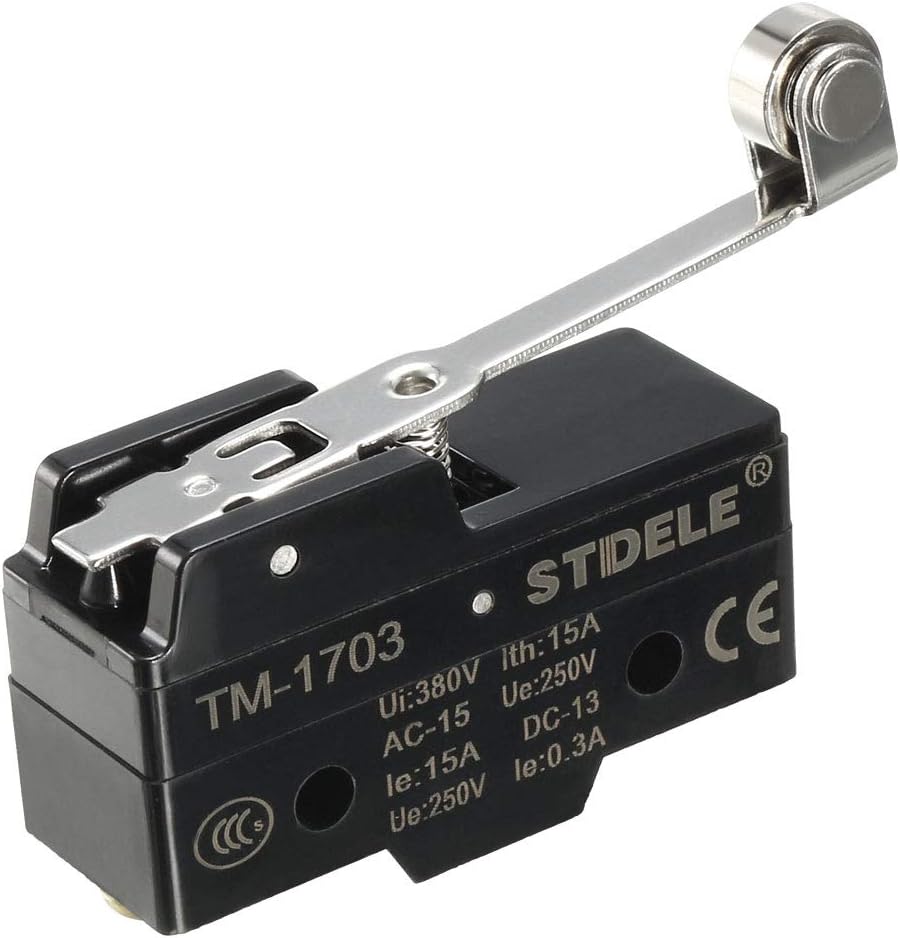
Figure 1: Front view of the uxcell TM-1703 Micro Limit Switch, showing the roller lever and model number.
1.2 Key Features
- Contact Type: SPDT (Single Pole Double Throw) with 1 Normally Open (NO) and 1 Normally Closed (NC) contact.
- High Precision: Designed for accurate detection of mechanical part movement.
- Versatile Application: Applicable to both AC and DC control circuits.
- Robust Design: IP62 protection degree, suitable for environments where protection against dust and splashing water is needed.
- Easy Connection: Features screw terminals for reliable wiring.
1.3 Package Contents
- 1 x uxcell TM-1703 Micro Limit Switch
2. Setup and Installation
Follow these steps for proper installation of your micro limit switch. Ensure all power is disconnected before beginning any wiring or installation work.
2.1 Mounting the Switch
- Identify a suitable mounting location where the switch's roller lever can be actuated by the moving part.
- The switch is designed for panel mounting. Use the two fixing holes on the switch body to secure it using appropriate screws (not included). The fixing holes have a diameter of 4mm (0.16 inch).
- Ensure the switch is mounted securely and does not wobble, as this can affect its accuracy and lifespan.

Figure 2: Dimensions and terminal layout of the uxcell TM-1703 Micro Limit Switch.
2.2 Wiring Instructions
The TM-1703 switch features three screw terminals: COM (Common), NO (Normally Open), and NC (Normally Closed). Refer to Figure 2 for terminal identification.
- Disconnect Power: Before making any electrical connections, ensure that the power supply to the circuit is completely disconnected.
- Identify Terminals: Locate the COM, NO, and NC terminals on the switch.
- Connect Common (COM): Connect the common wire from your control circuit to the COM terminal.
- Connect Normally Open (NO): If you require the circuit to be closed when the switch is actuated (lever pressed), connect your load or signal wire to the NO terminal.
- Connect Normally Closed (NC): If you require the circuit to be closed when the switch is NOT actuated (lever released), connect your load or signal wire to the NC terminal.
- Secure Connections: Ensure all wires are stripped to the appropriate length and securely fastened under the screw terminals to prevent loose connections and potential hazards.
Caution: Incorrect wiring can damage the switch or connected equipment. If you are unsure, consult a qualified electrician.
3. Operating the Switch
The uxcell TM-1703 is an automatic switch designed to change its contact state based on the physical actuation of its roller lever.
3.1 Basic Operation
- When the roller lever is in its normal, unactuated position, the circuit between COM and NC is closed, and the circuit between COM and NO is open.
- When an external force (e.g., a moving part of a machine) presses the roller lever, the internal contacts switch state. The circuit between COM and NC opens, and the circuit between COM and NO closes.
- Upon release of the roller lever, the switch returns to its original state.

Figure 3: Side view of the uxcell TM-1703, illustrating the internal spring mechanism of the roller lever.
3.2 Applications
This micro limit switch is widely used in:
- Monitoring the position of moving parts in machinery.
- Control circuits for automated equipment.
- Auxiliary circuits for terminal limit protection.
- Appliance and electronic equipment.
- Automotive electrical systems.
4. Maintenance
Regular maintenance ensures the longevity and reliable operation of your uxcell TM-1703 Micro Limit Switch.
4.1 General Care
- Keep the switch clean and free from excessive dust, dirt, or debris. Use a soft, dry cloth for cleaning.
- Avoid exposing the switch to harsh chemicals or corrosive environments beyond its IP62 rating.
- Ensure the roller lever mechanism moves freely and is not obstructed.
4.2 Inspection
- Periodically check the wiring connections to ensure they remain tight and secure.
- Inspect the roller lever and hinge for any signs of wear, damage, or deformation.
- Verify that the switch actuates smoothly and consistently at the desired position.
5. Troubleshooting
If you encounter issues with your uxcell TM-1703 Micro Limit Switch, refer to the following common problems and solutions.
| Problem | Possible Cause | Solution |
|---|---|---|
| Switch not actuating or inconsistent operation. | Misalignment of the moving part with the roller lever. Obstruction of the roller lever. Worn or damaged roller/hinge. | Adjust the position of the switch or the moving part. Clear any debris or obstructions. Inspect the roller/hinge for damage; replace if necessary. |
| No electrical signal change when actuated. | Loose or incorrect wiring. Damaged internal contacts. Overload or short circuit. | Check all terminal connections (COM, NO, NC) for tightness and correct wiring according to your circuit diagram. Test the switch with a multimeter for continuity. If no change, the switch may be faulty and require replacement. Verify that the current and voltage ratings are within the switch's specifications. |
| Switch feels stiff or sticky. | Accumulation of dirt or grime. Corrosion. | Clean the switch mechanism with a soft, dry brush or cloth. Ensure the operating environment is suitable for the switch's IP rating. |
6. Specifications
Detailed technical specifications for the uxcell TM-1703 Micro Limit Switch.
| Attribute | Value |
|---|---|
| Product Name | Micro Switch |
| Model No. | TM-1703 |
| Contact Form | SPDT NO+NC |
| Termination Style | Screw Terminal |
| Terminal Number | 3 |
| Rating (Ui) | 380V |
| Rating (Ith) | 15A |
| AC-15 (Ue) | 250V |
| AC-15 (Ie) | 15A |
| DC-13 (Ue) | 250V |
| DC-13 (Ie) | 0.3A |
| Protection Degree | IP62 |
| Overall Size (L*W*H) | 65x45x18mm / 2.56x1.77x0.71inch |
| Fixing Holes Dia. | 4mm / 0.16inch |
| Net Weight | 38g |
| Operation Mode | Automatic |
| Current Rating | 15 Amps |
| Operating Voltage | 250 Volts |
| Connector Type | Screw |
| Mounting Type | Panel Mount |
| Actuator Type | Long Hinge Roller Lever |
7. Warranty and Support
For any questions, technical assistance, or warranty information regarding your uxcell TM-1703 Micro Limit Switch, please contact uxcell customer support or visit the official uxcell store online.
You can find more information and contact details by visiting the uxcell Store on Amazon.
Ask a question about this manual
Ask about setup, troubleshooting, compatibility, parts, safety, or missing instructions. Manuals+ will review the question and use this page’s manual context to help answer it.