
Introduction
Thank you for purchasing the Camry Digital Kitchen Scale EK5055. This manual provides detailed instructions for the proper setup, operation, and maintenance of your new kitchen scale. Please read this manual thoroughly before use and retain it for future reference.
Safety Information
- Do not immerse the scale in water or other liquids.
- Clean the scale with a damp cloth. Do not use abrasive cleaners.
- Place the scale on a hard, flat, and stable surface for accurate measurements.
- Avoid dropping the scale or subjecting it to strong impacts.
- Do not overload the scale beyond its maximum capacity of 5 kg (11 lb).
- Keep the scale away from extreme temperatures and direct sunlight.
- Remove batteries if the scale will not be used for an extended period.
Package Contents
The package should contain the following items:
- Camry Digital Kitchen Scale EK5055
- User Manual (this document)
- Note: 2 x 1.5V AAA batteries are required but not included.

Image: The retail packaging box for the Camry Digital Kitchen Scale EK5055, showing the scale on the front.
Product Overview
The Camry Digital Kitchen Scale EK5055 features a 5mm tempered glass platform and a high-precision strain gauge sensor for accurate measurements. It includes an LCD display and intuitive control buttons.

Image: Front view of the Camry Digital Kitchen Scale EK5055, displaying its tempered glass platform and digital screen.
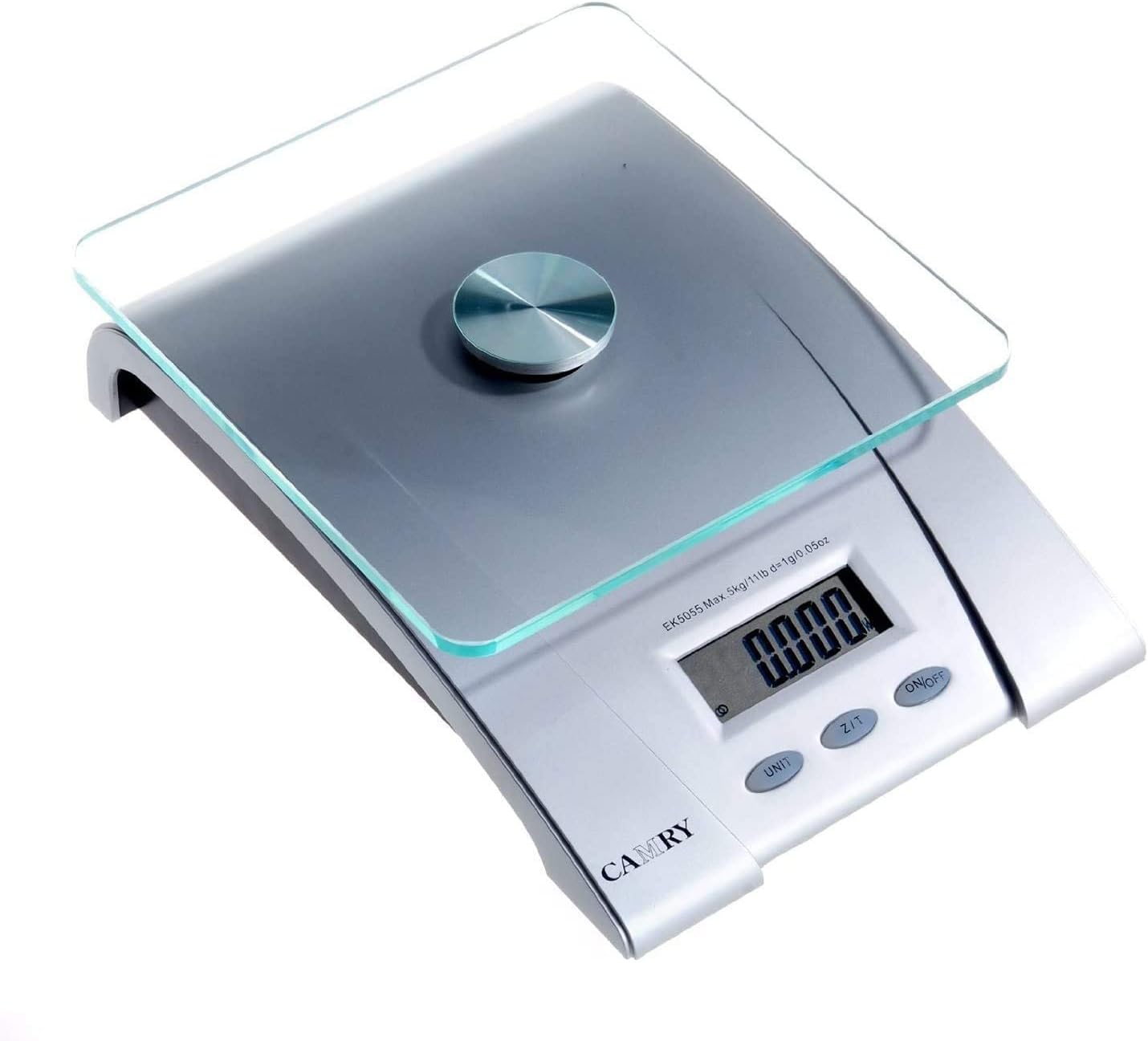
Image: Top-down view of the scale, showing the "UNIT", "Z/T" (Tare), and "ON/OFF" buttons clearly visible below the LCD display.

Image: A close-up view of the scale's LCD display and the three control buttons: UNIT, Z/T, and ON/OFF.
Setup
Battery Installation
- Locate the battery compartment on the underside of the scale.
- Open the battery compartment cover.
- Insert two (2) 1.5V AAA batteries, ensuring correct polarity (+/-).
- Close the battery compartment cover securely.

Image: The underside of the scale, showing the battery compartment cover and non-slip feet.
Operating Instructions
Power On/Off
- To turn on: Press the ON/OFF button. The display will show "88888" and then "0g" (or "0.00oz").
- To turn off: Press and hold the ON/OFF button for a few seconds, or the scale will automatically shut off after approximately 2 minutes of inactivity.
Unit Conversion
- With the scale on, press the UNIT button to cycle through available units: grams (g), pounds (lb), and ounces (oz).
- The selected unit will be displayed on the LCD screen.
Tare Function (Auto Zero)
The tare function allows you to weigh items in a container by subtracting the container's weight.
- Place an empty container on the scale platform. The display will show its weight.
- Press the Z/T button. The display will reset to "0" (or "0.00").
- Add the items you wish to weigh into the container. The display will now show only the net weight of the items.
- To clear the tare, remove the container and its contents, then press Z/T again.
Weighing
- Ensure the scale is on and displaying "0" (or "0.00").
- Gently place the item(s) to be weighed onto the center of the tempered glass platform.
- Read the weight displayed on the LCD screen.
Overload Indication
If the display shows "Err", it indicates that the scale has been overloaded. Remove the item immediately to prevent damage. The maximum weight capacity is 5 kg (11 lb).
Low Battery Indication
If the display shows "Lo", the batteries are low and need to be replaced. Refer to the "Battery Installation" section for instructions.
Maintenance and Care
- Clean the scale surface with a soft, damp cloth. Do not use chemical cleaning agents or abrasive materials.
- Do not allow water to enter the interior of the scale.
- Store the scale in a dry place at room temperature.
- Avoid prolonged exposure to direct sunlight or extreme heat/cold.
Troubleshooting
| Problem | Possible Cause | Solution |
|---|---|---|
| Scale does not turn on. | Batteries are not installed or are depleted. | Install new 1.5V AAA batteries, ensuring correct polarity. |
| Inaccurate readings. | Scale is on an uneven surface; scale is overloaded; external vibrations. | Place the scale on a flat, stable surface. Ensure weight does not exceed 5 kg. Avoid vibrations during use. |
| Display shows "Lo". | Low battery power. | Replace the batteries with new 1.5V AAA batteries. |
| Display shows "Err". | Scale is overloaded. | Remove the item from the scale immediately. Do not exceed 5 kg capacity. |
Specifications
| Model | EK5055 |
| Brand | Camry |
| Type | Digital Kitchen Scale |
| Platform Material | 5mm Tempered Glass |
| Maximum Capacity | 5 kg (11 lb) |
| Division / Read-out Accuracy | 1 g (0.05 oz) |
| Units | g, lb, oz |
| Display | LCD (46 x 17 mm) |
| Power Source | 2 x 1.5V AAA batteries (not included) |
| Special Features | Auto Zero, Auto Shut Off, Low Battery Indication, Overload Indication |
| Item Weight | 740 g |
| Dimensions (Package) | 22.5 x 16.8 x 7.6 cm |
Warranty and Support
For warranty information or technical support, please refer to the warranty card included with your product or contact Camry customer service through their official website. Please have your model number (EK5055) and purchase details available when contacting support.