
1. Important Safety Information
Please read this manual carefully before operating your air conditioner. Keep this manual for future reference.
- Professional Installation: Installation, maintenance, and repair must be performed by qualified service personnel. Improper installation can lead to electric shock, fire, or injury.
- Power Supply: Ensure the power supply matches the specifications of the unit. Do not use damaged power cords or plugs.
- Ventilation: Do not block the air inlet or outlet of the unit.
- Water and Moisture: Do not expose the unit to direct water spray or excessive moisture. Do not operate with wet hands.
- Children and Pets: Keep children and pets away from the unit during operation.
- Cleaning: Always disconnect power before cleaning the unit. Use a soft, dry cloth for cleaning.
- Refrigerant: This unit uses R410A refrigerant. Handle with care and ensure proper ventilation during service.
2. Product Overview
The AUX ASW-H12A4/LIR1 is a 12000BTU (1 Ton) wall-mounted split air conditioning system designed for both heating and cooling. It features fine air purification, a T1 compressor, and Wi-Fi connectivity (optional).
2.1 Components
- Indoor Unit: Responsible for air intake, cooling/heating, and air discharge into the room.
- Outdoor Unit: Contains the compressor and condenser, responsible for heat exchange with the outside air.
- Remote Control: Used to operate the air conditioner's functions.

Figure 2.1: Overview of the AUX Split AC system, showing the indoor unit, outdoor unit, and remote control.
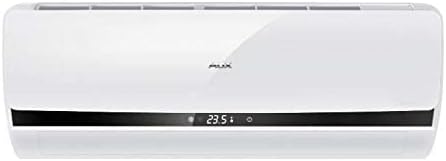
Figure 2.2: Front view of the AUX indoor unit, displaying its sleek design and digital display.
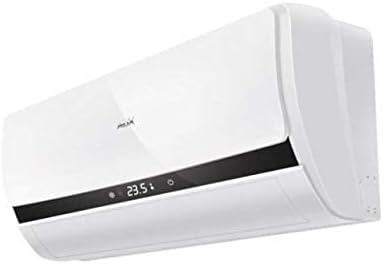
Figure 2.3: Angled view of the AUX indoor unit, highlighting its compact form factor and air vents.
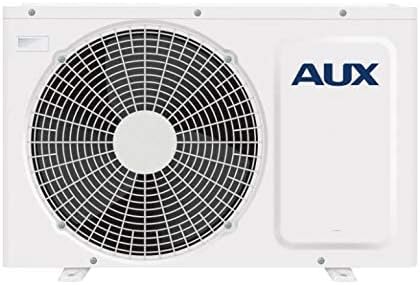
Figure 2.4: Front view of the AUX outdoor unit, showing the fan grille and the AUX branding.
3. Setup and Installation
Installation of this split air conditioning system requires specialized knowledge and tools. It is strongly recommended that you contact a certified HVAC professional for installation to ensure proper functioning, safety, and warranty validity.
3.1 Pre-Installation Checks
- Verify that the power supply voltage and frequency match the unit's requirements.
- Ensure the installation location for both indoor and outdoor units allows for proper airflow and drainage.
- Confirm that the maximum communication length of 15 meters is not exceeded.
3.2 Professional Installation Steps (Summary for reference)
- Mounting the indoor unit securely on the wall.
- Installing the outdoor unit on a stable, level surface.
- Connecting refrigerant lines and electrical wiring between indoor and outdoor units.
- Performing vacuuming and refrigerant charging.
- Checking for leaks and testing the system.
4. Operating Instructions
The air conditioner is primarily controlled via the wireless remote control. Ensure the remote control has working batteries.
4.1 Basic Operation
- Power On/Off: Press the ON/OFF button on the remote control to start or stop the unit.
- Mode Selection: Press the MODE button to cycle through available modes:
- Cooling Mode: For cooling the room. Cooling power: 2700 W.
- Heating Mode: For heating the room. Heating power: 2800 W. Minimum operating temperature for heating is -15°C.
- Fan Mode: Circulates air without cooling or heating.
- Auto Mode: The unit automatically selects the operating mode based on the room temperature.
- Dry Mode: Reduces humidity in the room.
- Temperature Adjustment: Use the TEMP UP/DOWN buttons to set the desired temperature.
- Fan Speed: Press the FAN SPEED button to adjust the fan speed (4 speeds available).
- Swing Function: Use the SWING button to adjust the direction of the airflow.
4.2 Advanced Functions
- Timer Function: The On/Off Timer allows you to set a specific time for the unit to turn on or off. Refer to the remote control's specific instructions for setting the timer.
- Wi-Fi Control (Option): If equipped with the Wi-Fi module, the unit can be controlled via a smartphone application. Consult the separate Wi-Fi control manual for setup and operation.
- Warm Start: This function prevents cold air from blowing out when the unit starts in heating mode.
- Memory Function: The unit can memorize your preferred settings.
5. Maintenance
Regular maintenance ensures optimal performance and extends the lifespan of your air conditioner. Always disconnect power before performing any maintenance.
5.1 Air Filter Cleaning
The air filters should be cleaned regularly, typically every two weeks, or more frequently depending on usage and air quality.
- Open the front panel of the indoor unit.
- Remove the air filters (Easy Clean Filter type).
- Clean the filters using a vacuum cleaner or wash them with lukewarm water (below 40°C).
- Allow the filters to dry completely in a shaded area before reinstalling them. Do not expose to direct sunlight.
- Reinstall the filters and close the front panel.
5.2 Other Filters
This unit features a deodorizing filter, filter with vitamin C, and an anion generator. Refer to your installer or service manual for specific maintenance or replacement instructions for these specialized filters.
5.3 Outdoor Unit Maintenance
The outdoor unit should be inspected periodically for obstructions (leaves, debris) around the fan and coils. This should ideally be done by a professional during annual servicing.
- Anti-ice formation system: The unit has a system to prevent ice formation on the outdoor coil during heating operation in cold weather.
6. Troubleshooting
Before contacting service, please check the following common issues.
| Problem | Possible Cause | Solution |
|---|---|---|
| Unit does not start | No power; Remote control batteries low; Timer set to OFF. | Check power supply; Replace batteries; Cancel timer setting. |
| Insufficient cooling/heating | Dirty air filters; Blocked air intake/outlet; Room too large; Doors/windows open. | Clean air filters; Remove obstructions; Close doors/windows. |
| Unusual noise | Loose parts; Unit not level; Refrigerant flow noise (normal). | Ensure unit is level; If noise persists and is unusual, contact service. |
| Water leakage from indoor unit | Clogged drain hose; Improper installation. | Check and clear drain hose; Contact professional for inspection. |
| Self-diagnosis of malfunctions | Error code displayed on indoor unit. | Note the error code and refer to the service manual or contact customer support. |
If the problem persists after checking these points, please contact qualified service personnel.
7. Specifications
| Feature | Specification |
|---|---|
| Brand | AUX |
| Model Number | ASW-H12A4/LIR1 |
| Type | Wall Split System |
| Cooling Capacity | 12000 BTU |
| Cooling Power | 2700 W |
| Heating Power | 2800 W |
| Power Consumption (Cooling) | 820 W |
| Power Consumption (Heating) | 770 W |
| Indoor Unit Dimensions (WxHxD) | 70 × 28.5 × 18.8 cm |
| Indoor Unit Weight | 8 kg |
| Outdoor Unit Dimensions (WxHxD) | 72 × 54 × 26 cm |
| Outdoor Unit Weight | 27 kg |
| Noise Level (min/max) | 27 dB / 36 dB |
| Refrigerant Type | R 410A |
| Phase | Single-phase |
| Max. Communication Length | 15 m |
| Air Flow (max) | 7.5 cu m / min |
| Filter Type | Easy Clean Filter, Deodorizing filter, Filter with Vitamin C |
| Special Features | Inverter, Self-diagnosis, Anion generator, Anti-ice formation, Memory function, Warm start, Wi-Fi control (option) |
8. Warranty and Support
This AUX air conditioner comes with a limited warranty. Please refer to the warranty card included with your product for specific terms, conditions, and duration. Keep your purchase receipt as proof of purchase.
For technical support, service requests, or inquiries regarding your warranty, please contact your local AUX authorized service center or the retailer from whom you purchased the product. Ensure to provide your model number (ASW-H12A4/LIR1) and serial number (if applicable) when seeking support.
For the most up-to-date information and support resources, please visit the official AUX website.