
Introduction
The Sony X950G 65 Inch 4K Ultra HD Smart LED TV offers an immersive viewing experience with incredible detail, brightness, and clarity. Powered by the Picture Processor X1 Ultimate, this TV delivers stunning 4K HDR picture quality with Full Array Local Dimming & Boosting for enhanced contrast. X-Motion Clarity technology ensures smooth, lifelike action scenes. This manual provides essential information for setting up, operating, and maintaining your television.

Front view of the Sony X950G 65 Inch TV on its stand, displaying a vibrant floral image.
What's in the Box
Upon unboxing your Sony X950G TV, please ensure all the following components are present:
- Television
- Remote
- Stand
- Batteries (2 AAA)
- Power Cord
- IR Blaster
- Start Guide
- Manual
Setup
Physical Setup: Stand or Wall Mount
Your Sony X950G TV can be placed on its included stand or mounted on a wall. For stand installation, attach the provided feet securely to the bottom of the television. For wall mounting, ensure you use a compatible VESA mount (not included) and follow the mount manufacturer's instructions. The TV dimensions are approximately 57 x 35 5/8 x 13 1/8 inches with the stand, and 57 x 32 7/8 x 2 3/4 inches without the stand.
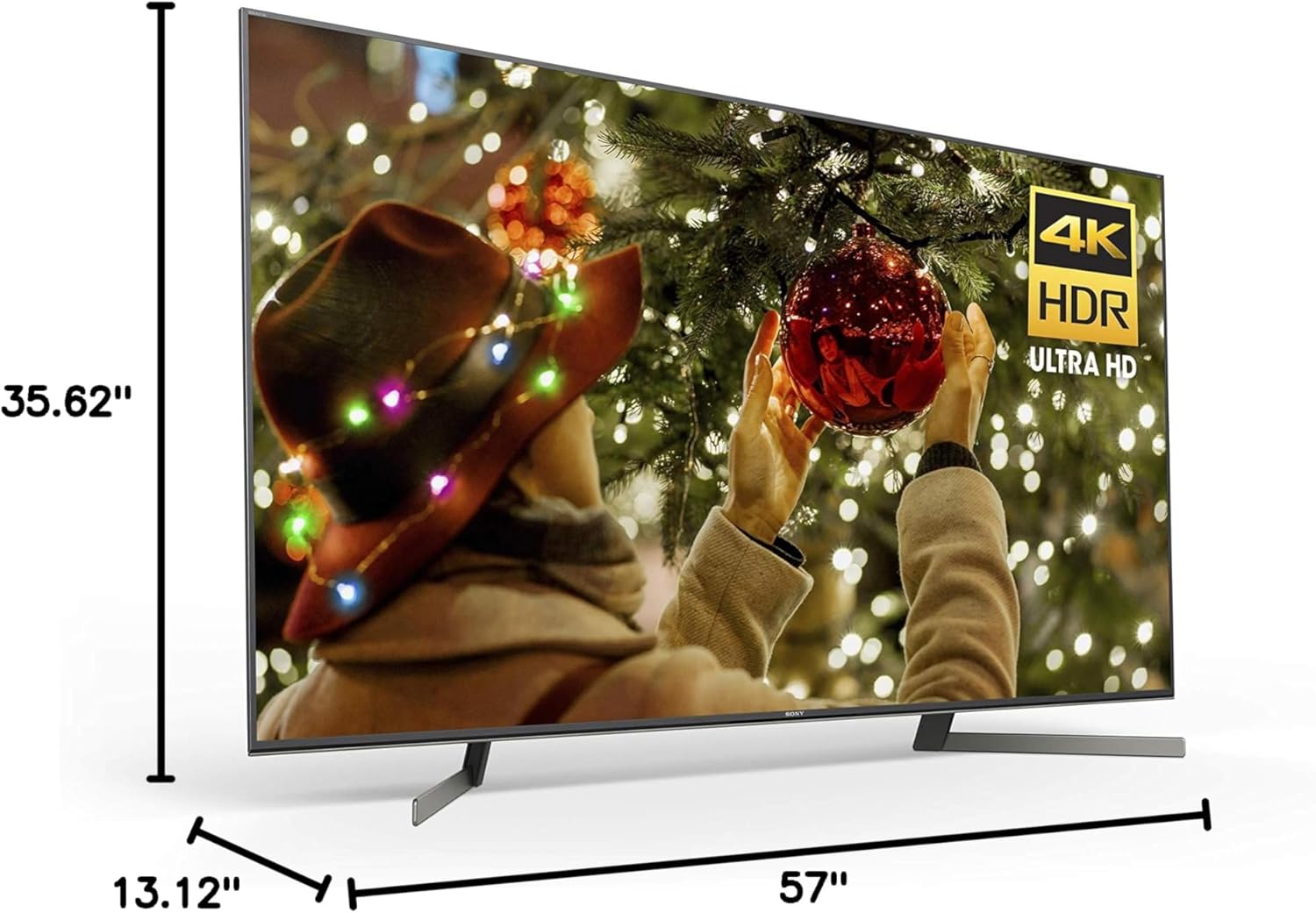
Diagram showing the dimensions of the Sony X950G 65 Inch TV.
Connections
The rear panel of your TV provides various ports for connecting external devices:
- HDMI Inputs: Connect your cable box, Blu-ray player, gaming consoles, and other HDMI-enabled devices.
- USB Ports: For connecting USB storage devices to view media or for firmware updates.
- LAN (Ethernet) Port: For a wired internet connection.
- Antenna/Cable Input: For connecting an antenna or cable TV signal.
- Digital Audio Out (Optical): For connecting to a soundbar or audio receiver.
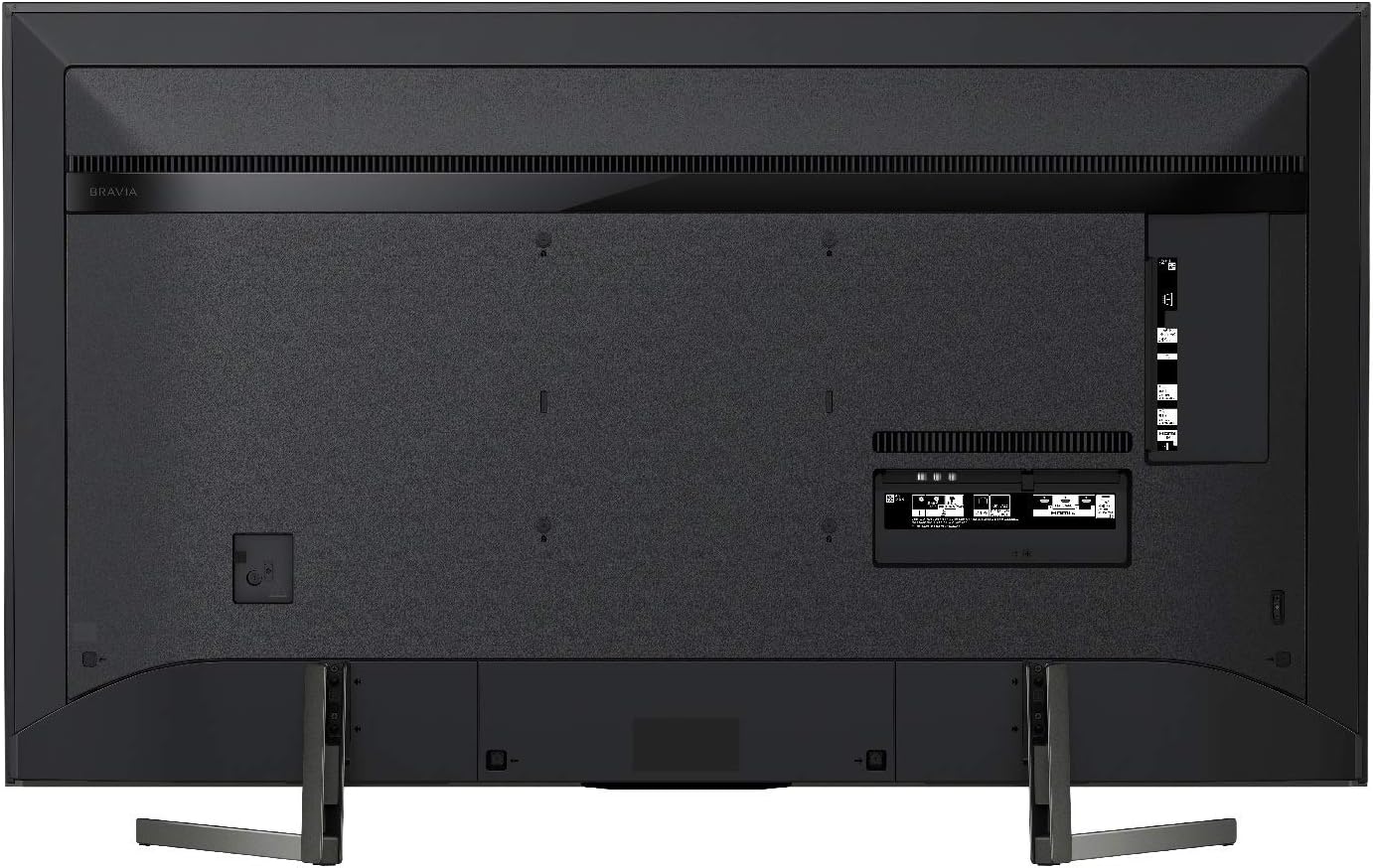
Rear view of the Sony X950G TV showing various input and output ports.
Initial Power On
After connecting all necessary cables, plug the power cord into an electrical outlet. Press the power button on the TV or the remote control. Follow the on-screen instructions to complete the initial setup, including network connection, channel scanning, and Google account login.
Operating Instructions
Smart TV Features
The Sony X950G runs on Android TV, providing access to a wide range of apps and services. It features built-in Google Assistant for voice control and is compatible with Alexa and Apple AirPlay 2/HomeKit. You can stream smart camera feeds, play music, launch video apps, and adjust volume using voice commands through an Alexa-enabled device. Seamlessly integrate your iPhone and Siri devices for effortless smart home management and content streaming.
Video: Overview of the Sony X950G 4K Ultra HD LED TV's smart features and user interface.
Picture Modes
Optimize your viewing experience with various picture modes:
- Vivid: Enhances brightness and color saturation for a dynamic picture.
- Standard: Suitable for everyday TV viewing with balanced picture settings.
- Cinema: Provides accurate colors and contrast, ideal for watching movies.
- Professional: Offers a calibrated picture for precise color reproduction.
- Calm: Reduces brightness for comfortable viewing in low-light environments.
- Photo: Optimized for displaying still images.
- IMAX Enhanced: Delivers an optimized picture for IMAX Enhanced content.
- Netflix Calibrated Mode: Automatically adjusts picture settings to match the content creator's intent when watching Netflix.
Gaming Features
The X950G is designed to enhance your gaming experience:
- Variable Refresh Rate (VRR): Reduces screen tearing and stuttering for smoother gameplay.
- Motion Blur Reduction: Minimizes blur in fast-paced action scenes.
- Black Equalizer: Adjusts dark areas to reveal hidden details without over-brightening.
- Crosshair: Provides an on-screen crosshair for improved aiming in games.
- YouTube Quick Search: Allows quick searching for gaming content on YouTube while playing.
- Gaming Multi View: Enables viewing game content alongside YouTube videos simultaneously.
Maintenance
To ensure the longevity and optimal performance of your Sony X950G TV, follow these maintenance guidelines:
- Screen Cleaning: Gently wipe the screen with a soft, dry microfiber cloth. For stubborn smudges, lightly dampen the cloth with water or a specialized screen cleaner (avoid harsh chemicals).
- Frame Cleaning: Use a soft, dry cloth to clean the TV frame and stand.
- Ventilation: Ensure adequate airflow around the TV by keeping vents clear of obstructions.
- Power Management: Unplug the TV during electrical storms or when it will be unused for extended periods.
Troubleshooting
If you encounter issues with your Sony X950G TV, try the following troubleshooting steps:
- No Picture/Sound: Check all cable connections (HDMI, power, audio). Ensure the correct input source is selected.
- Wi-Fi Connectivity Issues: Restart your router and modem. Go to the TV's network settings and reconnect to your Wi-Fi network. If the issue persists, try restarting the TV by unplugging it from the power outlet for a few minutes.
- Remote Not Responding: Replace the batteries in the remote control. Ensure there are no obstructions between the remote and the TV's IR sensor.
- Picture Quality Issues: Adjust picture settings (brightness, contrast, color, clarity) or try a different picture mode. Ensure your content source is high quality.
- Slow Performance: Close unused applications. Restart the TV to clear temporary data.
For more complex issues, refer to the full electronic manual or contact Sony customer support.
Specifications
| Feature | Detail |
|---|---|
| Brand | Sony |
| Model Number | XBR65X950G |
| Screen Size | 65 Inches |
| Display Technology | LED |
| Resolution | 4K |
| Refresh Rate | 120 Hz |
| Special Feature | Flat |
| Connectivity Technology | Bluetooth |
| Aspect Ratio | 16:9 |
| Product Dimensions (with stand) | 57 x 35 5/8 x 13 1/8 inches |
| Product Dimensions (without stand) | 57 x 32 7/8 x 2 3/4 inches |
| Item Weight | 52.9 Pounds |
| Voltage | 220 Volts |
| Batteries | 2 AAA batteries required (included) |
Warranty and Support
Your Sony X950G TV comes with a manufacturer's warranty. Please refer to the warranty card included in your product packaging for specific terms and conditions. For technical support, troubleshooting assistance, or service inquiries, please visit the official Sony support website or contact their customer service hotline. Keep your proof of purchase handy for warranty claims.