
Rain Bird 322170720657
Contents
Rain Bird 5000 Series Rotor Sprinkler Head User Manual
Model: 5004 PC (Y54007)
Introduction
The Rain Bird 5000 Series Rotor Sprinkler Head is designed to provide efficient and uniform water distribution for medium to large-sized lawns. Featuring patented Rain Curtain Nozzle Technology, this rotor ensures consistent coverage and minimizes water waste. Its robust construction and user-friendly adjustments make it suitable for both residential and commercial irrigation systems.
Key features include:
- Rain Curtain Nozzle Technology: Delivers uniform spray pattern for even watering.
- Adjustable Arc: 40 to 360 degrees arc rotation and reversing full circle in one.
- Radius Adjustment: Allows up to 25% radius reduction without changing nozzles.
- Slip Clutch Mechanism: Facilitates quick and easy adjustment during installation.
- Durable Construction: Heavy-duty design for long-lasting performance.
Setup and Installation
Proper installation is crucial for optimal performance and longevity of your Rain Bird 5000 Series Rotor Sprinkler Head. Ensure all connections are secure and the sprinkler is positioned correctly for desired coverage.
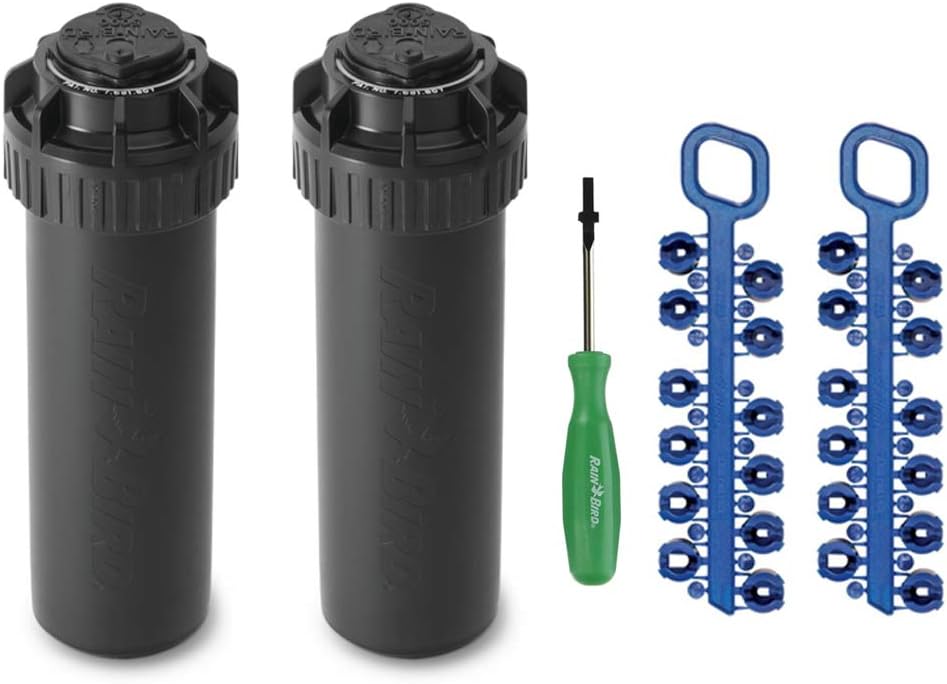
Figure 1: Rain Bird 5000 Series Rotor Sprinkler Heads with included adjustment tool and nozzle trees.
- Prepare the Site: Ensure the area for the sprinkler head is clear of debris and the piping is ready for connection.
- Connect the Sprinkler: Thread the sprinkler head onto the riser. Hand-tighten first, then use a wrench for a secure, leak-free connection.
- Adjust Arc (Initial): The sprinkler features a slip clutch mechanism allowing for initial arc adjustment by simply rotating the turret. For fine-tuning, use the top-adjust arc adjustment screw.
- Nozzle Selection and Installation:

Figure 2: Included Rain Curtain Nozzle Tree with various nozzle options.
Select the appropriate nozzle from the provided nozzle tree based on your desired spray distance and arc. Insert the nozzle into the nozzle opening on the sprinkler head. Ensure it clicks securely into place.
- Radius Adjustment: Use the radius adjustment screw (located on top of the sprinkler head) to reduce the spray radius by up to 25% without changing nozzles.

Figure 3: Top of the sprinkler head showing arc and radius adjustment points.

Figure 4: Rain Bird adjustment tool for fine-tuning.
Operating Instructions
Once installed, the Rain Bird 5000 Series Rotor Sprinkler Head operates automatically as part of your irrigation system. Ensure proper water pressure for optimal performance.

Figure 5: Rain Bird 5000 Series rotor in operation, demonstrating water coverage.
- Water Pressure: The sprinkler is designed to operate effectively within a pressure range of 25 to 65 PSI. Optimal performance is typically achieved around 45-55 PSI.
- Coverage: Depending on the installed nozzle and water pressure, the sprinkler can achieve a spray distance of 25 to 50 feet.
- Arc Adjustment: To adjust the arc, rotate the sprinkler turret to the desired starting point. Then, use the flat-blade screwdriver in the arc adjustment slot on top of the rotor to increase or decrease the arc. A full 360-degree rotation is also possible.
- Radius Adjustment: The radius adjustment screw allows for fine-tuning the spray distance. Turning the screw clockwise will decrease the radius, while turning it counter-clockwise will increase it.
Maintenance
Regular maintenance ensures the longevity and efficient operation of your sprinkler system.
- Cleaning: The self-cleaning arc adjustment screw helps prevent debris buildup. Periodically inspect the sprinkler head for any obstructions or debris that might affect its rotation or spray pattern.
- Wiper Seal: The pressure-activated multi-function wiper seal protects internal components from debris and ensures positive pop-up and retraction. No specific user maintenance is required for this component, but ensure the sprinkler pops up and retracts smoothly.
- Winterization: In colder climates, ensure proper winterization procedures are followed to prevent freezing and damage to the sprinkler head and irrigation lines. Consult a local irrigation professional if unsure.
Troubleshooting
If you encounter issues with your Rain Bird 5000 Series Rotor Sprinkler Head, refer to the common problems and solutions below.
| Problem | Possible Cause | Solution |
|---|---|---|
| Sprinkler not rotating or rotating intermittently. | Low water pressure, debris in the mechanism, or worn internal components. | Check water pressure. Flush the system to remove debris. If problem persists, replacement may be necessary. |
| Uneven water distribution or short spray distance. | Incorrect nozzle installed, low water pressure, or clogged nozzle. | Verify correct nozzle for desired range. Check water pressure. Clean or replace nozzle if clogged. |
| Sprinkler does not pop up or retract fully. | Debris around the stem, low water pressure, or damaged retract spring/wiper seal. | Clear debris from around the stem. Check water pressure. If internal components are damaged, replacement is recommended. |
| Water leaking from the base of the sprinkler. | Loose connection or damaged seal. | Tighten the connection to the riser. Inspect for cracks or damage to the sprinkler body. |
Specifications
| Attribute | Value |
|---|---|
| Brand | Rain Bird |
| Model Number | 322170720657 (5004 PC) |
| UPC | 857447008034 |
| Material | Plastic |
| Style | Pop-Up |
| Item Dimensions (L x W x H) | 8.66 x 5.55 x 2.64 inches |
| Item Weight | 1.3 pounds |
| Maximum Pressure | 65 Pound per Square Inch (PSI) |
| Maximum Flow Rate | 50 Gallons Per Minute (GPM) |
| Arc Adjustment Range | 40 - 360 degrees |
| Spray Distance | 25 - 50 feet |
Warranty and Support
For specific warranty information, please refer to the documentation included with your purchase or contact Rain Bird customer support directly. You can also visit the official Rain Bird store on Amazon for additional product information and support resources.
Important Safety Information: Avoid contact with moving parts. Ensure proper installation to prevent accidents.
Rain Bird Store: Visit the Rain Bird Store on Amazon
Ask a question about this manual
Ask about setup, troubleshooting, compatibility, parts, safety, or missing instructions. Manuals+ will review the question and use this page’s manual context to help answer it.