
Introduction
Thank you for purchasing the Ambient Weather TX-3107 Floating Pool and Spa Thermometer. This device is designed to provide accurate water temperature readings for your pool or spa and wirelessly transmit them to a compatible Ambient Weather Station. This manual will guide you through the setup, operation, and maintenance of your thermometer.
What's in the Box
- One (1) Ambient Weather TX-3107 Floating Pool and Spa Thermometer
Note: 2 x AA batteries are required for operation and are not included.
Product Overview
The TX-3107 is a wireless, waterproof thermometer designed for outdoor use in pools and spas. It features a digital display and transmits data via RF (915 MHz) to a compatible Ambient Weather display console.
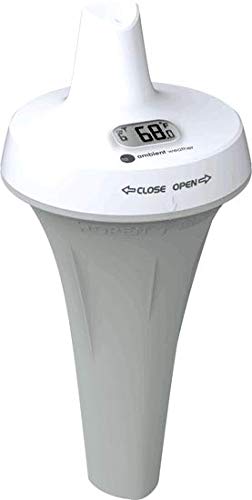
Figure 1: Ambient Weather TX-3107 Floating Pool and Spa Thermometer. This image shows the thermometer in its floating, conical design, ready for deployment in water.
Battery Installation
- Unscrew the top cap of the thermometer counter-clockwise to open the battery compartment.
- Insert two (2) fresh AA batteries, observing the correct polarity (+/-) as indicated inside the compartment.
- Carefully replace the top cap, ensuring the O-ring seal is properly seated to maintain waterproof integrity. Screw clockwise until hand-tight. Do not overtighten.
- The thermometer will power on automatically and begin transmitting data.
Important: Ensure the battery compartment is securely sealed to prevent water ingress, which can damage the device.
Setup and Pairing
The TX-3107 thermometer is designed to pair with compatible Ambient Weather Stations (e.g., WS-7078, WS-7079, WS-8482, WS-8478). Refer to your weather station's manual for specific instructions on adding a new sensor.
- Ensure your Ambient Weather Station is powered on and in pairing mode (if applicable).
- Place the TX-3107 thermometer within the wireless range of your weather station.
- The thermometer will automatically attempt to connect and transmit data. Once connected, the water temperature will appear on your weather station's display.
- The TX-3107 supports up to 8 channels. If you are adding multiple thermometers or other sensors, ensure each is assigned a unique channel on your weather station.
Placement Guidelines
Optimal placement ensures accurate readings and reliable wireless transmission.
- Water Placement: Allow the thermometer to float freely in the pool or spa. Avoid placing it where it might be trapped or submerged for extended periods.
- Wireless Range: The sensor has a wireless range of up to 150 feet (100 feet in most conditions). Obstructions like walls, large metal objects, or dense foliage can reduce this range.
- Line of Sight: For best results, ensure a clear line of sight between the thermometer and your weather station's display console.

Figure 2: Pool Sensor Placement Diagram. This diagram illustrates optimal placement for the floating thermometer to ensure good wireless signal reception by the display console, avoiding obstructions.
Operation
Once paired and placed, the TX-3107 will continuously measure and transmit water temperature data. The digital display on the thermometer itself provides a local reading, while the paired weather station console will show the remote reading.
- Temperature Display: The thermometer's built-in display shows the current water temperature.
- Data Transmission: Temperature data is transmitted wirelessly every 10 seconds to your compatible Ambient Weather Station.
- Online Monitoring: If your weather station is connected to the internet, you can view your pool/spa temperature data remotely via the Ambient Weather Network (ambientweather.net) on a web browser or mobile app.

Figure 3: Ambient Weather Dashboard on Multiple Devices. This image displays the Ambient Weather online dashboard interface across various devices like a desktop monitor, laptop, tablet, and smartphone, showing real-time weather data including temperature.
Maintenance
- Cleaning: Clean the thermometer periodically with a soft cloth and mild soap. Avoid abrasive cleaners that could damage the plastic. The product care instructions specify "Hand Wash Only".
- Battery Replacement: Replace batteries annually or when the low battery indicator appears on your weather station console. Always use fresh, high-quality AA batteries. Ensure the O-ring is clean and properly seated when reassembling the battery compartment to maintain its waterproof seal.
- Winterization: During freezing temperatures, remove the thermometer from the water and store it indoors to prevent damage.
Troubleshooting
| Problem | Solution |
|---|---|
| No temperature reading on display console. |
|
| Inaccurate temperature readings. |
|
| Water inside the battery compartment. |
|
Specifications
| Feature | Detail |
|---|---|
| Model | TX-3107 |
| Power Source | 2 x AA Batteries (not included) |
| Wireless Frequency | 915 MHz |
| Wireless Range | Up to 150 feet (100 feet in most conditions) |
| Temperature Range | Upper: 104 °F, Lower: 25 °C (Note: Unit discrepancy in source data. Please refer to your display console for actual range.) |
| Response Time | 10 seconds |
| Immersion Depth | 8.17 inches |
| Dimensions | 3.94 x 3.94 x 8.17 inches |
| Material | Plastic |
| Special Feature | Waterproof |
| Connectivity Technology | RF, Internet (via compatible weather station) |
Warranty and Support
Ambient Weather provides a limited warranty for this product. For detailed warranty information, technical support, or to purchase replacement parts, please visit the Ambient Weather website or contact their customer service.
- Online Support: www.ambientweather.com/support
- Product Registration: Register your product to receive updates and support.