
1. Introduction and Overview
The Pyle PDT100 USB Microphone Kit is a versatile cardioid condenser microphone designed for high-quality audio capture. It offers simple plug-and-play operation, making it suitable for various applications including gaming, streaming, podcasting, studio recording, and YouTube content creation. This microphone kit is universally compatible with Windows PC, Mac, and Linux operating systems, providing a reliable solution for home, office, and business use.
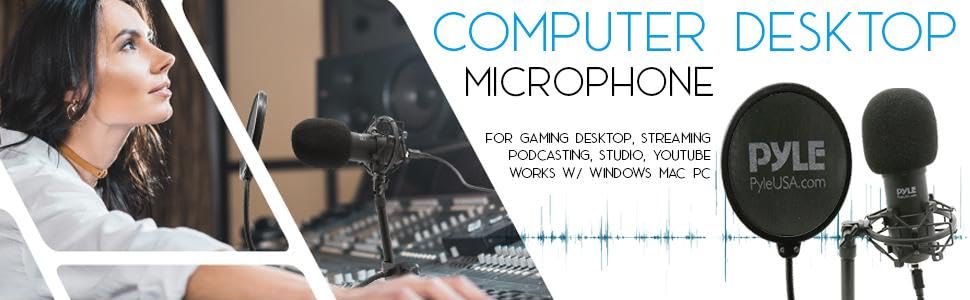
An overview image showing the Pyle USB microphone kit, highlighting its use for various applications like gaming, streaming, podcasting, and studio recording.
2. What's in the Box
Your Pyle PDT100 USB Microphone Kit includes the following components:
- USB Condenser Microphone
- Mic Shock Mount
- Adjustable Gooseneck Pop Filter
- Desktop Stand with Metal Iron Base
- Detachable USB Cable
- Portable Aluminum Storage/Travel Case

A compact view of the Pyle USB microphone kit, including the microphone, stand, pop filter, and travel case.
3. Setup Instructions
Follow these steps to set up your Pyle PDT100 USB Microphone Kit:
- Assemble the Stand: Attach the microphone stand to its metal iron base. Ensure it is stable on your desktop or counter.
- Mount the Microphone: Secure the USB condenser microphone into the mic shock mount. The shock mount helps to isolate the microphone from physical vibrations, floor, and stand noise.
- Attach the Pop Filter: Connect the adjustable gooseneck pop filter to the microphone stand. Position the pop filter approximately 1-2 inches in front of the microphone. The pop filter helps to eliminate plosive sounds (like 'p' and 'b' sounds) for clearer audio.
- Connect to Computer: Plug the detachable USB cable into the microphone's USB port and then into an available USB port on your Windows PC, Mac, or Linux computer. The microphone is designed for plug-and-play operation and typically does not require additional drivers.
- Select as Input Device: Once connected, your computer should automatically detect the microphone. Navigate to your computer's sound settings or the audio input settings within your recording/streaming software (e.g., OBS, Audacity, GarageBand) and select the Pyle PDT100 as your primary audio input device.

A user operating the Pyle USB microphone, showcasing its stable freestanding desktop placement next to a computer.
4. Operating Instructions
To achieve optimal audio quality with your Pyle PDT100 microphone:
- Microphone Placement: Position the microphone directly in front of the sound source (e.g., your mouth) at a distance of 6-12 inches for clear vocal pickup. The cardioid pickup pattern is designed to capture sound primarily from the front, reducing unwanted background noise from the sides and rear.
- Pop Filter Usage: Ensure the pop filter is correctly positioned between you and the microphone. This will effectively reduce harsh 'p' and 'b' sounds, known as plosives, which can distort recordings.
- Gain Settings: Adjust the input gain (microphone volume) in your computer's sound settings or recording software. Start with a moderate gain level and increase it gradually until your audio is clear and strong without peaking or distortion.
- Monitoring: If your software allows, use headphones to monitor your audio in real-time. This helps you identify and correct any issues with volume or clarity during recording or streaming.
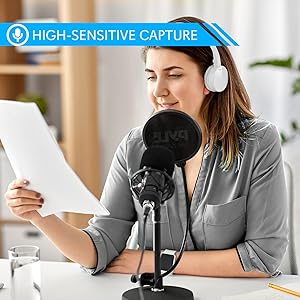
A user wearing headphones while speaking into the Pyle USB microphone, illustrating its high-sensitive audio capture capability.
5. Maintenance
Proper maintenance ensures the longevity and performance of your microphone kit:
- Cleaning: Use a soft, dry cloth to wipe down the microphone body and stand. Avoid using liquid cleaners or solvents, as they may damage the finish or internal components.
- Pop Filter Care: The pop filter can be gently cleaned with a damp cloth if necessary. Ensure it is completely dry before reattaching.
- Storage: When not in use, store the microphone and its accessories in the provided portable aluminum storage/travel case. This protects the components from dust, moisture, and physical damage.
- Cable Management: Avoid sharp bends or kinks in the USB cable to prevent internal wire damage.

A person carrying the durable hard travel case included with the Pyle USB microphone kit, emphasizing portability.
6. Troubleshooting
If you encounter issues with your Pyle PDT100 microphone, refer to the following troubleshooting tips:
- No Sound Output:
- Ensure the USB cable is securely connected to both the microphone and your computer.
- Verify that the Pyle PDT100 is selected as the default input device in your computer's sound settings and within your recording/streaming software.
- Check the input gain/volume levels in your software and operating system.
- Try connecting the microphone to a different USB port on your computer.
- Poor Sound Quality (Distortion, Low Volume, Background Noise):
- Adjust the microphone's distance from the sound source. Too close can cause distortion, too far can result in low volume and increased background noise.
- Ensure the pop filter is correctly positioned to reduce plosives.
- Lower the input gain if the audio sounds distorted or 'clipped'. Increase it if the volume is too low.
- Minimize ambient noise in your recording environment.
- Check for any loose connections in the shock mount or stand.
- Microphone Not Recognized by Computer:
- Restart your computer and try reconnecting the microphone.
- Test the microphone on a different computer to rule out a computer-specific issue.
- Ensure your operating system is up to date.
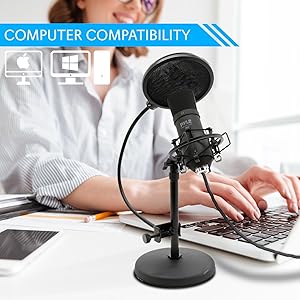
The Pyle USB microphone in use with a laptop, highlighting its broad compatibility with various computer operating systems.
7. Specifications
| Microphone Form Factor | Gooseneck |
| Item Dimensions (L x W x H) | 5.99 x 5.99 x 12.17 inches |
| Power Source | USB Microphone |
| Material | Aluminum, Metal |
| Signal-to-Noise Ratio | 74 dB |
| Hardware Platform | Gaming Console, PC |
| Number of Channels | 1 |
| UPC | 842893116075 |
| Item Weight | 5.83 pounds |
| Connectivity Technology | USB Mini 2.0 |
| Connector Type | USB |
| Compatible Devices | Works with PC, Mac, Linux |
| Color | Black |
| Polar Pattern | Unidirectional (Cardioid) |
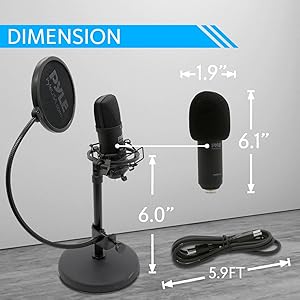
A diagram illustrating the physical dimensions of the Pyle USB microphone, stand, pop filter, and cable.
8. Warranty and Support
For detailed warranty information and customer support, please refer to the documentation included with your purchase or visit the official Pyle website. The website typically provides the most up-to-date information regarding product warranties, technical support, and service options.


