
ZdalaMit 32FNT005
Contents
Instruction Manual for ZdalaMit 32FNT005 Replacement Remote Control
Model: 32FNT005
Introduction
This manual provides essential information for the proper setup, operation, and maintenance of your ZdalaMit 32FNT005 replacement remote control. This remote is designed to be compatible with various Magnavox LCD and LED TV models, including 24ME403V, 24ME403V/F7, 29ME403V, 29ME403V/F7, 32ME303V, 32ME303V/F7, 32ME403V, 32ME403V/F7, 40ME325V, and 40ME325V/F7. It requires no programming or pairing, offering immediate functionality upon battery installation.

Image: Front view of the ZdalaMit 32FNT005 replacement remote control, showing all buttons and its compact design.
Setup
Battery Installation
- Locate the battery compartment on the back of the remote control.
- Slide the battery compartment cover downwards to open it.
- Insert two (2) 1.5V AAA alkaline batteries, ensuring the positive (+) and negative (-) terminals align correctly with the indicators inside the compartment.
- Slide the battery compartment cover back into place until it clicks securely.
The remote control is pre-programmed and does not require any additional setup or pairing with your Magnavox TV. It is ready for use immediately after battery installation.

Image: Rear view of the ZdalaMit 32FNT005 remote control, showing the open battery compartment and the placement of two AAA batteries.
Operating Instructions
To operate your Magnavox TV, point the ZdalaMit 32FNT005 remote control directly at the television's infrared sensor. Ensure there are no obstructions between the remote and the TV.
Button Functions
- Power (Red Button): Turns the TV on or off.
- SOURCE: Cycles through available input sources (e.g., HDMI, AV, Component).
- PIC/SOUND MODE: Adjusts picture or sound modes.
- FREEZE: Freezes the current image on the screen.
- SLEEP: Sets a sleep timer for the TV.
- PICTURE SIZE: Adjusts the aspect ratio or picture size.
- Number Buttons (0-9): Directly select channels.
- PREV.CH: Returns to the previously viewed channel.
- VOL +/-: Increases or decreases the volume level.
- Mute (Speaker with X): Mutes or unmutes the TV sound.
- CH +/-: Changes the channel up or down.
- SAP: Selects Secondary Audio Program (if available).
- BACK: Returns to the previous menu or screen.
- MENU: Opens the TV's main menu.
- INFO: Displays information about the current program or input.
- Navigation Arrows (Up, Down, Left, Right): Navigate through menus and options.
- OK: Confirms selections in menus.
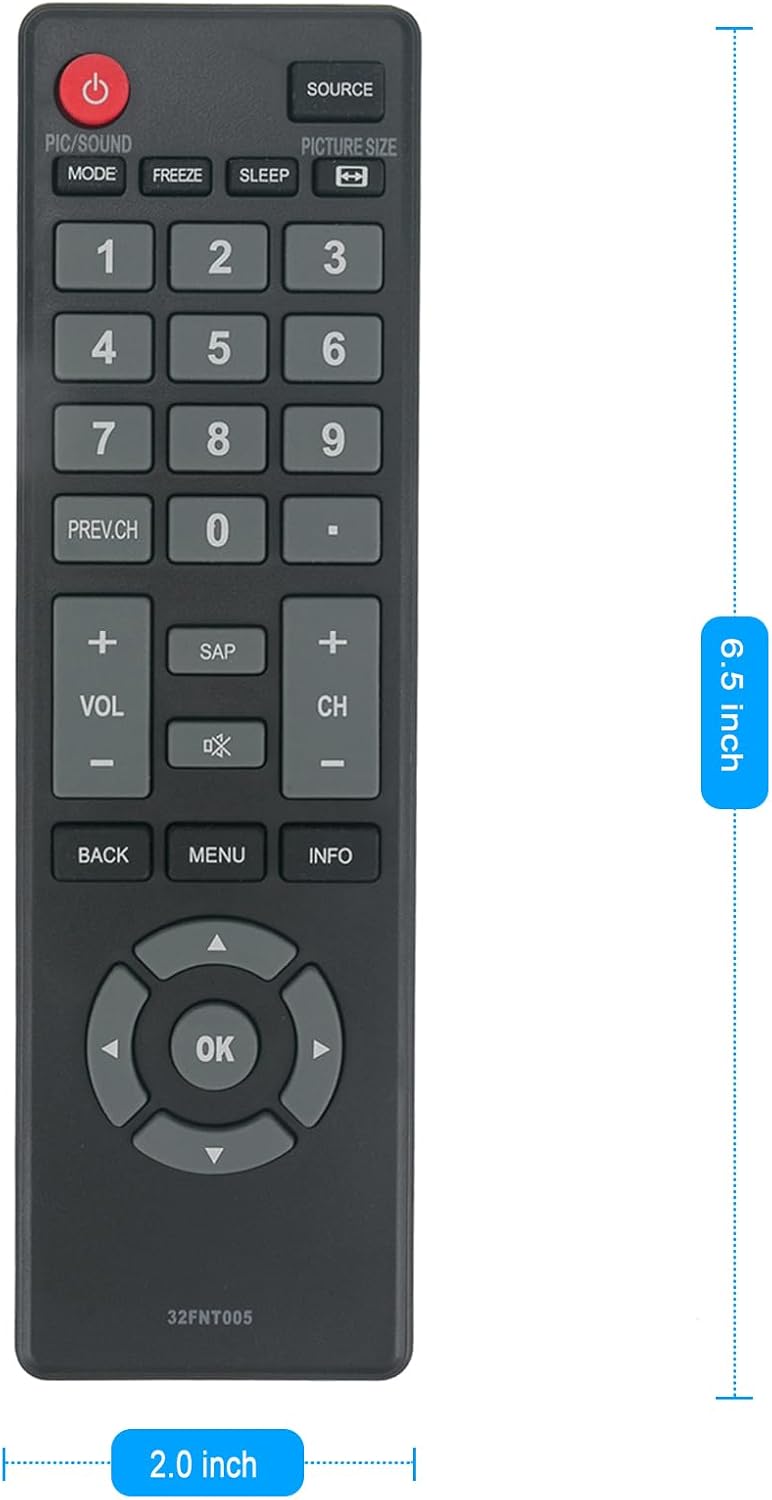
Image: The ZdalaMit 32FNT005 remote control positioned next to a Magnavox TV, illustrating its intended use.
Maintenance
Cleaning
To clean the remote control, use a soft, dry cloth. Do not use liquid cleaners or aerosol sprays, as they may damage the remote's internal components or finish.
Battery Care
- Replace batteries when the remote's responsiveness decreases.
- Remove batteries if the remote will not be used for an extended period to prevent leakage and damage.
- Dispose of used batteries responsibly according to local regulations.
Storage
Store the remote control in a cool, dry place away from direct sunlight and extreme temperatures to prolong its lifespan.
Troubleshooting
| Problem | Possible Cause | Solution |
|---|---|---|
| Remote not responding | Dead or incorrectly inserted batteries. Obstruction between remote and TV. Remote out of range. | Replace batteries with new AAA alkaline batteries, ensuring correct polarity. Remove any objects blocking the line of sight. Move closer to the TV (optimal range is approximately 10 feet). |
| Buttons are unresponsive or sticky | Dirt or debris under buttons. Worn out internal contacts. | Clean the remote surface with a dry cloth. If the issue persists, the remote may need replacement. |
| Remote works intermittently | Low battery power. Loose battery connection. | Replace batteries. Ensure batteries are firmly seated in the compartment. |
Specifications
- Product Dimensions: 6.5 x 2 x 0.6 inches
- Item Weight: 1.44 ounces
- Batteries: 2 AAA batteries required (not included)
- Compatible Devices: Television
- Max Number of Supported Devices: 1
- Color: Black
- Special Feature: Pre-Programmed

Image: Diagram illustrating the dimensions of the ZdalaMit 32FNT005 remote control.
Warranty and Support
Specific warranty details for this product are not provided in the available information. For any queries or support regarding your ZdalaMit 32FNT005 replacement remote control, please feel free to contact the seller or manufacturer directly.
Thank you for choosing ZdalaMit.
Ask a question about this manual
Ask about setup, troubleshooting, compatibility, parts, safety, or missing instructions. Manuals+ will review the question and use this page’s manual context to help answer it.