
Introduction
The Mayer MMMC01 Set Meal Cooker is designed for convenient and efficient meal preparation. This appliance allows for cooking a full set meal simultaneously, saving time and energy. It features multiple safety protections and is user-friendly, suitable for various cooking methods.
Key features include micro-pressure and anti-overflow cooking functions, enabling the creation of nutritious and well-balanced meals. The cooker has a gross capacity of 0.8 liters and operates at 700 watts.
Important Safety Instructions
Please read all instructions carefully before using the Mayer MMMC01 Set Meal Cooker to ensure safe operation and prevent injury or damage. Keep this manual for future reference.
- Always ensure the appliance is placed on a stable, level, heat-resistant surface away from edges.
- Do not immerse the main unit, cord, or plug in water or any other liquid.
- This appliance is for household use only. Do not use outdoors.
- Supervise children closely when the appliance is in use.
- Unplug from the outlet when not in use and before cleaning. Allow to cool before adding or removing parts.
- Do not operate any appliance with a damaged cord or plug, or after the appliance malfunctions or has been damaged in any manner.
- Avoid touching hot surfaces. Use handles or knobs. Steam released during cooking is hot.
- Do not block the steam vent during operation.
- Use only accessories recommended by the manufacturer.
Package Contents
Upon unpacking, please verify that all components are present and in good condition:
- 1 x Mayer MMMC01 Set Meal Cooker (Main Unit)
- 4 x Cooking Pots
- 1 x Measuring Cup
- 1 x Spatula
- 1 x Metal Rack
- 1 x Power Cord
Product Overview
Familiarize yourself with the components of your Mayer MMMC01 Set Meal Cooker.
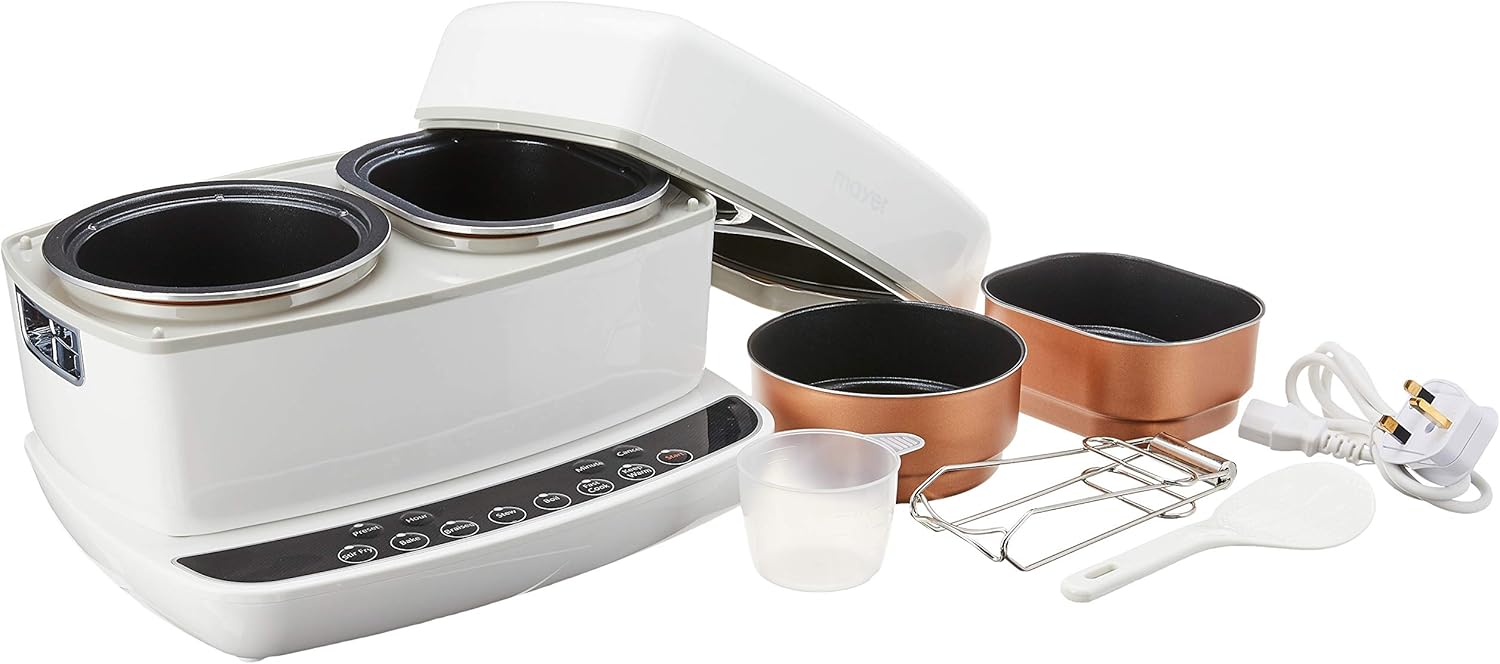
This image displays the Mayer MMMC01 Set Meal Cooker, featuring its main unit with two cooking compartments, four individual cooking pots (two black, two copper-colored), a measuring cup, a spatula, a metal rack, and a power cord.
Control Panel
The control panel features various buttons for selecting cooking functions and adjusting settings.
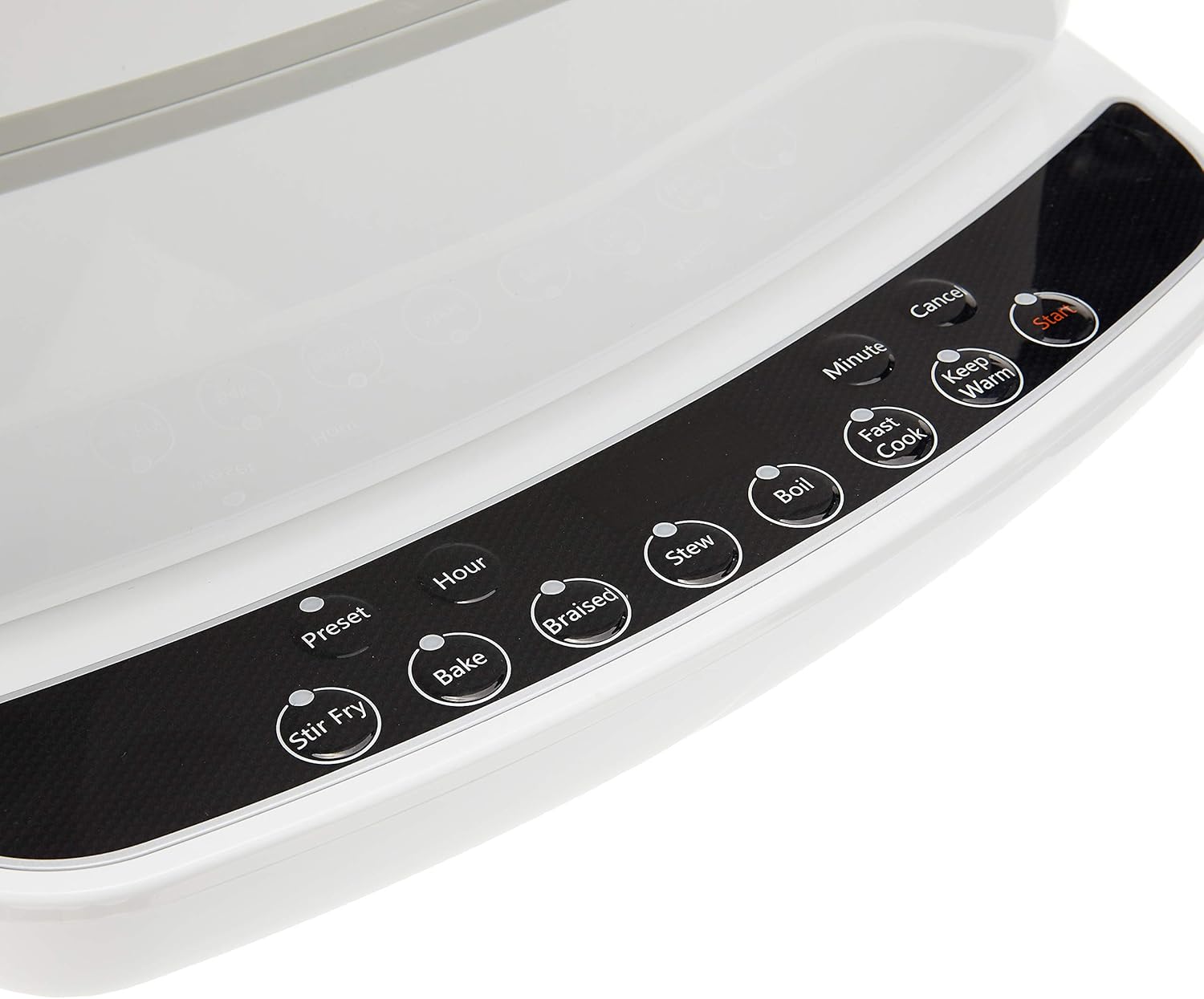
This image provides a detailed view of the cooker's control panel, highlighting buttons for 'Preset', 'Hour', 'Minute', 'Stir Fry', 'Bake', 'Braised', 'Stew', 'Boil', 'Fast Cook', 'Keep Warm', 'Start', and 'Cancel'.
- Preset: Sets a delayed start time for cooking.
- Hour/Minute: Adjusts cooking time or preset time.
- Stir Fry/Bake/Braised/Stew/Boil/Fast Cook: Selects specific cooking modes.
- Keep Warm: Maintains food temperature after cooking.
- Start: Initiates the selected cooking program.
- Cancel: Stops the current operation or clears settings.
Setup
- Unpack: Carefully remove all packaging materials and accessories from the box.
- Initial Cleaning: Before first use, wash the cooking pots, measuring cup, spatula, and metal rack with warm soapy water. Rinse thoroughly and dry. Wipe the exterior of the main unit with a damp cloth. Do not immerse the main unit in water.
- Placement: Place the cooker on a dry, stable, and heat-resistant surface, ensuring adequate ventilation around the appliance. Keep it away from walls and other heat sources.
- Power Connection: Ensure the power cord is securely plugged into the cooker and then into a grounded electrical outlet.
Operating Instructions
Follow these steps to operate your Mayer MMMC01 Set Meal Cooker:
- Prepare Ingredients: Place your desired ingredients into the individual cooking pots. Ensure the total volume does not exceed the maximum fill line to prevent overflow.
- Place Pots: Carefully place the filled cooking pots into the cooker's compartments.
- Close Lid: Close the cooker lid securely.
- Select Function: Plug in the cooker. The display will light up. Press the desired cooking function button (e.g., Stir Fry, Bake, Braised, Stew, Boil, Fast Cook).
- Adjust Time (if necessary): Use the Hour and Minute buttons to adjust the cooking time for the selected function.
- Use Preset (Optional): To set a delayed start, press the Preset button, then use Hour and Minute to set the delay time. After setting the preset time, select your desired cooking function and time, then press Start.
- Start Cooking: Press the Start button to begin the cooking process. The indicator light for the selected function will illuminate.
- Keep Warm: Once cooking is complete, the cooker may automatically switch to Keep Warm mode. You can also manually select Keep Warm.
- Cancel: To stop any operation, press the Cancel button.
- Serve: Carefully open the lid, avoiding steam. Use oven mitts to remove the hot cooking pots.
Maintenance and Cleaning
Regular cleaning ensures the longevity and optimal performance of your cooker. Always unplug the appliance and allow it to cool completely before cleaning.
- Cooking Pots: The cooking pots are dishwasher-safe. Alternatively, wash them with warm soapy water and a non-abrasive sponge. Rinse thoroughly and dry completely.
- Main Unit: Wipe the exterior of the cooker with a soft, damp cloth. For stubborn stains, use a mild detergent. Do not use abrasive cleaners or scouring pads. Never immerse the main unit in water or any other liquid.
- Lid: Clean the inside of the lid with a damp cloth. Ensure the steam vent is clear of any food debris.
- Accessories: Wash the measuring cup, spatula, and metal rack with warm soapy water, rinse, and dry.
- Storage: Store the clean and dry cooker and its accessories in a cool, dry place.
Troubleshooting
If you encounter any issues with your Mayer MMMC01 Set Meal Cooker, please refer to the following common problems and solutions:
| Problem | Possible Cause | Solution |
|---|---|---|
| Cooker does not turn on. | Not plugged in; power outlet issue; damaged cord. | Ensure the power cord is securely plugged into both the cooker and a working electrical outlet. Check the circuit breaker. If the cord is damaged, contact customer support. |
| Food is not cooking properly. | Incorrect cooking time/function selected; insufficient liquid; lid not closed properly. | Verify the selected cooking function and time. Ensure adequate liquid is added for steaming/stewing. Confirm the lid is securely closed. |
| Steam leaking from lid. | Lid not properly sealed; food debris blocking seal. | Ensure the lid is correctly positioned and fully closed. Check the lid seal for any food particles and clean if necessary. |
| Display shows an error code. | Internal malfunction. | Unplug the cooker, wait a few minutes, then plug it back in. If the error persists, contact customer support. |
Specifications
Technical details for the Mayer MMMC01 Set Meal Cooker:
- Model: MMMC01
- Brand: Mayer
- Capacity: 0.8 Liters
- Power: 700 Watts
- Material: Plastic (main unit), other materials for pots.
- Color: White
- Control Method: Touch
- Operation Mode: Automatic
- Dishwasher-Safe Parts: Cooking pots
- Package Dimensions: Approximately 36 x 30 x 29 cm
- Item Weight: Approximately 5.3 kg
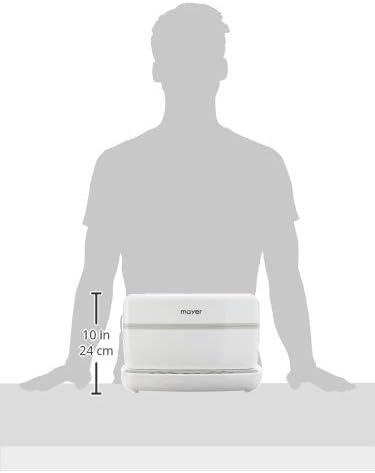
This image illustrates the physical dimensions of the Mayer MMMC01 Set Meal Cooker, specifically highlighting its height of 10 inches or 24 cm.
Warranty and Support
For warranty information or technical support, please refer to the warranty card included with your product or contact Mayer customer service directly. Keep your purchase receipt as proof of purchase.
For further assistance, you may visit the official Mayer website or contact their authorized service centers.