
1. Introduction
Thank you for choosing the EdgeStar CBR902SG 15 Inch Wide 80 Can Built-In Beverage Cooler. This manual provides essential information for the safe and efficient operation, installation, and maintenance of your new appliance. Please read this manual thoroughly before use and retain it for future reference.
This beverage cooler is designed to store and cool a variety of beverages, offering both built-in and free-standing installation options. Its compact design and advanced features ensure optimal performance and convenience.
2. Important Safety Information
To reduce the risk of fire, electrical shock, or injury when using your appliance, follow these basic precautions:
- Read all instructions before using the appliance.
- Connect to properly grounded outlets only.
- Do not remove the grounding prong, bypass the grounding adapter, or use an extension cord.
- It is recommended that a separate circuit, serving only your appliance, be provided.
- Never clean appliance parts with flammable fluids. The fumes can create a fire hazard or explosion.
- Do not store or use gasoline or other flammable vapors and liquids in the vicinity of this or any other appliance.
- Before proceeding with cleaning and maintenance operations, make sure the unit's power line is disconnected.
- Do not connect or disconnect the electric plug when your hands are wet.
- Do not attempt to repair or replace any part of your appliance unless it is specifically recommended in this manual. All other servicing should be referred to a qualified technician.
- This appliance is CFC- and HFC-free and contains small quantities of Isobutane (R600a) which is environmentally friendly but flammable. Care must be taken during handling and moving the appliance to avoid damaging the cooling system or increasing the chance of a leak.
- Proposition 65 Warning: This product can expose you to chemicals including Di(2-ethylhexyl)phthalate (DEHP), which is known to the State of California to cause cancer and birth defects or other reproductive harm. For more information go to www.P65Warnings.ca.gov.
3. Product Features
The EdgeStar CBR902SG beverage cooler is equipped with several features designed for optimal beverage storage and user convenience:
- Temperature Range: Maintains temperatures between 38 and 50 degrees Fahrenheit (3-10°C), ideal for various beverages.
- Security Lock: Includes a security lock to keep contents secure.
- Stainless Steel Flat Bar Handle: A sleek and durable handle for easy door access.
- High/Low Temperature Alarm: Alerts you if the internal temperature deviates significantly from the set point.
- Door Ajar Alarm: Sounds an alarm if the door is left open, preventing temperature fluctuations and energy waste.
- Automatic Defrost: Eliminates the need for manual defrosting, ensuring consistent performance.
- Adjustable Soft-Touch Electronic Thermostat: Allows for precise temperature control with easy-to-use buttons and a digital display.
- Front-Vented Design: Enables versatile installation as either a built-in or free-standing unit.
- Fan-Forced Ventilation: Ensures even cooling throughout the interior, preventing cold spots.
- Compressor-Based Cooling System: Provides efficient and rapid cooling performance.
- Three Glass Shelves: Durable and easy-to-clean shelves for organized storage.
- Blue Internal LED Lighting: Illuminates the interior for clear visibility of contents.
- Reversible Door: The door hinge can be reversed to open from either the left or right side, adapting to your space.
- Rubber Bushings: Designed to dampen vibration and reduce operational noise.

Figure 3.1: Front view of the EdgeStar CBR902SG Beverage Cooler, showcasing its glass door and internal blue LED lighting with various beverages stored on shelves.

Figure 3.2: Detailed front view of the beverage cooler, illustrating its capacity to hold multiple soda cans on its glass shelves.
4. Installation
4.1 Pre-Installation Considerations
- Location: Choose a location with a stable, level surface capable of supporting the unit's weight when fully loaded. Avoid direct sunlight or heat sources.
- Ventilation: Ensure adequate air circulation around the unit. For built-in installations, the front ventilation grille must not be obstructed.
- Power Supply: Connect the unit to a dedicated, grounded 115 Volt, 60 Hz AC outlet. Do not use extension cords or adapter plugs.
4.2 Built-In vs. Free-Standing Installation
This unit is designed for both built-in and free-standing installations. For built-in installations, ensure the following clearances:
- Allow a minimum of 1" to 2" of clearance at the back for proper ventilation and service access.
- The unit must be installed in an area protected from the elements (wind, rain, etc.).
- Ensure the unit can be pulled forward for servicing if necessary.

Figure 4.1: Diagram showing the external dimensions of the EdgeStar CBR902SG: 32 inches height, 15 inches width, and 23.75 inches depth.

Figure 4.2: The beverage cooler seamlessly integrated into kitchen cabinetry, demonstrating a typical built-in installation.
4.3 Door Reversal
The unit is shipped with the door hinged on the right side. If your installation requires the door to open from the left, the door is reversible. Refer to the detailed instructions in the full owner's manual for the step-by-step process of reversing the door swing.
5. Operation
5.1 Initial Startup
After installation, allow the unit to stand upright for at least 2-4 hours before plugging it into a power outlet. This allows the refrigerant to settle. Once plugged in, the unit will begin cooling to the factory preset temperature.
5.2 Temperature Control
The temperature is controlled via the soft-touch electronic thermostat located at the top of the interior. Use the UP and DOWN arrows to adjust the desired temperature between 38°F and 65°F (3°C and 18°C). The digital display will show the set temperature.
5.3 Internal LED Lighting
The unit features blue internal LED lighting. This light can be turned on or off using the light button on the control panel. The light will automatically turn on when the door is opened.
5.4 Door Ajar Alarm
If the door is left open for an extended period, the door ajar alarm will sound to alert you, helping to maintain internal temperature and conserve energy.
5.5 Security Lock
The beverage cooler is equipped with a security lock located at the bottom of the door. Use the provided keys to lock or unlock the unit, securing your beverages.
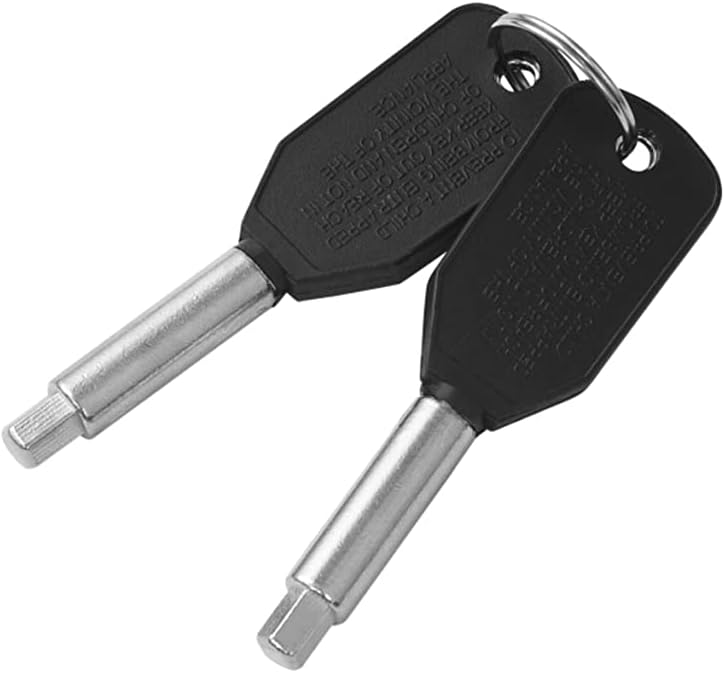
Figure 5.1: The two keys provided for the integrated security lock on the beverage cooler.

Figure 5.2: View inside the cooler, highlighting the digital control panel at the top and the blue LED lighting illuminating the contents.
6. Maintenance
6.1 Cleaning
- Exterior: Clean the exterior surfaces with a mild detergent and warm water. Wipe dry with a soft cloth. Avoid abrasive cleaners.
- Interior: Clean the interior with a solution of baking soda and water (2 tablespoons of baking soda to 1 quart of water). Rinse thoroughly and dry.
- Door Gasket: Regularly clean the door gasket to ensure a proper seal.
- Shelves: Glass shelves can be removed and washed with mild soap and water.
6.2 Automatic Defrost
The unit features an automatic defrost system. During operation, frost may accumulate on the evaporator. This frost will automatically melt during the compressor's off-cycle and drain into a drip tray at the back of the unit, where it evaporates. There is no need for manual defrosting.
6.3 Power Interruption
In case of a power interruption, the unit will automatically resume operation with the last set temperature once power is restored. For prolonged power outages, consider removing contents to prevent spoilage.
7. Troubleshooting
Before contacting customer service, please review the following common issues and their potential solutions:
| Problem | Possible Cause / Solution |
|---|---|
| Unit does not operate | Check if the power cord is properly plugged in. Verify the circuit breaker or fuse. Ensure the power switch is on. |
| Unit is not cold enough | Temperature setting is too high. Door is not closed properly or is opened too frequently. Door gasket is not sealing properly. Unit is located near a heat source or in direct sunlight. Insufficient clearance around the unit. |
| Excessive noise | Unit is not leveled. Loose parts. Compressor cycling on/off frequently (some users report this as normal for the unit, but ensure proper ventilation). |
| Vibrations | Ensure the unit is on a level surface. Adjust leveling legs. |
| Door will not close properly | Unit is not leveled. Door gasket is dirty or damaged. Shelves are out of position, obstructing the door. |
| Internal light not working | Light switch is off. LED bulb may need replacement (contact service). |
If the problem persists after checking these points, please contact EdgeStar customer support.
8. Specifications
Detailed specifications for the EdgeStar CBR902SG Beverage Cooler:
| Specification | Value |
|---|---|
| Model Number | CBR902SG |
| Brand | EdgeStar |
| External Dimensions (H x W x D) | 32" x 15" x 23.75" (25.25" with handle) |
| Internal Dimensions (H x W x D) | 25.5" x 12" x 18" |
| Weight | 79.8 lbs |
| Capacity (12 oz. cans) | 80 cans |
| Temperature Range | 38°F - 65°F (3°C - 18°C) |
| Installation Type | Built-In or Free Standing |
| Voltage | 115 Volts |
| Wattage | 120 watts |
| Defrost Type | Automatic |
| Number of Shelves | 3 (Glass) |
| Door Material | Glass |
| Color | Stainless Steel |
| Included Components | REFRIGERATOR |
9. Warranty and Customer Support
For detailed warranty information, please refer to the warranty card included with your product or visit the official EdgeStar website. In the event of issues not covered in the troubleshooting section, or for parts and service, please contact EdgeStar customer support directly.
Note on Videos: No official seller videos were found in the provided product data for this model. For visual guides or demonstrations, please refer to the manufacturer's official website or support channels.


