
WANATOP 499000-4441
Fuel Rail Pressure Switch Sensor
Model: 499000-4441 | Brand: WANATOP
1. Introduction
This instruction manual provides essential information for the proper installation, operation, and maintenance of the WANATOP Fuel Rail Pressure Switch Sensor, Model 499000-4441. Please read this manual thoroughly before installation and operation to ensure safe and effective use of the product.
2. Product Overview
2.1. Description
The Fuel Rail Pressure Switch Sensor (Model 499000-4441) is a critical component designed for precise measurement of fuel pressure within the common rail system of Hino Excavator engines. It converts fuel pressure into an electrical signal, which is then sent to the engine control unit (ECU) to optimize fuel delivery and engine performance.
2.2. Features
- High accuracy for reliable fuel pressure readings.
- Durable construction for extended service life in demanding engine environments.
- Direct replacement for original equipment, ensuring compatibility and ease of installation.
- Designed to withstand vibrations and temperature fluctuations common in heavy machinery.
2.3. Product Image

Figure 1: Front view of the WANATOP Fuel Rail Pressure Switch Sensor 499000-4441.
3. Specifications
| Specification | Value |
|---|---|
| Manufacturer Part Number | 499000-4441 |
| Brand | WANATOP |
| Current Rating | 5 Milliamps |
| Operating Voltage | 220 Microvolts |
| Connector Type | Plug In |
| Actuator Type | Plunger |
| Item Weight | 4.8 ounces |
| Package Dimensions | 3.5 x 2.48 x 2.09 inches |
4. Safety Information
Always observe the following safety precautions when handling or installing the sensor:
- Ensure the engine is off and cooled down before beginning any work on the fuel system.
- Disconnect the vehicle's battery to prevent accidental electrical discharge.
- Wear appropriate personal protective equipment (PPE), including safety glasses and gloves.
- Be aware of residual fuel pressure in the system. Depressurize the fuel system according to the vehicle manufacturer's service manual before removing the sensor.
- Handle fuel with care in a well-ventilated area, away from open flames or ignition sources.
- Refer to the Hino Excavator service manual for specific safety procedures related to your equipment.
5. Installation
5.1. Pre-Installation Checks
- Verify that the new sensor (Model 499000-4441) matches the original part.
- Inspect the sensor for any visible damage or defects.
- Ensure the mating surface on the fuel rail is clean and free of debris.
5.2. Installation Steps
- Locate the existing fuel rail pressure sensor on your Hino Excavator.
- Carefully disconnect the electrical connector from the old sensor.
- Using an appropriate wrench, loosen and remove the old sensor. Be prepared for a small amount of fuel leakage.
- Apply a thin layer of clean engine oil to the threads of the new sensor to aid in installation and sealing.
- Thread the new WANATOP 499000-4441 sensor into the fuel rail by hand to prevent cross-threading.
- Tighten the sensor to the vehicle manufacturer's specified torque. Overtightening can damage the sensor or fuel rail.
- Reconnect the electrical connector to the new sensor. Ensure it clicks securely into place.
- Reconnect the vehicle's battery.
- Start the engine and check for any fuel leaks around the newly installed sensor.
- Clear any diagnostic trouble codes (DTCs) that may have been stored in the ECU.
5.3. Connector Detail
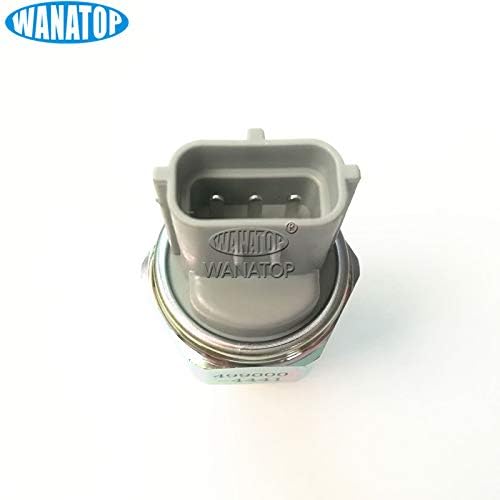
Figure 2: View of the electrical connector on the sensor.
5.4. Installation Video
Video 1: A visual demonstration of the Fuel Rail Pressure Switch Sensor 499000-4441, showing its various angles and components. This video can assist in understanding the physical characteristics of the sensor during installation.
6. Operation
Once installed, the Fuel Rail Pressure Switch Sensor operates continuously when the engine is running. It monitors the fuel pressure in the common rail and sends real-time data to the engine's ECU. The ECU uses this information to adjust fuel injection timing and quantity, ensuring optimal engine performance, fuel efficiency, and emissions control. The sensor is a passive component that provides data; no user interaction is required for its operation.
7. Maintenance
The WANATOP Fuel Rail Pressure Switch Sensor is designed for long-term reliability and typically requires minimal maintenance. However, periodic inspection is recommended:
- Visual Inspection: During routine engine maintenance, visually inspect the sensor and its electrical connector for any signs of damage, corrosion, or loose connections.
- Leak Check: Check for any fuel leaks around the sensor's mounting point.
- Cleaning: If necessary, gently clean the exterior of the sensor and connector with a soft, dry cloth. Do not use harsh chemicals or abrasive materials.
If any issues are detected, refer to the Troubleshooting section or consult a qualified technician.
8. Troubleshooting
Common issues related to a faulty fuel rail pressure sensor and potential solutions:
| Symptom | Possible Cause | Solution |
|---|---|---|
| Check Engine Light (CEL) with related DTCs (e.g., P0190, P0191) | Faulty sensor, wiring issue, or ECU problem. | Check sensor wiring and connector. Test sensor output with diagnostic tool. Replace sensor if faulty. Consult service manual for specific DTCs. |
| Engine Cranks but No Start | Incorrect fuel pressure reading preventing fuel injection. | Verify fuel pressure with a gauge. Inspect sensor and wiring. |
| Rough Idling or Stalling | Inaccurate fuel pressure data leading to improper fuel delivery. | Check sensor readings via diagnostic tool. Inspect for fuel leaks. |
| Reduced Engine Performance / Power Loss | ECU receiving incorrect fuel pressure information. | Diagnose with scan tool to monitor live fuel pressure data. |
If troubleshooting steps do not resolve the issue, it is recommended to consult a certified automotive technician or the vehicle's service manual.
9. Warranty and Support
WANATOP products are manufactured to high-quality standards. For information regarding product warranty, returns, or technical support, please refer to the purchase documentation or contact your retailer. Keep your proof of purchase for any warranty claims.
Ask a question about this manual
Ask about setup, troubleshooting, compatibility, parts, safety, or missing instructions. Manuals+ will review the question and use this page’s manual context to help answer it.