
Introduction
This instruction manual provides essential information for the safe and effective operation, maintenance, and troubleshooting of your Makita DVC265ZXU Twin 18V (36V) LXT Brushless Backpack Vacuum Cleaner. Please read this manual thoroughly before using the product and retain it for future reference.
Safety Information
Always observe basic safety precautions to reduce the risk of fire, electric shock, and personal injury. This vacuum cleaner is designed for professional use. Ensure you understand all warnings and instructions.
- Battery Safety: Use only Makita LXT 18V Li-ion batteries. Do not expose batteries to water, heat, or direct sunlight. Do not short-circuit or incinerate batteries.
- Proper Use: Do not vacuum flammable or combustible materials, hot ashes, or sharp objects. This vacuum is intended for dry vacuuming only.
- Personal Protective Equipment: Wear appropriate personal protective equipment, such as safety glasses and a dust mask, especially in dusty environments.
- Maintenance: Disconnect batteries before performing any maintenance or cleaning.
- Storage: Store the vacuum cleaner in a dry, secure place out of reach of children.
Package Contents
Verify that all items are present upon unpacking:
- Makita DVC265ZXU Backpack Vacuum Cleaner unit
- 1 x 28mm x 1m Hose
- 1 x Dust Bag
- 1 x Front Cuffs (22mm, 24mm, and 38mm)
- 1 x Wireless Unit (for AWS functionality)
- Instruction Manual (this document)
Note: Batteries and charger are not included with this model.
Product Overview
Familiarize yourself with the main components of your Makita DVC265ZXU backpack vacuum cleaner.

Figure 1: Main view of the Makita DVC265ZXU backpack vacuum cleaner, showing the teal and white housing, hose connection, and battery slots at the base.
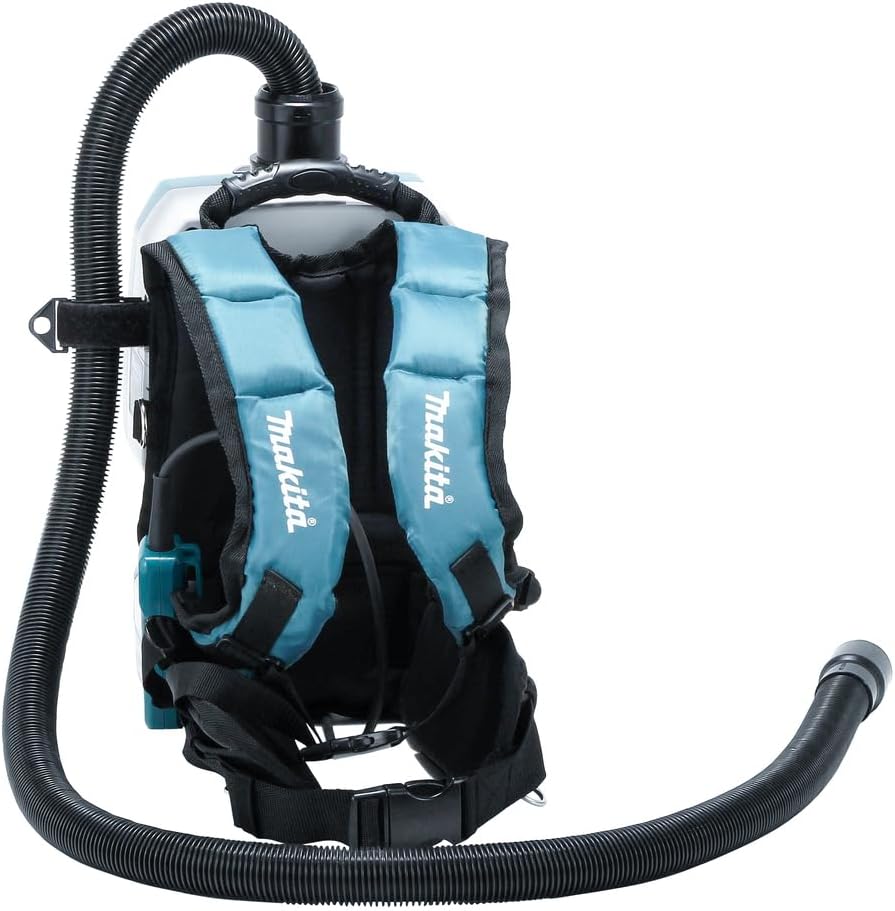
Figure 2: Rear view of the vacuum cleaner, highlighting the padded shoulder straps and waist belt for comfortable backpack wear.

Figure 3: Close-up view of the dust bag compartment with the lid open, showing the installed dust bag.
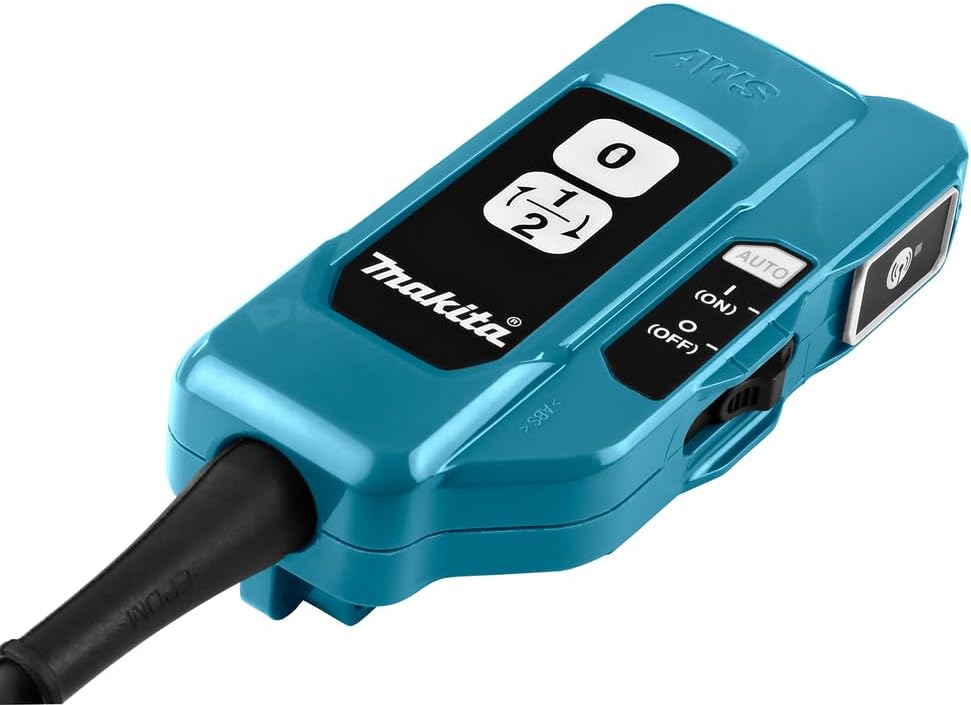
Figure 4: The remote controller unit, featuring power buttons, speed selection (1/2), and an AWS (Auto-Start Wireless System) button.
Setup
1. Battery Installation
- Ensure the vacuum cleaner is turned off.
- Open the battery covers located at the bottom of the unit.
- Insert two fully charged Makita 18V LXT Li-ion batteries into the battery slots, ensuring they click into place.
- Close the battery covers securely.
2. Dust Bag Installation
- Open the dust bag compartment lid (refer to Figure 3).
- Insert a new dust bag, aligning the opening with the suction inlet. Ensure the bag is fully seated.
- Close the dust bag compartment lid firmly until it latches.
3. Hose and Nozzle Attachment
- Attach the 28mm x 1m hose to the suction port on the top of the vacuum cleaner by twisting it clockwise until secure.
- Select the appropriate front cuff (22mm, 24mm, or 38mm) for your application and attach it to the end of the hose.
- Connect your desired nozzle or accessory to the front cuff.
4. Wireless Unit (AWS) Pairing (Optional)
The Auto-Start Wireless System (AWS) allows the vacuum to automatically start when a paired Makita tool is activated.
- Ensure the wireless unit is inserted into the vacuum cleaner's designated slot.
- Turn on the vacuum cleaner.
- On the vacuum's remote controller (Figure 4), press and hold the AWS pairing button until the indicator light flashes.
- On your compatible Makita AWS tool, activate its AWS pairing function (refer to the tool's manual for specific instructions).
- Once paired, the indicator lights on both devices will confirm the connection.
Operating Instructions
1. Wearing the Vacuum Cleaner
Adjust the shoulder straps and waist belt of the backpack harness (Figure 2) to ensure a comfortable and secure fit. The weight should be evenly distributed across your shoulders and hips.
2. Power On/Off and Speed Selection
Use the remote controller (Figure 4) for operation:
- Press the ON button to start the vacuum cleaner.
- Press the 1/2 button to switch between the two available suction speeds.
- Press the OFF button to turn off the vacuum cleaner.
3. AWS Operation (if paired)
If the vacuum is paired with an AWS-compatible tool, set the remote controller to AUTO mode. The vacuum will automatically start when the paired tool is operated and stop shortly after the tool is turned off.
4. Workplace Lighting
The integrated LED workplace lighting can be activated via the remote controller to illuminate the work area.
Maintenance
Regular maintenance ensures optimal performance and extends the life of your vacuum cleaner. Always remove batteries before performing maintenance.
1. Dust Bag Replacement
Replace the dust bag when suction power decreases significantly or when the bag full indicator (if present) illuminates. Refer to the "Dust Bag Installation" section for steps.
2. Filter Cleaning and Replacement
The DVC265ZXU uses a HEPA filter and a foam filter. Inspect these regularly.
- HEPA Filter: Tap off dust or use a soft brush to clean. Replace if damaged or heavily soiled.
- Foam Filter: Can be rinsed with water. Ensure it is completely dry before reinstallation.
3. Hose and Nozzle Cleaning
Clear any blockages in the hose or nozzles. Wash detachable parts with mild soap and water, then dry thoroughly.
4. General Cleaning
Wipe the exterior of the vacuum cleaner with a damp cloth. Do not use harsh chemicals or abrasive cleaners.
Troubleshooting
| Problem | Possible Cause | Solution |
|---|---|---|
| Vacuum does not start. | Batteries not installed or discharged. | Install charged batteries. |
| Remote controller not functioning. | Check remote controller batteries (if applicable) or ensure it's within range. | |
| Low suction power. | Dust bag full. | Replace dust bag. |
| Filter clogged. | Clean or replace filters. | |
| Hose or nozzle blocked. | Clear any obstructions. | |
| AWS not connecting. | Not paired or out of range. | Re-pair the wireless unit. Ensure both devices are within range. |
Specifications
| Brand | Makita |
| Model Name | DVC265ZXU |
| Power Source | Twin 18V (36V) Li-ion LXT Batteries (not included) |
| Motor Type | Brushless |
| Special Feature | HEPA Filter, AWS Auto-Start Wireless System |
| Filter Type | Foam |
| Capacity | 2 Liters |
| Wattage | 90 watts |
| Maximum Suction | 64 Feet |
| Hose Length | 1.5 Meters (59 inches) |
| Recommended Use | Indoor/Outdoor |
| Form Factor | Canister (Backpack) |
| Color | Blue |
| Product Dimensions | 5.98"L x 9.06"W x 14.69"H |
| Noise Level | 69 dB |
| Controller Type | Push Button |
| Connectivity Technology | Bluetooth (for AWS) |
| Number of Speeds | 2 |
| Item Weight | 2.2 pounds (without batteries) |
Warranty and Support
For warranty information, please refer to the warranty card included with your product or visit the official Makita website. For technical support, spare parts, or service inquiries, please contact Makita customer service directly. Keep your purchase receipt as proof of purchase.
You can find more information and contact details on the official Makita website: www.makitatools.com


