
1. Introduction
Thank you for choosing the Proscenic 880L Robot Vacuum Cleaner. This manual provides essential information for the safe operation, maintenance, and troubleshooting of your device. Please read it thoroughly before use and retain it for future reference.
2. Safety Instructions
- Ensure the robot is fully charged before first use.
- Do not operate the robot in wet environments or near liquids.
- Keep loose cables, curtains, and small objects out of the robot's path to prevent entanglement.
- Supervise children and pets when the robot is operating.
- Only use the original charging dock and power adapter provided.
- Do not use the robot to clean burning objects, large debris, or sharp objects.
3. Product Overview
The Proscenic 880L is an intelligent robot vacuum cleaner designed for efficient floor cleaning. It features smart navigation, app control, Alexa voice integration, and a 2-in-1 sweeping and mopping function.

Figure 3.1: Proscenic 880L Robot Vacuum Cleaner, top view, showcasing its sleek design and control panel.
Key Features:
- APP Control: Manage cleaning schedules, modes, and monitor cleaning paths via the Proscenic Home App.
- Alexa Voice Control: Integrate with Alexa for convenient voice commands.
- IPNAS Intelligent Cleaning System: Utilizes a logical cleaning path for comprehensive coverage without omissions.
- 2-in-1 Sweeping and Mopping: Offers combined sweeping, vacuuming, and mopping for effective floor cleaning.
- Automatic Recharging: Returns to the charging station automatically when cleaning is complete or battery is low.
- Anti-falling and Anti-collision Sensors: Detects obstacles, walls, and stairs to prevent damage.
- V-shaped Floating Roller Brush: Enhances suction power and adapts to floor edges for thorough cleaning.
4. Setup
4.1 Charging Station Placement
Place the charging station against a wall in an open area, ensuring there are no obstacles within 1 meter to the sides and 2 meters in front. This allows the robot to return and charge efficiently. Connect the power adapter to the charging station and plug it into a power outlet.
4.2 Initial Charging
Place the robot onto the charging station. Ensure the charging contacts on the robot align with those on the station. The indicator lights will show charging status. Fully charge the robot before its first use, which may take several hours.
4.3 App Installation and WiFi Connection
- Download the 'Proscenic Home' app from your smartphone's app store (Android or iOS).
- Register an account and log in.
- Follow the in-app instructions to add your Proscenic 880L robot. Note that the app supports only 2.4GHz Wi-Fi networks.
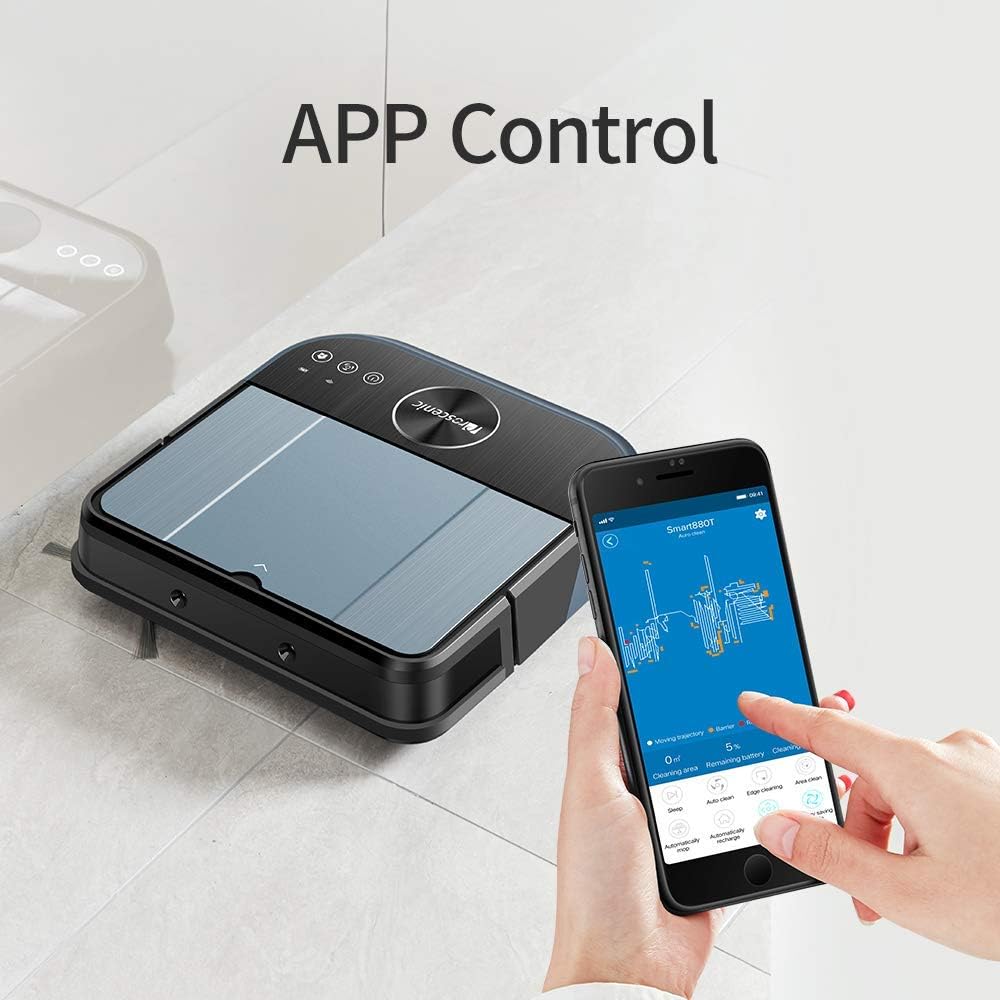
Figure 4.1: The Proscenic 880L Robot Vacuum Cleaner being controlled via the Proscenic Home App on a smartphone, demonstrating remote operation and monitoring.
4.4 Alexa Integration
To control your robot with Alexa voice commands:
- Open the Alexa app on your smartphone.
- Go to 'Skills & Games' and search for 'Proscenic Robot'.
- Enable the skill and link your Proscenic Home account.
- You can now use commands like "Alexa, start cleaning with Proscenic Robot" or "Alexa, tell Proscenic Robot to go home."
5. Operating Instructions
5.1 Cleaning Modes
The Proscenic 880L offers various cleaning modes:
- Auto Clean: The robot intelligently navigates and cleans your entire floor area.
- Spot Clean: Focuses on a specific dirty area, cleaning in a spiral pattern.
- Edge Clean: Cleans along walls and furniture edges.
You can select these modes via the Proscenic Home App or the physical buttons on the robot.

Figure 5.1: Illustration of the Proscenic 880L Robot Vacuum Cleaner's IPNAS intelligent cleaning system, depicting a systematic and logical cleaning path for thorough coverage.
5.2 Sweeping and Mopping Function
The 880L can sweep, vacuum, and mop simultaneously or individually. Attach the water tank and mop pad for mopping. The mop pad is designed with two sections: a wet section for cleaning and a dry section to prevent water stains.

Figure 5.2: Detailed view of the Proscenic 880L Robot Vacuum Cleaner's underside, highlighting the V-shaped roller brush, side brushes, and mopping pad for combined sweeping, vacuuming, and mopping functions.
5.3 Scheduling
Use the Proscenic Home App to set cleaning schedules. You can program the robot to clean at specific times and days, ensuring your floors are always maintained.
6. Maintenance
Regular maintenance ensures optimal performance and extends the lifespan of your robot vacuum.
6.1 Dustbin and Filter Cleaning
- Empty the dustbin after each cleaning cycle.
- Remove the filter and tap it gently to dislodge dust. Rinse the filter with water if necessary, ensuring it is completely dry before reinstallation.
6.2 Brush Cleaning
- Main Brush: Remove the main brush cover and lift out the brush. Use the cleaning tool to cut and remove any tangled hair or debris.
- Side Brushes: Periodically check side brushes for wear or entanglement. Clean or replace as needed.

Figure 6.1: An exploded diagram illustrating the V-shaped floating roller brush mechanism of the Proscenic 880L Robot Vacuum Cleaner, designed for enhanced suction and effective debris collection.
6.3 Sensor Cleaning
Wipe the anti-drop sensors, anti-collision sensors, and charging contacts with a clean, dry cloth to ensure they function correctly.

Figure 6.2: The Proscenic 880L Robot Vacuum Cleaner utilizing its infrared detection (red lines) and ultrasonic radar (blue waves) for obstacle avoidance and navigation.
6.4 Water Tank and Mop Pad Maintenance
Empty any remaining water from the tank after each mopping session. Wash the mop pad thoroughly and allow it to air dry before storing.
7. Troubleshooting
| Problem | Possible Cause | Solution |
|---|---|---|
| Robot does not start | Low battery; Power switch off | Charge the robot; Turn on the power switch |
| Robot gets stuck frequently | Obstacles; Tangled brushes | Clear the cleaning area; Clean main and side brushes |
| Poor cleaning performance | Full dustbin; Dirty filter; Worn brushes | Empty dustbin; Clean/replace filter; Clean/replace brushes |
| Robot cannot return to charging station | Charging station obstructed; Robot too far | Ensure clear area around station; Manually place robot closer |
| App connection issues | Incorrect Wi-Fi (not 2.4GHz); Router issues | Ensure 2.4GHz Wi-Fi; Restart router and robot; Re-pair device |

Figure 7.1: The Proscenic 880L Robot Vacuum Cleaner demonstrating its 1500Pa powerful suction capability, effectively cleaning dust and debris from a hard floor surface.
8. Specifications
| Feature | Specification |
|---|---|
| Brand | Proscenic |
| Model | 880L |
| Package Dimensions | 41.4 x 33.6 x 13 cm |
| Item Weight | 5.09 Kilograms |
| Battery Life | 120 minutes (2 hours) |
| Battery Cell Composition | Lithium |
| Power Source | Battery Powered |
| Controller Type | App Control |
| Surface Recommendation | Hard Floor, Carpets (up to 1.5 cm pile) |
| Special Features | Charging Station, Smart Mapping, WiFi Connectivity, Alexa Control, Anti-falling, Anti-collision |
| Filter Type | Cloth |
9. Warranty and Support
For warranty information and technical support, please refer to the warranty card included with your product or visit the official Proscenic website. You can also contact Proscenic customer service for assistance with any issues or questions regarding your 880L Robot Vacuum Cleaner.