
1. Introduction
Thank you for choosing the Ancheer Fitness JF-B01C Vibration Platform. This manual provides essential information for the safe and effective operation, maintenance, and troubleshooting of your new fitness equipment. Please read this manual thoroughly before use and keep it for future reference.
2. Safety Information
Always consult with a healthcare professional before starting any new exercise program. Ensure the platform is placed on a stable, level surface. Do not use the device if you are pregnant, have a pacemaker, or have any serious medical conditions. Keep children and pets away from the device during operation. Disconnect from power when not in use or during cleaning.
3. Package Contents

Image: The Ancheer JF-B01C Vibration Platform shown with its included accessories: a wrist-worn remote control, power cable, and two resistance bands with handles.
Please check the package contents to ensure all items are present:
- Ancheer JF-B01C Vibration Platform
- Wrist-worn Remote Control (battery included)
- Power Cable
- 2 x Resistance Bands with Handles
- User Manual (this document)
4. Product Overview and Features
The Ancheer JF-B01C Vibration Platform is designed to enhance your fitness routine with its oscillating vibration technology. It features a compact design, multiple exercise modes, and a user-friendly interface.
Key Features:
- Smart Display & Remote Control: The integrated display shows calories, time, speed, and program information. The included wrist-worn remote allows for convenient mode and speed adjustments during your workout.
- Multiple Programs & Speeds: Features 5 automatic programs, 1 manual mode, and 20 adjustable speed levels to customize your workout intensity.
- Three Vibration Zones: The platform surface is divided into three distinct zones (Running, Jogging, Walking) to provide varying intensities based on foot placement. Placing your feet closer to the edge increases vibration intensity.
- Compact & Portable Design: Its modern, space-saving design allows for easy storage. Integrated wheels facilitate effortless transportation.
- Silent Motor & High Capacity: Equipped with a quiet motor and a robust design supporting a maximum load capacity of 120 kg (264 lbs).
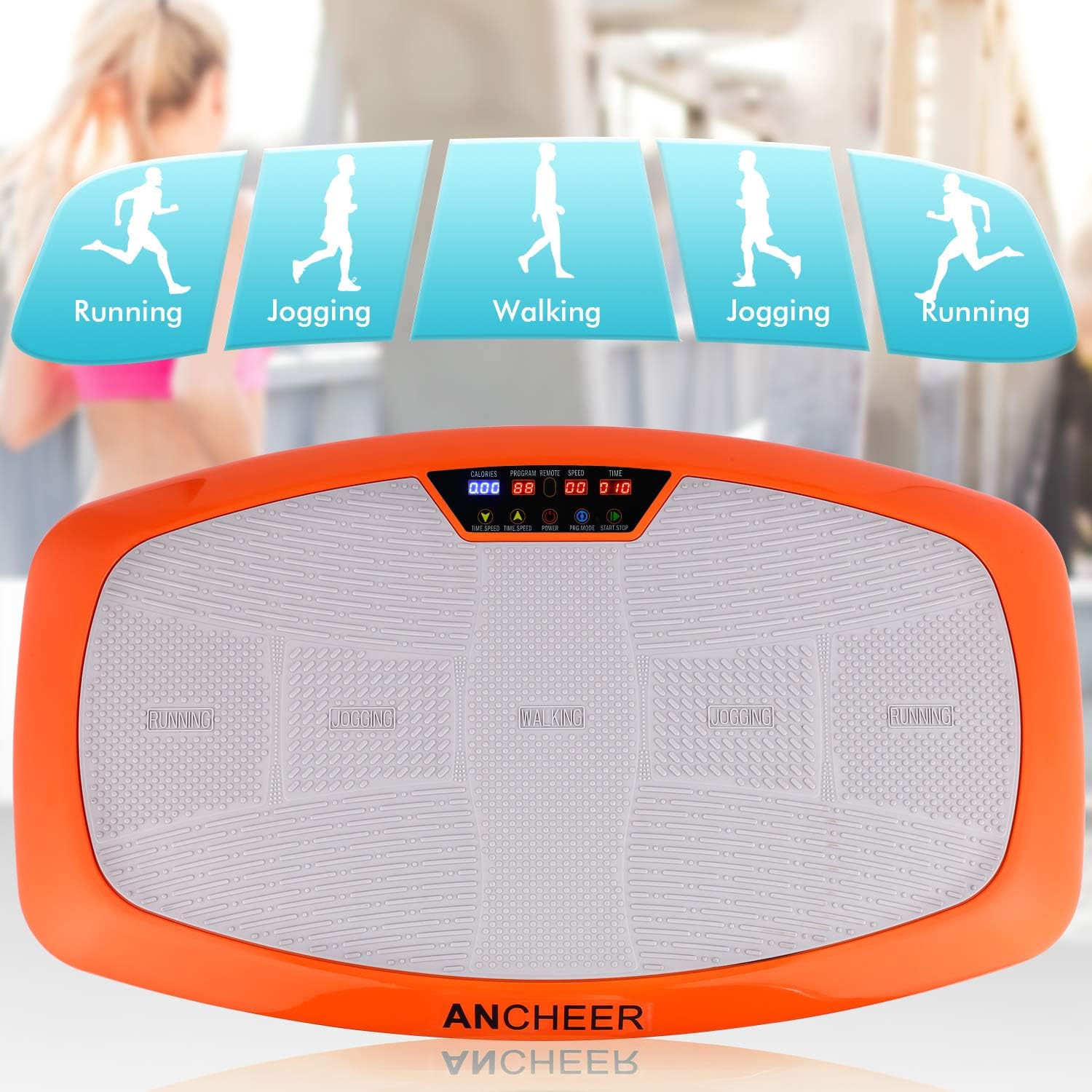
Image: Top view of the Ancheer JF-B01C platform, highlighting the designated 'Running', 'Jogging', and 'Walking' zones on the footpad, indicating different intensity levels.

Image: A graphic representation of the Ancheer JF-B01C's operational capabilities, indicating 1 Manual Program, 5 Automatic Programs, and 20 adjustable Speed Levels.
5. Setup
- Unpack: Carefully remove all components from the packaging.
- Placement: Place the vibration platform on a firm, level, and non-slip surface. Ensure there is enough clear space around the unit for safe exercise.
- Power Connection: Locate the power input port on the side of the platform. Connect the power cable to the platform and then plug it into a standard electrical outlet.
- Resistance Bands (Optional): If desired, attach the resistance bands to the designated attachment points on the base of the platform.

Image: A collage of detailed views showing various components of the Ancheer JF-B01C, including the resistance bands, the digital display, the wrist remote, the main power switch, the power input port, and the stabilizing suction cup feet.
6. Operating Instructions
Getting Started:
- Turn on the main power switch located on the side of the platform. The display will illuminate.
- Step onto the platform with both feet. For initial use, stand in the 'Walking' zone (center) for a gentler vibration.
- Use the wrist-worn remote control to operate the platform.
Remote Control Functions:
- Power Button: Turns the platform ON/OFF.
- Start/Stop Button: Starts or pauses the current program/manual mode.
- Speed Up/Down Buttons (▲ / ▼): Adjusts the vibration speed in manual mode.
- Program (P) Button: Cycles through the 5 automatic programs (P1-P5) and the manual mode.
- Time +/- Buttons: Adjusts the workout duration (if applicable in manual mode).
Exercise Zones:
The platform features three distinct zones for varied intensity:
- Walking Zone (Center): Lowest intensity, suitable for beginners or rehabilitation.
- Jogging Zone (Middle): Medium intensity, for moderate workouts.
- Running Zone (Outer): Highest intensity, for advanced users and more vigorous workouts.
Recommended Exercises:
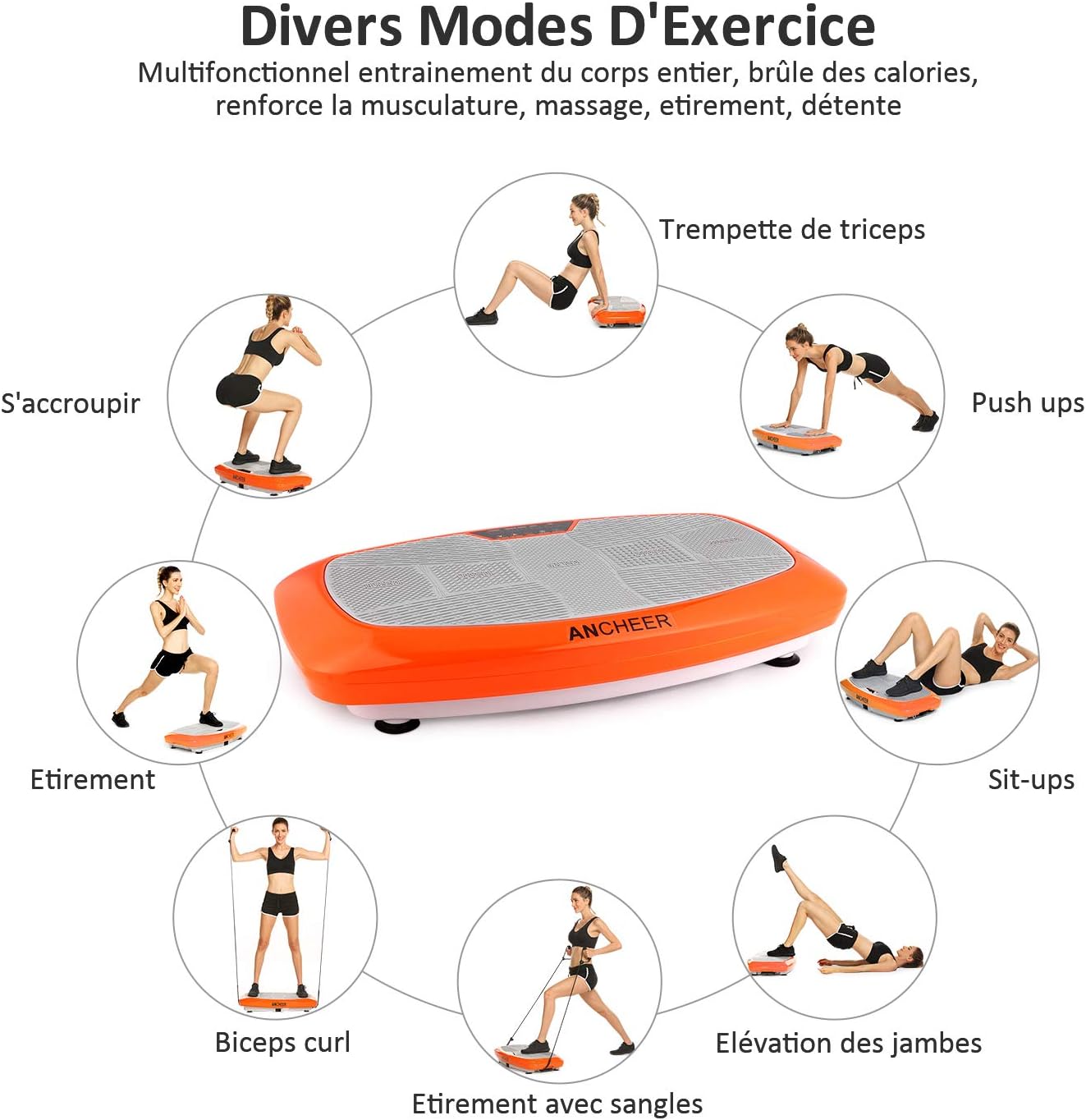
Image: A visual guide demonstrating various exercises that can be performed on the Ancheer JF-B01C Vibration Platform, including triceps dips, push-ups, sit-ups, leg raises, bicep curls, stretches with bands, and squats.
You can perform various exercises on the platform, including:
- Squats
- Push-ups
- Sit-ups
- Leg raises
- Bicep curls (with resistance bands)
- Stretches (with resistance bands)
- Triceps dips

Image: Individuals demonstrating home workouts using the Ancheer JF-B01C Vibration Platform, including squats and exercises with resistance bands.
7. Maintenance
- Cleaning: Always unplug the platform before cleaning. Wipe the surface with a soft, damp cloth. Do not use abrasive cleaners or solvents.
- Storage: Store the platform in a cool, dry place away from direct sunlight and moisture. Its compact design allows for easy storage in a corner or under furniture.
- Inspection: Regularly check the power cord for any damage. Ensure all components are securely attached.
8. Troubleshooting
- Platform does not turn on:
- Ensure the power cable is securely plugged into both the platform and the wall outlet.
- Check if the main power switch on the side of the platform is in the 'ON' position.
- Verify the wall outlet is functional by plugging in another device.
- Remote control is not working:
- Ensure the platform is powered on.
- Check the battery in the remote control. Replace if necessary.
- Ensure there are no obstructions between the remote and the platform's sensor.
- Vibration feels too weak/strong:
- Adjust the speed level using the remote control.
- Change your foot placement on the platform to utilize the different intensity zones (Walking, Jogging, Running).
9. Specifications

Image: A diagram illustrating the dimensions of the Ancheer JF-B01C Vibration Platform (79cm length, 45cm width, 14cm height), its net weight (16.2 kg), and maximum load capacity (120 kg).
| Specification | Detail |
|---|---|
| Model | JF-B01C |
| Brand | ANCHEER |
| Dimensions (L x W x H) | 82 x 49 x 18 cm (32.3 x 19.3 x 7.1 inches) |
| Net Weight | 17.44 kg (38.45 lbs) |
| Max. Load Capacity | 120 kg (264 lbs) |
| Material | Acrylonitrile Butadiene Styrene (ABS) |
| Control Type | Remote Control |
| Color | Orange |
10. Warranty and Support
ANCHEER offers a one-year warranty for this product. You may return undamaged items within 30 days of purchase for any reason. If you encounter any issues or have questions regarding your Ancheer Fitness JF-B01C Vibration Platform, please do not hesitate to contact ANCHEER customer support for assistance.
For further support, please refer to the official ANCHEER website or contact their customer service directly.